
Types of WMS Systems & Their Role in Supply Chain Management


Every day, millions of products are stored, packed, and shipped from warehouses across the globe. While we, as customers, are mostly concerned with getting the orders delivered on time, businesses have to look after countless moving parts behind the scenes to make those deliveries possible.
When manually dealing with inventories and orders this huge and varied, operational setbacks in the form of stock misplacement, fulfilment errors, and more are bound to arise.
That’s exactly why businesses, today, are turning to Warehouse Management Systems (WMS). These software solutions automate everyday warehouse operations in order to keep the inventory orderly and as its direct consequence, orders flowing.
The best part? There are different types of WMS systems available in the market to meet different business needs. Let’s explore them one by one and while at it, also shed light on the key role they play in making the supply chain more productive.
What is a Warehouse Management System (WMS)?
A warehouse management system is a supply chain management tool that, as the name implies, helps businesses manage their routine warehouse tasks more conveniently. To attain the same, it provides businesses with a clear picture of their inventory and stock movement in real time.
The software also supports receiving, storage, packing, and shipping of deliverables to speed up the fulfilment process. In doing so, it helps reduce manual errors, better manage stock levels and warehouse space, all of this and more to ensure orders reach customers on time.
Types of WMS Systems
Different businesses have different needs. One warehouse management system therefore cannot serve every warehouse equally. This is why different types of WMS systems exist, so businesses can choose a solution that best fits their operational needs and budget.
We have listed some of them below for your convenience…
Core Types of Warehouse Management Systems
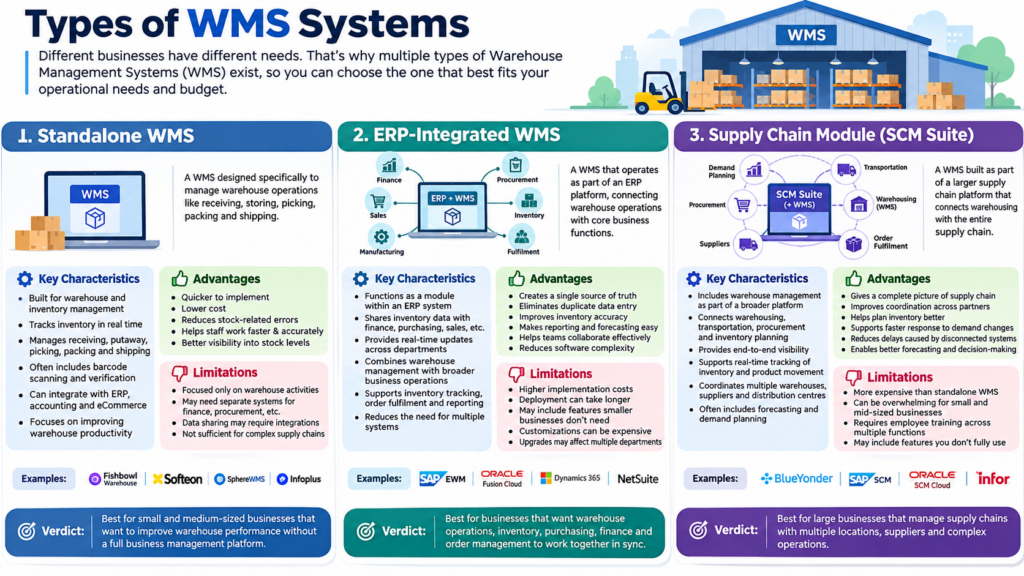
1. Standalone WMS
A Standalone Warehouse Management System (WMS) is a software solution programmed to manage warehouse operations. It focuses primarily on what happens inside the warehouse, be it receiving inventory, storing it, keeping track of it, packing it when the times comes, or shipping it to its final destination.
The system also often connects with other business applications, such as accounting, ERP, and eCommerce platforms, but warehouse management remains its core function.
Key Characteristics of Standalone WMS:
- Is built specifically for warehouse and inventory management
- Tracks inventory in real time
- Manages receiving, putaway, picking, packing, and shipping processes
- Often includes barcode scanning and inventory verification features
- Can integrate with ERP, accounting, and eCommerce systems when needed
- Focuses on improving warehouse productivity
Advantages of Standalone WMS:
- Is quicker to implement than larger enterprise systems
- Lower cost compared to ERP-integrated or SCM-based WMS solutions
- Reduces stock-related errors
- Helps warehouse staff complete tasks faster and more accurately
- Provides better visibility into stock levels and product locations
Limitations of Standalone WMS:
- Standalone WMS is primarily focused on warehouse activities rather than the entire supply chain
- May require separate systems for finance, procurement, transportation, and manufacturing management
- Data sharing between systems can sometimes require additional integrations
- Not sufficient for businesses with highly complex supply chain operations
Standalone WMS Examples: Fishbowl Warehouse, Softeon WMS, SphereWMS, Infoplus etc., are some of the leading examples of Standalone WMS.
Verdict: A standalone WMS is best for small and medium-sized businesses that wish to improve their warehouse performance without investing in a full business management platform.
2. ERP-Integrated WMS
An ERP-Integrated WMS is a type of warehouse management system that operates as part of an Enterprise Resource Planning (ERP) platform. Instead of managing warehouse activities alone, it connects internal business functions like inventory, procurement, sales, finance, manufacturing, and fulfilment within a single system. This, so each and every team works with the same set of information, eliminating confusion.
Key Characteristics of ERP-Integrated WMS:
- Functions as a module within a larger ERP system
- Shares inventory data with finance, purchasing, sales, and manufacturing teams
- Provides real-time updates across departments
- Combines warehouse management with broader business operations
- Supports inventory tracking, order fulfilment, procurement, and reporting from a single platform
- Reduces the need for multiple disconnected software systems
Advantages of ERP-Integrated WMS:
- Creates a single source of truth across the business
- Eliminates duplicate data entry and reduces errors
- Improves inventory accuracy
- Makes reporting and forecasting easy
- Helps teams collaborate more effectively since everyone works with the same data
- Reduces the complexity of managing multiple software platforms
Limitations of ERP-Integrated WMS:
- Has higher implementation costs than standalone WMS solutions
- Deployment can take longer because multiple business functions are involved
- May include features that smaller businesses don’t need
- Customizations can be more expensive
- System upgrades may affect multiple departments at the same time
ERP-Integrated WMS Examples: SAP Extended Warehouse Management (SAP EWM), Oracle Fusion Cloud Warehouse Management, Microsoft Dynamics 365 Supply Chain Management, NetSuite WMS etc., are some of the leading examples of ERP-Integrated WMS.
Verdict: An ERP-Integrated WMS is best suited for businesses that want warehouse operations, inventory, purchasing, finance, and order management to work together in sync.
3. Supply Chain Module (SCM Suite)
A Supply Chain Module (SCM Suite) is a type of WMS system that is built as part of a larger supply chain platform. Instead of focusing only on warehouse activities, it connects warehousing with the entire supply chain, including transportation, demand planning, procurement, supplier management, and order fulfilment.
This, to give businesses a complete view of how products move from suppliers to customers, so they can plan accordingly and respond to changes in the supply chain more ably.
Key Characteristics of Supply Chain Module (SCM Suite):
- Includes warehouse management as one element of a broader supply chain platform
- Connects warehousing, transportation, procurement, and inventory planning
- Provides end-to-end visibility across the supply chain
- Supports real-time tracking of inventory and product movement
- Helps businesses coordinate multiple warehouses, suppliers, and distribution centres
- Often includes forecasting and demand planning capabilities
Advantages of Supply Chain Module (SCM Suite):
- Gives a complete picture of supply chain operations
- Improves coordination between suppliers, warehouses, and logistics partners
- Helps businesses plan inventory better
- Supports faster responses to demand changes and supply disruptions
- Reduces delays caused by disconnected systems
- Enables better forecasting and decision-making using shared data across the supply chain
Limitations of Supply Chain Module (SCM Suite):
- Is more expensive than standalone WMS solutions
- Can be overwhelming for small and mid-sized businesses
- Requires employee training across multiple functions
- Businesses may end up paying for features they don’t fully use
Supply Chain Module (SCM Suite) Examples: Blue Yonder Supply Chain Platform, SAP Supply Chain Management (SCM), Oracle Supply Chain Management Cloud, Infor Supply Chain Management Suite etc., are some of the leading examples of Supply Chain Module suite.
Verdict: A Supply Chain Module (SCM Suite) is a tool of great significance for large businesses that manage supply chains with multiple warehouses, suppliers, carriers, and distribution networks.
Types of WMS by Deployment Model
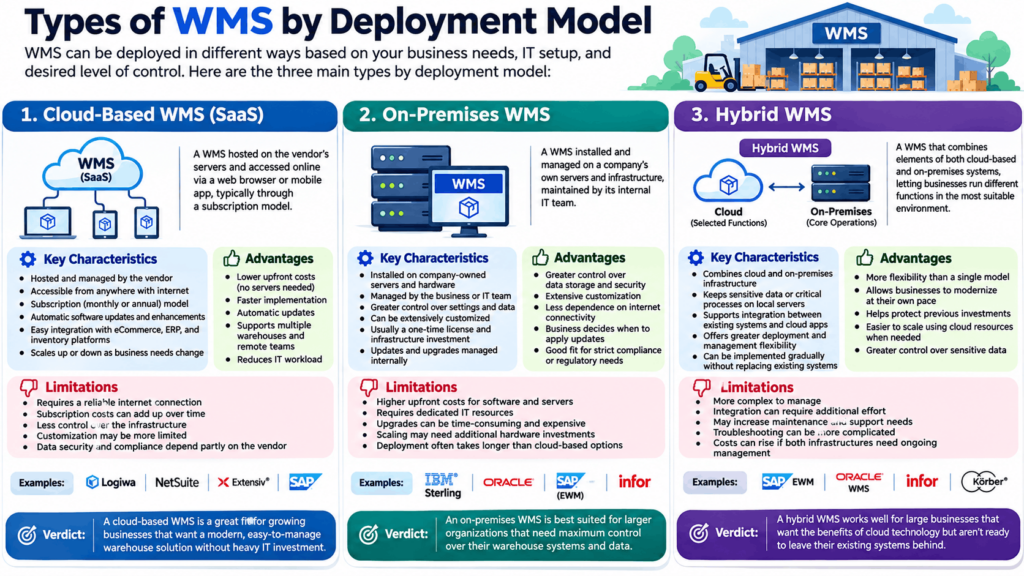
1. Cloud-Based WMS (SaaS):
A Cloud-Based WMS, also known as Software-as-a-Service (SaaS) WMS, is hosted on the vendor’s servers and accessed through a web browser or mobile app. Instead of purchasing and maintaining software on their own infrastructure, businesses pay a subscription fee and get to access the system online.
Key Characteristics of Cloud-Based WMS:
- Is hosted and managed by the software provider
- Accessible from anywhere with an internet connection
- Cloud-based WMS is offered through a monthly or annual subscription model
- Automatic software updates and feature enhancements
- Easy integration with eCommerce, ERP, and inventory management platforms
- Can scale up or down as business needs change
Advantages of Cloud-Based WMS:
- Has lower upfront costs since there’s no need to invest in servers or infrastructure
- Faster implementation compared to most on-premises systems
- Software updates happen automatically with minimal disruption
- Easier to support multiple warehouses and remote teams
- Reduces the burden on internal IT teams
Limitations of Cloud-Based WMS:
- Requires a reliable internet connection for day-to-day operations
- Subscription costs can add up over time
- Businesses have less control over the infrastructure
- Customization options may be more limited than some on-premises solutions
- Data security and compliance depend partly on the vendor’s policies
Cloud-Based WMS Examples: Logiwa WMS, NetSuite WMS, Extensiv (formerly 3PL Central), SAP Business Network WMS, Mintsoft, etc., are some of the leading examples of Cloud-Based WMS.
Verdict: A cloud-based WMS is a great fit for growing businesses that want a modern, easy-to-manage warehouse solution without spending heavily on IT infrastructure.
2. On-Premises WMS
An On-Premises WMS is a warehouse management system that is installed and managed on a company’s own servers and infra. Unlike cloud-based solutions, the software runs within the organization’s facilities and is maintained by its internal IT team. This type of WMS system is often preferred when greater control over data and system configurations is sought.
Key Characteristics of On-Premises WMS:
- Is installed on company-owned servers and hardware
- Managed and maintained by the business or its IT team
- Offers greater control over system settings and data
- Can be extensively customized to match specific warehouse workflows
- Usually involves a one-time software license and infrastructure investment
- Updates and upgrades are planned and managed internally
Advantages of On-Premises WMS:
- Greater control over data storage and security
- Extensive customization options to support unique business processes
- Less dependence on internet connectivity for core operations
- Businesses decide when to apply updates or system changes
- Can be a good fit for organizations with strict compliance or regulatory requirements
Limitations of On-Premises WMS:
- Has higher upfront costs for software, servers, and implementation
- Requires dedicated IT resources for maintenance and support
- Software upgrades can be time-consuming and expensive
- Scaling the system may require additional hardware investments
- Deployment often takes longer than cloud-based alternatives
On-Premises WMS Examples: IBM Sterling Warehouse Management, Oracle Warehouse Management (On-Premises), SAP Extended Warehouse Management (On-Premises Deployments), Infor WMS, etc., are some of the leading examples of On-Premises WMS.
Verdict: An on-premises WMS is best suited for larger organizations that need maximum control over their warehouse systems and data.
3. Hybrid WMS
A Hybrid WMS combines elements of both cloud-based and on-premises warehouse management systems. Instead of keeping everything in one environment, businesses can run certain functions on their own servers while using cloud services for other operations.
This approach is often chosen by organizations that want the flexibility of the cloud without completely moving away from their existing warehouse systems.
Key Characteristics of Hybrid WMS:
- Combines cloud and on-premises infrastructure in a single solution
- Allows businesses to keep sensitive data or critical processes on local servers
- Supports integration between existing warehouse systems and cloud applications
- Offers greater flexibility in how the system is deployed and managed
- Can be implemented gradually without replacing existing systems all at once
Advantages of Hybrid WMS:
- Provides more flexibility than fully cloud-based or on-premises solutions
- Allows businesses to modernize at their own pace
- Helps protect previous investments in warehouse technology
- Makes it easier to scale operations using cloud resources when needed
- Gives organizations greater control over sensitive business data
Limitations of Hybrid WMS:
- Is more complex to manage than a single deployment model
- Integrating cloud and on-premises systems can require additional effort
- May increase maintenance and support requirements
- Troubleshooting issues can be more complicated when multiple environments are involved
- Costs can rise if both infrastructures need ongoing management
Hybrid WMS Examples: SAP Extended Warehouse Management (SAP EWM), Oracle Warehouse Management, Infor WMS, Korber WMS etc., are some of the leading examples of Hybrid WMS.
Verdict: A Hybrid WMS works well for large businesses that want the benefits of cloud technology but aren’t ready to leave their existing systems behind.
Specialized Types of WMS Systems
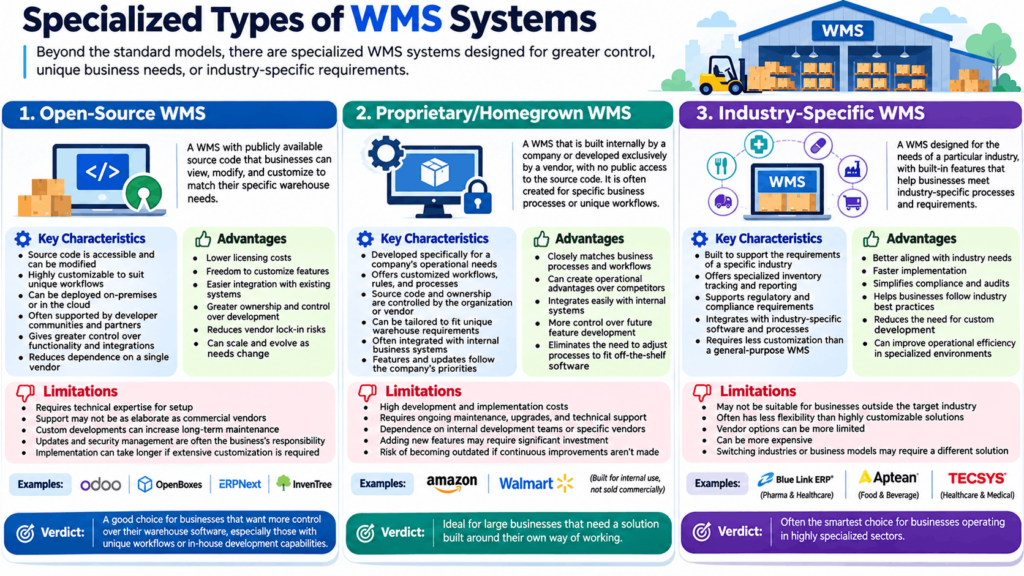
1. Open-Source WMS
An Open-Source WMS is a warehouse management system whose source code is publicly available, allowing businesses to view, modify, and customize the software to match their specific needs. Unlike proprietary solutions, it, as such, does not limit companies to the vendor’s standard features.
Key Characteristics of Open-Source WMS:
- Source code is accessible and can be modified by users
- Highly customizable to suit unique warehouse workflows
- Can be deployed on-premises or in the cloud
- Often supported by developer communities and implementation partners
- Gives businesses greater control over system functionality and integrations
- Helps reduce dependence on a single software vendor
Advantages of Open-Source WMS:
- Lower licensing costs compared to many commercial solutions
- Freedom to customize features based on operational requirements
- Easier to integrate with existing business systems and applications
- Greater ownership and control over system development
- Reduces vendor lock-in risks
- Can scale and evolve as business needs change
Limitations of Open-Source WMS:
- Requires technical expertise for setup
- Support may not be as elaborate as commercial software vendors
- Custom developments can increase long-term maintenance efforts
- Updates and security management often remain the business’s responsibility
- Implementation can take longer if extensive customization is required
Open-Source WMS Examples: Odoo Inventory, OpenBoxes, ERPNext Warehouse Management, InvenTree etc., are some of the leading examples of Open-Source WMS.
Verdict: An open-source WMS is a good choice for businesses that want more control over how their warehouse software works. For companies with unique workflows or in-house development capabilities, it can be a highly cost-effective option.
2. Proprietary/Homegrown WMS
A Proprietary or Homegrown WMS is a warehouse management system that is either built internally by a company or developed exclusively by a software vendor. Unlike open-source solutions, the source code is not publicly available. These systems are often created to support specific business processes, unique warehouse workflows, or operational requirements that standard WMS platforms may not fully address.
Key Characteristics of Proprietary/Homegrown WMS:
- Is Developed specifically for a company’s operational needs
- Offers customized workflows, rules, and processes
- Source code and system ownership are controlled by the organization or vendor
- Can be tailored to fit unique warehouse requirements
- Often integrated with existing business systems and internal applications
- Features and updates follow the company’s priorities rather than a general market roadmap
Advantages of Proprietary/Homegrown WMS:
- Closely matches business processes and warehouse workflows
- Can create operational advantages that competitors may not have
- Integrates easily with internal systems built by the organization
- Businesses have more control over future feature development
- Eliminates the need to adjust processes to fit off-the-shelf software
Limitations of Proprietary/Homegrown WMS:
- Has high development and implementation costs
- Requires ongoing maintenance, upgrades, and technical support
- Dependence on internal development teams or specific vendors
- Adding new features may require significant investment
- Risk of becoming outdated if continuous improvements aren’t made
Proprietary/Homegrown WMS Examples: Unlike other types of warehouse management systems, Proprietary/Homegrown systems are typically built for internal use and are not sold commercially. Large organizations such as Amazon and Walmart rely on such systems through and through.
Verdict: Proprietary/Homegrown WMS is ideal for large businesses that need a solution built around their own way of working.
3. Industry-Specific WMS
An Industry-Specific WMS is a type of WMS system designed for the needs of a particular industry. In other words, it offers industry-focused warehouse features, so businesses in the field get to fulfil their orders easily without having to rely on expensive customizations.
The software is commonly used in sectors such as healthcare, pharma, food and beverage, manufacturing, retail, and third-party logistics (3PL), where standard warehouse processes may not be enough.
Key Characteristics of Industry-Specific WMS:
- Built to support the requirements of a specific industry
- Offers specialized inventory tracking and reporting features
- Supports regulatory and compliance requirements where applicable
- Integrates with industry-specific software and processes
- Requires less customization than a general-purpose WMS
Advantages of Industry-Specific WMS:
- Better aligned with industry needs from the start
- Faster implementation due to fewer customization requirements
- Simplifies compliance and audit processes
- Helps businesses follow industry best practices
- Reduces the need for custom development
- Can improve operational efficiency in specialized environments
Limitations of Industry-Specific WMS:
- May not be suitable for businesses outside the target industry
- Often has less flexibility than highly customizable solutions
- Vendor options can be more limited
- Can be more expensive
- Switching industries or business models may require a different solution
Industry-Specific WMS Examples: Blue Link ERP for pharmaceutical and healthcare distributors, Aptean Food & Beverage ERP WMS for food and beverage businesses, TECSYS Elite WMS for healthcare and medical supply chains etc.
Verdict: An industry-specific WMS is often the smartest choice for businesses operating in highly specialized sectors.
The Role of WMS in Supply Chain Management
Here’s everything that a warehouse management system does to make the entire supply chain fast and more reliable…
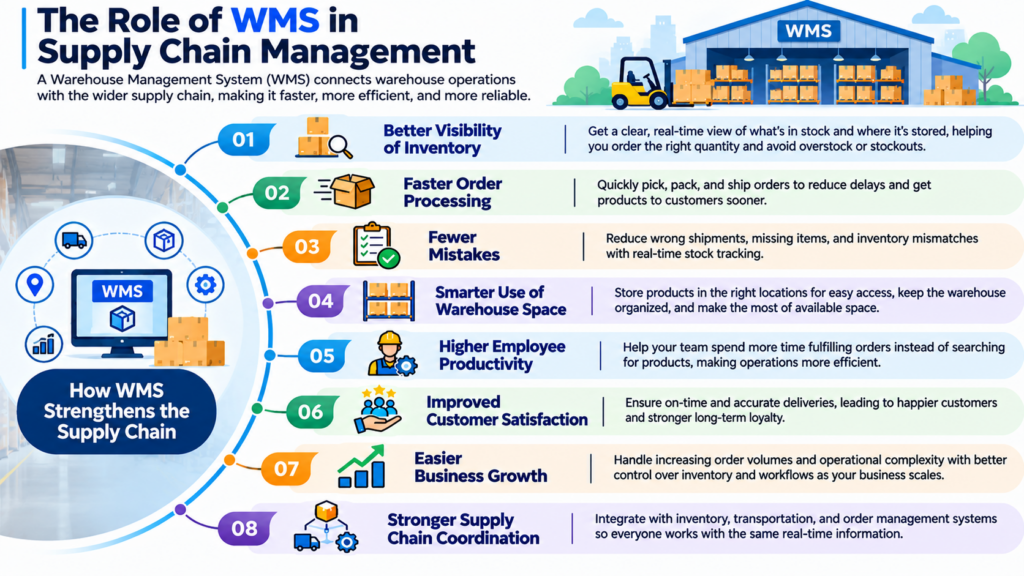
- Better Visibility of Inventory: With a good WMS in place, businesses get a clear picture of their inventory. They get to know what products are available and where they are stored. This helps them decide how much to order, so they don’t stock in more than what’s necessary or run out of stuff when needed.
- Faster Order Processing: With the help of a warehouse management system, orders, as and when they come, can be quickly picked, packed, and shipped. This reduces delays and helps customers receive their orders sooner.
- Fewer Mistakes: Wrong shipments, missing products, and inventory mismatches can be costly. By keeping track of stock movements in real time, a WMS helps reduce errors that come with manual tracking.
- Smarter Use of Warehouse Space: When you have a reliable WMS in place, it becomes easier to decide where to store products for easy access. This not only keeps the warehouse organized but also makes certain you make good use of all the available space.
- Higher Employee Productivity: A WMS makes sure workers spend more time on fulfiling orders and not searching for products, making the supply chain more efficient.
- Improved Customer Satisfaction: When customers get their orders on time, they are bound to be satisfied and come back for more. All thanks to WMS, businesses can achieve this feat, and how!
- EasiBusiness Growth: As a business grows, its operations become more and more complex. With the help of a warehouse management system, businesses can handle this complexity and growth in demand more easily by exercising greater control over inventory and workflows.
- Stronger Supply Chain Coordination: WMS platforms allow integration with inventory, transportation, and order management systems. This ensures everyone involved in the supply chain works with the same up-to-date information.
Wopt Warehouse Management
Conclusion
Warehouse management has little to do with storing more products and more to do with knowing where everything is, so orders get packed and shipped on time without unwanted delays.
If you too are looking to turn your warehouse into a success, the types of WMS systems listed above can help you find the right fit. If you find it confusing still, give the Techjockey team a call right away and watch your warehousing journey become smooth, one order at a time!


Written by
Rohit Prajapati

Rohit Prajapati is a supply chain and logistics professional with over six years of experience across the telecom and IT sectors. He currently works as a Senior Executive – Logistics (SCM-B2B) at SISL Infotech Pvt. Ltd., where his professional expertise includes procurement, vendor coordination, inventory management, logistics execution,... Read more
 Previous


