linkedin
Odoo Inventory logo
play Warehouse Operations Overview | Odoo Inventory
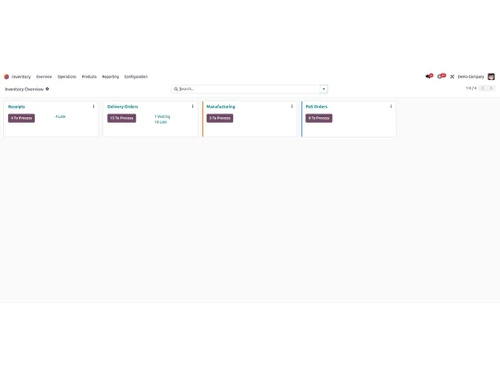
odoo inventory
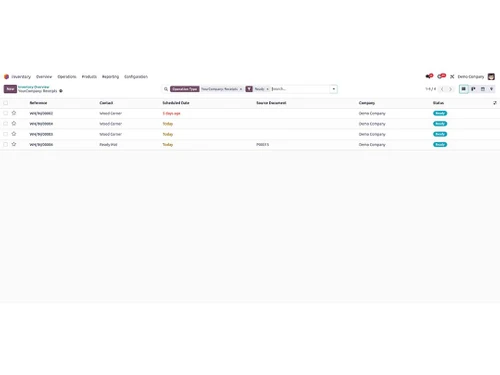
odoo inventory receipt

Odoo Inventory

Brand: Odoo

  • 4.4

  • 4 Ratings

Odoo Inventory is an inventory management solution that helps businesses track stock, manage warehouse operations, and maintain inventory visibility.

See More

Have you used Odoo Inventory before?

Share your insights for better experience

Add a Review
Starting Price 20% OFF
₹760 excl.GST  ₹950
₹ 897 incl. GST

View plans

100% Genuine
Products
Best Price
Guaranteed
Safe & Secure
Payment
  • Description

  • Pricing

  • Features

  • Specification

  • Review

  • Compare

  • Alternatives

  • FAQ

Starting at ₹760

Odoo Inventory Software Overview

What is Odoo Inventory?

Odoo Inventory is a modern, comprehensive warehouse management software designed to provide businesses with complete control and real-time visibility over their supply chain. It is engineered to streamline all inventory operations, from receiving and storage to picking and shipping. The platform's primary goal is to help organizations reduce stockouts, accelerate operational speed, and optimize warehouse layouts and routes. By integrating powerful automation and data-driven strategies, Odoo Inventory transforms traditional warehousing into a highly efficient, responsive, and organized system, capable of scaling with a growing business.

Why Choose Odoo Inventory?

  • Flawless Replenishment: The system helps manage replenishment using strategies like min-max rules, Make-to-Order (MTO), and the Master Production Schedule. It can suggest replenishment quantities and automate procurement workflows based on configured replenishment rules.
  • Optimized Warehouse Operations: Odoo gives you full control over incoming and outgoing shipments with customizable push and pull rules. It leverages put-away strategies such as ABC analysis and cross-docking to optimize storage space and reduce the movement of goods.
  • Offline Functionality: Odoo provides offline access to certain previously opened data when connectivity is unavailable, helping users continue accessing relevant information in areas with unreliable internet connections.
  • Scalable Ecosystem: Odoo Inventory is not a standalone product but part of a fully integrated suite of business applications. As your business grows, you can easily add other Odoo apps for Sales, Manufacturing, Accounting, and more, creating a unified management system.
  • Proven Success: As one user noted, Odoo Inventory effectively replaces legacy spreadsheets that cannot keep up with a growing business, saving time and providing greater accessibility to critical inventory data.

Advanced Features of Odoo Inventory

  • Real-Time Inventory Management: Gain granular control with features like serial numbers, lots, packaging management, reservation strategies, and cycle counting. Instantly look up the location of any product across multiple warehouses or companies.
  • Intelligent Picking Strategies: Optimize picking operations and reduce unnecessary movements with multiple strategies designed to fit different warehouse needs:
    • Wave Picking: Ideal for large warehouses, this method allows you to launch picking orders by aisle or area and regroup them at the packing zone.
    • Cluster Picking: Perfect for small products, this strategy involves picking multiple orders in a single trip to save time.
    • Batch Picking: Regroup multiple orders into one picking run and consolidate them at the packing station.
  • Integrated Packing and Shipping: The system integrates directly with major carriers to print shipping labels. It seamlessly handles various packing units, including individual parts, boxes, and pallets, and incorporates quality control checks into the process.
  • Advanced Barcode Scanning: Odoo Barcode supports various barcode formats, including standard barcodes, QR codes, and GS1 barcodes, helping streamline product identification and inventory operations.
  • Comprehensive Inventory Valuation: Whether you use perpetual or periodic inventory valuation, Odoo supports valuation methods including FIFO, Average Cost (AVCO), and Standard Price, helping businesses maintain accurate inventory records.
  • Complete Traceability: Maintain a clear audit trail of all inventory movements. Generate real-time reports on stock levels, historical moves, and production to make informed decisions.

Modules of Odoo Inventory

  • Sales: Automatically trigger inventory reservations or procurement orders based on sales demand, ensuring you can always meet customer expectations.
  • Manufacturing: Coordinate Just-In-Time (JIT) manufacturing by ensuring components are available exactly when needed, reducing storage costs and waste.
  • Purchase: Automate the entire replenishment process, from triggering purchase orders based on stock rules to tracking vendor deliveries.
  • Accounting: Integrate inventory valuation with accounting and record inventory valuation entries based on configured valuation and accounting methods, helping maintain accurate financial records.
  • Quality: Set up mandatory quality control points at various stages, such as upon receipt of goods or before shipping, to maintain high product standards.

How to Use Odoo Inventory?

  1. Configure Your Warehouse: Start by defining your warehouse structure, locations, and complex routes. Set up smart replenishment rules (e.g., min-max quantities) to automate procurement.
  2. Manage Inbound Shipments: Use the barcode scanner to process incoming goods. Perform quality control checks upon receipt and use put-away strategies to guide workers to the optimal storage location for each item.
  3. Track and Control Stock: Leverage real-time tracking with serial numbers and lots. Conduct cycle counting to ensure inventory accuracy and monitor performance with built-in KPIs and dashboards.
  4. Process Outbound Orders: Choose the most effective picking strategy (wave, cluster, or batch) for your order profile. The system guides pickers through the warehouse efficiently.
  5. Pack and Ship: At the packing station, verify items, pack them into appropriate units (boxes, pallets), and print shipping labels directly from the system through carrier integrations.
  6. Analyze and Report: Utilize the powerful reporting engine to get a clear overview of stock valuation, product moves, and overall warehouse performance to identify areas for improvement.

Odoo Inventory Pricing

Odoo Inventory price starts at INR 760 at techjockey.com.

The pricing model is based on different parameters, including extra features, deployment type, and the total number of users. For further queries related to the product, you can contact our product team and learn more about the pricing and offers.

Read more

Odoo Company Details

Founded Year:  2005

Odoo is an open-source suite of integrated business applications actively programmed, supported, and organized by Odoo SA.

Director/Founders Fabien Pinckaers
Company Size 1000+ Employees

Odoo Inventory Pricing & Plans

Standard

Calculated Price

₹ 760 ₹950
SAVE UPTO 20%
Exclusive of all taxes
    • Licenses

      Licenses
      Licenses
    • Monthly

      Monthly
      Monthly

Key Features

  • All apps

  • Odoo Online

  • Odoo Studio

  • Multi-Company

  • External API

Custom

Calculated Price

₹ 1140 ₹1420
SAVE UPTO 20%
Exclusive of all taxes
    • Licenses

      Licenses
      Licenses
    • Monthly

      Monthly
      Monthly

Key Features

  • All apps

  • Odoo Online / Odoo.sh** / On-premise

  • Odoo Studio

  • Multi-Company

  • External API

Odoo Inventory Features

  • icon_check Barcode & RFID Integration
    A mobile-first scanning module that allows warehouse staff to process receipts, internal transfers, and digital picking lists
  • icon_check Putaway rules
    Automatically assign incoming products to ideal storage locations based on capacity, product type & picking ease.
  • icon_check Smart removal
    Manage stock using FIFO, FEFO, LEFO or nearest-zone strategies, optimizing picker paths and reducing waste.
  • icon_check Role-based to-do list
    Provide tailored task boards for teams (picking, packing, quality, etc.), prioritizing duties by deadline.
  • icon_check Receipts
    Handle vendor shipments with arrival dates and auto unit conversions (e.g., tons to kg).
  • icon_check Returns Management
    Configure return workflows—assess, refurbish, restock, or dispose—and auto update accounting.
  • icon_check Drop-ship
    Enable direct-to-customer shipments from suppliers without storing items in your warehouse.
  • icon_check Cross-dock
    Automatically transfer incoming items directly to outbound shipments with minimal storage.
  • icon_check Subcontracting
    Trigger raw-material deliveries to subcontractors, bill services, inspect quality, then ship finished goods.
  • icon_check Customer Portal
    Allow clients to track orders, payments, shipments, and initiate returns via a live interface.
  • icon_check Audit Trail
    Log all inventory actions—moves, adjustments, approvals, and edits—for full traceability.
  • icon_check Cyclic Inventory
    A modern stock-taking utility that allows you to schedule recurring counts for specific locations or products to maintain
Odoo Inventory Demo Video play icon

Get Odoo Inventory Demo

Watch the demo video to explore key features, real workflows, and how the software fits your business needs.

Understand
Key Features
Personal
Demo Insights
Interactive
Demo Support

Odoo Inventory Specifications

Supported Platforms
Ubuntu Ubuntu Windows Windows MacOS MacOS Linux Linux
Devices
Desktop Desktop Mobile Mobile Tablet Tablet iPad iPad
Deployment
Cloud-Based Cloud-Based
Suitable For
Manufacturing Hospitality Automobiles Pharmaceutical
Business Specific
All Businesses
Business Size
Small Business Startups Medium Business Enterprises
Customer Support
Phone Email Communities
Language
عربى Nederlands English français Italiano 日本人 한국어
Training Resources
Videos

Explore the Best Alternative Solutions Similar to Your Business Size and Needs

Odoo Inventory Review

4.4

Out of 5

img

Overall Rating

Based on
4 Verified Ratings

Rating Breakdown

  • Features 4
  • Value for Money 4.3
  • Ease of Use 4.5
  • Customer Support 5

90% Recommend this Product

Add Review

Techjockey Trusted Reviews from Verified Users

No reviews are currently available for Odoo Inventory. Discover similar Inventory Management Software reviews

  • Fishbowl Inventory

    4.0

    Whats great - Fishbowl has improved our inventory visibility and management. read more

  • aStock ERP

    4.4

    Whats great - Supports large inventories, dynamic categories, excellent data export options. read more

  • Stock Register

    4.8

    Whats great - Stock Register has a clear user interface that makes inventory management easier. Real-time stock updates and low-stock alert... read more

Compare Odoo Inventory With other Inventory Management Software

Products
Ratings
Pricing
Device Supported
Deployment
Supported Platforms
  • img

    Odoo Inventory

  • 4.4

  • ₹ 760.00 excl. GST

  • Desktop

    Mobile

  • Web based

    On Premises

  • Windows

    Mac OS

  • img

    Arka Inventory

  • 4.7

  • Price On Request

  • Desktop

    Mobile

  • Web based

    On Premises

  • Windows

    Mac OS

  • img

    aStock ERP

  • 4.3

  • ₹ 7499

  • Desktop

    Mobile

  • Web based

    On Premises

  • Windows

    Mac OS

  • img

    ALP Inventory

  • 4.4

  • ₹ 5999

  • Desktop

    Mobile

  • Web based

    On Premises

  • Windows

    Mac OS

  • img

    Zoho Inventory

  • 4.3

  • ₹ 2299

  • Desktop

    Mobile

  • Web based

    On Premises

  • Windows

    Mac OS

  • img

    Barometer MATS

  • 5

  • ₹ 2500

  • Desktop

    Mobile

  • Web based

    On Premises

  • Windows

    Mac OS

  • img

    Sowmax

  • 4.6

  • ₹ 8500

  • Desktop

    Mobile

  • Web based

    On Premises

  • Windows

    Mac OS

  • img

    Inventoryplus

  • 4.6

  • ₹ 599

  • Desktop

    Mobile

  • Web based

    On Premises

  • Windows

    Mac OS

  • img

    Pro-Biz

  • 4.8

  • ₹ 5999

  • Desktop

    Mobile

  • Web based

    On Premises

  • Windows

    Mac OS

(2) Product(s) selected
Odoo Inventory Alternatives

See All Odoo Inventory Alternatives

Starting Price:

₹10,000 /License/Year

Available

Price on Request

Articles for Odoo Inventory

See All Related Articles

What does Odoo Inventory do?

Odoo Inventory is a modern warehouse management app that helps businesses reduce stockouts, speed up operations, optimize routes, and gain real-time visibility of their inventory. It automates replenishment strategies, streamlines receipt and storage, and optimizes picking and packing processes.

How much does Odoo Inventory cost?

Odoo Inventory price starts at INR 760 at techjockey.com.

What are the main features of Odoo Inventory?

Odoo Inventory's main features include smart replenishment strategies, optimized receipt and storage with customizable put-away rules, and real-time inventory management with serial and lot tracking. It also offers various picking methods, fast barcode scanning, inventory valuation, and comprehensive traceability with real-time reports.

Is there a free trial for Odoo Inventory?

Odoo Inventory is not offered as a free trial but is instead available for free, forever, with unlimited users, providing instant access without requiring a credit card.

Who can use Odoo Inventory?

Odoo Inventory is suitable for businesses of all sizes, from small to large enterprises, including mid-market companies looking to replace legacy systems. It is designed to support growing businesses and offers unlimited users, making it adaptable for various operational scales.

How does Odoo Inventory help prevent stockouts?

Odoo Inventory prevents stockouts by employing smart replenishment strategies like min-max rules, Make-to-Order (MTO), or the master production schedule. It can automatically propose or trigger purchase orders and automate vendor follow-ups to ensure timely stock replenishment.

Can Odoo Inventory manage multiple warehouses or companies?

Yes, Odoo Inventory is capable of managing inventory across multiple warehouses or multiple companies, providing instant lookup of product locations.

What picking strategies does Odoo Inventory support?

Odoo Inventory supports multiple picking strategies, including single, cluster, wave, and batch picking, allowing businesses to choose the most efficient method for their warehouse layout and order volume. These strategies help minimize picking movements and streamline the packing process.

Does Odoo Inventory work offline?

Yes, Odoo Inventory is designed to work offline, ensuring continuous operations without WiFi coverage issues and enabling blazing-fast, zero-latency barcode scans.

20,000+ Software Listed

Best Price Guranteed

Free Expert Consultation

2M+ Happy Customers

Terms and Condtions

close

Users with registered businesses can purchase goods from merchants on the platform to satisfy their business needs. Users are not permitted to utilize any products acquired through the platform for resale, advertising, business, or further distribution.

For each purchase made, users will receive a Tax Invoice (or 'GST invoice') that includes specific details such as:

  • the GSTIN of the user associated with their registered business, and

  • the specified Entity Name for their business.

It should be noted that not all products are eligible for GST Invoice. Only the products displayed by participating sellers with the 'GST-based Invoice Available' callout on the product description page would qualify.

Certain goods and services are not eligible to get a GST Invoice, including items with VAS, i.e., Value Added Services (e.g., Total Mobile Protection/Assured Buyback) and those involving an exchange offer at the time of purchase.

Users must ensure the accuracy of the GSTIN, and business entity name provided for the GST Invoice. Requests for corrections into GST Invoice would not be accommodated by Techjockey.com or any Seller, and any issues arising from user-provided information are the sole responsibility of users.

Techjockey.com is not liable for the GST Invoice or any associated input tax credit. To efficiently claim an input tax credit, users should select the registered place of business address as per the GST authority's data and follow the provisions of the GST Act and rules.

To claim an input tax credit, the delivery and billing addresses must match. Furthermore, input tax credits will not be granted if the delivery address and GSTIN on the invoice are from different states. In case of incorrect GST details provided during the order placement, the order will be canceled automatically.