
linkedin
CookieHub logo
play Creating new domains in the CookieHub dashboard
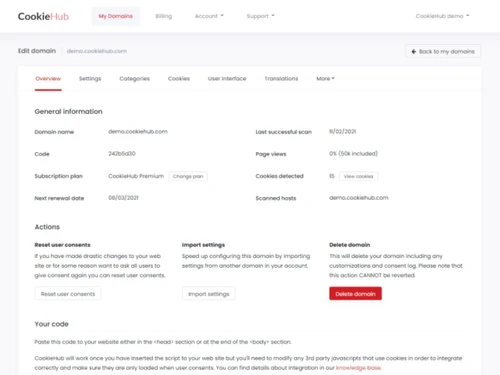
CookieHub-overview
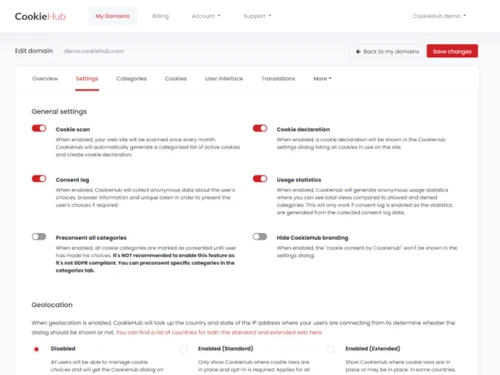
CookieHub-setting

CookieHub

Brand: CookieHub

  • 4.3

  • 4 Ratings

Have you used CookieHub before?

Share your insights for better experience

Add a Review
Starting Price
$9

View plans

100% Genuine
Products
Best Price
Guaranteed
Safe & Secure
Payment
  • Description

  • Pricing

  • Features

  • Specification

  • Review

Starting at $9

CookieHub Software Overview

CookieHub Company Details

Founded Year:  2021

CookieHub is a fully featured cookie consent solution with automatic cookie scanning, providing everything you need to get consent from your web visitors.

Director/Founders Astthor Ingi Petursson, Julius Freyr Gudmundsson
Company Size 1-100 Employees

CookieHub Pricing & Plans

Basic
Starting at $9
    • Licenses

      Licenses
      Licenses
    • Monthly

      Monthly
      Monthly

Key Features

  • 25,000/mo sessions

  • 100 pages scanned

  • Multilingual with auto-detection

  • Pre-built customizable templates

  • Advanced scan reports

Business
Starting at $27
    • Licenses

      Licenses
      Licenses
    • Monthly

      Monthly
      Monthly

Key Features

  • 100,000/mo sessions

  • 1,000 pages scanned

  • IAB Transparency & Consent Framework 2.2

  • Cross domain consent and forwarding

  • Remove CookieHub branding

CookieHub Features

  • icon_check Real-Time Cookie Categorization
    Automatically assigns cookies into categories such as essential, analytics, and marketing for clearer policy communication.
  • icon_check User Preference Management
    Lets users revisit and adjust cookie preference settings anytime, supporting transparency and ongoing privacy control.
  • icon_check Compliance Reporting Dashboard
    Provides an analytics dashboard with reports on consent rates, banner performance, and compliance readiness indicators.
  • icon_check Accessibility Compliance
    Ensures banners are WCAG-compliant, offering accessible layouts for screen readers and keyboard navigation capabilities.
  • icon_check Automatic Cookie Scanning
    Automatically detects all cookies and trackers on your website, generating categorized lists for full compliance visibility.
  • icon_check Consent Banner Management
    Provides customizable cookie consent banners that inform visitors and let them manage preferences before enabling cookies.
  • icon_check Granular Consent Controls
    Enables users to allow or reject specific cookie categories, improving transparency and ensuring strict regulatory alignment.
  • icon_check Automatic Script Blocking
    Blocks analytics and marketing scripts until explicit consent is received, preventing unauthorized data collection activities.
  • icon_check Logging & Records
    Maintains detailed records of each visitor’s consent action to support compliance audits and regulatory reporting needs.
  • icon_check Geo-Targeted Rules
    Delivers location-specific consent banners to meet region-based privacy laws like GDPR, CCPA, LGPD, and global frameworks.
  • icon_check Google Consent Mode Support
    Integrates with Google Consent Mode to ensure analytics and ads adjust behavior automatically based on user permissions.
  • icon_check IAB TCF Framework Support
    Provides compatibility with IAB TCF 2.2 standards to streamline consent requirements for advertising and publisher networks.
  • icon_check Multilingual Support
    Supports multiple languages so global visitors can understand cookie usage clearly in their preferred local language.
  • icon_check Customizable Banner Design
    Allows styling of consent banners with custom colors, layouts, and text to match your website’s branding and design theme.
  • icon_check Third Party Integrations
    Integrates seamlessly with CMS systems, eCommerce platforms, and tag managers to simplify the consent deployment workflow.
CookieHub Demo Video play icon

Get CookieHub Demo

Watch the demo video to explore key features, real workflows, and how the software fits your business needs.

Understand
Key Features
Personal
Demo Insights
Interactive
Demo Support

CookieHub Specifications

Supported Platforms
Windows Windows MacOS MacOS Linux Linux
Devices
Desktop Desktop
Deployment
Cloud-Based Cloud-Based
Suitable For
All Industries
Business Specific
All Businesses
Business Size
Small Business Startups Medium Business Enterprises
Customer Support
Email
Language
English
Training Resources
Videos
Compliance Regulation
CCPA

CookieHub Review

4.3

Out of 5

img

Overall Rating

Based on
4 Verified Ratings

Rating Breakdown

  • Features 4.5
  • Value for Money 4.7
  • Ease of Use 4
  • Customer Support 4.1

80% Recommend this Product

Add Review

Be the First to Review

This product has no reviews yet. Be the first to leave your feedback.

Add Review

20,000+ Software Listed

Best Price Guranteed

Free Expert Consultation

2M+ Happy Customers

Terms and Condtions

close

Users with registered businesses can purchase goods from merchants on the platform to satisfy their business needs. Users are not permitted to utilize any products acquired through the platform for resale, advertising, business, or further distribution.

For each purchase made, users will receive a Tax Invoice (or 'GST invoice') that includes specific details such as:

  • the GSTIN of the user associated with their registered business, and

  • the specified Entity Name for their business.

It should be noted that not all products are eligible for GST Invoice. Only the products displayed by participating sellers with the 'GST-based Invoice Available' callout on the product description page would qualify.

Certain goods and services are not eligible to get a GST Invoice, including items with VAS, i.e., Value Added Services (e.g., Total Mobile Protection/Assured Buyback) and those involving an exchange offer at the time of purchase.

Users must ensure the accuracy of the GSTIN, and business entity name provided for the GST Invoice. Requests for corrections into GST Invoice would not be accommodated by Techjockey.com or any Seller, and any issues arising from user-provided information are the sole responsibility of users.

Techjockey.com is not liable for the GST Invoice or any associated input tax credit. To efficiently claim an input tax credit, users should select the registered place of business address as per the GST authority's data and follow the provisions of the GST Act and rules.

To claim an input tax credit, the delivery and billing addresses must match. Furthermore, input tax credits will not be granted if the delivery address and GSTIN on the invoice are from different states. In case of incorrect GST details provided during the order placement, the order will be canceled automatically.