linkedin
Deque axe Auditor® logo
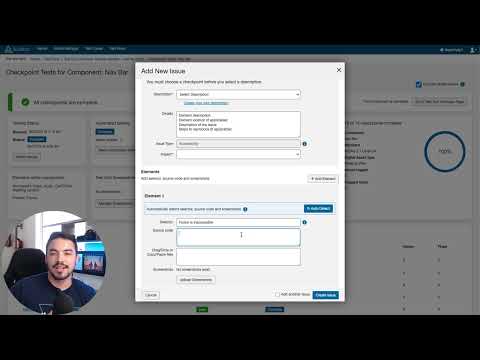
play Axe Auditor Demo
deque axe auditor
deque axe auditor testing

Deque axe Auditor®

Brand: Deque Systems

  • 4.1

  • 5 Ratings

Deque axe Auditor helps teams check digital content for accessibility issues with clear guidance, making testing faster, easier, and ensuring compliance with accessibility standards.

See More

Have you used Deque axe Auditor® before?

Share your insights for better experience

Add a Review

Price Available on Request

Questions about pricing or customization? We’re here to help, just a click away.

100% Genuine
Products
Best Price
Guaranteed
Safe & Secure
Payment
  • Description

  • Pricing

  • Features

  • Specification

  • Review

  • FAQ

Deque axe Auditor® Software Overview

What is Deque axe Auditor?

Deque axe Auditor is a testing tool designed to make manual accessibility testing easy and effective. It helps teams find and fix accessibility issues in digital products like websites, PDFs, and kiosks.

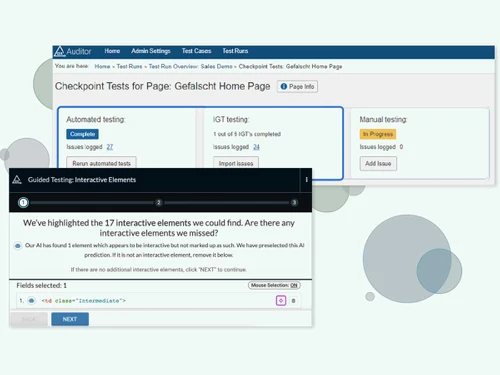
Even non-experts can use it with clear, step-by-step instructions and guided testing. It works with automated testing tools but focuses on issues that need human checks. axe Auditor also keeps detailed records of tests and fixes for compliance and reporting. This helps companies prove they meet accessibility standards and create inclusive digital experiences.

This accessibility testing tool speeds up testing, lowers costs, and improves consistency in accessibility checks. While 80% of accessibility issues can be found through developer tools like axe DevTools Extension, manual testing is essential to achieve 100% accessibility.

Why Choose Deque axe Auditor?

  • Easy Accessibility: Enables accessibility novices to perform manual testing with structured guidance, reducing cost and effort.
  • Actionable Insights: Provides prioritized results, ready-to-use issue descriptions, and remediation libraries to help developers quickly fix issues.
  • Comprehensive Issue Tracking: Maintains a full system of records for compliance with detailed audit trails and issue tracking.
  • Early Issue Detection: Leverages axe DevTools, test automation, and the axe-core engine to test PDFs, kiosks, and websites before code release, lowering costs.
  • Save Time & Fix Faster: Establishes a consistent test methodology, with issue description libraries and clear instructions for developers.
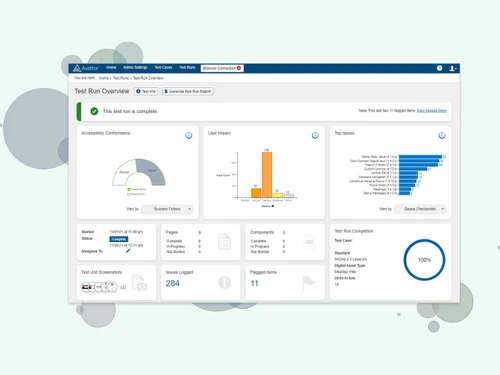
  • Compliance & Progress Management: Generate tailored reports, identify trends, and prove compliance to stakeholders while maintaining a complete audit trail.

Benefits of Deque axe Auditor

  • Increase Testing Capacity & Efficiency: Combine axe Auditor and axe DevTools for automated, semi-automated, and manual testing to detect and address issues faster.
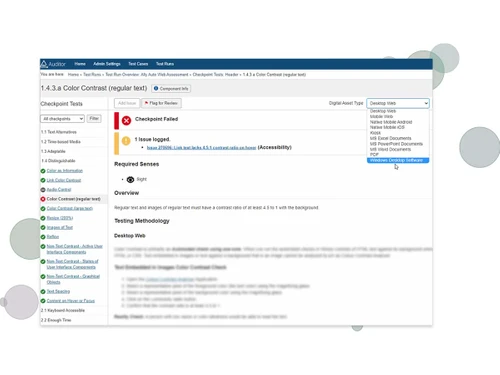
  • Manage 100% of Requirements: Specify relevant rules for each content type to ensure no accessibility requirement is missed.
  • Deliver Concise and Customizable Reports: Generate stakeholder-specific reports to track progress, identify trends, and meet reporting needs.
  • Eliminate Costly Rework: Use ready-to-use issue descriptions and remediation libraries to guide developers and prevent repeated fixes.
  • Manual Testing Without Slowdowns: Complete the final compliance requirements efficiently with a comprehensive manual testing tool.
  • Modern QA Integration: Integrate automated and semi-automated testing with manual processes to streamline the entire accessibility workflow.
  • Focus on High-Priority Issues: Dashboards highlight the most critical problems, helping teams address the biggest business impacts first.
  • Expert Guidance at Your Fingertips: Step-by-step instructions, remediation advice, and detailed issue descriptions improve tester knowledge and consistency.
  • Efficient Communication: Resolve issues quickly using in-product messaging, with threads saved for a complete audit trail.
  • Consistency Across Teams: Built on axe-core rules, ensuring all testers and developers receive consistent results and guidance across the SDLC.

Deque axe Auditor Pricing

Deque axe Auditor price details are available on request at techjockey.com.

The pricing model is based on different parameters, including extra features, deployment type, and the total number of users. For further queries related to the product, you can contact our product team and learn more about the pricing and offers.

Read more

Deque Systems Company Details

Founded Year:  1999

Founded in 1999, Deque Systems is a global leader in digital accessibility, headquartered in Virginia, USA. Led by Founder & CEO Preety Kumar, Deque empowers organizations to achieve Digital Equality through tools, audits, and guidance. Its open-source axe-core, with 3B+ downloads

Director/Founders Preety Kumar
Company Size 101-500 Employees

Deque axe Auditor® Pricing & Plans

Looking for The Right Pricing?

Share your requirements and get a plan built around your business.

  • Define your business needs
  • Get customised pricing
  • Choose features that fit your workflow

Price Available on Request

Get personalised Deque axe Auditor® pricing that fits your needs. Our team will connect with you.

Deque axe Auditor® Features

  • icon_check Automated & Manual Testing
    Supports a mix of automated, semi-automated, and manual accessibility testing.
  • icon_check Issue Library with Remediation Advice
    Ready-to-use issue descriptions and step-by-step guidance for developers.
  • icon_check System-of-Record for Accessibility Issues
    Maintain a central repository for all accessibility issues across your projects.
  • icon_check In-Product Collaboration & Messaging
    Communicate directly within the tool, with saved threads for tracking resolutions.
  • icon_check Built on axe-core Rule Engine
    Leverages the world’s most trusted accessibility rules library for consistent results.
  • icon_check Audit Trail
    Keep detailed records of tests, issues, and resolutions for compliance and reporting.
  • icon_check Browser Interface
    Easy-to-use interface accessible directly in the browser.
  • icon_check Reports
    Generate customizable, stakeholder-specific reports for progress tracking and compliance.
  • icon_check Bulk Component & Page Management
    Manage multiple pages or components efficiently within a single workflow.
  • icon_check Test Case & Run Management
    Organize and execute test cases consistently across projects.
  • icon_check Dedicated Roles & Permissions
    Assign permissions based on team roles to ensure secure and organized access.
Deque axe Auditor® Demo Video play icon

Get Deque axe Auditor® Demo

Watch the demo video to explore key features, real workflows, and how the software fits your business needs.

Understand
Key Features
Personal
Demo Insights
Interactive
Demo Support

Deque axe Auditor® Specifications

Supported Platforms
Windows Windows MacOS MacOS Linux Linux
Devices
Desktop Desktop
Deployment
Cloud-Based Cloud-Based
Suitable For
All Industries
Business Specific
All Businesses
Business Size
Small Business Medium Business Enterprises SMBs SMEs MSMBs MSMEs
Customer Support
Email Communities Forums
Language
English
Training Resources
Documentation

Deque axe Auditor® Review

4.1

Out of 5

img

Overall Rating

Based on
5 Verified Ratings

Rating Breakdown

  • Features 4.2
  • Value for Money 4.1
  • Ease of Use 3.9
  • Customer Support 4.1

80% Recommend this Product

Add Review

Be the First to Review

This product has no reviews yet. Be the first to leave your feedback.

Add Review

How much does Deque axe Auditor Software cost?

Deque axe Auditor pricing information can be requested from techjockey.com.

Is there a mobile app available for Deque axe Auditor Software?

No, Deque axe Auditor has no mobile app available.

Which operating systems are compatible with Deque axe Auditor Software?

Deque axe Auditor works on Windows, macOS, and Linux via web browsers.

Does Deque axe Auditor Software offer a free trial?

No, Deque axe Auditor does not offer a free trial.

How does Deque axe Auditor Software function?

Deque axe Auditor combines automated, semi-automated, and manual accessibility testing with issue tracking and remediation guidance to ensure compliance and improve digital accessibility.

Who uses Deque axe Auditor Software?

Accessibility testers, QA engineers, developers, product managers, and organizations aiming to maintain accessibility compliance across digital assets use Deque axe Auditor.

Is a free demo available for Deque axe Auditor Software?

Yes, you can request a demo of Deque axe Auditor.

Is Deque axe Auditor Software available for free?

No, Deque axe Auditor is a paid software.

20,000+ Software Listed

Best Price Guranteed

Free Expert Consultation

2M+ Happy Customers

Terms and Condtions

close

Users with registered businesses can purchase goods from merchants on the platform to satisfy their business needs. Users are not permitted to utilize any products acquired through the platform for resale, advertising, business, or further distribution.

For each purchase made, users will receive a Tax Invoice (or 'GST invoice') that includes specific details such as:

  • the GSTIN of the user associated with their registered business, and

  • the specified Entity Name for their business.

It should be noted that not all products are eligible for GST Invoice. Only the products displayed by participating sellers with the 'GST-based Invoice Available' callout on the product description page would qualify.

Certain goods and services are not eligible to get a GST Invoice, including items with VAS, i.e., Value Added Services (e.g., Total Mobile Protection/Assured Buyback) and those involving an exchange offer at the time of purchase.

Users must ensure the accuracy of the GSTIN, and business entity name provided for the GST Invoice. Requests for corrections into GST Invoice would not be accommodated by Techjockey.com or any Seller, and any issues arising from user-provided information are the sole responsibility of users.

Techjockey.com is not liable for the GST Invoice or any associated input tax credit. To efficiently claim an input tax credit, users should select the registered place of business address as per the GST authority's data and follow the provisions of the GST Act and rules.

To claim an input tax credit, the delivery and billing addresses must match. Furthermore, input tax credits will not be granted if the delivery address and GSTIN on the invoice are from different states. In case of incorrect GST details provided during the order placement, the order will be canceled automatically.