linkedin
Detecting AI logo
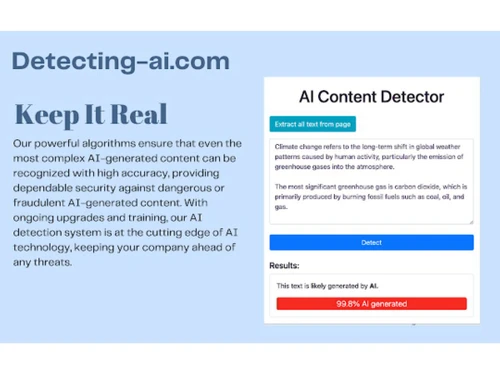
Detecting AI Content
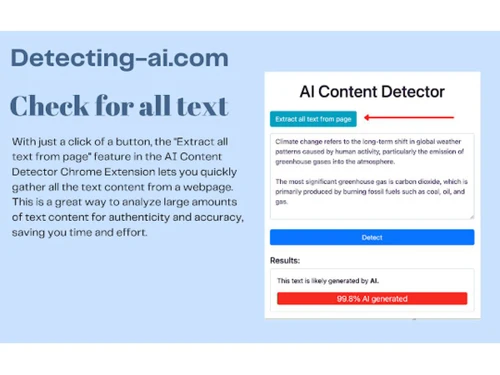
Detecting AI Chrome Extension
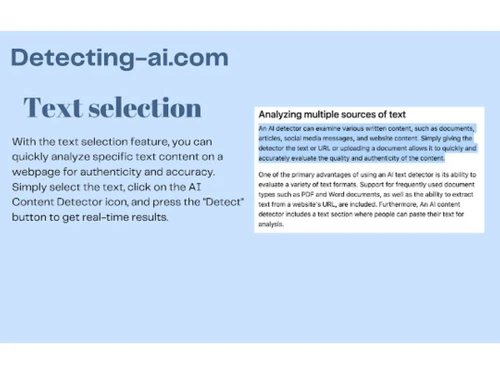
Detecting AI Text Selection

Detecting AI

Brand: Detecting AI

  • 4.0

  • 5 Ratings

Detecting AI is your all-in-one content detector system, ensuring accurate identification and management of sensitive content.

See More

Have you used Detecting AI before?

Share your insights for better experience

Add a Review
Starting Price
$10

View plans

100% Genuine
Products
Best Price
Guaranteed
Safe & Secure
Payment
  • Description

  • Pricing

  • Features

  • Specification

  • Review

  • Compare

  • Alternatives

  • FAQ

Starting at $10

Detecting AI Software Overview

What is Detecting AI Software?

Detecting-AI is a web-based tool that helps in content analysis by identifying the AI-generated content from documents and input text. It uses advanced text matching and AI algorithms to determine the matching likeliness of the AI text from each sentence in the paragraph. It has a simple interface where the user inputs input text, can upload documents, and can give a URL link to the document for analysis. It uses two methods, A and B, that are trained on huge datasets and use sentence structuring analysis to accurately detect AI text content from the input text. It is highly useful for content creators looking for verified and original content and to avoid plagiarism content.

It is trained on huge datasets and thus can detect various types of content, including documents, articles, social media messages, and website content. It can detect content generated from AI models, including ChatGPT, GPT3, GPT2, Jasper, etc., It gives percentage breakdowns for each paragraph and sentence. Two methods are available to enhance the detection accuracy and reduce the risk of missing AI-generated content.

Detecting AI provides a 98% accuracy rate in text detection. It is trained over 1 billion articles and texts. It provides detailed insights in its report by highlighting AI-generated content in the sentence.

Why Choose Detecting AI Software?

These AI Content Detectors are essential for ensuring the authenticity of the content in today's era, where there are numerous AI content generation tools. This tool can easily detect AI content and verify whether the content was human-written or not. It is essential in maintaining the credibility of the work.

This tool also serves as an important mechanism against unintentional plagiarism by helping identify and rectify AI-generated content. It thus helps to ensure that the work remains original and avoids legal and ethical issues. This is particularly important for students, writers, and content creators who emphasize originality and integrity of the work.

Benefits of Detecting AI Content Detector Tool

  • Content originality: It ensures the content is genuinely created, preserving credibility.
  • Plagiarism prevention: It protects the work by identifying AI-generated text and avoiding unintentional plagiarism.
  • Academic integrity: For educators and students, it helps to uphold academic honesty by spotting AI-generated texts.
  • SEO Optimization: Improve search rankings with high-quality, authentic content compliant with guidelines.

Detecting AI Pricing

Detecting AI content detector platform pricing is available on request at techjockey.com.

The pricing model is based on different parameters, including extra features, deployment type, and total users. For further queries related to the product, you can contact our product team and learn more about the pricing and offers.

Read more

Detecting AI Pricing & Plans

Monthly
Key Features
  • Best for: Regular use and flexibility
  • Unlimited detections/day
  • 1000 plagiarism checker Credits
  • 160,000 character limit
  • Premium support
  • Fact Checker
  • AI Humanizer
Starting at $10
    • Licenses

      Licenses
      Licenses
    • Monthly

      Monthly
      Monthly

Key Features

  • Best for: Regular use and flexibility

  • Unlimited detections/day

  • 1000 plagiarism checker Credits

  • 160,000 character limit

  • Premium support

  • Fact Checker

  • AI Humanizer

Detecting AI Features

Core Features

  • icon_check Multi Language Support
    Detects AI content across multiple languages.
  • icon_check Domain Filtering
    Customizes detection based on specific industry standards.
  • icon_check AI Content Detection
    Identifies AI-generated text patterns across content.
  • icon_check Readability Analysis
    Evaluates text readability to improve engagement.
  • icon_check Paraphrased Detection
    Spots AI-based paraphrasing in the content.
  • icon_check Plagiarism Detection
    Scans content for duplication across vast databases.
  • icon_check Multi-Model Support
    Detects content generated by various AI models.
  • icon_check Multi Format Support
    Supports multiple content formats for analysis.
  • icon_check File Upload Management
    Allows bulk content uploads for comprehensive checks.

Report and Analysis

  • icon_check Dashboards
    Tailor dashboard layout and data based on preferences.
  • icon_check PDF Reports
    Generates downloadable reports for easy sharing.
  • icon_check Originality Score
    Indicates the uniqueness level of the content.
  • icon_check Plagiarism Score
    Provides a duplication percentage for reviewed text.

Integrations

  • icon_check API Integration
    Enables custom integrations with other platforms.
  • icon_check Browser Extension
    Real-time detection within popular web browsers.
  • icon_check Learning Management System (LMS) Integration
    Connects with LMS for academic use.
  • icon_check Google Docs Integration
    Direct content analysis in Google Docs.
  • icon_check Microsoft Office Integration
    Content checks within MS Office apps.

Administrative Features

  • icon_check API Access
    Programmatic access to detection features and data.
  • icon_check User Access Management
    Controls individual user access securely.
  • icon_check Role-Based Access Control (RBAC)
    Manages user permissions by role.
  • icon_check Team Management
    Enables collaboration by managing team roles.
  • icon_check Audit Logs
    Tracks actions and changes for compliance and security.

Others

  • icon_check AI Image Detector
    Identify AI-generated images to maintain authenticity in visual content.
  • icon_check Fact Checker

Detecting AI Specifications

Supported Platforms
Ubuntu Ubuntu Windows Windows MacOS MacOS Linux Linux
Devices
Desktop Desktop Mobile Mobile Tablet Tablet iPad iPad
Deployment
Cloud-Based Cloud-Based
Suitable For
All Industries
Business Specific
All Businesses
Business Size
Small Business Medium Business SMBs SMEs
Customer Support
Email Communities
Language
English
AI Features
AI Integrated

Explore the Best Alternative Solutions Similar to Your Business Size and Needs

Detecting AI Review

4.0

Out of 5

img

Overall Rating

Based on
5 Verified Ratings

Rating Breakdown

  • Features 4.2
  • Value for Money 4
  • Ease of Use 3.9
  • Customer Support 4.2

90% Recommend this Product

Add Review

Techjockey Trusted Reviews from Verified Users

No reviews are currently available for Detecting AI. Discover similar AI Content Detectors reviews

  • Originality AI

    4.0

    Whats great - Highly Accurate AI Detection. Easy to Use interface makes checking content quick and hassle ree. Responsive team that provide... read more

  • CopyLeaks

    4.1

    Whats great - Clear Reporting That reveals Detection Logic. Gives Insights Needed To Make More Informed Decisions. read more

  • Crossplag

    4.3

    Whats great - It provides seamless integration with other platforms I use. This makes my workflow smoother. read more

Compare Detecting AI With other AI Content Detectors

Products
Ratings
Pricing
Device Supported
Deployment
Supported Platforms
  • img

    Detecting AI

  • 4.0

  • Price On Request

  • Desktop

    Mobile

  • Web based

    On Premises

  • Windows

    Mac OS

  • img

    GPTZero

  • 4.4

  • Price On Request

  • Desktop

    Mobile

  • Web based

    On Premises

  • Windows

    Mac OS

  • img

    Passed AI

  • 4.6

  • Price On Request

  • Desktop

    Mobile

  • Web based

    On Premises

  • Windows

    Mac OS

  • img

    Undetectable AI

  • 4.3

  • Price On Request

  • Desktop

    Mobile

  • Web based

    On Premises

  • Windows

    Mac OS

  • img

    Smodin

  • 4.3

  • ₹ 1200

  • Desktop

    Mobile

  • Web based

    On Premises

  • Windows

    Mac OS

  • img

    Originality AI

  • 4.3

  • Price On Request

  • Desktop

    Mobile

  • Web based

    On Premises

  • Windows

    Mac OS

  • img

    ZeroGPT

  • 4.2

  • Price On Request

  • Desktop

    Mobile

  • Web based

    On Premises

  • Windows

    Mac OS

  • img

    HIX Bypass

  • 4.3

  • ₹ 540

  • Desktop

    Mobile

  • Web based

    On Premises

  • Windows

    Mac OS

  • img

    Cramly AI

  • 4.4

  • Price On Request

  • Desktop

    Mobile

  • Web based

    On Premises

  • Windows

    Mac OS

  • img

    StealthWriter

  • 4.1

  • Price On Request

  • Desktop

    Mobile

  • Web based

    On Premises

  • Windows

    Mac OS

  • img

    BypassGPT

  • 4.4

  • Price On Request

  • Desktop

    Mobile

  • Web based

    On Premises

  • Windows

    Mac OS

(0) Product(s) selected

Detecting AI Alternatives

See All Detecting AI Alternatives

Starting Price:

$10 /Month

Starting Price:

$20 /Month

Starting Price:

$12 /Month

Starting Price:

$5 /Month

Articles for Detecting AI

See All Related Articles

Which operating system does the Detecting AI Software Support?

Detecting AI software is compatible with Windows and macOS device systems.

Is there any Detecting AI App?

Detecting AI app is not available on Android and iOS devices.

What is the deployment type of the Detecting AI System?

Detecting AI system supports web-based deployment.

How much does the Detecting Cost?

Detecting software pricing is available on request at techjockey.com.

Who are the potential users of the Detecting Software?

Detecting AI can be utilized by content platforms, social media sites, and organizations seeking to maintain content integrity. It helps moderators, administrators, and users identify and manage AI-generated content.

Is there any free trial or demo for Detecting AI?

Detecting AI software demo is available for free with techjockey.com.

Is Detecting AI Content Detector Software Free?

Detecting system does not offer a free trial.

How can you download the Detecting?

Detecting Software's installation is not required, as it is web-based. Just open the Setup Wizard to get started.

How does Detecting work?

Detecting AI is a cutting-edge content detection software that analyses patterns and features within digital content, such as text, images, and videos. It employs advanced algorithms to identify characteristics associated with artificial intelligence-generated content.

Is there software to detect AI?

There are numerous software that can be used to detect AI content, for example, Plagiarism Checker X, DrillBit Plagiarism Checker, Plagiarism Detector Pro, Check For Plag, and many more.

What is the AI tool to detect AI content?

Software like Plagiarism Checker X, Plagiarism Detector Pro, Grammarly, Unicheck Plagiarism and QuillBot AI can be used to detect AI content.

20,000+ Software Listed

Best Price Guranteed

Free Expert Consultation

2M+ Happy Customers

Terms and Condtions

close

Users with registered businesses can purchase goods from merchants on the platform to satisfy their business needs. Users are not permitted to utilize any products acquired through the platform for resale, advertising, business, or further distribution.

For each purchase made, users will receive a Tax Invoice (or 'GST invoice') that includes specific details such as:

  • the GSTIN of the user associated with their registered business, and

  • the specified Entity Name for their business.

It should be noted that not all products are eligible for GST Invoice. Only the products displayed by participating sellers with the 'GST-based Invoice Available' callout on the product description page would qualify.

Certain goods and services are not eligible to get a GST Invoice, including items with VAS, i.e., Value Added Services (e.g., Total Mobile Protection/Assured Buyback) and those involving an exchange offer at the time of purchase.

Users must ensure the accuracy of the GSTIN, and business entity name provided for the GST Invoice. Requests for corrections into GST Invoice would not be accommodated by Techjockey.com or any Seller, and any issues arising from user-provided information are the sole responsibility of users.

Techjockey.com is not liable for the GST Invoice or any associated input tax credit. To efficiently claim an input tax credit, users should select the registered place of business address as per the GST authority's data and follow the provisions of the GST Act and rules.

To claim an input tax credit, the delivery and billing addresses must match. Furthermore, input tax credits will not be granted if the delivery address and GSTIN on the invoice are from different states. In case of incorrect GST details provided during the order placement, the order will be canceled automatically.