linkedin
Exasol logo
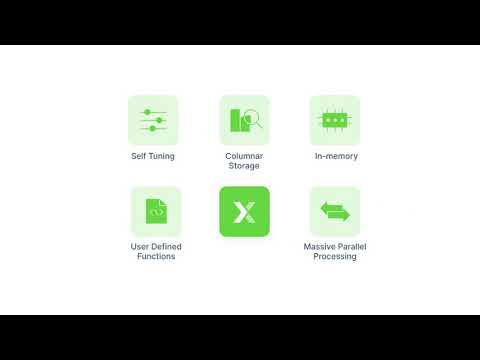
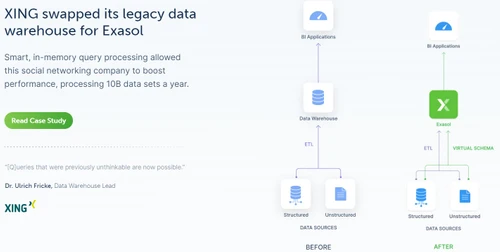
play Built for Speed: Exasol offers complete choice of deployment
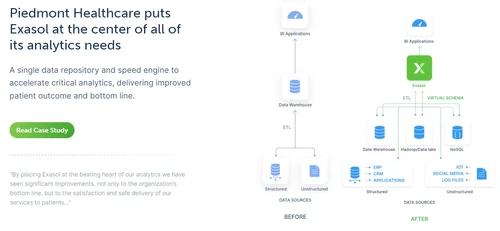
exasol analytics
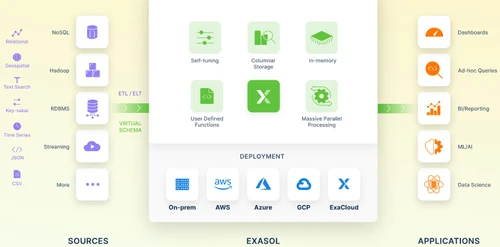
exasol architecture

Exasol

Brand: Exasol

  • 4.2

  • 5 Ratings & 1 Review

Exasol is a cloud-based big data software that runs fast analytics, helping businesses manage big data with ease.

See More

Have you used Exasol before?

Share your insights for better experience

Add a Review

Price Available on Request

Questions about pricing or customization? We’re here to help, just a click away.

100% Genuine
Products
Best Price
Guaranteed
Safe & Secure
Payment
  • Description

  • Pricing

  • Features

  • Specification

  • Review

  • Compare

  • Alternatives

  • FAQ

Exasol Software Overview

What is Exasol?

Exasol is a cloud-based big data tool built for adaptive analytics. It stores information in memory and uses massive parallel processing to answer analytical queries quickly. The interface is simple, with dashboards that help users manage data, run reports, and view results clearly, making complex analytics easier for businesses of all sizes.

Exasol provides a powerful analytical engine, advanced query acceleration, real-time dashboards, and strong integration with BI tools like Tableau and Power BI. It supports machine learning workloads, supports terabytes of data storage and processing, and provides a free community edition.

It uses security features like role-based access and encryption. It supports machine learning and artificial intelligence workloads directly, integrating with Python, R, and Jupyter environments. It connects to data lakes and lakehouse architectures for fast query processing across structured and semi-structured datasets.

Why Choose Exasol?

  • Data Analytics: Enables organizations to process massive datasets quickly, uncovering patterns, trends, and insights that drive smarter business decisions.
  • AI and ML execution: It supports integration with Python and R to help in model training, predictive analytics, and advanced machine learning workloads efficiently.
  • Data warehouse: Acts as a scalable repository for structured information, to give reliable storage, fast retrieval, and simplified reporting across enterprise systems.
  • Business Intelligence: Provides dashboards and reporting tools like Tableau and Power BI, this giving real-time insights for executives and analysts.
  • Lakehouse integration: Connects with modern lakehouse architectures for faster queries across structured and semi-structured data.

Benefits of Exasol

  • Friendly interface: It provides simple navigation with clear dashboards, making complex analytics tasks easy for all business users.
  • Powerful parallel processing: It executes queries across multiple nodes simultaneously, ensuring faster results and efficient handling of massive datasets.
  • Increases ROI: Helps to optimize resource usage and accelerates insights, for organizations reduce costs while maximizing overall business value.
  • Real-time updates: Provides instant data refreshes, enabling timely decisions and keeping analytics aligned with current business conditions.
  • Reporting: Delivers detailed, customizable reports that improve visibility, support compliance, and strengthen strategic planning across departments.

Pricing of Exasol

Exasol details are available on request at techjockey.com.

Exasol may vary based on factors like customization, additional features required, number of users, and the deployment type. Please request a callback for subscription-related details and to avail offers on premium packages at techjockey.com.

Read more

Exasol Company Details

Founded Year:  2000

Exasol is the high-performance analytics database provider bringing increased productivity, cost-savings and flexibility to redefine how businesses use data – on their own terms, without having to compromise.

Director/Founders Falko Mattasch
Company Size 101-500 Employees

Exasol Pricing & Plans

Looking for The Right Pricing?

Share your requirements and get a plan built around your business.

  • Define your business needs
  • Get customised pricing
  • Choose features that fit your workflow

Price Available on Request

Get personalised Exasol pricing that fits your needs. Our team will connect with you.

Exasol Features

  • icon_check Data Compression
    Applies advanced columnar compression to reduce storage size and accelerate analytical workloads.
  • icon_check Parallel processing
    Distributes workloads across multiple nodes with massively parallel processing for scalability.
  • icon_check In-Memory Storage
    Stores hot data in-memory to minimize latency and deliver sub-second analytical query results.
  • icon_check Query Optimization
    Uses self-tuning mechanisms to optimize query execution without manual indexing or partitioning.
  • icon_check Concurrency Management
    Handles thousands of concurrent SQL queries with efficient workload balancing across clusters.
  • icon_check Machine Learning Execution
    Runs and deploys ML algorithms within the database to avoid data movement bottlenecks.
  • icon_check Data Integration
    Connects seamlessly to BI, ETL, and AI tools through standard connectors and open interfaces.
  • icon_check SQL Processing
    Provides ANSI SQL support for advanced analytical processing and complex data transformations.
  • icon_check Reduce Workload
    Distributes queries evenly across clusters to maintain stable performance under heavy load.
  • icon_check Data virtualization
    Queries external data sources through virtual schemas without physical data replication.
  • icon_check Security Management
    Provides role-based access control, encryption, and compliance features for secure analytics.
  • icon_check System Monitoring
    Delivers real-time monitoring tools and dashboards for cluster health and performance tracking.
  • icon_check Backup and Recovery
    Supports high-speed backup, restore, and recovery operations to ensure business continuity.
  • icon_check Data Lake Connectivity
    Connects to data lakes like Hadoop, S3, or Parquet via optimized virtual schemas and loaders.
Exasol Demo Video play icon

Get Exasol Demo

Watch the demo video to explore key features, real workflows, and how the software fits your business needs.

Understand
Key Features
Personal
Demo Insights
Interactive
Demo Support

Exasol Specifications

Supported Platforms
Ubuntu Ubuntu Windows Windows MacOS MacOS Linux Linux
Devices
Desktop Desktop
Deployment
Cloud-Based Cloud-Based
Suitable For
All Industries
Business Specific
All Businesses
Business Size
Small Business Startups Medium Business Enterprises
Customer Support
Email Communities
Language
English
Training Resources
Documentation Videos

Explore the Best Alternative Solutions Similar to Your Business Size and Needs

Exasol Review

4.2

Out of 5

img

Overall Rating

Based on
1 Verified Review

Rating Breakdown

  • Features 4.1
  • Value for Money 4.1
  • Ease of Use 4.2
  • Customer Support 4.6

88% Recommend this Product

Add Review

Exasol Video Review

youtubeVideoId

4.3

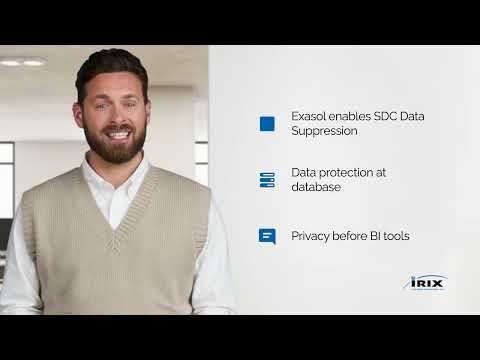
“Protecting Sensitive Data with SDC | iRIX + Exasol”

Review by: IRIX

Compare Exasol With other Big Data Tools

Products
Ratings
Pricing
Device Supported
Deployment
Supported Platforms
  • img

    Exasol

  • 4.2

  • Price On Request

  • Desktop

    Mobile

  • Web based

    On Premises

  • Windows

    Mac OS

  • img

    HPCC

  • 4.4

  • Price On Request

  • Desktop

    Mobile

  • Web based

    On Premises

  • Windows

    Mac OS

  • img

    Confluent

  • 4.4

  • Price On Request

  • Desktop

    Mobile

  • Web based

    On Premises

  • Windows

    Mac OS

  • img

    Apache Drill

  • 4.3

  • Price On Request

  • Desktop

    Mobile

  • Web based

    On Premises

  • Windows

    Mac OS

  • img

    RisingWave

  • 4.3

  • Price On Request

  • Desktop

    Mobile

  • Web based

    On Premises

  • Windows

    Mac OS

  • img

    Presto

  • 4.3

  • Price On Request

  • Desktop

    Mobile

  • Web based

    On Premises

  • Windows

    Mac OS

  • img

    Apache Druid

  • 4.2

  • Price On Request

  • Desktop

    Mobile

  • Web based

    On Premises

  • Windows

    Mac OS

  • img

    Materialize

  • 4.2

  • Price On Request

  • Desktop

    Mobile

  • Web based

    On Premises

  • Windows

    Mac OS

  • img

    Azure HDInsight

  • 4.1

  • Price On Request

  • Desktop

    Mobile

  • Web based

    On Premises

  • Windows

    Mac OS

  • img

    Exploratory

  • 4.3

  • Price On Request

  • Desktop

    Mobile

  • Web based

    On Premises

  • Windows

    Mac OS

  • img

    Rockset

  • 4.2

  • Price On Request

  • Desktop

    Mobile

  • Web based

    On Premises

  • Windows

    Mac OS

(2) Product(s) selected

Exasol Alternatives

See All Exasol Alternatives

HPCC

4.4

Available

Price on Request

Available

Price on Request

Available

Price on Request

Available

Price on Request

Available

Price on Request

Articles for Exasol

See All Related Articles

How much does Exasol cost?

Exasol pricing details are available upon request at techjockey.com.

Who uses Exasol?

Exasol is used by enterprises, data analysts, and BI teams for big data analytics, reporting, and machine learning workloads.

How does Exasol work?

Exasol works by storing data in memory, using columnar storage and parallel processing to deliver ultra-fast query performance.

Which operating systems are compatible with Exasol Software?

Exasol runs smoothly on OS like Linux distributions for server deployments, with client connectivity available on Windows and macOS.

Is a free demo available for Exasol software?

Yes, a free Community Edition of Exasol is available, allowing users to explore features before enterprise adoption.

Does Exasol support analytics acceleration?

Yes, Exasol accelerates analytics by integrating with BI tools like Tableau and Power BI, reducing query times significantly.

Can Exasol be used as a data warehouse?

Yes, Exasol functions as a high-performance data warehouse, storing structured information for reporting and enterprise analytics.

Does Exasol support AI and ML execution?

Yes, Exasol supports AI and ML workloads, integrating with Python, R, and Jupyter for model training and predictive analytics.

20,000+ Software Listed

Best Price Guranteed

Free Expert Consultation

2M+ Happy Customers

Terms and Condtions

close

Users with registered businesses can purchase goods from merchants on the platform to satisfy their business needs. Users are not permitted to utilize any products acquired through the platform for resale, advertising, business, or further distribution.

For each purchase made, users will receive a Tax Invoice (or 'GST invoice') that includes specific details such as:

  • the GSTIN of the user associated with their registered business, and

  • the specified Entity Name for their business.

It should be noted that not all products are eligible for GST Invoice. Only the products displayed by participating sellers with the 'GST-based Invoice Available' callout on the product description page would qualify.

Certain goods and services are not eligible to get a GST Invoice, including items with VAS, i.e., Value Added Services (e.g., Total Mobile Protection/Assured Buyback) and those involving an exchange offer at the time of purchase.

Users must ensure the accuracy of the GSTIN, and business entity name provided for the GST Invoice. Requests for corrections into GST Invoice would not be accommodated by Techjockey.com or any Seller, and any issues arising from user-provided information are the sole responsibility of users.

Techjockey.com is not liable for the GST Invoice or any associated input tax credit. To efficiently claim an input tax credit, users should select the registered place of business address as per the GST authority's data and follow the provisions of the GST Act and rules.

To claim an input tax credit, the delivery and billing addresses must match. Furthermore, input tax credits will not be granted if the delivery address and GSTIN on the invoice are from different states. In case of incorrect GST details provided during the order placement, the order will be canceled automatically.