linkedin
Fluid Ui logo
Fluid UI
Fluid UI
fluid ui creativity

Fluid Ui

Brand: Fluid UI

  • 4.4

  • 4 Ratings

Fluid UI is a prototyping and wireframing software that helps in building and testing interactive mobile and web application prototypes.

See More

Have you used Fluid Ui before?

Share your insights for better experience

Add a Review
Starting Price
$15

View plans

100% Genuine
Products
Best Price
Guaranteed
Safe & Secure
Payment
  • Description

  • Pricing

  • Features

  • Specification

  • Review

  • Compare

  • Alternatives

  • FAQ

Starting at $15

Fluid Ui Software Overview

What is Fluid UI?

Fluid UI is a highly interactive prototyping and wireframing tool to help create and test interactive web and mobile user interface prototypes. It enables users to quickly make a mock UI/UX of their ideas, visualize user flows, gestures, and actions, and test interactions before development begins. The platform comes with a drag-and-drop interface with a rich set of tools and libraries for easy placement and development of wireframes using pre-built components from extensive libraries. It provides real-time collaboration features so that the teams can work together giving instant feedback on UI/UX and recommending necessary adjustments.

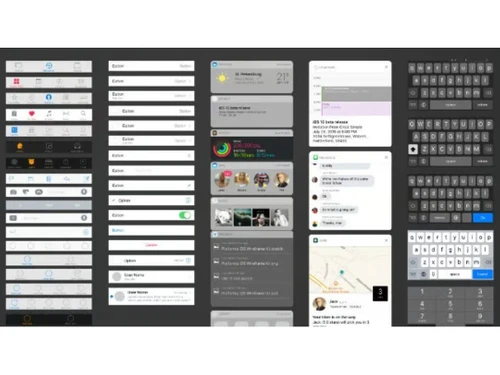
Fluid UI comes with 2,000 built-in components from material design, iOS, Windows, and wireframe libraries, icons for rapid prototyping. Users can upload existing assets, use mouse and touch gestures, and lock pages while making changes. It provides interactive linking for user flows, and animations for giving better visual appeal. For teamwork, it supports live video, reviewer mode, and annotation tools. Remote user testing allows prototypes to be tested by users in various locations, giving feedback to improve the final product. It is accessible via web browsers, a desktop client, and mobile preview apps for testing on different devices.

Why choose Fluid UI Wireframe Tools?

  • Web Prototyping: Helps to design interactive web prototypes with ease, thus giving opportunity to simulate user interactions before development.
  • Mobile App Mockups: Allows to create mobile app prototypes, complete with touch gestures like taps and swipes for better app development.
  • Build Wireframes: Quickly create low-fidelity wireframes using built-in libraries to visualize app structures before detailed design begins.
  • UI/UX Prototyping: Design and refine interactive UI/UX prototypes, ensuring smooth navigation and an engaging user experience before development.
  • Remote User Testing: Conduct usability tests with remote users, analyze behavior, and gather insights to improve the prototype before final implementation.

Benefits of Fluid UI

  • Extensive Libraries: Gives access to over 2000 pre-built components to create diverse and functional prototypes.
  • Faster Prototyping: Helps to quickly create prototypes using built-in libraries and intuitive drag-and-drop functionality.
  • Better Collaboration: Provides live chat, team working collaboration tools to help the team work on projects in real time, share feedback, and make instant changes together.
  • Interactive Design: It allows users to add gestures, animations, and transitions to make prototypes feel like real applications.
  • User Testing: This software conducts remote usability tests to gather insights and refine designs based on feedback.
  • Cross-Platform Compatibility: It provides compatibility on web browsers, desktops, and mobile devices for flexible prototyping.

Pricing of Fluid UI

Fluid UI price in India starts at $15. Fluid UI comes with multiple pricing plans and caters to the diverse customer base.

For subscription-related details and offers on premium packages, please request a call back from our product experts.

Read more

Fluid UI Company Details

Founded Year:  2010

Fluid UI Enterprise is built for larger organisations looking to deliver the best possible design experience.

Director/Founders Dave Kearney, Ian Hannigan
Company Size 1-100 Employees

Fluid Ui Pricing & Plans

Solo
Starting at $15
    • Licenses

      Licenses
      Licenses
    • Monthly

      Monthly
      Monthly

Key Features

  • 5 active projects

  • 1 user license (you)

  • Unlimited reviewers

Pro
Starting at $25
    • Licenses

      Licenses
      Licenses
    • Monthly

      Monthly
      Monthly

Key Features

  • 10 projects

  • 1 user license (you)

  • Unlimited reviewers

  • Export, print and comment

Team
Starting at $65
    • Licenses

      Licenses
      Licenses
    • Monthly

      Monthly
      Monthly

Key Features

  • Unlimited projects

  • 5 users (including you)

  • Unlimited reviewers

  • Export, print and comment

  • Real time team collaboration

Fluid Ui Features

  • icon_check Interactive Prototyping
    Create clickable, interactive app prototypes to simulate real user flows without any coding.
  • icon_check Drag-and-Drop Editor
    Quickly build interfaces using an intuitive drag-and-drop canvas for rapid visual prototyping.
  • icon_check Real-Time Collaboration
    Work simultaneously with team members, sharing feedback and edits in real time.
  • icon_check Pre-Built UI Libraries
    Access device-specific UI kits for iOS, Android, and web to speed up design creation.
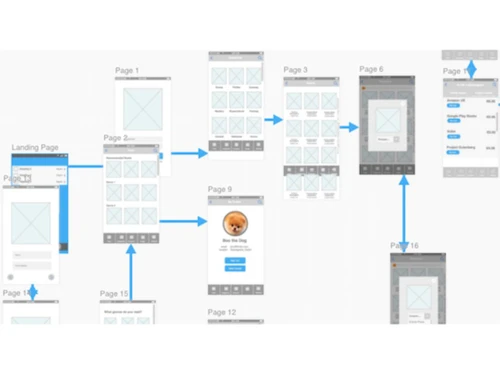
  • icon_check Linking & Navigation Flow
    Easily connect screens with hotspots to create lifelike navigation paths and transitions.
  • icon_check Live Preview on Devices
    Instantly preview prototypes on mobile devices using the Fluid UI player app.
  • icon_check Comments & Feedback Tools
    Collaborators can leave contextual comments directly on design screens.
  • icon_check Cloud-Based Storage
    Automatically store all projects in the cloud, ensuring easy access from any device.
  • icon_check Team Workspaces
    Organize projects and assign access roles within shared team environments
  • icon_check Assets
    Upload your existing graphic assets effortlessly and organize them for seamless integration into prototypes.
  • icon_check Animations
    Add dynamic animations to make your prototypes engaging and visually captivating for users.
  • icon_check Collaborate
    Collaborate with team members in real-time, ensuring efficient workflow and instant feedback on designs.
  • icon_check Live video presentations
    Present prototypes via built-in video calls, share feedback live, and collaborate in real time with teams and clients globally.
  • icon_check Live chat support
    Benefit from live chat support to quickly address any queries or issues while designing.
  • icon_check Libraries
    Access extensive libraries with over 2000 pre-built components to streamline the design process.

Fluid Ui Specifications

Supported Platforms
Windows Windows MacOS MacOS Linux Linux
Devices
Desktop Desktop Mobile Mobile Tablet Tablet iPad iPad
Deployment
Cloud-Based Cloud-Based
Suitable For
All Industries
Business Specific
All Businesses
Business Size
Individual Small Business Startups Medium Business Enterprises
Customer Support
Live Chat Communities
Language
English
Training Resources
Documentation

Fluid Ui Review

4.4

Out of 5

img

Overall Rating

Based on
4 Verified Ratings

Rating Breakdown

  • Features 4.7
  • Value for Money 4.5
  • Ease of Use 4.3
  • Customer Support 4

90% Recommend this Product

Add Review

Be the First to Review

This product has no reviews yet. Be the first to leave your feedback.

Add Review

Compare Fluid Ui With other Wireframe Tools

Products
Ratings
Pricing
Device Supported
Deployment
Supported Platforms
  • img

    Fluid Ui

  • 4.4

  • Price On Request

  • Desktop

    Mobile

  • Web based

    On Premises

  • Windows

    Mac OS

  • img

    Visily

  • 4.7

  • Price On Request

  • Desktop

    Mobile

  • Web based

    On Premises

  • Windows

    Mac OS

  • img

    Balsamiq

  • 4.7

  • Price On Request

  • Desktop

    Mobile

  • Web based

    On Premises

  • Windows

    Mac OS

  • img

    Wireframe.cc

  • 4.2

  • Price On Request

  • Desktop

    Mobile

  • Web based

    On Premises

  • Windows

    Mac OS

  • img

    Ninjamock

  • 4.3

  • Price On Request

  • Desktop

    Mobile

  • Web based

    On Premises

  • Windows

    Mac OS

  • img

    Moqups

  • 4.2

  • Price On Request

  • Desktop

    Mobile

  • Web based

    On Premises

  • Windows

    Mac OS

  • img

    Freehand

  • 4.5

  • Price On Request

  • Desktop

    Mobile

  • Web based

    On Premises

  • Windows

    Mac OS

  • img

    MockFlow

  • 4.5

  • Price On Request

  • Desktop

    Mobile

  • Web based

    On Premises

  • Windows

    Mac OS

  • img

    Mockplus

  • 4

  • Price On Request

  • Desktop

    Mobile

  • Web based

    On Premises

  • Windows

    Mac OS

(0) Product(s) selected

Fluid Ui Alternatives

See All Fluid Ui Alternatives

Starting Price:

$132

Starting Price:

$144 /Year

Starting Price:

$12 /Month

Available

Price on Request

Starting Price:

$19 /Month

Starting Price:

$15 $30

SAVE UPTO 50%

Articles for Fluid Ui

See All Related Articles

Who uses Fluid UI?

Fluid UI is used by UX/UI designers, product managers, developers, and teams building interactive prototypes for apps.

Is a demo available for Fluid UI Wireframe Tools?

Yes, Fluid UI offers a free lifetime account, allowing users to explore its features before upgrading.

Can Fluid UI prototypes include interactive animations?

Yes, Fluid UI allows adding animations like fade-ins, pop-ins, and flips for a more engaging experience.

Does Fluid UI support mobile prototyping?

Yes, Fluid UI has Android and iOS preview apps to test prototypes directly on mobile devices.

Can I import custom assets into Fluid UI Wireframe Tools?

Yes, Fluid UI allows uploading and saving custom graphics to reuse in future projects.

How does Fluid UI handle screen linking?

Fluid UI uses an intuitive linking system to connect screens with gestures like swipes, taps, and clicks.

On which operating systems does Fluid UI run?

Fluid UI Wireframe Tools works on web browsers like Chrome and Firefox, with desktop clients for Windows and macOS.

Can a user export Fluid UI Wireframe Tools prototypes?

Users can export Fluid UI prototypes to various formats, shareable links and visual screen flows, PNG and PDF, for presentation and documentation.

Does Fluid UI support version control for prototypes?

Fluid UI Wireframe Tools automatically saves changes in the cloud, allowing users to track updates and revert if needed.

Can Fluid UI prototypes simulate different device screen sizes?

Yes, Fluid UI supports multiple device resolutions, allowing users to design for various screen sizes and platforms.

Is offline prototyping possible with Fluid UI Wireframe Tools?

Yes, Fluid UI's desktop client allows users to work offline and sync changes when reconnected to the internet.

How much does Fluid UI cost?

Fluid UI price in India starts at $15. Fluid UI comes with multiple pricing plans and caters to the diverse customer base.

20,000+ Software Listed

Best Price Guranteed

Free Expert Consultation

2M+ Happy Customers

Terms and Condtions

close

Users with registered businesses can purchase goods from merchants on the platform to satisfy their business needs. Users are not permitted to utilize any products acquired through the platform for resale, advertising, business, or further distribution.

For each purchase made, users will receive a Tax Invoice (or 'GST invoice') that includes specific details such as:

  • the GSTIN of the user associated with their registered business, and

  • the specified Entity Name for their business.

It should be noted that not all products are eligible for GST Invoice. Only the products displayed by participating sellers with the 'GST-based Invoice Available' callout on the product description page would qualify.

Certain goods and services are not eligible to get a GST Invoice, including items with VAS, i.e., Value Added Services (e.g., Total Mobile Protection/Assured Buyback) and those involving an exchange offer at the time of purchase.

Users must ensure the accuracy of the GSTIN, and business entity name provided for the GST Invoice. Requests for corrections into GST Invoice would not be accommodated by Techjockey.com or any Seller, and any issues arising from user-provided information are the sole responsibility of users.

Techjockey.com is not liable for the GST Invoice or any associated input tax credit. To efficiently claim an input tax credit, users should select the registered place of business address as per the GST authority's data and follow the provisions of the GST Act and rules.

To claim an input tax credit, the delivery and billing addresses must match. Furthermore, input tax credits will not be granted if the delivery address and GSTIN on the invoice are from different states. In case of incorrect GST details provided during the order placement, the order will be canceled automatically.