linkedin
Formly logo
play Meet Formly 2.0: Wow every respondent with instant, personalized results
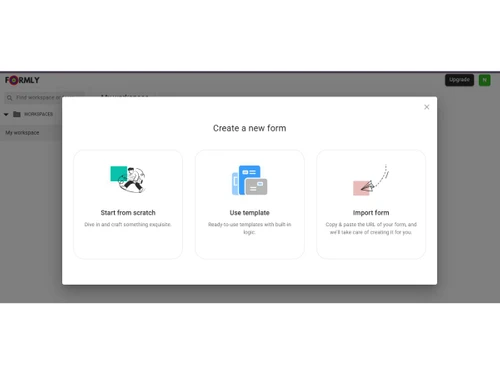
formly-login
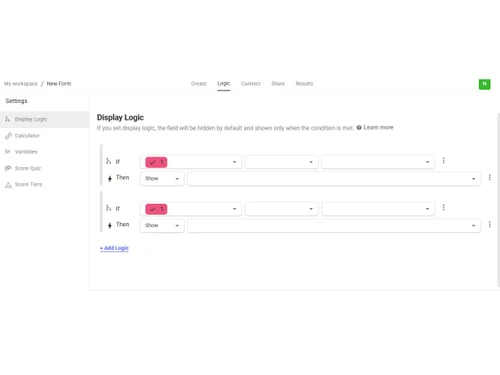
formly-logic

Formly

Brand: Formly

  • 4.3

  • 4 Ratings

Formly is a no-code form creation platform that enables users to design, customize, and share online forms quickly without technical skills.

See More

Have you used Formly before?

Share your insights for better experience

Add a Review
Starting Price
$19

View plans

100% Genuine
Products
Best Price
Guaranteed
Safe & Secure
Payment
  • Description

  • Pricing

  • Features

  • Specification

  • Review

  • FAQ

Starting at $19

Formly Software Overview

What is Formly?

Formly is a survey software that helps individuals and businesses create customizable online forms, surveys, and data collection tools without coding. It provides an intuitive interface with templates, automation, and response management features, allowing users to gather information, feedback, and leads efficiently.

The platform is commonly used for customer feedback, registrations, lead generation, and research, making data collection faster and more organized for teams and organizations.

Why Choose Formly?

  • Easy Form Creation: Formly offers an intuitive interface that allows users to build professional forms, surveys, and questionnaires without coding.
  • AI-Powered Assistance: Some versions include AI features that can generate forms from simple prompts, saving time and effort.
  • Flexible Customization: Users can design forms freely rather than being restricted to rigid templates, making it suitable for various industries and use cases.
  • Data Collection & Insights: It helps businesses capture responses, analyze results, and make data-driven decisions efficiently.
  • Affordable & Scalable: Designed for individuals, startups, and growing businesses, Formly balances cost with functionality.

Benefits of Formly

  • Easy Form Creation: Build professional surveys and forms quickly with a user-friendly drag-and-drop or editor interface.
  • Customization Flexibility: Personalize layouts, branding, and question types to match business or research needs.
  • Automation & Efficiency: Streamline data collection with automated responses, notifications, and integrations.
  • Real-Time Data Insights: Access responses instantly with dashboards and analytics for faster decision-making.
  • Lead Generation & Engagement: Capture customer information, feedback, and registrations efficiently.
  • Scalable for Teams: Suitable for individuals, startups, and organizations managing multiple forms or campaigns.
  • Time & Cost Savings: Reduces manual data entry and development effort with ready-to-use templates and workflows.
  • Mobile-Friendly Forms: Create responsive forms that work seamlessly across smartphones, tablets, and desktops without extra design effort.
  • Advanced Integrations: Connect with CRM tools, email marketing platforms, payment gateways, and productivity apps to automate workflows end-to-end.

Formly Pricing

Formly pricing starts at USD 19 at techjockey.com. The pricing model is based on different parameters, including the amount of bandwidth you need, the number of servers you need, and the features you need. For further queries related to the product, you can contact our product team and learn more about the pricing and offers.

Read more

Formly Pricing & Plans

Silver
Starting at $19
    • Users

      Users
      Users
    • Monthly

      Monthly
      Monthly

Key Features

  • Unlimited forms

  • Unlimited questions

  • All question types

  • 1,000 responses/month

  • 3 Workspaces

  • Email notifications

  • Webhooks

  • Charts for respondents

Gold
Starting at $29
    • Users

      Users
      Users
    • Monthly

      Monthly
      Monthly

Key Features

  • Unlimited forms

  • Unlimited questions

  • All question types

  • Unlimited responses/month

  • 10 Workspaces

  • Everything in Silver, plus:

  • Custom domain (10)

  • Redirect on completion

Formly Features

  • icon_check Form Builder
    Utilize a visual drag-and-drop interface to create complex digital forms, surveys, and quizzes without writing any software code.
  • icon_check Multi Layout Support
    Choose between various structural formats including conversational slides, single-page views, or multi-page step-by-step layouts.
  • icon_check Payment Gateway Integration
    Integrate secure payment processing directly into forms to collect one-time fees or subscriptions during the submission process.
  • icon_check Alerts & Notifications
    Configure automated email alerts to be sent to administrators or respondents immediately after a form entry is successfully
  • icon_check Custom Domain
    Host published forms on a personal or business web domain to maintain brand consistency and provide a professional user
  • icon_check Email Address Verification
    Require respondents to verify their email identity before final submission to ensure the authenticity and quality of lead data.
  • icon_check Data Export
    Download all collected form submission records in standard file formats including CSV, PDF, and HTML for external record keeping.
  • icon_check Custom Branding
    Upload corporate logos and define specific color schemes to ensure all published forms align with the organization's visual
  • icon_check PDF Response Generation
    Generate automated PDF documents containing specific form submission details and attach them to confirmation emails for
  • icon_check Multilingual Support
    Create and distribute forms in over 25 different languages, including support for Right-to-Left (RTL) scripts like Arabic or
  • icon_check Password Protection
    Restrict access to sensitive forms or surveys by requiring respondents to enter a valid password before viewing any questions.
Formly Demo Video play icon

Get Formly Demo

Watch the demo video to explore key features, real workflows, and how the software fits your business needs.

Understand
Key Features
Personal
Demo Insights
Interactive
Demo Support

Formly Specifications

Supported Platforms
Ubuntu Ubuntu Windows Windows MacOS MacOS Linux Linux
Devices
Desktop Desktop
Deployment
Cloud-Based Cloud-Based
Suitable For
All Industries
Business Specific
All Businesses
Business Size
Small Business Startups Medium Business Enterprises SMBs SMEs MSMBs MSMEs
Customer Support
Email Communities
Language
English
Training Resources
Videos

Formly Review

4.3

Out of 5

img

Overall Rating

Based on
4 Verified Ratings

Rating Breakdown

  • Features 4.5
  • Value for Money 3.8
  • Ease of Use 4.3
  • Customer Support 4.6

80% Recommend this Product

Add Review

Techjockey Trusted Reviews from Verified Users

No reviews are currently available for Formly. Discover similar Survey Software reviews

  • QS Plus Quantity surveying software

    4.9

    Whats great - Jon from Techjockey was very in tune with our requirements, and after a good discussion recommended some good products/vendor... read more

  • SurveySparrow

    4.3

    Whats great - Perfectly planned front and back end. Exceptionally simple to set up a study, send it by means of email by their administrati... read more

  • Zoho Survey

    4.8

    Whats great - Zoho Survey is really clear to utilize in the event that you know about making studies. Some overviews can get very intricate... read more

Articles for Formly

See All Related Articles

How much does Formly cost?

Formly pricing starts at USD 19 at techjockey.com. Pricing is customised based on specific business needs.

Which operating system does Formly support?

Formly is a cloud-based platform that works on any operating system, including Windows, macOS, and Linux, through a web browser.

How does Formly work?

It allows users to create forms and surveys using templates or custom fields, share them online, and collect and analyze responses in a centralized dashboard.

Is Formly suitable for small businesses?

Yes, Formly is suitable for small businesses, startups, and individuals due to its ease of use, affordability, and scalability.

Does Formly offer a free trial or a demo?

Yes, Formly typically offers a free plan or trial so users can explore its features before upgrading to paid versions.

What features does Formly offer?

Key features include customizable forms, templates, automation, response tracking, analytics, integrations, and data export options.

Is there an Formly App?

Formly mainly operates as a web-based platform, though forms can be accessed and managed via mobile browsers.

Who are the potential users of Formly?

Businesses, marketers, educators, researchers, event organizers, and individuals needing data collection or feedback tools.

How secure is Formly?

It uses standard cloud security practices such as data encryption and secure access controls to protect user information.

What is Formly used for?

It is used to create surveys, registration forms, feedback forms, lead capture forms, and other data collection workflows efficiently.

20,000+ Software Listed

Best Price Guranteed

Free Expert Consultation

2M+ Happy Customers

Terms and Condtions

close

Users with registered businesses can purchase goods from merchants on the platform to satisfy their business needs. Users are not permitted to utilize any products acquired through the platform for resale, advertising, business, or further distribution.

For each purchase made, users will receive a Tax Invoice (or 'GST invoice') that includes specific details such as:

  • the GSTIN of the user associated with their registered business, and

  • the specified Entity Name for their business.

It should be noted that not all products are eligible for GST Invoice. Only the products displayed by participating sellers with the 'GST-based Invoice Available' callout on the product description page would qualify.

Certain goods and services are not eligible to get a GST Invoice, including items with VAS, i.e., Value Added Services (e.g., Total Mobile Protection/Assured Buyback) and those involving an exchange offer at the time of purchase.

Users must ensure the accuracy of the GSTIN, and business entity name provided for the GST Invoice. Requests for corrections into GST Invoice would not be accommodated by Techjockey.com or any Seller, and any issues arising from user-provided information are the sole responsibility of users.

Techjockey.com is not liable for the GST Invoice or any associated input tax credit. To efficiently claim an input tax credit, users should select the registered place of business address as per the GST authority's data and follow the provisions of the GST Act and rules.

To claim an input tax credit, the delivery and billing addresses must match. Furthermore, input tax credits will not be granted if the delivery address and GSTIN on the invoice are from different states. In case of incorrect GST details provided during the order placement, the order will be canceled automatically.