linkedin
Geonix logo
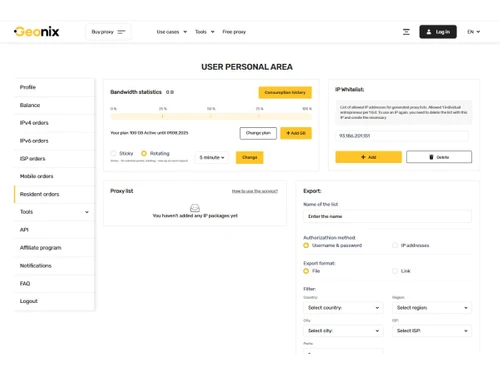
Geonix-resident orders
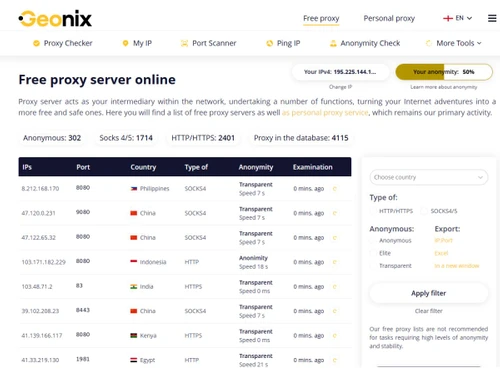
Geonix-proxy checker
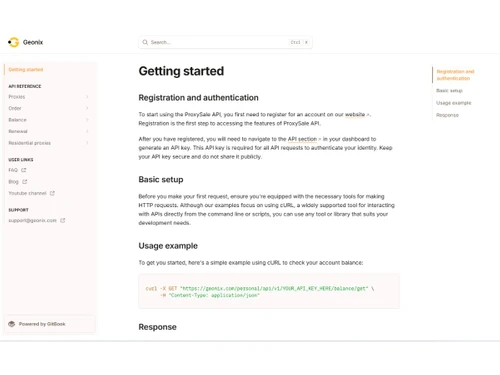
Geonix-API

Geonix

Brand: Geonix

  • 4.3

  • 5 Ratings

Geonix IPAM Tool is an IP address management software that helps businesses organize, track, and manage IP addresses, networks, and connected devices easily.

See More

Have you used Geonix before?

Share your insights for better experience

Add a Review

Price Available on Request

Questions about pricing or customization? We’re here to help, just a click away.

100% Genuine
Products
Best Price
Guaranteed
Safe & Secure
Payment
  • Description

  • Pricing

  • Features

  • Specification

  • Review

  • FAQ

Geonix Software Overview

What is Geonix?

Geonix IPAM Tool helps businesses organize, track, and manage IP addresses and network devices easily. It allows IT teams to monitor available and used IP addresses from one dashboard.

The software helps prevent IP conflicts and network errors by keeping IP information updated automatically. Geonix supports both IPv4 and IPv6 network management for modern IT systems.

Users can scan networks, detect connected devices, and manage subnets more efficiently. The platform also provides tools for DNS and DHCP management to improve network control. Businesses use it to reduce manual work and avoid using spreadsheets for IP tracking.

Geonix offers cloud-based access so teams can manage networks remotely from anywhere. IT administrators, network engineers, and enterprises use the tool for better network organization and security.

Why Choose Geonix Software?

  • Easy IP Address Management: Geonix IPAM Tool helps businesses manage IP addresses easily.
  • Centralized Network Control: Users can manage all network information from one dashboard.
  • IPv4 and IPv6 Support: The software supports both modern IP address systems.
  • Real-Time IP Tracking: Businesses can monitor used and available IP addresses live.
  • Automatic Network Discovery: Geonix can scan and detect connected devices automatically.
  • Prevents IP Conflicts: It helps avoid duplicate IP address issues on networks.
  • Improves Network Visibility: Businesses get a clear view of network infrastructure.
  • Faster Network Management: IT teams can manage networks more efficiently.
  • DNS and DHCP Support: The tool helps manage DNS and DHCP services easily.
  • Reduces Manual Work: Automation replaces spreadsheets and manual IP tracking.
  • Subnet Management: Users can organize and manage subnets properly.
  • Better Network Planning: The software helps plan network growth easily.
  • Secure Network Monitoring: Geonix helps improve network security and monitoring.

Benefits of Geonix Software

  • Easy Device Tracking: Businesses can identify connected devices quickly.
  • Real-Time Updates: IP information updates automatically in the system.
  • Improves IT Productivity: Teams save time with automated management tools.
  • Supports Large Networks: Suitable for small businesses and enterprises.
  • Reliable Network Data: Users get accurate IP and device information.
  • Better Infrastructure Organization: Helps organize networks more clearly.
  • Remote Network Management: IT admins can monitor systems remotely.
  • Easy Network Scanning: The platform scans networks for active devices quickly.
  • All-in-One IPAM Solution: It combines IP tracking, monitoring, subnet management, and network control in one platform.

Geonix Pricing

Geonix price details are available on request at techjockey.com.

The pricing model is based on different parameters, including extra features, deployment type, and the total number of users. For further queries related to the product, you can contact our product team and learn more about the pricing and offers.

Read more

Geonix Pricing & Plans

Looking for The Right Pricing?

Share your requirements and get a plan built around your business.

  • Define your business needs
  • Get customised pricing
  • Choose features that fit your workflow

Price Available on Request

Get personalised Geonix pricing that fits your needs. Our team will connect with you.

Geonix Features

  • icon_check Residential Proxies
    Real residential IPs from real devices help bypass blocks, reduce detection, and access geo-restricted content reliably.
  • icon_check Mobile Proxies
    Mobile IPs from real carriers enable high trust automation, ad verification, and social media workflows.
  • icon_check Datacenter Proxies
    High-speed datacenter IPs optimized for bulk tasks like scraping, monitoring, and automated testing.
  • icon_check ISP Proxies
    Static ISP-issued IPs combine residential trust with datacenter-level speed and long session stability.
  • icon_check IPv4 Proxy Support
    Dedicated and shared IPv4 proxies ensure compatibility with legacy systems and most online platforms.
  • icon_check IPv6 Proxy Support
    Modern IPv6 proxies provide massive IP pools, lower costs, and scalability for advanced applications.
  • icon_check Geo Targeting
    Select IPs by country, region, or city to simulate real user locations for localized access and testing.
  • icon_check Rotating IP Sessions
    Automatic IP rotation at set intervals reduces bans and improves anonymity for scraping and automation.
  • icon_check Sticky Session
    Maintain the same IP for extended periods to support logins, account management, and session-based tasks.
  • icon_check API Access
    Programmatic API enables automated proxy management, integration with tools, and workflow automation.
  • icon_check 24/7 support
    Round-the-clock technical support assists with setup, troubleshooting, and performance optimization.
  • icon_check Dashboards
    Centralized dashboard to manage proxies, track usage, rotate IPs, and monitor account activity.
  • icon_check Authentication
    Supports IP whitelisting and username-password authentication for flexible and secure access control.
  • icon_check Unlimited Concurrent Sessions
    Run multiple connections simultaneously without hard limits, enabling large-scale parallel operations.

Geonix Specifications

Supported Platforms
Windows Windows MacOS MacOS Linux Linux
Devices
Desktop Desktop
Deployment
Cloud-Based Cloud-Based
Suitable For
All Industries
Business Specific
All Businesses
Business Size
Small Business Medium Business Enterprises
Customer Support
Email Communities
Language
English
Integration
API Integration
Training Resources
Videos

Geonix Review

4.3

Out of 5

img

Overall Rating

Based on
5 Verified Ratings

Rating Breakdown

  • Features 4.5
  • Value for Money 3.8
  • Ease of Use 4.6
  • Customer Support 4.3

80% Recommend this Product

Add Review

Be the First to Review

This product has no reviews yet. Be the first to leave your feedback.

Add Review

How much does Geonix Software cost?

Geonix pricing information is available on request at techjockey.

Is there a mobile app available for Geonix Software?

No, Geonix mobile app is not available.

Which operating systems are compatible with Geonix Software?

Geonix Software is compatible with Windows, MacOS and Linux operating systems.

Does Geonix Software offer a free trial?

Yes, Geonix software offers a free trial.

How does Geonix Software function?

Geonix IPAM Tool works by helping businesses track, organize, scan, and manage IP addresses, networks, and connected devices from one dashboard.

Who uses Geonix Software?

IT administrators, network engineers, enterprises, telecom companies, and businesses with large network systems use Geonix Software.

Is a free demo available for Geonix Software?

Yes, Geonix provides free access/demo options through its online platform for users to explore its IP management features.

Is Geonix Software available for free?

Yes, Geonix offers a free version/platform for IP address and network management tools.

20,000+ Software Listed

Best Price Guranteed

Free Expert Consultation

2M+ Happy Customers

Terms and Condtions

close

Users with registered businesses can purchase goods from merchants on the platform to satisfy their business needs. Users are not permitted to utilize any products acquired through the platform for resale, advertising, business, or further distribution.

For each purchase made, users will receive a Tax Invoice (or 'GST invoice') that includes specific details such as:

  • the GSTIN of the user associated with their registered business, and

  • the specified Entity Name for their business.

It should be noted that not all products are eligible for GST Invoice. Only the products displayed by participating sellers with the 'GST-based Invoice Available' callout on the product description page would qualify.

Certain goods and services are not eligible to get a GST Invoice, including items with VAS, i.e., Value Added Services (e.g., Total Mobile Protection/Assured Buyback) and those involving an exchange offer at the time of purchase.

Users must ensure the accuracy of the GSTIN, and business entity name provided for the GST Invoice. Requests for corrections into GST Invoice would not be accommodated by Techjockey.com or any Seller, and any issues arising from user-provided information are the sole responsibility of users.

Techjockey.com is not liable for the GST Invoice or any associated input tax credit. To efficiently claim an input tax credit, users should select the registered place of business address as per the GST authority's data and follow the provisions of the GST Act and rules.

To claim an input tax credit, the delivery and billing addresses must match. Furthermore, input tax credits will not be granted if the delivery address and GSTIN on the invoice are from different states. In case of incorrect GST details provided during the order placement, the order will be canceled automatically.