linkedin
HitPaw Voice Changer logo
play The BEST AI Voice Changer in REAL TIME | HitPaw Voice Changer Guide
HitPaw Voice Changer AI
HitPaw Voice Changer Magic

HitPaw Voice Changer

Brand: HitPaw

  • 4.3

  • 3 Ratings

HitPaw Voice Changer is a software that lets you alter your voice in real-time or modify pre-recorded audio files with various effects and settings.

See More

Have you used HitPaw Voice Changer before?

Share your insights for better experience

Add a Review
Starting Price
$16

View plans

100% Genuine
Products
Best Price
Guaranteed
Safe & Secure
Payment
  • Description

  • Pricing

  • Features

  • Specification

  • Review

  • Compare

  • Alternatives

  • FAQ

Starting at $16

HitPaw Voice Changer Software Overview

What is HitPaw Voice Changer?

HitPaw Voice Changer is a user-friendly software designed to modify audio files or change voices in real-time for various purposes. With this tool, you can experiment with different voice effects like robotic, male, female, and many more, enhancing your creativity. It allows users to have fun with voice modulation and create unique voices for voiceover projects, prank calls, gaming, or content creation.

The software offers a range of customization options to tweak pitch, tempo, and other parameters to achieve the desired voice transformation. Whether you want to sound like a robot or alter your pitch to match a specific character, HitPaw Voice Changer provides a simple and intuitive interface for achieving these effects effortlessly. This software can add a fun and creative element to your audio projects or online interactions.

Why Choose HitPaw Voice Changer Software?

  • Easy-to-Use: It offers a user-friendly interface, making it accessible for beginners and professionals alike.
  • Wide Range of Effects: It provides a variety of voice effects such as robotic, male, female, and more, allowing for versatile voice modulation.
  • Real-Time Voice Editing: Users can apply voice changes in real time, enabling instant feedback and adjustments during recording or live sessions.
  • Customization Options: It allows for customization of pitch, tempo, and other parameters, giving users control over the audio transformation process.
  • Creative Potential: It enables users to unleash their creativity by experimenting with different voices, perfect for content creators, gamers, voiceover artists, and pranksters.
  • Enhance Productions: Whether for fun projects, professional voiceovers, gaming content, or online interactions, It can add an entertaining and unique twist to audio productions.

Benefits of HitPaw Voice Changer Platform

  • User Profiles: Users can create and save multiple profiles with different voice settings for easy access and switching between setups.
  • Import and Export: The software allows users to import audio files for voice modulation and export the modified audio in various formats for use in different projects.
  • Voice Effects Library: It offers a library of pre-set voice effects for quick and easy application, saving time on manual adjustments.
  • Voice Recorder Integration: Users can directly record and edit their voice within the software, streamlining the recording and editing process.
  • Support for Various Platforms: The software is compatible with multiple platforms, making it versatile for different use cases and workflows.

Pricing of HitPaw Voice Changer AI Voice Generator

HitPaw Voice Changer price in India starts from $16 at techjockey.com.

The pricing model is based on different parameters, including extra features, deployment type, and the total number of users. For further queries related to the product, you can contact our product team and learn more about the pricing and offers.

Read more

HitPaw Voice Changer Pricing & Plans

Monthly
Key Features
  • Automatically Renew, Cancel Any Time
  • 1-Month free upgrades
  • One license for 1 computer
  • Unlock all different features
  • Enjoy various AI voice effects
  • Evaluate chats and games experience
  • 7/24 Technical Support
Starting at $16
    • Monthly

      Monthly
      Monthly

Key Features

  • Automatically Renew, Cancel Any Time

  • 1-Month free upgrades

  • One license for 1 computer

  • Unlock all different features

  • Enjoy various AI voice effects

  • Evaluate chats and games experience

  • 7/24 Technical Support

HitPaw Voice Changer Features

  • icon_check AI Voice Changer
    AI is used to alter voices in real-time, allowing for a range of effects and character voices.
  • icon_check Voice Cloning
    Allows users to replicate & mimic the voices & create personalized voice models using AI algorithms.
  • icon_check Artificial Intelligence
    Unleash AI for immersive voice transformations with precision and ease.
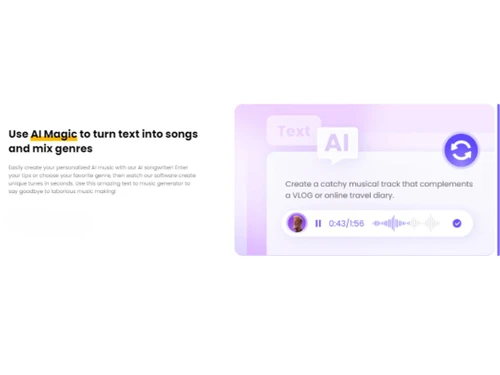
  • icon_check AI Music Generators
    AI is used to create music based on user inputs, offering limitless creative options.
  • icon_check Noise Reduction
    Enhances audio quality by automatically reducing background noise and improving the clarity of recordings or voiceovers.
  • icon_check Keybinds Control
    Offers customizable shortcuts for quick and convenient control over various functions and settings within the software.
  • icon_check Audio Editing
    Edit and refine audio recordings easily with tools for trimming, merging, adjusting volume, and adding effects.
  • icon_check AI Voice Cleaner
    The AI-enhanced tool refines voice recordings by reducing background noise and distortions for professional quality.
HitPaw Voice Changer Demo Video play icon

Get HitPaw Voice Changer Demo

Watch the demo video to explore key features, real workflows, and how the software fits your business needs.

Understand
Key Features
Personal
Demo Insights
Interactive
Demo Support

HitPaw Voice Changer Specifications

Supported Platforms
Ubuntu Ubuntu Windows Windows MacOS MacOS Linux Linux
Devices
Desktop Desktop Mobile Mobile Tablet Tablet iPad iPad
Deployment
Cloud-Based Cloud-Based
Suitable For
All Industries
Business Specific
All Businesses
Business Size
Small Business Medium Business Enterprises
Customer Support
Email Communities
Language
English
Training Resources
Videos
AI Features
AI Integrated

Explore the Best Alternative Solutions Similar to Your Business Size and Needs

HitPaw Voice Changer Review

4.3

Out of 5

img

Overall Rating

Based on
3 Verified Ratings

Rating Breakdown

  • Features 4
  • Value for Money 4.5
  • Ease of Use 4.5
  • Customer Support 4.3

90% Recommend this Product

Add Review

Be the First to Review

This product has no reviews yet. Be the first to leave your feedback.

Add Review

Compare HitPaw Voice Changer With other AI Voice Generators

Products
Ratings
Pricing
Device Supported
Deployment
Supported Platforms
  • img

    HitPaw Voice Changer

  • 4.3

  • Price On Request

  • Desktop

    Mobile

  • Web based

    On Premises

  • Windows

    Mac OS

  • img

    Typecast

  • 4.5

  • Price On Request

  • Desktop

    Mobile

  • Web based

    On Premises

  • Windows

    Mac OS

  • img

    Slang AI

  • 4.4

  • Price On Request

  • Desktop

    Mobile

  • Web based

    On Premises

  • Windows

    Mac OS

  • img

    Listnr

  • 4.6

  • Price On Request

  • Desktop

    Mobile

  • Web based

    On Premises

  • Windows

    Mac OS

  • img

    Parrot AI

  • 4.1

  • Price On Request

  • Desktop

    Mobile

  • Web based

    On Premises

  • Windows

    Mac OS

  • img

    FineVoice

  • 4.4

  • Price On Request

  • Desktop

    Mobile

  • Web based

    On Premises

  • Windows

    Mac OS

  • img

    Voice AI

  • 4.3

  • Price On Request

  • Desktop

    Mobile

  • Web based

    On Premises

  • Windows

    Mac OS

  • img

    Respeecher

  • 4.0

  • Price On Request

  • Desktop

    Mobile

  • Web based

    On Premises

  • Windows

    Mac OS

  • img

    Voicebooking

  • 4.2

  • Price On Request

  • Desktop

    Mobile

  • Web based

    On Premises

  • Windows

    Mac OS

  • img

    SteosVoice

  • 4.5

  • Price On Request

  • Desktop

    Mobile

  • Web based

    On Premises

  • Windows

    Mac OS

  • img

    Altered

  • 4.5

  • Price On Request

  • Desktop

    Mobile

  • Web based

    On Premises

  • Windows

    Mac OS

(0) Product(s) selected

HitPaw Voice Changer Alternatives

See All HitPaw Voice Changer Alternatives

Starting Price:

$399 /Location/Month

Starting Price:

$1

Available

Price on Request

Available

Price on Request

Available

Price on Request

Which operating system does HitPaw Voice Changer Software Support?

HitPaw Voice Changer Software is compatible with Ubuntu, Windows, Linux and MacOS.

Is there any HitPaw Voice Changer Software App?

HitPaw Voice Changer is not available for Android and iOS app users.

What is the deployment type of HitPaw Voice Changer Software?

HitPaw Voice Changer Software supports on-premises deployment.

How much does HitPaw Voice Changer Software Cost?

HitPaw Voice Changer price in India starts at $16 at techjockey.com.

Who are the potential users of HitPaw Voice Changer Software?

HitPaw Voice Changer Software is typically used by all industries to modify audio files or change voices in real-time for various purposes.

Is there any free trial or demo for HitPaw Voice Changer Software?

Yes, HitPaw Voice Changer Software free demo is available at techjockey.com.

Is HitPaw Voice Changer Software Free?

HitPaw Voice Changer software does not offer a free trial. However, the premium plan with advanced features is available at techjockey.com with exciting deals.

How can you download HitPaw Voice Changer Software?

For HitPaw software installation, you can go directly to Techjockey’s official website to buy this solution. Once purchased, you will receive a key to download the same via email.

How Does HitPaw Voice Changer Software Work?

HitPaw Voice Changer Software works by modifying the pitch and tone of recorded audio files, enabling users to alter their voices and create different vocal effects in just a few clicks.

20,000+ Software Listed

Best Price Guranteed

Free Expert Consultation

2M+ Happy Customers

Terms and Condtions

close

Users with registered businesses can purchase goods from merchants on the platform to satisfy their business needs. Users are not permitted to utilize any products acquired through the platform for resale, advertising, business, or further distribution.

For each purchase made, users will receive a Tax Invoice (or 'GST invoice') that includes specific details such as:

  • the GSTIN of the user associated with their registered business, and

  • the specified Entity Name for their business.

It should be noted that not all products are eligible for GST Invoice. Only the products displayed by participating sellers with the 'GST-based Invoice Available' callout on the product description page would qualify.

Certain goods and services are not eligible to get a GST Invoice, including items with VAS, i.e., Value Added Services (e.g., Total Mobile Protection/Assured Buyback) and those involving an exchange offer at the time of purchase.

Users must ensure the accuracy of the GSTIN, and business entity name provided for the GST Invoice. Requests for corrections into GST Invoice would not be accommodated by Techjockey.com or any Seller, and any issues arising from user-provided information are the sole responsibility of users.

Techjockey.com is not liable for the GST Invoice or any associated input tax credit. To efficiently claim an input tax credit, users should select the registered place of business address as per the GST authority's data and follow the provisions of the GST Act and rules.

To claim an input tax credit, the delivery and billing addresses must match. Furthermore, input tax credits will not be granted if the delivery address and GSTIN on the invoice are from different states. In case of incorrect GST details provided during the order placement, the order will be canceled automatically.