USA
USA UAE
UAESmall Business
Designed for startups and growing businesses

See More





Brand: Ipvanish
IPvanishVPN provides a set of features for business users to increase productivity and perform core functions accurately. Depending on the size and requirements of your organization, you can pick the best pricing plan. Automation through IPvanishVPN further reduces the need for your employees to han...
See MoreHave you used Ipvanish before?
Share your insights for better experience
Brand: Ipvanish
Founded Year: 1999
IPVanish is the only true tier-1 VPN service in the world, which means we deliver the best VPN speeds, the most secure connections.
Core Modules
 Remote Access Split Tunneling Automatic Kill Switch DNS Leak Protection IPv6 Leak Protection Port Forwarding Alternative Routing P2P Support Ad Blocker Wi-Fi Protection Cookie Blocker Multi-hop VPN Smart DNS
 Privacy Protection
Obfuscated Servers No Log Policy IP Address Masking WebRTC Leak Protection Privacy-Focused DNS Servers Automatic Reconnection Static and Dynamic IP Addresses Multi-Factor Authentication (MFA) Deep & Dark Web Monitoring Encryption Protocols
SSTP OpenVPN IKEv2/IPsec L2TP/IPsec WireGuard PPTP Performance & Monitoring
Load Balancing Stealth Mode Speed Throttling Connection Speed Unlimited Bandwidth Server Locations Connection Stability Usability Features
User-Friendly Interface Multi-Device Support Platform Compatibility Browser Extension Availability Cross-Platform Synchronization Compliance Management
GDPR Compliant HIPAA Compliance PCI DSS Compliance Security Audits Advanced Firewall Features
Phishing Protection DDoS protection Malware Blocker Device Scanning Administrative Features
Policy Management Reporting & Analytics URL Filtering User Access Management Session Management Traffic Management Content Filtering Global Content Access Torrent Downloading 

Watch the demo video to explore key features, real workflows, and how the software fits your business needs.
 Ubuntu
  Windows
  iOS
iOS  Android MacOS
  Linux
Linux  Desktop
  Mobile
  Tablet
  iPad
iPad  Cloud-Based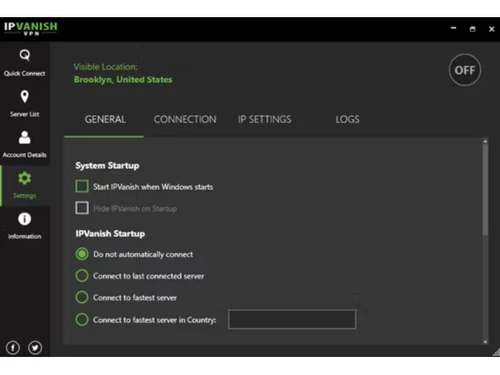
Small Business
Designed for startups and growing businesses
Medium Business
Built for business growth and flexibility
Enterprises
Designed for complex and large-scale business needs
4.4
Out of 5

Overall Rating
Based on
11 Verified Reviews
Rating Breakdown
92% Recommend this Product
Add ReviewUsers generally appreciate IPVanish for its user-friendly interface, strong security measures, and ability to unblock popular streaming services. The 30-day money-back guarantee adds to the overall satisfaction, providing a sense of security. However, common complaints include the lack of a dedicated IP option, limited transparency regarding security audits, and occasional server overcrowding, which can lead to slowdowns. Additionally, some users desire more advanced features and browser extensions for enhanced convenience. Overall, IPVanish is well-regarded but has room for improvement in certain areas.
Pros
"It offers a money-back guarantee. The 30-day money-back guarantee makes me feel safe. In case I am not satisfied with the service I can get my money back."
"My favorite feature about IPVanish is that I can connect unlimited devices as I want. This is great since I can connect my family’s devices to the same account."
"It has an easy-to-use interface. I found the app to be intuitive and user-friendly. I did not have to struggle with the setup or even the settings to start using it."
Cons
"There is no dedicated IP option. Unlike some VPNs, it does not offer a dedicated IP address, this could be a dealbreaker for certain use cases."
"It does not have a lot of advanced features. For advanced users, IPVanish could have offered more customization options such as tunneling protocols and kill switch features."
"IPVanish has not always been transparent about its internal security audits. Even though they claim to have a no-logs policy, I found that they have limited transparency."


Dec 31, 2024
Techjockey Verified
“Rish-Free but Not Perfect for Geo-Blocking”
I like that IPVanish gives it risk-free to check it out with a 30-day money-back guarantee. Knowing that I could get my money back if I was not satisfied made me feel secure. But I did see that some websites are still prohibited, so it is not the ideal way to get around all geo-restrictions.
Pros
It offers a money-back guarantee. The 30-day money-back guarantee makes me feel safe. In case I am not satisfied with the service I can get my money back.
Cons
There are inconsistencies with some of the websites. There are still certain websites that are blocked from my access. Despite using IPVanish, it was not the most ideal solution to avoid geo-blocking.
Reason to switch
MEGA VPN did not perform well for Streaming and had slower speeds. IPVanish was a better option due to its policy and guarantee.
Dec 12, 2024
Techjockey Verified
“Great Control with Split Tunnelling but No Dedicated IP”
It allows me to control which websites or apps use the VPN. I like IPVanish’s split tunneling option. I have more control over my internet traffic, and it is convenient. But the lack of a dedicated IP option, which some people might require, disappointed me a little.
Pros
The split tunneling feature is great since I can choose which apps or websites go through the VPN and which do not. This gives me more control over my traffic when I am going through the internet.
Cons
There is no dedicated IP option. Unlike some VPNs, it does not offer a dedicated IP address, this could be a dealbreaker for certain use cases.
Reason to switch
I moved from CyberGhost since I needed better control over my traffic, and IPVanish’s features offered just that.
Nov 17, 2024
Techjockey Verified
“User-Friendly but Needs More Transparency”
The ease of use of IPVanish is something I like. I had no trouble setting up or modifying the settings because the software is easy to use. To support their no-logs promises, they could be more open about their security audits.
Pros
It has an easy-to-use interface. I found the app to be intuitive and user-friendly. I did not have to struggle with the setup or even the settings to start using it.
Cons
IPVanish has not always been transparent about its internal security audits. Even though they claim to have a no-logs policy, I found that they have limited transparency.
Reason to switch
I needed a solution that was simpler and more budget-friendly. NordVPN was not providing me with these so I moved to IPVanish.

Ipvanish
Price On Request
Desktop
Mobile
Web based
On Premises
Windows
Mac OS

Avast SecureLine VPN
Price On Request
Desktop
Mobile
Web based
On Premises
Windows
Mac OS

Astrill VPN
Price On Request
Desktop
Mobile
Web based
On Premises
Windows
Mac OS

NordVPN
₹ 4999
Desktop
Mobile
Web based
On Premises
Windows
Mac OS

TorGuard VPN
Price On Request
Desktop
Mobile
Web based
On Premises
Windows
Mac OS

Private Internet Access
₹ 901
Desktop
Mobile
Web based
On Premises
Windows
Mac OS

Proton VPN
Price On Request
Desktop
Mobile
Web based
On Premises
Windows
Mac OS

Cyberghost
₹ 965
Desktop
Mobile
Web based
On Premises
Windows
Mac OS

Surfshark
Price On Request
Desktop
Mobile
Web based
On Premises
Windows
Mac OS

Bitdefender Premium VPN
₹ 1458
Desktop
Mobile
Web based
On Premises
Windows
Mac OS

Mullvad VPN
Price On Request
Desktop
Mobile
Web based
On Premises
Windows
Mac OS
(0) Product(s) selected
Starting Price:
$11 /Month
Starting Price:
₹901 /Month

Starting Price:
$10 /Month

Starting Price:
$6 /month

Starting Price:
$7 /Month

Starting Price:
$10 /Month

Starting Price:
$15 /Month

Starting Price:
$12 /month

Starting Price:
$10 /Month

Available
Price on Request

Starting Price:
$6 /Month
Ipvanish Vpn VPN Software demo is available for free at Techjockey.
Ipvanish Vpn VPN Software offers a free trial. However, the premium plan with advanced features available at Techjockey.
For Ipvanish Vpn VPN Software installation, insert the given CD/USB flash storage in your system and open the Setup Wizard to get started.
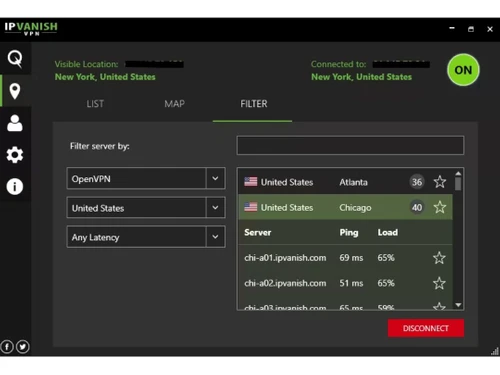
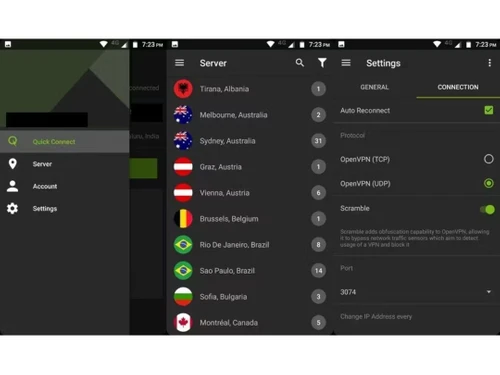
Open the IPVanish app, go to Settings, and select the VPN protocol you want to use (e.g., OpenVPN, IKEv2).
0 0
Ensure your app is updated, try switching servers, or check your internet connection. If the problem persists, reinstall the app or contact support.
0 0
To cancel an IPVanish VPN subscription, you can:
0 0
Unlimited number of devices can connect to IPVanish's VPN at once. This implies that you can use IPVanish simultaneously on any number of devices, including your computer, streaming box, phone, and tablet.
0 0
Restart your device, switch servers, check your internet connection, or reinstall the IPVanish app. If issues persist, contact IPVanish support.
0 0
20,000+ Software Listed
Best Price Guranteed
Free Expert Consultation
2M+ Happy Customers
Terms and Condtions

Users with registered businesses can purchase goods from merchants on the platform to satisfy their business needs. Users are not permitted to utilize any products acquired through the platform for resale, advertising, business, or further distribution.
For each purchase made, users will receive a Tax Invoice (or 'GST invoice') that includes specific details such as:
the GSTIN of the user associated with their registered business, and
the specified Entity Name for their business.
It should be noted that not all products are eligible for GST Invoice. Only the products displayed by participating sellers with the 'GST-based Invoice Available' callout on the product description page would qualify.
Certain goods and services are not eligible to get a GST Invoice, including items with VAS, i.e., Value Added Services (e.g., Total Mobile Protection/Assured Buyback) and those involving an exchange offer at the time of purchase.
Users must ensure the accuracy of the GSTIN, and business entity name provided for the GST Invoice. Requests for corrections into GST Invoice would not be accommodated by Techjockey.com or any Seller, and any issues arising from user-provided information are the sole responsibility of users.
Techjockey.com is not liable for the GST Invoice or any associated input tax credit. To efficiently claim an input tax credit, users should select the registered place of business address as per the GST authority's data and follow the provisions of the GST Act and rules.
To claim an input tax credit, the delivery and billing addresses must match. Furthermore, input tax credits will not be granted if the delivery address and GSTIN on the invoice are from different states. In case of incorrect GST details provided during the order placement, the order will be canceled automatically.