linkedin
Manuskript logo
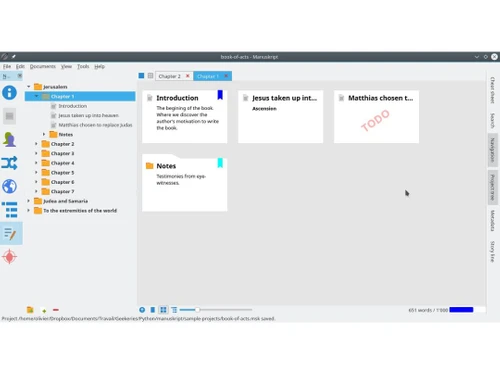
Manuskript Dashboard
Manuskript Notes
Manuskript Scriptwriting

Manuskript

Brand: Theologeek

  • 4.0

  • 4 Ratings

Manuskript is a free and open-source script writing software designed for authors, particularly those working on long-form projects like novels and screenplays.

See More

Have you used Manuskript before?

Share your insights for better experience

Add a Review

Free Forever

Get started immediately at no cost. Upgrade anytime if your business demand more.

100% Genuine
Products
Best Price
Guaranteed
Safe & Secure
Payment
  • Description

  • Pricing

  • Features

  • Specification

  • Review

  • Compare

  • Alternatives

  • FAQ

Manuskript Software Overview

What is Manuskript?

Manuskript is a script writing software designed to assist writers in organizing their creative work efficiently. It offers outlining, character development, plot structuring, and note-taking to streamline the writing process. With its intuitive interface, writers can focus on crafting their stories without distractions.

It supports various formats, including novels, screenplays, and stage plays, catering to diverse writing needs. It allows users to set goals, track progress, and stay motivated throughout their writing journey. Overall, Manuskript is a versatile tool tailored to meet the specific demands of scriptwriters and authors alike.

Why Choose Manuskript Software?

  • Focused Writing Environment: It provides a distraction-free writing environment, allowing writers to concentrate fully on their creative process without unnecessary interruptions.
  • Organizational Features: Includes tools like outlining and character profiles for better project organization.
  • Versatility: Supports various writing formats, suitable for novels, screenplays, and more.
  • Goal Tracking: Allows setting and monitoring writing goals to maintain progress and motivation.
  • Multi-Platform Compatibility: Works across Ubuntu, Windows, macOS, and Linux, ensuring accessibility.
  • Community Support: Benefits from an active user community for updates, tips, and resources.

Benefits of Manuskript Platform

  • Customizable Templates: It offers templates for different writing projects, allowing writers to start with a structure that suits their specific needs and preferences.
  • Version Control: The software typically includes version control features, enabling writers to track changes, revert to previous versions, and collaborate with others seamlessly without fear of losing their work.
  • Export Options: It provides various export options, allowing writers to easily export their projects into common file formats such as PDF and DOCX or even directly to ebook formats, facilitating sharing and publishing.
  • Integration with Writing Tools: Many users appreciate its compatibility with writing tools like spell checkers, grammar checkers, and even writing style analysis tools, enhancing the overall writing experience and quality.
  • Visual Plotting: Some versions offer visual plotting tools, such as timeline views or storyboarding features, which help writers visualize their plots and story arcs more effectively.
  • Data Security: With features like automatic backups and secure cloud storage options, writers can trust that their work is protected against data loss or system failures.

Pricing of Manuskript

Manuskript is available for free.

The pricing model is based on different parameters, including extra features, deployment type, and the total number of users. If you have further queries related to the product, you can contact our product team to learn more about the pricing and offers.

Read more

Manuskript Pricing & Plans

This Product is Available Free Forever.

Start instantly with no fees, no subscriptions, and no commitments.

  • Full access to basic version available
  • No credit card or sign-up required

Free Forever Plan

Get started immediately at no cost. Upgrade anytime if your business demand more.

Free Forever

Manuskript Features

  • icon_check Data Import/Export
    Easily import and export your writing projects in various file formats for seamless sharing and collaboration.
  • icon_check Dashboard
    Central hub for managing writing projects, tracking progress, and setting goals.
  • icon_check Content Management
    Organize and manage your writing content efficiently, including characters, scenes, and notes.
  • icon_check Outliner
    Plan and structure your writing projects using an intuitive outlining tool to organize your ideas.
  • icon_check Story board
    Visualize your story's structure and sequence using a storyboard feature, helping you plan and arrange scenes effectively.
  • icon_check Script Writing
    Write scripts for screenplays or stage plays with dedicated tools tailored to the specific requirements of scriptwriting.
  • icon_check Screenwriting
    Format your scripts professionally for screenplays, ensuring compliance with industry standards.
  • icon_check Drag & Drop
    Easily rearrange and organize elements of your writing project by dragging and dropping them within the software interface.
  • icon_check Frequency Analyzer
    Analyze word and phrase frequency to spot patterns and repetitions, aiding editing.
  • icon_check Outliner
    Organize your ideas hierarchically in an outliner, letting you structure and reorganize your project flexibly.
  • icon_check Distraction-free Mode
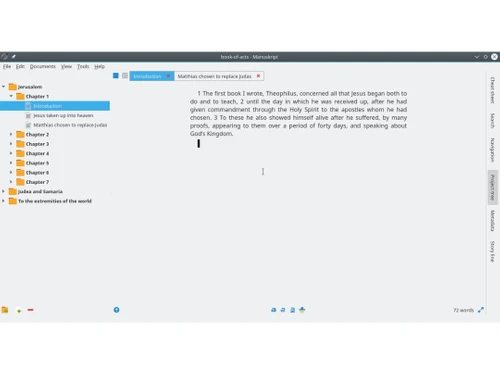
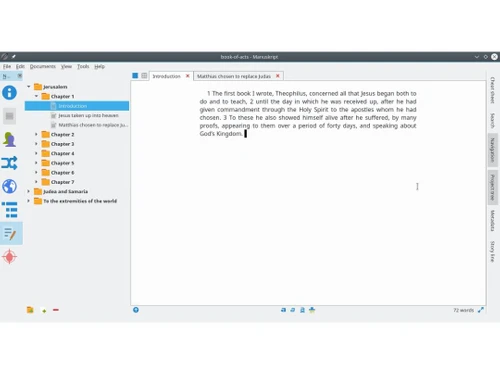
    Write in a clean, minimal editor where you can set word- or time-based goals to stay focused.
  • icon_check Novel Assistant
    Use the snowflake method wizard to expand a single idea into a full story with characters and plot.
  • icon_check Character Management
    Maintain detailed profiles for characters, tracking traits, summary, notes and detailed descriptions.
  • icon_check Plot Structuring
    Create and interlink complex plots, associate them with characters, and build narrative arcs.
  • icon_check World-Building Organizer
    Design your story’s world, including locations, societies, and lore, within a dedicated “world” panel.

Manuskript Specifications

Supported Platforms
Ubuntu Ubuntu Windows Windows MacOS MacOS Linux Linux
Devices
Desktop Desktop
Deployment
Cloud-Based Cloud-Based Perpetual Perpetual
Suitable For
All Industries
Business Specific
All Businesses
Business Size
Small Business Startups Medium Business
Customer Support
Email Communities
Language
English
Training Resources
Videos

Manuskript Review

4.0

Out of 5

img

Overall Rating

Based on
4 Verified Ratings

Rating Breakdown

  • Features 3.7
  • Value for Money 4.3
  • Ease of Use 4.1
  • Customer Support 4.1

90% Recommend this Product

Add Review

Be the First to Review

This product has no reviews yet. Be the first to leave your feedback.

Add Review

Compare Manuskript With other Script Writing Software

Products
Ratings
Pricing
Device Supported
Deployment
Supported Platforms
  • img

    Manuskript

  • 4.0

  • FREE

  • Desktop

    Mobile

  • Web based

    On Premises

  • Windows

    Mac OS

  • img

    Squibler

  • 4.4

  • Price On Request

  • Desktop

    Mobile

  • Web based

    On Premises

  • Windows

    Mac OS

  • img

    Scrivener

  • 4.1

  • ₹ 4900

  • Desktop

    Mobile

  • Web based

    On Premises

  • Windows

    Mac OS

  • img

    NolanAI

  • 4.2

  • Price On Request

  • Desktop

    Mobile

  • Web based

    On Premises

  • Windows

    Mac OS

  • img

    DramaQueen

  • 4.1

  • ₹ 9583

  • Desktop

    Mobile

  • Web based

    On Premises

  • Windows

    Mac OS

  • img

    Inklewriter

  • 4.4

  • Price On Request

  • Desktop

    Mobile

  • Web based

    On Premises

  • Windows

    Mac OS

  • img

    Twine

  • 4.1

  • Price On Request

  • Desktop

    Mobile

  • Web based

    On Premises

  • Windows

    Mac OS

  • img

    Celtx

  • 4.2

  • Price On Request

  • Desktop

    Mobile

  • Web based

    On Premises

  • Windows

    Mac OS

(0) Product(s) selected

Manuskript Alternatives

See All Manuskript Alternatives

Starting Price:

$29 /Month

Starting Price:

$40 /Month

Available

Price on Request

Starting Price:

$15 /month

Articles for Manuskript

See All Related Articles

What is the cost of Manuskript software?

Manuskript is available for free.

Does Manuskript Software offer a free trial?

Manuskript is entirely free to use.

Is there any Manuskript Software App?

No, Manuskript is primarily desktop software.

Which operating system does Manuskript Software Support?

Manuskript supports Ubuntu, Windows, macOS, and Linux.

How Does Manuskript Software Work?

Manuskript Software helps writers organize, plan, and develop their ideas into coherent stories using features like the snowflake method and character/plots/world organization.

Who are the potential users of Manuskript Software?

Manuskript is designed for all industries that like to organize and plan their stories before writing, offering features to develop complex characters, intricate plots, and detailed worlds to grow a single idea into a coherent novel

Is Manuskript Software Free?

Yes, Manuskript is free to download and use.

Does Manuskript support importing from other writing software?

Yes, Manuskript supports importing files from various formats, including plain text, Markdown, and Scrivener.

20,000+ Software Listed

Best Price Guranteed

Free Expert Consultation

2M+ Happy Customers

Terms and Condtions

close

Users with registered businesses can purchase goods from merchants on the platform to satisfy their business needs. Users are not permitted to utilize any products acquired through the platform for resale, advertising, business, or further distribution.

For each purchase made, users will receive a Tax Invoice (or 'GST invoice') that includes specific details such as:

  • the GSTIN of the user associated with their registered business, and

  • the specified Entity Name for their business.

It should be noted that not all products are eligible for GST Invoice. Only the products displayed by participating sellers with the 'GST-based Invoice Available' callout on the product description page would qualify.

Certain goods and services are not eligible to get a GST Invoice, including items with VAS, i.e., Value Added Services (e.g., Total Mobile Protection/Assured Buyback) and those involving an exchange offer at the time of purchase.

Users must ensure the accuracy of the GSTIN, and business entity name provided for the GST Invoice. Requests for corrections into GST Invoice would not be accommodated by Techjockey.com or any Seller, and any issues arising from user-provided information are the sole responsibility of users.

Techjockey.com is not liable for the GST Invoice or any associated input tax credit. To efficiently claim an input tax credit, users should select the registered place of business address as per the GST authority's data and follow the provisions of the GST Act and rules.

To claim an input tax credit, the delivery and billing addresses must match. Furthermore, input tax credits will not be granted if the delivery address and GSTIN on the invoice are from different states. In case of incorrect GST details provided during the order placement, the order will be canceled automatically.