linkedin
Mozart AI logo
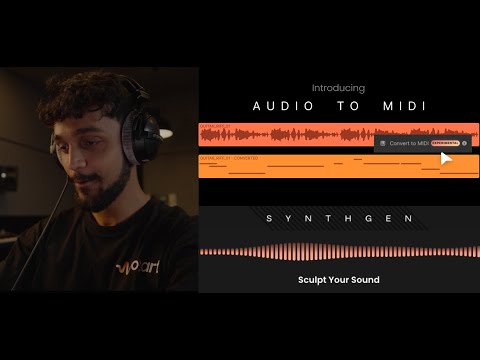
play Mozart AI New Features: Audio to Midi + Synthgen
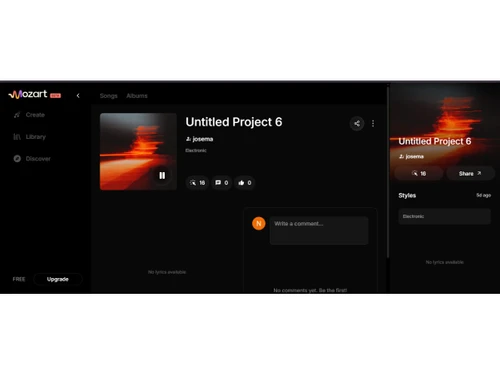
mozart ai-project
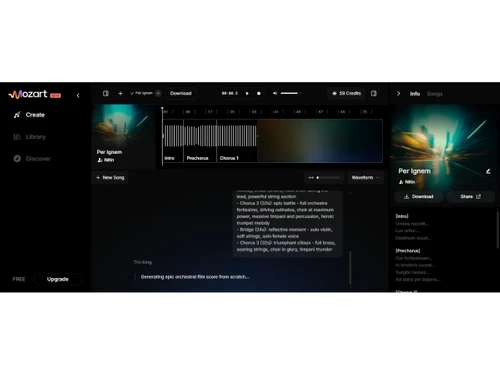
mozart ai-interface

Mozart AI

Brand: Arthos

  • 4.3

  • 4 Ratings

Mozart AI is an AI-powered music creation platform that helps users generate, edit, and produce songs, vocals, beats, and melodies using simple prompts and creative inputs.

See More

Have you used Mozart AI before?

Share your insights for better experience

Add a Review
Starting Price
$6

View plans

100% Genuine
Products
Best Price
Guaranteed
Safe & Secure
Payment
  • Description

  • Pricing

  • Features

  • Specification

  • Review

  • FAQ

Starting at $6

Mozart AISoftware Overview

What is Mozart AI?

Mozart AI is an AI music generator that helps users generate, edit, and produce songs using simple text prompts, lyrics, photos, or voice inputs. It allows users to create complete music tracks, melodies, beats, and vocals without needing advanced music production skills. The platform can generate songs in different genres, moods, and styles within minutes. Users can edit lyrics, customize vocals, adjust instruments, and refine tracks using AI-powered tools.

Mozart AI also supports voice covers, vocal removal, audio enhancement, and music mastering features. It includes tools for creating music videos and cover art for generated songs. The platform offers browser-based and mobile access for easy music creation anywhere. Musicians, content creators, producers, and beginners can use it to speed up the songwriting process.

Mozart AI provides commercial usage rights for original music created on the platform. It also supports collaboration between human creativity and AI-assisted music production.

Why Choose Mozart AI Software?

  • Screen Recording Tool: Record your screen in high quality.
  • Webcam Recording: Capture webcam video alongside screen recordings.
  • Audio Recording Support: Record microphone and system audio simultaneously.
  • Built-In Video Editor: Edit recordings without using separate software.
  • Automatic Subtitle Generation: Creates subtitles automatically from speech.
  • Voice Enhancement Tools: Improves audio quality in recordings.
  • Background Removal: Remove or replace backgrounds easily.
  • Annotation Tools: Add text, arrows, and highlights to videos.
  • Screen Drawing Features: Draw on the screen while recording.
  • Presentation Recording: Ideal for recording presentations and lectures.
  • Tutorial Creation: Easily create educational and training videos.
  • Gameplay Recording: Record gaming sessions smoothly.
  • Webinar Recording: Capture online meetings and webinars.

Benefits of Mozart AI Software

  • Video Effects Library: Enhance videos with visual effects.
  • Transition Effects: Add smooth transitions between scenes.
  • Template Support: Use ready-made templates for quick editing.
  • Multi-Track Editing: Manage video, audio, and effects separately.
  • High-Quality Exports: Export videos in various formats and resolutions.
  • Social Media Ready: Create content suitable for online platforms.
  • Content Creator Friendly: Helps YouTubers and creators make engaging videos.

Mozart AI Pricing

Mozart AI price starts at USD 6 at techjockey.com.

The pricing model is based on different parameters, including extra features, deployment type, and the total number of users. For further queries related to the product, you can contact our product team and learn more about the pricing and offers.

Read more

Mozart AI Pricing & Plans

Creator
Starting at $6
    • Licenses

      Licenses
      Licenses
    • Monthly

      Monthly
      Monthly

Key Features

  • 1,000 credits monthly (200 songs)

  • Commercial use rights

  • Free unlimited downloads

  • Latest and most advanced models

  • Advanced Stem Splitting (10 stems)

  • Artwork generation

  • AI Mastering

Pro
Starting at $18
    • Licenses

      Licenses
      Licenses
    • Monthly

      Monthly
      Monthly

Key Features

  • 4,375 credits monthly (650 songs)

  • Up to 22 videos

  • Commercial use rights

  • Free unlimited downloads

  • Latest and most advanced models

  • Advanced Stem Splitting (10 stems)

  • Artwork generation

Premium
Starting at $40
    • Licenses

      Licenses
      Licenses
    • Monthly

      Monthly
      Monthly

Key Features

  • 17,500 credits monthly (2,300 songs)

  • Up to 100 videos

  • Commercial use rights

  • Free unlimited downloads

  • Latest and most advanced models

  • Advanced Stem Splitting (10 stems)

  • Artwork generation

Mozart AI Features

  • icon_check Track Control
    Adjust the duration and pacing of generated audio tracks with integrated BPM settings and precise tempo control parameters.
  • icon_check Multi Format Compatibility
    Save completed music projects in high-fidelity formats including WAV, MP3, and MIDI for professional production workflows.
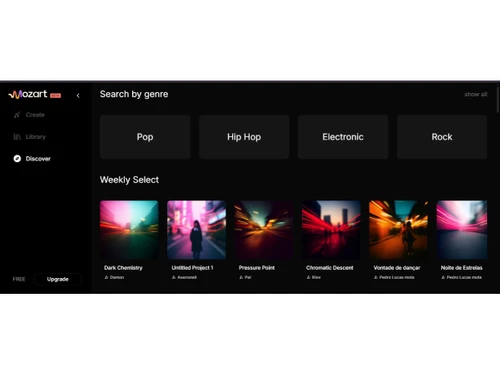
  • icon_check Dynamic Genre Selection
    Configure the musical output by selecting from various styles, emotions, and themes to match the project's specific tone.
  • icon_check Lyric to Song Generation
    Input textual lyrics to create original musical compositions with synthesized vocal elements synced to the written prompts.
  • icon_check Audio Remixing
    Modify existing audio files by expanding or editing track elements using intuitive AI-powered remixing and arrangement tools.
  • icon_check Batch Volume Generation
    Produce multiple musical variations or tracks simultaneously to streamline the creative process and increase content volume.
  • icon_check Stem Splitting
    Extract up to ten individual instrument and vocal stems from a single audio file for detailed mixing and post-production work.
  • icon_check Automated Melody Creation
    Generate original melodic sequences from simple user prompts to serve as the foundation for complex musical arrangements.
  • icon_check Video Generation
    Create synchronized music videos with AI-powered visuals that match the rhythm and mood of the generated audio compositions.
  • icon_check AI Voice Cloning
    Create digital voice models by uploading audio samples to generate personalized vocals for any original musical composition.
  • icon_check Image to Music Conversion
    Utilize visual data from uploaded photos to generate unique melodies and songs that reflect the aesthetic of the input image.
  • icon_check Midi Data Interoperability
    Import and export MIDI data to allow seamless collaboration between the AI platform and external digital audio workstations.
  • icon_check Synth Patch Generation
    Create custom synthesizer sounds and patches using AI to produce unique electronic textures for modern music production.
Mozart AI Demo Video play icon

Get Mozart AI Demo

Watch the demo video to explore key features, real workflows, and how the software fits your business needs.

Understand
Key Features
Personal
Demo Insights
Interactive
Demo Support

Mozart AI Specification

Supported Platforms
Ubuntu Ubuntu Windows Windows MacOS MacOS Linux Linux
Devices
Desktop Desktop
Deployment
Web-Based Web-Based
Suitable For
Media House
Business Specific
All Businesses
Business Size
Individual Small Business Startups SMBs MSMEs Freelancers
Customer Support
Email Communities
Language
English
Training Resources
Videos
AI Features
AI Integrated

Mozart AI Review

4.3

Out of 5

img

Overall Rating

Based on
4 Verified Ratings

Rating Breakdown

  • Features 4.3
  • Value for Money 4.6
  • Ease of Use 4
  • Customer Support 4.2

80% Recommend this Product

Add Review

Be the First to Review

This product has no reviews yet. Be the first to leave your feedback.

Add Review

How much does Mozart AI Software cost?

Mozart AI pricing starts from USD 6 on techjockey.com.

Is there a mobile app available for Mozart AI Software?

No, Mozart AI does not offer mobile apps for both Android and iOS users.

Which operating systems are compatible with Mozart AI Software?

Mozart AI is a web-based platform accessible on Ubuntu, Linux, Windows and MacOS.

Does Mozart AI Software offer a free trial?

Yes, Mozart AI offers free credits and trial access for users to explore its AI music creation features.

How does Mozart AI Software function?

Mozart AI works by using artificial intelligence to generate, edit, and enhance songs, vocals, beats, and music tracks from user inputs such as text prompts, lyrics, or audio.

Who uses Mozart AI Software?

Mozart AI is used by musicians, producers, content creators, songwriters, marketers, and music enthusiasts.

Is a free demo available for Mozart AI Software?

Yes, Mozart AI provides free access and sample features that allow users to experience the platform before upgrading.

Is Mozart AI Software available for free?

Yes, Mozart AI offers a free plan with limited usage, while advanced features require a paid subscription.

20,000+ Software Listed

Best Price Guranteed

Free Expert Consultation

2M+ Happy Customers

Terms and Condtions

close

Users with registered businesses can purchase goods from merchants on the platform to satisfy their business needs. Users are not permitted to utilize any products acquired through the platform for resale, advertising, business, or further distribution.

For each purchase made, users will receive a Tax Invoice (or 'GST invoice') that includes specific details such as:

  • the GSTIN of the user associated with their registered business, and

  • the specified Entity Name for their business.

It should be noted that not all products are eligible for GST Invoice. Only the products displayed by participating sellers with the 'GST-based Invoice Available' callout on the product description page would qualify.

Certain goods and services are not eligible to get a GST Invoice, including items with VAS, i.e., Value Added Services (e.g., Total Mobile Protection/Assured Buyback) and those involving an exchange offer at the time of purchase.

Users must ensure the accuracy of the GSTIN, and business entity name provided for the GST Invoice. Requests for corrections into GST Invoice would not be accommodated by Techjockey.com or any Seller, and any issues arising from user-provided information are the sole responsibility of users.

Techjockey.com is not liable for the GST Invoice or any associated input tax credit. To efficiently claim an input tax credit, users should select the registered place of business address as per the GST authority's data and follow the provisions of the GST Act and rules.

To claim an input tax credit, the delivery and billing addresses must match. Furthermore, input tax credits will not be granted if the delivery address and GSTIN on the invoice are from different states. In case of incorrect GST details provided during the order placement, the order will be canceled automatically.