linkedin
NextDNS logo
play This NextDNS Feature Gives Me Ultimate Control
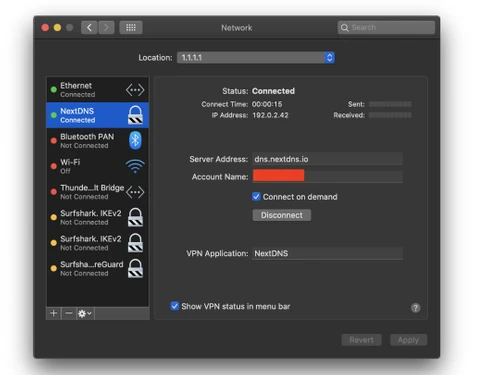
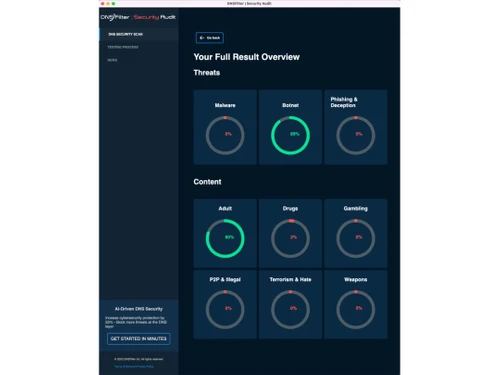
nextdns-result
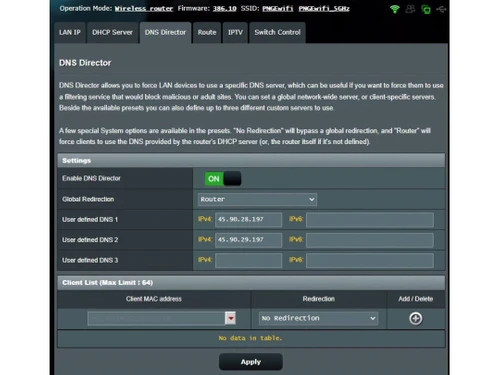
nextdns-director

NextDNS

Brand: NextDNS

  • 4.2

  • 5 Ratings

A privacy-focused VPN software that blocks ads, tracks activity, filters content, and keeps your internet safe across all devices.

See More

Have you used NextDNS before?

Share your insights for better experience

Add a Review
Starting Price
₹1590

View plans

100% Genuine
Products
Best Price
Guaranteed
Safe & Secure
Payment
  • Description

  • Pricing

  • Features

  • Specification

  • Review

  • Compare

  • Alternatives

  • FAQ

Starting at ₹1,590

NextDNS Software Overview

What is NextDNS?

NextDNS is one of network security solutions and VPN software that provides enhanced privacy and content-blocking capabilities with advanced DNS filtering. This VPN software enables the user to configure their security settings, like preventing harmful codes like malware, advertisements, and tracking sites.

Also, NextDNS allows real-time network activity monitoring to give a better degree of control. Being a VPN software, it offers encrypted and safe internet surfing, keeping the user information out of the threat.

NextDNS has a simple interface and provides individuals and businesses with personalized filtering features. It aims at enhancing general security, privacy of personal data, and browsing experience at all devices.

Why Choose NextDNS Software?

  • Customizable Filters: You can set filtering options according to the contents, advertisements, and domains that can meet individual or organizational requirements.
  • Real-time Monitoring: Real-time monitoring gives you visibility to the network, so you can watch and act upon possible security threats.
  • Advanced Parental Controls: It offers control over content by giving the parents a high degree of control over what their children can access online.
  • Detailed Analytics: Users are able to monitor all detailed information of their network usage including which websites are being visited and blocked.
  • Global Coverage: NextDns has servers all over the world to give you the fastest and best performance no matter where you are.
  • DNS-over-HTTPS (DoH) and DNS-over-TLS (DoT): It also alerts unauthorized intervention of DNS queries by using advanced encryptions like DNS-over-HTTPS and DNS-over-TLS.
  • Ease of Setup: It is easy to set up with ease of integration in numerous devices and systems without complicated configurations.

Key Features of NextDNS

  • Unlimited Configurations: Create different internet filter settings for each device or user in your account, based on personal or family needs.
  • Custom Denylist/Allowlist: Manually block or allow any website or domain to control what can or can't be accessed on your network.
  • Customizable Block Page: Show a personalized message or page whenever a blocked website is accessed, helpful for kids or employees.
  • Rewrites: Change how websites load by setting custom DNS responses for any domain, ideal for developers or testing environments.
  • DNSSEC: Ensures DNS data is genuine and safe by verifying that answers haven’t been tampered with or redirected.
  • Handshake: Uses a new, peer-to-peer naming system instead of traditional DNS to reduce reliance on centralized domain name providers.

NextDNS Pricing

NextDNS pricing starts at INR 1590 per year at Techjockey.com.

The pricing model is based on different parameters, including extra features, deployment type, and the total number of users. For further queries related to the product, you can contact our product team and learn more about the pricing and offers.

Read more

NextDNS Company Details

Founded Year:  2019

NextDNS protects you from all kinds of security threats, blocks ads and trackers on websites and in apps and provides a safe and supervised Internet for kids — on all devices and on all networks.

Director/Founders Romain Cointepas, Olivier Poitrey
Company Size 1-100 Employees

NextDNS Pricing & Plans

Pro
Starting at ₹1590
    • Licenses

      Licenses
      Licenses
    • Yearly

      Yearly
      Yearly

Key Features

  • Unlimited queries

  • Unlimited devices

  • Unlimited configurations

  • Access to all features

  • Community support

Business
Starting at ₹15900
    • Employees

      Employees
      Employees
    • Yearly

      Yearly
      Yearly

Key Features

  • Unlimited queries

  • Unlimited devices

  • Unlimited configurations

  • Access to all features

  • Email support

Education
Starting at ₹15900
    • Student

      Student
      Student
    • Yearly

      Yearly
      Yearly

Key Features

  • Unlimited queries

  • Unlimited devices

  • Unlimited configurations

  • Access to all features

  • Email support

NextDNS Features

Core Modules

  • icon_check DNS Leak Protection
    Stops DNS from leaking and protects browsing activity
  • icon_check IPv6 Leak Protection
    Secures IPv6 traffic to avoid tracking or leaks
  • icon_check Ad Blocker
    Blocks ads on websites for a cleaner and faster web
  • icon_check Automatic Kill Switch
    Disconnects internet if VPN fails, protecting data from exposure.
  • icon_check Port Forwarding
    Allows remote devices to connect through specific ports for better access.
  • icon_check Split Tunneling
    Lets users choose which apps use the VPN and which access the internet directly.
  • icon_check Multi-hop VPN
    Routes traffic through multiple servers for enhanced security and privacy.
  • icon_check Alternative Routing
    Offers different paths for data to enhance performance and reliability.
  • icon_check P2P Support
    Allows peer-to-peer file sharing safely and securely through the VPN.
  • icon_check Smart DNS
    Enables access to geo-restricted content without encrypting traffic.
  • icon_check Wi-Fi Protection
    Secures connections on public Wi-Fi networks to prevent data interception.
  • icon_check Cookie Blocker
    Prevents tracking cookies from collecting user data online.
  • icon_check Remote Access
    Allows users to connect to a private network from any location securely.

Privacy Protection

  • icon_check Multi-Factor Authentication (MFA)
    Adds extra login security beyond passwords
  • icon_check Static and Dynamic IP Addresses
    Choose fixed or changing IP for privacy
  • icon_check Privacy-Focused DNS Servers
    Uses DNS that doesn’t collect your data
  • icon_check No Log Policy
    Ensures no user activity is stored, enhancing online privacy.
  • icon_check IP Address Masking
    Hides real IP address, providing anonymity while browsing.
  • icon_check WebRTC Leak Protection
    Prevents WebRTC leaks that could expose user IP addresses.
  • icon_check Obfuscated Servers
    Masks VPN traffic to bypass censorship and restrictions.
  • icon_check Automatic Reconnection
    Re-establishes VPN connection automatically if dropped.
  • icon_check Deep & Dark Web Monitoring
    Scans hidden web layers for compromised data, and alerts users to potential security threats.

Encryption Protocols

  • icon_check OpenVPN
    A reliable and secure VPN protocol for most users
  • icon_check WireGuard
    Fast, modern VPN protocol with strong encryption
  • icon_check SSTP
    A secure tunneling protocol using SSL for encrypted VPN connections.
  • icon_check IKEv2/IPsec
    Fast and stable, ideal for mobile devices and quick reconnects.
  • icon_check L2TP/IPsec
    Combines L2TP and IPsec for better security than standalone L2TP.
  • icon_check PPTP
    Older protocol, fast but less secure; suitable for low-risk activities.

Performance & Monitoring

  • icon_check Connection Speed
    Ensures smooth and fast internet performance
  • icon_check Server Locations
    Pick global servers for better speed and access
  • icon_check Load Balancing
    Distributes user traffic evenly across servers to maintain performance.
  • icon_check Speed Throttling
    Controls internet speed for specific applications or users.
  • icon_check Unlimited Bandwidth
    No data caps, allowing unrestricted use for streaming and downloading.
  • icon_check Connection Stability
    Ensures consistent VPN connections without frequent drops.
  • icon_check Stealth Mode
    Masks VPN use to bypass deep packet inspection and censorship.

Usability Features

  • icon_check Multi-Device Support
    Allows simultaneous connections on multiple devices.
  • icon_check Platform Compatibility
    Supports Android, iOS, Windows, Mac, etc.
  • icon_check Browser Extension Availability
    Use features directly in your browser
  • icon_check User-Friendly Interface
    Simple and intuitive design for easy navigation and use.
  • icon_check Cross-Platform Synchronization
    Syncs user settings across devices for convenience.

Compliance Management

  • icon_check PCI DSS Compliance
    Adheres to security standards for handling payment data.
  • icon_check GDPR Compliant
    Ensures user data protection in accordance with EU regulations.
  • icon_check HIPAA Compliance
    Meets healthcare data protection regulations for sensitive information.
  • icon_check Security Audits
    Regularly assesses security measures and compliance adherence.

Advanced Firewall Features

  • icon_check Phishing Protection
    Blocks fake sites trying to steal passwords
  • icon_check Malware Blocker
    Prevents harmful files from reaching your device
  • icon_check DDoS protection
    Guards against distributed denial-of-service attacks on your connection.
  • icon_check Device Scanning
    Scans devices for vulnerabilities before establishing a connection.

Administrative Features

  • icon_check Reporting & Analytics
    Provides insights and analytics on user behavior and traffic patterns.
  • icon_check URL Filtering
    Block specific sites or groups of sites
  • icon_check Content Filtering
    Restrict adult or unsafe content for users
  • icon_check Session Management
    Allows administrators to monitor and manage active user sessions.
  • icon_check Traffic Management
    Controls and prioritizes traffic flow for optimal performance.
  • icon_check Global Content Access
    Enables users to bypass regional restrictions for global content.
  • icon_check Torrent Downloading
    Supports secure and private torrenting activities.
  • icon_check Policy Management
    Defines and enforces policies for user access and network usage.
  • icon_check User Access Management
    Controls user permissions and access to the VPN.
NextDNS Demo Video play icon

Get NextDNS Demo

Watch the demo video to explore key features, real workflows, and how the software fits your business needs.

Understand
Key Features
Personal
Demo Insights
Interactive
Demo Support

NextDNS Specifications

Supported Platforms
Ubuntu Ubuntu Windows Windows iOS iOS Android Android MacOS MacOS Linux Linux
Devices
Desktop Desktop Mobile Mobile Tablet Tablet iPad iPad
Deployment
Cloud-Based Cloud-Based Perpetual Perpetual
Suitable For
All Industries
Business Specific
All Businesses
Business Size
Individual Small Business Startups Medium Business Enterprises SMBs SMEs Freelancers
Customer Support
Email Communities Forums
Language
English
Integration
API Integration
Training Resources
Documentation Videos
AI Features
AI Integrated
Technology
Next Generation
Compliance Regulation
COPPA HIPAA CCPA

Explore the Best Alternative Solutions Similar to Your Business Size and Needs

NextDNS Review

4.2

Out of 5

img

Overall Rating

Based on
5 Verified Ratings

Rating Breakdown

  • Features 4.4
  • Value for Money 4.1
  • Ease of Use 4.7
  • Customer Support 3.9

88% Recommend this Product

Add Review

Techjockey Trusted Reviews from Verified Users

No reviews are currently available for NextDNS. Discover similar VPN Software reviews

  • NordVPN

    4.4

    Whats great - Cyber security is very important to me, and a good VPN is essential for that. I also hate ads and I hate having my online act... read more

  • hide.me

    4.5

    Whats great - Stable connections, user-friendly interface. read more

  • Mullvad VPN

    4.3

    Whats great - Straightforward service without gimmicks. read more

Compare NextDNS With other VPN Software

Products
Ratings
Pricing
Device Supported
Deployment
Supported Platforms
  • img

    NextDNS

  • 4.2

  • Price On Request

  • Desktop

    Mobile

  • Web based

    On Premises

  • Windows

    Mac OS

  • img

    Astrill VPN

  • 4.4

  • Price On Request

  • Desktop

    Mobile

  • Web based

    On Premises

  • Windows

    Mac OS

  • img

    NordVPN

  • 4.4

  • ₹ 4999

  • Desktop

    Mobile

  • Web based

    On Premises

  • Windows

    Mac OS

  • img

    TorGuard VPN

  • 4.8

  • Price On Request

  • Desktop

    Mobile

  • Web based

    On Premises

  • Windows

    Mac OS

  • img

    Proton VPN

  • 4.6

  • Price On Request

  • Desktop

    Mobile

  • Web based

    On Premises

  • Windows

    Mac OS

  • img

    Cyberghost

  • 4.4

  • ₹ 965

  • Desktop

    Mobile

  • Web based

    On Premises

  • Windows

    Mac OS

  • img

    Surfshark

  • 4.4

  • Price On Request

  • Desktop

    Mobile

  • Web based

    On Premises

  • Windows

    Mac OS

  • img

    Mullvad VPN

  • 4.3

  • Price On Request

  • Desktop

    Mobile

  • Web based

    On Premises

  • Windows

    Mac OS

(2) Product(s) selected

NextDNS Alternatives

See All NextDNS Alternatives

Starting Price:

$6 /month

Starting Price:

$7 /Month

Starting Price:

$10 /Month

Starting Price:

$15 /Month

Starting Price:

$12 /month

Starting Price:

$10 /Month

Articles for NextDNS

See All Related Articles

How much does NextDNS cost?

NextDNS pricing starts at INR 1590 per year at Techjockey.com.

How does NextDNS work?

NextDNS can filter your internet traffic, block ads, trackers, and dangerous websites and protect your privacy when browsing on all devices.

Who uses NextDNS?

NextDNS is a privacy-sensitive DNS that is adopted by privacy-conscious users, parents, tech geeks, and businesses to block unwanted content and control internet access.

Is NextDNS free?

Yes, there is a free plan with a restrictive number of monthly queries, which is practical when you are an occasional user or want to test the characteristics of the service.

Is AdGuard or NextDNS better?

They are both excellent, though NextDNS is better in network-based customization, whereas Adguard is more app-centric and includes additional features.

Are NextDNS safe?

Yes, NextDNS is secure and privacy-focused. It does not track your data and employs the secure and encrypted DNS servers.

Does NextDNS have an app?

NextDNS does not have its app yet, but it operates through system settings, profiles, or browser extensions on the majority of devices.

Can I use NextDNS with VPN?

Yes, you can install NextDNS with VPN to add more privacy protection, but it can work differently according to the device and VPN.

20,000+ Software Listed

Best Price Guranteed

Free Expert Consultation

2M+ Happy Customers

Terms and Condtions

close

Users with registered businesses can purchase goods from merchants on the platform to satisfy their business needs. Users are not permitted to utilize any products acquired through the platform for resale, advertising, business, or further distribution.

For each purchase made, users will receive a Tax Invoice (or 'GST invoice') that includes specific details such as:

  • the GSTIN of the user associated with their registered business, and

  • the specified Entity Name for their business.

It should be noted that not all products are eligible for GST Invoice. Only the products displayed by participating sellers with the 'GST-based Invoice Available' callout on the product description page would qualify.

Certain goods and services are not eligible to get a GST Invoice, including items with VAS, i.e., Value Added Services (e.g., Total Mobile Protection/Assured Buyback) and those involving an exchange offer at the time of purchase.

Users must ensure the accuracy of the GSTIN, and business entity name provided for the GST Invoice. Requests for corrections into GST Invoice would not be accommodated by Techjockey.com or any Seller, and any issues arising from user-provided information are the sole responsibility of users.

Techjockey.com is not liable for the GST Invoice or any associated input tax credit. To efficiently claim an input tax credit, users should select the registered place of business address as per the GST authority's data and follow the provisions of the GST Act and rules.

To claim an input tax credit, the delivery and billing addresses must match. Furthermore, input tax credits will not be granted if the delivery address and GSTIN on the invoice are from different states. In case of incorrect GST details provided during the order placement, the order will be canceled automatically.