linkedin
NitroPack logo
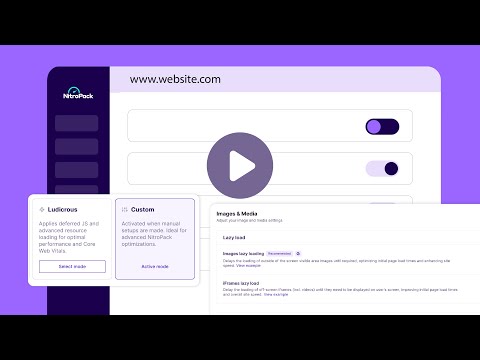
play What's New in NitroPack's Settings
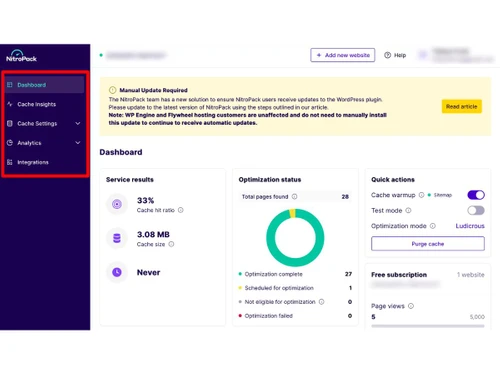
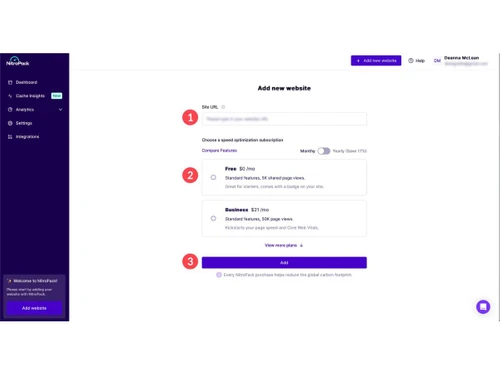
nitropack-dashboard
nitropack-videos

NitroPack

Brand: NitroPack

  • 3.9

  • 3 Ratings

A website development tool that automates website speed optimization to improve performance and user experience.

See More

Have you used NitroPack before?

Share your insights for better experience

Add a Review
Starting Price
$8

View plans

100% Genuine
Products
Best Price
Guaranteed
Safe & Secure
Payment
  • Description

  • Pricing

  • Features

  • Specification

  • Review

  • FAQ

Starting at $8

NitroPack Software Overview

What is NitroPack?

NitroPack is a specialized website development tools platform designed to solve the problem of slow websites. It is a powerful business software that takes the complex, technical task of web optimization and makes it simple and automatic.

Instead of requiring developers to manually adjust code, compress images, or set up caching, NitroPack handles over 60 different optimization techniques in its own cloud. The platform is built as a true 'set-and-forget' solution for WordPress sites, WooCommerce stores, and custom-built websites.

You connect your site, choose an optimization level, and NitroPack goes to work 24/7. It focuses heavily on improving Google's Core Web Vitals, which are key metrics for both user experience and search engine rankings.

As a dedicated business software, it helps businesses reduce bounce rates, improve conversion rates, and provide a better overall experience for every visitor, all while maintaining strong security certifications.

Why Choose NitroPack?

  • All-in-One Cloud Optimization: Combines caching, image compression, code minification, and a CDN in one service that runs off your server.
  • Plug-and-Play Simplicity: Get started in minutes with no coding required; just install a connector and select your optimization mode.
  • Core Web Vitals Focus: Engineered specifically to improve key Google ranking metrics like LCP, INP, and CLS for better SEO.
  • Built-In Global Content Delivery Network (CDN): Uses a massive network of servers to deliver your site's files from locations nearest to your visitors.
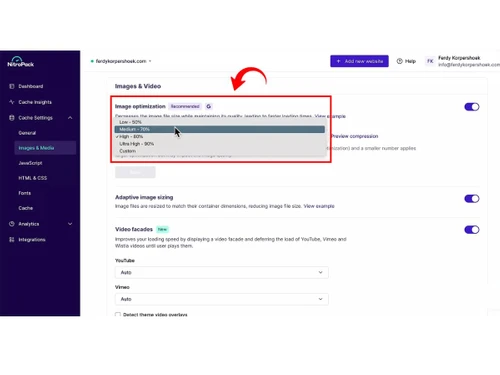
  • Advanced Image Optimization: Automatically converts images to modern WebP format, resizes them, and delays loading off-screen images.

Benefits of NitroPack

  • Significantly Increases Website Loading Speed: Can transform a slow site into a fast one, often improving PageSpeed scores by a large margin.
  • Improves User Experience and Engagement: Faster pages lead to lower bounce rates, longer visit times, and happier customers.
  • Boosts Search Engine Optimization (SEO): Better Core Web Vitals scores can positively impact your Google search rankings.
  • Reduces Reliance on Multiple Plugins: Replaces several separate optimization plugins with one unified, more efficient service.
  • Saves Development Time and Effort: Eliminates the need for manual, technical tweaks and constant performance monitoring.

NitroPack Pricing

NitroPack price starts at USD 8 at techjockey.com. The pricing model is based on different parameters, including extra features, deployment type, and the total number of users. For further queries related to the product, you can contact our product team and learn more about the pricing and offers.

Read more

NitroPack Company Details

Founded Year:  2018

NitroPack helps ecommerce, content publishers and web agencies achieve outstanding website speed optimization results

Director/Founders Deyan Georgiev, Georgi Petrov, Ivailo Hristov, Mihail Stoychev, Simeon Totev
Company Size 1-100 Employees

NitroPack Pricing & Plans

Starter
Starting at $8
    • Licenses

      Licenses
      Licenses
    • Monthly

      Monthly
      Monthly

Key Features

  • 1 website

  • 8,000/mo pageviews

  • 5GB/mo CDN bandwidth

  • 1 team member

  • All Optimization Modes

  • Image Optimization

  • Critical CSS

  • Minify Resources

  • Advanced Cache Warmup

Plus
Starting at $18
    • Licenses

      Licenses
      Licenses
    • Monthly

      Monthly
      Monthly

Key Features

  • 1 website

  • 40,000/mo pageviews

  • 25GB/mo CDN bandwidth

  • 3 team members

  • All Optimization Modes

  • Image Optimization

  • Critical CSS

  • Minify Resources

  • Advanced Cache Warmup

Pro
Starting at $80
    • Licenses

      Licenses
      Licenses
    • Monthly

      Monthly
      Monthly

Key Features

  • 3 websites

  • 540,000/mo pageviews

  • 270GB/mo CDN bandwidth

  • 10 team members

  • All Optimization Modes

  • Image Optimization

  • Critical CSS

  • Minify Resources

  • Advanced Cache Warmup

NitroPack Features

  • icon_check Resource Preloading
    Preloads key resources to optimize rendering and reduce perceived load time.
  • icon_check Image Compression
    Applies lossy or lossless compression to reduce image file size.
  • icon_check CSS and JS Combining
    Merges multiple CSS/JS files into single files to reduce HTTP requests.
  • icon_check Font Optimization
    Optimizes font loading to prevent layout shifts and improve load performance.
  • icon_check E-commerce Compatibility
    Ensures dynamic pages like checkout and cart remain functional while optimizing static pages.
  • icon_check Page Caching
    Stores static copies of pages to reduce server load and deliver faster page load to visitors.
  • icon_check Cache Invalidation
    Automatically clears cached pages when content or resources are updated.
  • icon_check Cookie aware Caching
    Generates cache variations depending on user-specific cookies.
  • icon_check Session aware Caching
    Adjusts cached content based on user session information.
  • icon_check Global CDN Delivery
    Distributes cached resources across multiple edge servers for reduced latency.
  • icon_check HTML Minification
    Reduces HTML file size by removing unnecessary spaces and comments.
  • icon_check Critical CSS Generation
    Extracts essential CSS for above-the-fold content to render pages faster.
  • icon_check Deferred JavaScript Loading
    Delays non-critical JS execution until after main content is loaded.
NitroPack Demo Video play icon

Get NitroPack Demo

Watch the demo video to explore key features, real workflows, and how the software fits your business needs.

Understand
Key Features
Personal
Demo Insights
Interactive
Demo Support

NitroPack Specifications

Supported Platforms
Ubuntu Ubuntu Windows Windows MacOS MacOS Linux Linux
Devices
Desktop Desktop
Deployment
Cloud-Based Cloud-Based
Suitable For
All Industries
Business Specific
All Businesses
Business Size
Individual Small Business Startups Medium Business Enterprises SMBs SMEs MSMBs MSMEs
Customer Support
Email Communities
Language
English
Integration
API Integration
Training Resources
Videos

NitroPack Review

3.9

Out of 5

img

Overall Rating

Based on
3 Verified Ratings

Rating Breakdown

  • Features 3.8
  • Value for Money 3.8
  • Ease of Use 4.5
  • Customer Support 3.5

80% Recommend this Product

Add Review

Techjockey Trusted Reviews from Verified Users

No reviews are currently available for NitroPack. Discover similar Website Development Tools reviews

  • Django

    4.4

    Whats great - Django offers extensive and well-structured documentation, making it easier to understand and implement various features. read more
  • Bookitt

    4.5

    Whats great - It has all highlights which are required for bookmarking locales and grouped destinations. Its adjustable, hearty and adaptab... read more

  • Thumbpin

    4.5

    Whats great - 9002224155/// read more

Articles for NitroPack

See All Related Articles

How much does NitroPack cost?

NitroPack price starts at USD 8 at Techjockey.com. Contact experts for current offers and packages based on your website's monthly traffic.

How does NitroPack work?

You connect your website to the NitroPack cloud service. It then fetches your web pages, applies dozens of optimizations on its servers, and serves the super-fast version to your visitors through its global CDN.

Who uses NitroPack?

It is used by website owners, online store managers, digital marketers, and developers who want to make their WordPress, WooCommerce, or custom websites load faster with minimal effort.

Will it work with my WordPress site?

Yes, NitroPack is particularly popular and easy to use with WordPress and WooCommerce sites, offering dedicated plugins for simple integration.

Does it require technical skills to set up?

No, it is designed to be a no-code solution. Most users can get it running in just a few minutes with its guided setup.

Can it help my site rank better on Google?

Yes, by improving Core Web Vitals, which are official Google ranking factors, it can contribute to better SEO performance.

20,000+ Software Listed

Best Price Guranteed

Free Expert Consultation

2M+ Happy Customers

Terms and Condtions

close

Users with registered businesses can purchase goods from merchants on the platform to satisfy their business needs. Users are not permitted to utilize any products acquired through the platform for resale, advertising, business, or further distribution.

For each purchase made, users will receive a Tax Invoice (or 'GST invoice') that includes specific details such as:

  • the GSTIN of the user associated with their registered business, and

  • the specified Entity Name for their business.

It should be noted that not all products are eligible for GST Invoice. Only the products displayed by participating sellers with the 'GST-based Invoice Available' callout on the product description page would qualify.

Certain goods and services are not eligible to get a GST Invoice, including items with VAS, i.e., Value Added Services (e.g., Total Mobile Protection/Assured Buyback) and those involving an exchange offer at the time of purchase.

Users must ensure the accuracy of the GSTIN, and business entity name provided for the GST Invoice. Requests for corrections into GST Invoice would not be accommodated by Techjockey.com or any Seller, and any issues arising from user-provided information are the sole responsibility of users.

Techjockey.com is not liable for the GST Invoice or any associated input tax credit. To efficiently claim an input tax credit, users should select the registered place of business address as per the GST authority's data and follow the provisions of the GST Act and rules.

To claim an input tax credit, the delivery and billing addresses must match. Furthermore, input tax credits will not be granted if the delivery address and GSTIN on the invoice are from different states. In case of incorrect GST details provided during the order placement, the order will be canceled automatically.