linkedin
SetupVPN logo
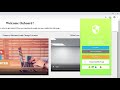
play SetupVPN - Residential Servers Explained
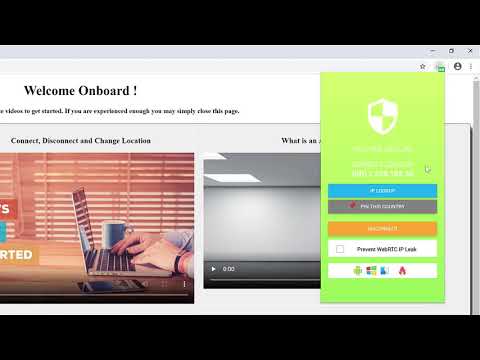
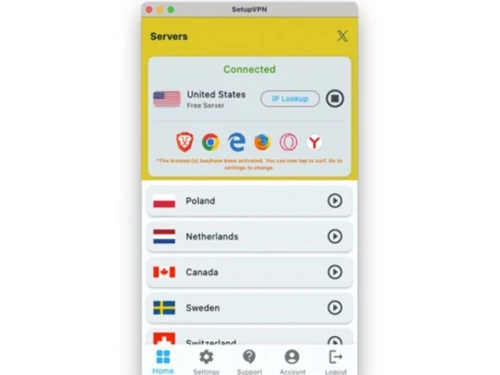
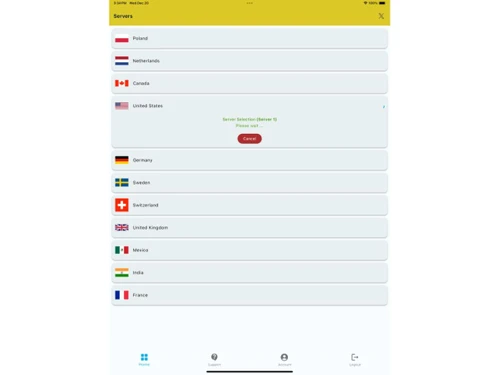
setupvpn-servers
setupvpn-countries

SetupVPN

Brand: SetupVPN

  • 4.3

  • 4 Ratings

An easy-to-use VPN software that offers encrypted browsing, global servers, and both free and premium plans for accessing the internet securely and privately.

See More

Have you used SetupVPN before?

Share your insights for better experience

Add a Review

Price Available on Request

Questions about pricing or customization? We’re here to help, just a click away.

100% Genuine
Products
Best Price
Guaranteed
Safe & Secure
Payment
  • Description

  • Pricing

  • Features

  • Specification

  • Review

  • FAQ

SetupVPNSoftware Overview

What is SetupVPN?

SetupVPN is a VPN software that helps you browse the internet securely and privately, and it offers a free plan that works through browser extensions and mobile apps.

It uses strong encryption to protect your data, especially when using public Wi-Fi, and provides access to over 100 global servers so you can change your virtual location and unlock blocked content. The setup is very easy just install, create an account, and connect.

Why Choose SetupVPN Software?

  • Free Usage Option: You can start using the VPN without paying anything.
  • Easy Installation: Works quickly through simple browser extensions and apps.
  • Strong Encryption: Helps protect your online data and privacy.
  • Global Server Network: Lets you choose from many servers across different countries.
  • One-Click Connection: No complex setup or technical skills required.
  • Works on Multiple Platforms: Available on browsers and mobile devices.
  • Secure Public Wi-Fi: Protects you when using open or shared networks.
  • Bypass Restrictions: Helps unlock blocked or geo-restricted content.
  • Unlimited Server Switching: Change servers anytime based on speed or location needs.
  • Free + Premium Options: Choose according to your usage level.
  • No Speed or Data Limit in Premium: Paid version offers fully unrestricted access.

Benefits of SetupVPN Software

  • Static IP Availability: Useful for accounts, remote work, and secure logins.
  • Beginner-Friendly Interface: Designed for non-technical users.
  • Good for Streaming Access: Helps access websites and apps not available in your country.
  • Security Against Online Threats: Reduces risks like tracking and spying.
  • No Hardware Stress: Runs as an extension or app without heavy system load.
  • Suitable for Travelers: Easily access home-country content while abroad.
  • Helps Maintain Online Anonymity: Hides your real IP address.
  • Useful for Students & Employees: Works even on restricted Wi-Fi networks.
  • Scalable for Casual & Heavy Use: Works well whether you browse lightly or stream frequently.

SetupVPN Pricing

SetupVPN price is available upon request at Techjockey.com. The pricing model is based on different parameters, including extra features, deployment type, and the total number of users. For further queries related to the product, you can contact our product team and learn more about the pricing and offers.

Read more

SetupVPN Pricing & Plans

Looking for The Right Pricing?

Share your requirements and get a plan built around your business.

  • Define your business needs
  • Get customised pricing
  • Choose features that fit your workflow

Price Available on Request

Get personalised SetupVPN pricing that fits your needs. Our team will connect with you.

SetupVPN Features

Core Modules

  • icon_check Remote Access
    Lets you connect securely to the internet from any location.
  • icon_check DNS Leak Protection
    Prevents DNS queries from revealing your real identity
  • icon_check IPv6 Leak Protection
    Stops IP leaks that can occur through IPv6 traffic.
  • icon_check Wi-Fi Protection
    Secures your data on public or shared Wi-Fi networks.
  • icon_check Automatic Kill Switch
    Disconnects internet if VPN fails, protecting data from exposure.
  • icon_check Port Forwarding
    Allows remote devices to connect through specific ports for better access.
  • icon_check Split Tunneling
    Lets users choose which apps use the VPN and which access the internet directly.
  • icon_check Multi-hop VPN
    Routes traffic through multiple servers for enhanced security and privacy.
  • icon_check Alternative Routing
    Offers different paths for data to enhance performance and reliability.
  • icon_check P2P Support
    Allows peer-to-peer file sharing safely and securely through the VPN.
  • icon_check Smart DNS
    Enables access to geo-restricted content without encrypting traffic.
  • icon_check Ad Blocker
    Blocks ads and trackers, improving browsing experience and speed.
  • icon_check Cookie Blocker
    Prevents tracking cookies from collecting user data online.

Privacy Protection

  • icon_check No Log Policy
    Claims not to track or store your online activities.
  • icon_check IP Address Masking
    Hides your real IP and shows a virtual one
  • icon_check WebRTC Leak Protection
    Blocks browser leaks that can expose your identity.
  • icon_check Automatic Reconnection
    Reconnects automatically if the VPN disconnects
  • icon_check Static and Dynamic IP Addresses
    Offers fixed or rotating IPs for varying privacy needs.
  • icon_check Obfuscated Servers
    Masks VPN traffic to bypass censorship and restrictions.
  • icon_check Multi-Factor Authentication (MFA)
    Adds an extra layer of security during user login.
  • icon_check Privacy-Focused DNS Servers
    Uses DNS servers that do not track user activity.
  • icon_check Deep & Dark Web Monitoring
    Scans hidden web layers for compromised data, and alerts users to potential security threats.

Encryption Protocols

  • icon_check OpenVPN
    Uses a trusted and secure VPN protocol for encrypted communication.
  • icon_check SSTP
    A secure tunneling protocol using SSL for encrypted VPN connections.
  • icon_check IKEv2/IPsec
    Fast and stable, ideal for mobile devices and quick reconnects.
  • icon_check L2TP/IPsec
    Combines L2TP and IPsec for better security than standalone L2TP.
  • icon_check PPTP
    Older protocol, fast but less secure; suitable for low-risk activities.
  • icon_check WireGuard
    Newer, efficient protocol offering strong security with minimal overhead.

Performance & Monitoring

  • icon_check Connection Speed
    Aims to offer stable browsing and streaming performance.
  • icon_check Unlimited Bandwidth
    No data usage restrictions while connected.
  • icon_check Server Locations
    Lets you choose from multiple countries and regions.
  • icon_check Connection Stability
    Works to maintain a consistent VPN link.
  • icon_check Load Balancing
    Distributes user traffic evenly across servers to maintain performance.
  • icon_check Speed Throttling
    Controls internet speed for specific applications or users.
  • icon_check Stealth Mode
    Masks VPN use to bypass deep packet inspection and censorship.

Usability Features

  • icon_check User-Friendly Interface
    Easy to use even for beginners
  • icon_check Multi-Device Support
    Can be used on different devices you own.
  • icon_check Platform Compatibility
    Works across browsers and mobile platforms
  • icon_check Browser Extension Availability
    Offers quick access via browser add-ons.
  • icon_check Cross-Platform Synchronization
    Syncs user settings across devices for convenience.

Compliance Management

  • icon_check PCI DSS Compliance
    Adheres to security standards for handling payment data.
  • icon_check GDPR Compliant
    Ensures user data protection in accordance with EU regulations.
  • icon_check HIPAA Compliance
    Meets healthcare data protection regulations for sensitive information.
  • icon_check Security Audits
    Regularly assesses security measures and compliance adherence.

Advanced Firewall Features

  • icon_check DDoS protection
    Guards against distributed denial-of-service attacks on your connection.
  • icon_check Malware Blocker
    Protects users by blocking access to known malicious websites.
  • icon_check Device Scanning
    Scans devices for vulnerabilities before establishing a connection.
  • icon_check Phishing Protection
    Identifies and blocks phishing attempts to protect user data.

Administrative Features

  • icon_check Global Content Access
    Helps unlock region-restricted websites and apps.
  • icon_check Session Management
    Allows administrators to monitor and manage active user sessions.
  • icon_check Traffic Management
    Controls and prioritizes traffic flow for optimal performance.
  • icon_check URL Filtering
    Blocks access to specific URLs based on set criteria.
  • icon_check Content Filtering
    Restricts access to certain types of content based on policies.
  • icon_check Torrent Downloading
    Supports secure and private torrenting activities.
  • icon_check Policy Management
    Defines and enforces policies for user access and network usage.
  • icon_check User Access Management
    Controls user permissions and access to the VPN.
  • icon_check Reporting & Analytics
    Provides insights and analytics on user behavior and traffic patterns.
SetupVPN Demo Video play icon

Get SetupVPN Demo

Watch the demo video to explore key features, real workflows, and how the software fits your business needs.

Understand
Key Features
Personal
Demo Insights
Interactive
Demo Support

SetupVPN Specification

Supported Platforms
Windows Windows iOS iOS Android Android MacOS MacOS
Devices
Desktop Desktop Mobile Mobile Tablet Tablet iPad iPad
Deployment
Web-Based Web-Based Perpetual Perpetual
Suitable For
All Industries
Business Specific
All Businesses
Customer Support
Email
Language
English

SetupVPN Review

4.3

Out of 5

img

Overall Rating

Based on
4 Verified Ratings

Rating Breakdown

  • Features 4.5
  • Value for Money 4.3
  • Ease of Use 4.2
  • Customer Support 4.2

80% Recommend this Product

Add Review

Techjockey Trusted Reviews from Verified Users

No reviews are currently available for SetupVPN. Discover similar VPN Software reviews

  • NordVPN

    4.4

    Whats great - Cyber security is very important to me, and a good VPN is essential for that. I also hate ads and I hate having my online act... read more

  • hide.me

    4.5

    Whats great - Stable connections, user-friendly interface. read more

  • Mullvad VPN

    4.3

    Whats great - Straightforward service without gimmicks. read more

Articles for SetupVPN

See All Related Articles

How much does SetupVPN Software cost?

SetupVPN price is available upon request at techjockey.com.

Is there a mobile app available for SetupVPN Software?

Yes, SetupVPN offers an iOS and Android mobile app.

Which operating systems are compatible with SetupVPN Software?

SetupVPN supports Windows, MacOS, iOS and Android.

Does SetupVPN Software offer a free trial?

Yes, SetupVPN offers a free trial.

How does SetupVPN Software function?

You install the app or browser extension, register anonymously, and connect with a single click to its secure servers.

Who uses SetupVPN Software?

Anyone looking for a simple, free (or low-cost) VPN to protect privacy, access restricted content, or secure public Wi-Fi.

Is a free demo available for SetupVPN Software?

Yes, SetupVPN free demo is available.

Is SetupVPN Software available for free?

No, SetupVPN is not available for free.

20,000+ Software Listed

Best Price Guranteed

Free Expert Consultation

2M+ Happy Customers

Terms and Condtions

close

Users with registered businesses can purchase goods from merchants on the platform to satisfy their business needs. Users are not permitted to utilize any products acquired through the platform for resale, advertising, business, or further distribution.

For each purchase made, users will receive a Tax Invoice (or 'GST invoice') that includes specific details such as:

  • the GSTIN of the user associated with their registered business, and

  • the specified Entity Name for their business.

It should be noted that not all products are eligible for GST Invoice. Only the products displayed by participating sellers with the 'GST-based Invoice Available' callout on the product description page would qualify.

Certain goods and services are not eligible to get a GST Invoice, including items with VAS, i.e., Value Added Services (e.g., Total Mobile Protection/Assured Buyback) and those involving an exchange offer at the time of purchase.

Users must ensure the accuracy of the GSTIN, and business entity name provided for the GST Invoice. Requests for corrections into GST Invoice would not be accommodated by Techjockey.com or any Seller, and any issues arising from user-provided information are the sole responsibility of users.

Techjockey.com is not liable for the GST Invoice or any associated input tax credit. To efficiently claim an input tax credit, users should select the registered place of business address as per the GST authority's data and follow the provisions of the GST Act and rules.

To claim an input tax credit, the delivery and billing addresses must match. Furthermore, input tax credits will not be granted if the delivery address and GSTIN on the invoice are from different states. In case of incorrect GST details provided during the order placement, the order will be canceled automatically.