linkedin
Tricentis qTest logo
play Tricentis qTest: The Defects Tab
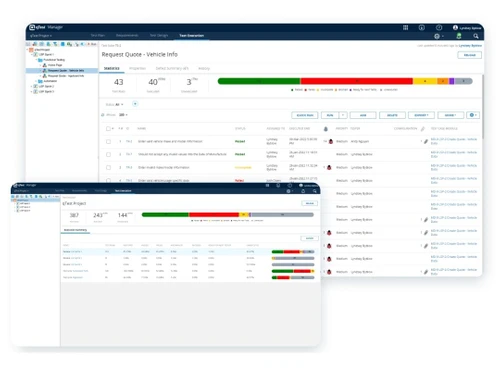
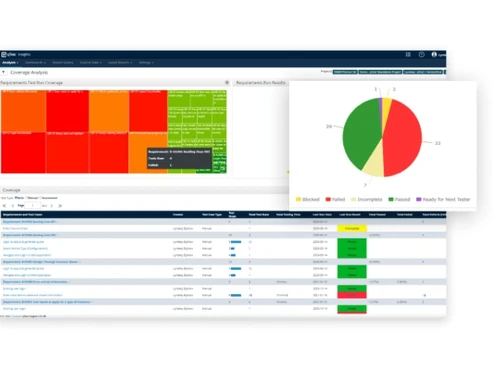
Tricentis qTest Dashboard
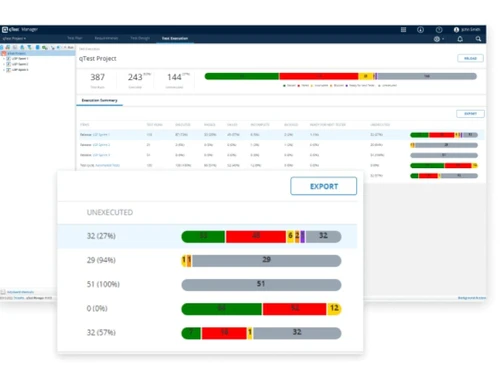
Tricentis qTest Automation

Tricentis qTest

Brand: Tricentis

  • 4.2

  • 3 Ratings

Tricentis qTest is a test management tool used for project management, bug tracking, and test management.

See More

Have you used Tricentis qTest before?

Share your insights for better experience

Add a Review

Price Available on Request

Questions about pricing or customization? We’re here to help, just a click away.

100% Genuine
Products
Best Price
Guaranteed
Safe & Secure
Payment
  • Description

  • Pricing

  • Features

  • Specification

  • Review

  • Compare

  • Alternatives

  • FAQ

Tricentis qTest Software Overview

What is Tricentis qTest?

Tricentis qTest is a test management solution that integrates with various planning, testing, and DevOps tools, including Jira, Selenium, and Jenkins. This integration provides teams with a unified view of testing activities throughout the entire software development cycle, supporting Agile, waterfall, or hybrid methodologies.

Specifically designed for DevOps teams, the test automation tool is an agile dev testing platform that facilitates in-sprint test management. The cloud-based suite of tools supports collaboration on open-source testing, exploratory testing, and behavior-driven development (BDD), offering real-time visibility into test statuses and results. It seamlessly integrates with Jira software to streamline releases, issues, and defects effortlessly.

Why Choose Tricentis qTest Software?

  • The testing automation tool allows you to manage all test cases in a central location and organize them with folders, tags, and custom fields.
  • It facilitates powerful test result recording to track and report milestones, test cycles, and feature releases.
  • The platform provides a unique repository view to work efficiently with folders, tests, and results side-by-side.
  • It enables direct navigation between folders and tests to add results and link issues without leaving the page.
  • The test case management system includes power user features such as shortcuts, bulk editing, inline notes, and screenshots.

Benefits of Tricentis qTest Platform

  • The testing automation software offers built-in support for exploratory testing and test automation management.
  • It facilitates rich note-taking during test sessions, including accurate time tracking, screenshots, test results, and comments.
  • The platform lets users track and manage ad-hoc sessions and session-based test management for projects of all sizes.
  • It automatically groups automated tests into sources for easy tracing and tracking of all project automation suites.
  • The test case management system allows users to identify the most failed, slow, and flaky tests.

Pricing of Tricentis qTest Testing Automation Software

Tricentis qTest price details are available on request at techjockey.com.

Tricentis qTest price in India may vary based on factors like customization, additional features required, number of users, and the deployment type. Please request a call back for subscription-related details and to avail offers on premium packages.

Read more

Tricentis Company Details

Founded Year:  2007

Tricentis offers enterprise software testing solutions that enable enterprises to achieve high automation rates while minimizing risks.

Director/Founders Franz Fuchsberger, Wolfgang Platz
Company Size 1-100 Employees

Tricentis qTest Pricing & Plans

Looking for The Right Pricing?

Share your requirements and get a plan built around your business.

  • Define your business needs
  • Get customised pricing
  • Choose features that fit your workflow

Price Available on Request

Get personalised Tricentis qTest pricing that fits your needs. Our team will connect with you.

Tricentis qTest Features

  • icon_check Audit Trail
    Maintain traceable records of testing activities, approvals, changes, and decisions to support governance, accountability,
  • icon_check Test Management Tools
    Plan, create, track, and execute all your tests, including manual, automated, or exploratory.
  • icon_check Role-Based Access Control (RBAC)
    Control user access to testing information and workflows through role-based permissions, supporting governance and consistent
  • icon_check Automated testing
    Design, schedule, and run automated tests across various frameworks and platforms.
  • icon_check Natural Language Testing
    Use natural-language interactions through AI-based chat to create test cases, manage test assets, and address coverage gaps
  • icon_check Performance Management
    Monitor application performance during testing and identify bottlenecks.
  • icon_check CI/CD Integration
    Connect testing activities with CI/CD pipelines to automate test execution and integrate quality validation into modern software
  • icon_check Custom Dashboards
    Build customizable dashboards using quality and testing metrics to provide teams and stakeholders with relevant visibility into
  • icon_check Workflow Management
    Define and automate testing workflows for improved efficiency and collaboration.
  • icon_check Requirements Management
    Connect requirements with test cases and execution results to help teams understand coverage, identify gaps, and validate
  • icon_check Centralized Test
    Manage all your testing assets (requirements, test cases, defects) in a central repository.
  • icon_check Defect Management
    Track defects alongside test execution and coverage information to understand failures, monitor resolution progress, and support
  • icon_check Performance Metrics
    Track key performance indicators (KPIs) like response times and resource utilization.
  • icon_check Uptime Reporting
    Monitor application uptime and generate reports for stakeholders.
  • icon_check Integrations
    Connect with existing tools like CI/CD platforms and defective management systems.
Tricentis qTest Demo Video play icon

Get Tricentis qTest Demo

Watch the demo video to explore key features, real workflows, and how the software fits your business needs.

Understand
Key Features
Personal
Demo Insights
Interactive
Demo Support

Tricentis qTest Specifications

Supported Platforms
Ubuntu Ubuntu Windows Windows MacOS MacOS Linux Linux
Devices
Desktop Desktop
Deployment
Cloud-Based Cloud-Based
Suitable For
All Industries
Business Specific
All Businesses
Business Size
Small Business Medium Business Enterprises
Customer Support
Email Communities
Language
English
Training Resources
Videos

Explore the Best Alternative Solutions Similar to Your Business Size and Needs

Medium Business

Built for business growth and flexibility

testRigor

4.4

Cypress

4.6

ZeuZ

4.4

See More

Tricentis qTest Review

4.2

Out of 5

img

Overall Rating

Based on
3 Verified Ratings

Rating Breakdown

  • Features 4.5
  • Value for Money 3.5
  • Ease of Use 4.1
  • Customer Support 4.8

86% Recommend this Product

Add Review

Techjockey Trusted Reviews from Verified Users

No reviews are currently available for Tricentis qTest. Discover similar Testing Automation Software reviews

  • AlgoQA

    5.0

    Whats great - AlgoQA offers AI-assisted test generation, auto-healing, test design, and support for different automation technologies. Thes... read more

  • Ranorex Studio

    4.8

    Whats great - I needed to automate a piece of software that was written in five distinct programming languages as a test automation special... read more

  • SafeHats Bug Bounty

    4.6

    Whats great - I have been using Safehats Bug bounty from the past 2 + years. My experience is splendid. The most important feature is to co... read more

Compare Tricentis qTest With other Testing Automation Software

Products
Ratings
Pricing
Device Supported
Deployment
Supported Platforms
  • img

    Tricentis qTest

  • 4.2

  • Price On Request

  • Desktop

    Mobile

  • Web based

    On Premises

  • Windows

    Mac OS

  • img

    Tricentis Tosca

  • 4.2

  • Price On Request

  • Desktop

    Mobile

  • Web based

    On Premises

  • Windows

    Mac OS

  • img

    TestProject

  • 4.7

  • Price On Request

  • Desktop

    Mobile

  • Web based

    On Premises

  • Windows

    Mac OS

  • img

    SpecFlow

  • 4.4

  • Price On Request

  • Desktop

    Mobile

  • Web based

    On Premises

  • Windows

    Mac OS

  • img

    AlgoQA

  • 4.9

  • Price On Request

  • Desktop

    Mobile

  • Web based

    On Premises

  • Windows

    Mac OS

  • img

    testRigor

  • 4.4

  • Price On Request

  • Desktop

    Mobile

  • Web based

    On Premises

  • Windows

    Mac OS

  • img

    Applitools

  • 4.3

  • Price On Request

  • Desktop

    Mobile

  • Web based

    On Premises

  • Windows

    Mac OS

  • img

    Playwright

  • 4.5

  • Price On Request

  • Desktop

    Mobile

  • Web based

    On Premises

  • Windows

    Mac OS

  • img

    Vectorcast

  • 4.2

  • Price On Request

  • Desktop

    Mobile

  • Web based

    On Premises

  • Windows

    Mac OS

  • img

    Autify

  • 4.5

  • Price On Request

  • Desktop

    Mobile

  • Web based

    On Premises

  • Windows

    Mac OS

  • img

    Qase

  • 4.4

  • Price On Request

  • Desktop

    Mobile

  • Web based

    On Premises

  • Windows

    Mac OS

(0) Product(s) selected

Tricentis qTest Alternatives

See All Tricentis qTest Alternatives

Available

Price on Request

Starting Price:

$199 /Month

Starting Price:

$20 /Month

Starting Price:

$20 /Month

Starting Price:

$745 /Month

Mabl

4.4

Available

Price on Request

Available

Price on Request

Starting Price:

$30 /Dev /Month
Articles for Tricentis qTest

See All Related Articles

Which operating system does Tricentis qTest support?

Tricentis qTest is compatible with Ubuntu, Windows, macOS, and Linux operating systems.

Is there any Tricentis qTest app?

Tricentis qTest is unavailable for Android and iOS app users.

What is the deployment type of Tricentis qTest?

Tricentis qTest supports cloud-based deployment.

How much does Tricentis qTest cost?

Tricentis qTest pricing is unavailable on request at techjockey.com.

Who are the potential users of Tricentis qTest?

Tricentis qTest can help users to improve their software testing process.

Is there any free trial or demo for Tricentis qTest?

Tricentis qTest free demo is available at techjockey.com.

Is Tricentis qTest free?

Tricentis qTest offers a free trial. However, the premium plan with advanced features and exciting deals is available at techjockey.com.

How can you download Tricentis qTest?

Tricentis qTest installation is not required, as it is cloud-based. Just open the Setup Wizard to get started.

How does Tricentis qTest work?

Tricentis qTest is a unified test management platform that helps organizations manage all aspects of their software testing process, from manual testing to test automation.

20,000+ Software Listed

Best Price Guranteed

Free Expert Consultation

2M+ Happy Customers

Terms and Condtions

close

Users with registered businesses can purchase goods from merchants on the platform to satisfy their business needs. Users are not permitted to utilize any products acquired through the platform for resale, advertising, business, or further distribution.

For each purchase made, users will receive a Tax Invoice (or 'GST invoice') that includes specific details such as:

  • the GSTIN of the user associated with their registered business, and

  • the specified Entity Name for their business.

It should be noted that not all products are eligible for GST Invoice. Only the products displayed by participating sellers with the 'GST-based Invoice Available' callout on the product description page would qualify.

Certain goods and services are not eligible to get a GST Invoice, including items with VAS, i.e., Value Added Services (e.g., Total Mobile Protection/Assured Buyback) and those involving an exchange offer at the time of purchase.

Users must ensure the accuracy of the GSTIN, and business entity name provided for the GST Invoice. Requests for corrections into GST Invoice would not be accommodated by Techjockey.com or any Seller, and any issues arising from user-provided information are the sole responsibility of users.

Techjockey.com is not liable for the GST Invoice or any associated input tax credit. To efficiently claim an input tax credit, users should select the registered place of business address as per the GST authority's data and follow the provisions of the GST Act and rules.

To claim an input tax credit, the delivery and billing addresses must match. Furthermore, input tax credits will not be granted if the delivery address and GSTIN on the invoice are from different states. In case of incorrect GST details provided during the order placement, the order will be canceled automatically.