linkedin
VerifyWise logo
verifywise-analytics
verifywise-dashboard
verifywise-continuous

VerifyWise

Brand: VerifyWise

  • 4.1

  • 4 Ratings

Have you used VerifyWise before?

Share your insights for better experience

Add a Review
Starting Price
$799

View plans

100% Genuine
Products
Best Price
Guaranteed
Safe & Secure
Payment
  • Description

  • Pricing

  • Features

  • Specification

  • Review

Starting at $799

VerifyWiseSoftware Overview

VerifyWise Company Details

Founded Year:  2024

AI governance shouldn’t be a black box. That is why we built VerifyWise, an open-source platform that puts transparency, control, and collaboration first.

Director/Founders Gorkem Cetin
Company Size 1-100 Employees

VerifyWise Pricing & Plans

Growth-[Billed annually]
Key Features
  • Seats-Unlimited seats
  • Use cases-5 use cases
  • Frameworks-2 frameworks
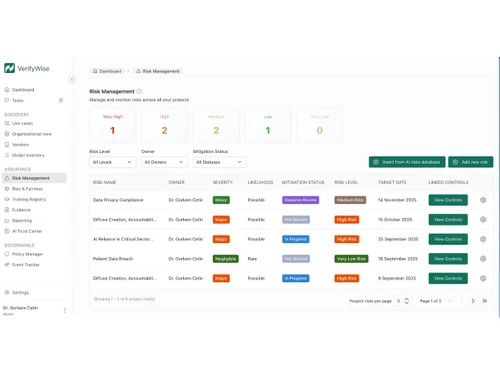
  • Project risks
  • Reports
  • Evidence center
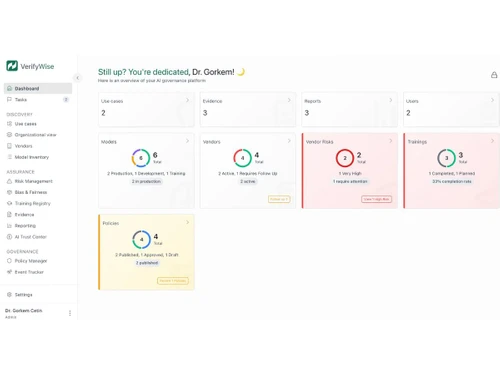
  • Vendor & risk module
  • Bias & fairness check
  • AI policy manager
Starting at $799
    • Licenses

      Licenses
      Licenses
    • Monthly

      Monthly
      Monthly

Key Features

  • Seats-Unlimited seats

  • Use cases-5 use cases

  • Frameworks-2 frameworks

  • Project risks

  • Reports

  • Evidence center

  • Vendor & risk module

  • Bias & fairness check

  • AI policy manager

VerifyWise Features

  • icon_check Policy Management
    Provides tools to define, update and enforce AI governance policies with version tracking and organization-wide access.
  • icon_check Lifecycle Management
    Tracks AI system progress across development, deployment and monitoring phases with activity records and checkpoints.
  • icon_check Audit Logs
    Captures platform actions, configuration edits and workflow activity in immutable logs to support traceability reviews.
  • icon_check Documentation Repository
    Stores AI compliance files, evidence and reference documents with access controls and organized folder structures.
  • icon_check Vendor Risk Evaluation
    Assesses external AI vendors using standardized questionnaires that record disclosures, risks and evidence submissions.
  • icon_check Incident Reporting
    Allows teams to submit AI incident reports, attach evidence, track resolutions and maintain post-incident documentation.
  • icon_check User Access Control
    Implements user roles and granular permissions to control visibility and modification rights across platform resources.
  • icon_check Framework Compliance Mapping
    Maps model assessments and documentation to AI governance standards such as ISO 42001, NIST AI RMF and EU AI Act rules.
  • icon_check Automated Workflow
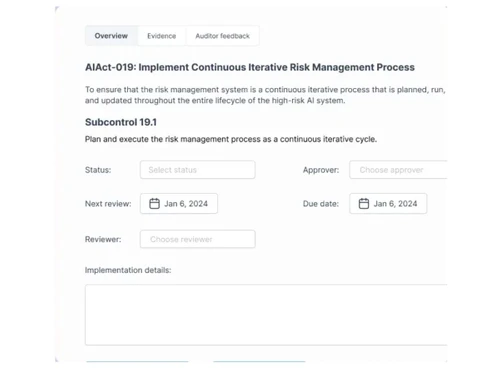
    Generates tasks, reminders and review steps automatically based on governance policies and assessment requirements.
  • icon_check Model Evidence Capture
    Allows uploading evaluation outputs, data summaries and test results for compliance verification and audit purposes.
  • icon_check System Integration
    Supports integration with authentication, notification and model operations systems for unified governance operations.
  • icon_check Evaluation Result Scoring
    Assigns scores to model evaluations using consistent criteria to support comparison, review and approval decisions.
  • icon_check Post Deployment Monitoring
    Schedules and tracks recurring monitoring activities requiring model checks, updates or documentation refresh cycles.
  • icon_check Multi Environment Deployment
    Supports SaaS and self-hosted deployments with configuration controls for data isolation and local infrastructure usage.
  • icon_check Model Inventory Management
    Maintains an indexed catalog of all AI systems with versions, ownership details, lifecycle stage and operational status.
  • icon_check Risk Assessment
    Evaluates AI models for operational, ethical and compliance risks using structured assessment workflows and criteria.

VerifyWise Specification

Supported Platforms
Ubuntu Ubuntu Windows Windows MacOS MacOS Linux Linux
Devices
Desktop Desktop
Deployment
Web-Based Web-Based Perpetual Perpetual
Suitable For
ITES
Business Specific
All Businesses
Business Size
Startups Enterprises
Customer Support
Email Communities
Language
English
Integration
API Integration
Training Resources
Documentation Videos
AI Features
AI Integrated

VerifyWise Review

4.1

Out of 5

img

Overall Rating

Based on
4 Verified Ratings

Rating Breakdown

  • Features 4.1
  • Value for Money 4.2
  • Ease of Use 4
  • Customer Support 4.3

80% Recommend this Product

Add Review

Be the First to Review

This product has no reviews yet. Be the first to leave your feedback.

Add Review

Articles for VerifyWise

See All Related Articles

20,000+ Software Listed

Best Price Guranteed

Free Expert Consultation

2M+ Happy Customers

Terms and Condtions

close

Users with registered businesses can purchase goods from merchants on the platform to satisfy their business needs. Users are not permitted to utilize any products acquired through the platform for resale, advertising, business, or further distribution.

For each purchase made, users will receive a Tax Invoice (or 'GST invoice') that includes specific details such as:

  • the GSTIN of the user associated with their registered business, and

  • the specified Entity Name for their business.

It should be noted that not all products are eligible for GST Invoice. Only the products displayed by participating sellers with the 'GST-based Invoice Available' callout on the product description page would qualify.

Certain goods and services are not eligible to get a GST Invoice, including items with VAS, i.e., Value Added Services (e.g., Total Mobile Protection/Assured Buyback) and those involving an exchange offer at the time of purchase.

Users must ensure the accuracy of the GSTIN, and business entity name provided for the GST Invoice. Requests for corrections into GST Invoice would not be accommodated by Techjockey.com or any Seller, and any issues arising from user-provided information are the sole responsibility of users.

Techjockey.com is not liable for the GST Invoice or any associated input tax credit. To efficiently claim an input tax credit, users should select the registered place of business address as per the GST authority's data and follow the provisions of the GST Act and rules.

To claim an input tax credit, the delivery and billing addresses must match. Furthermore, input tax credits will not be granted if the delivery address and GSTIN on the invoice are from different states. In case of incorrect GST details provided during the order placement, the order will be canceled automatically.