linkedin
Bildr logo
play Learn about the Current Record in Bildr | Bildr 101 & Data
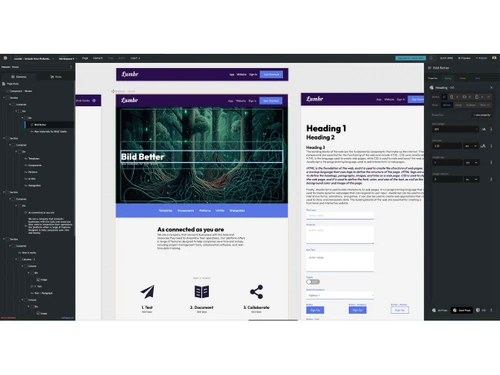
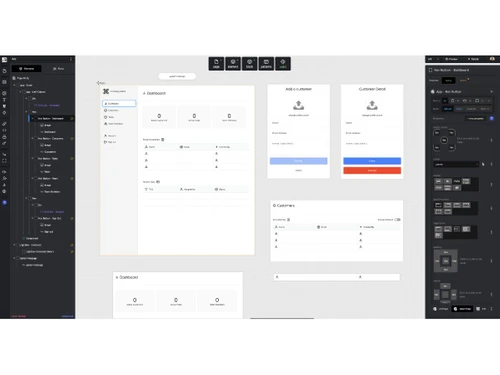
bildr-dashboard
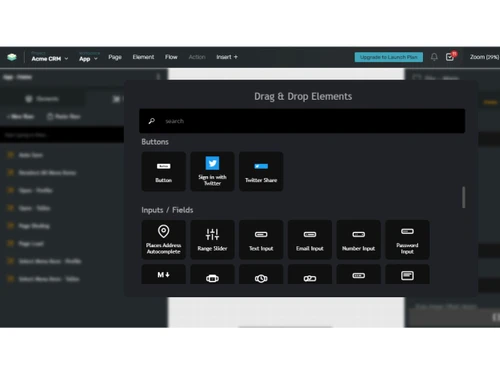
bildr-elements

Bildr

Brand: Bildr

  • 3.9

  • 5 Ratings

A low code no code software that lets you build fully functional web applications visually, without extensive coding.

See More

Have you used Bildr before?

Share your insights for better experience

Add a Review
Starting Price
$29

View plans

100% Genuine
Products
Best Price
Guaranteed
Safe & Secure
Payment
  • Description

  • Pricing

  • Features

  • Specification

  • Review

  • FAQ

Starting at $29

BildrSoftware Overview

What is Bildr?

Bildr is a low code no code software that lets you build full-stack web apps visually without needing deep coding skills.

It provides strong database control so you can easily manage and update your data. You can create app logic using visual flows instead of writing complex code.

The platform includes a drag-and-drop editor with full design control for styling your interface. Bildr supports user login systems with roles and authentication features.

It also connects with popular tools and APIs like Stripe, SendGrid, and OpenAI. You can use it to build SaaS products, internal tools, MVPs, and extensions. It supports real-time collaboration so teams can work together easily.

Why Choose Bildr Software?

  • No-Code / Low-Code Development: Build sophisticated web applications without needing deep programming knowledge. Ideal for beginners and non-technical users.
  • Full-Stack Capabilities: Create complete apps with front-end, back-end, and database functionality all in one platform. No need to rely on multiple tools.
  • Drag-and-Drop Interface: Design pages, workflows, and components visually using a simple drag-and-drop editor. Speeds up app development significantly.
  • Customizable Database: Set up and manage your app's database easily within Bildr. Tailor data structures to your specific needs without writing SQL.
  • Logic & Workflow Automation: Implement application logic with visual flows and actions. Automate tasks and processes without coding.
  • API Integration: Seamlessly connect your app to external services and APIs. Extend app functionality with third-party tools.
  • User Authentication: Add secure login, signup, and user management features effortlessly. Control user access and permissions with ease.
  • CSS Control: Fully customize the look and feel of your app using CSS. Achieve a professional and unique design without limitations.

Benefits of Bildr Software

  • Responsive Design: Build applications that adapt to different screen sizes and devices, including desktop, tablet, and mobile.
  • Fast Deployment: Launch your apps directly from Bildr without worrying about hosting or infrastructure. Deploy updates instantly.
  • Web3 Compatibility: Build decentralized applications using blockchain technology. Ideal for projects requiring crypto or NFT integration.
  • Chrome Extension Support: Develop and deploy Chrome browser extensions quickly. Expand your app's reach to users on the web.
  • Version Control: Track changes in your project and roll back updates if needed. Maintain a clean and organized development process.
  • Custom JavaScript: Add advanced functionality and dynamic features using JavaScript for technical users. Perfect for complex app requirements.
  • Scalable Architecture: Apps built on Bildr can grow with your business. Handle more users and data without major rewrites.
  • Real-Time Updates: Changes to your database or workflows are reflected instantly in the app. Keep your users updated in real-time.
  • Community & Support: Access tutorials, forums, and customer support for guidance. Learn from other users and troubleshoot issues quickly.
  • Cross-Platform Applications: Build apps that work seamlessly across different platforms and devices, saving time and development costs.
  • Time & Cost Efficient: Reduce the time and resources needed to develop apps compared to traditional coding methods. Launch ideas faster.
  • Ideal for Entrepreneurs & Startups: Quickly build MVPs and test new ideas. Focus on growth without getting bogged down in technical development.

Bildr Pricing

Bildr price starts at USD 29 at Techjockey.com. The pricing model is based on different parameters, including extra features, deployment type, and the total number of users. For further queries related to the product, you can contact our product team and learn more about the pricing and offers.

Read more

Bildr Company Details

Founded Year:  2020

Bildr empowers anything to build anything for the web with no-code & AI.

Director/Founders Mark Magnuson, Milton Fauss, Tim Magnuson
Company Size 1-100 Employees

Bildr Pricing & Plans

Launch
Starting at $29
    • Licenses

      Licenses
      Licenses
    • Monthly

      Monthly
      Monthly

Key Features

  • Custom domain

  • No Bildr branding

  • Add Collaborators

  • 2 builders

  • 25 GB bandwidth

  • 50,000 data records

  • 50,000 api calls

Pro
Starting at $119
    • Licenses

      Licenses
      Licenses
    • Monthly

      Monthly
      Monthly

Key Features

  • Unlimited Environments

  • Serverside functions

  • Partial Publishing

  • 5 builders

  • 250 GB bandwidth

  • 250,000 data records

  • 500,000 api calls

Scale Up
Starting at $500
    • Licenses

      Licenses
      Licenses
    • Monthly

      Monthly
      Monthly

Key Features

  • Isolated hosting & scaling

  • Custom billing solutions

  • 1:1 Onboarding

  • Premium Support

  • Custom Hosting

  • Custom Storage

  • Option for self-hosting

Bildr Features

  • icon_check Drag and Drop Functionality
    Create applications visually by dragging UI elements onto a canvas without writing complex code.
  • icon_check Custom Code Integration
    Extend app functionality by adding custom JavaScript, CSS, or Python wherever needed.
  • icon_check API Integration
    Connect seamlessly with third-party APIs like Stripe, Airtable, or OpenAI to enhance app capabilities.
  • icon_check Templates
    Accelerate development with ready-to-use templates and design patterns for common app functions.
  • icon_check Real Time Collaboration
    Allow multiple team members to build, edit, and update projects together instantly.
  • icon_check Workflow Automation
    Define visual workflows with triggers, conditions, and actions to create dynamic app behavior.
  • icon_check Custom Domain Support
    Publish applications directly under your own domain with secure SSL hosting included.
  • icon_check Database Management
    Build native databases or integrate with Airtable, Supabase, or Xano for data handling.
  • icon_check Version Control
    Track, manage, and roll back to previous app versions to maintain project stability.
  • icon_check Access Control
    Assign roles and permissions for collaborators to manage project contributions securely.
  • icon_check Authentication System
    Implement secure user authentication with prebuilt login, register, and password flows.
  • icon_check Web3 Integration
    Create blockchain-enabled apps, including NFT minting and smart contract functionality.
  • icon_check SEO Optimization
    Configure SEO metadata, titles, and descriptions to improve discoverability in search engines.
  • icon_check Resource Management
    Control project resources with defined limits on API calls, bandwidth, and storage.
Bildr Demo Video play icon

Get Bildr Demo

Watch the demo video to explore key features, real workflows, and how the software fits your business needs.

Understand
Key Features
Personal
Demo Insights
Interactive
Demo Support

Bildr Specification

Supported Platforms
Ubuntu Ubuntu Windows Windows MacOS MacOS Linux Linux
Devices
Desktop Desktop
Deployment
Web-Based Web-Based
Suitable For
All Industries
Business Specific
All Businesses
Business Size
Small Business Startups Medium Business Enterprises
Customer Support
Email Communities
Language
English
Integration
API Integration
Training Resources
Documentation Videos

Bildr Review

3.9

Out of 5

img

Overall Rating

Based on
5 Verified Ratings

Rating Breakdown

  • Features 4
  • Value for Money 4
  • Ease of Use 3.9
  • Customer Support 4

80% Recommend this Product

Add Review

Techjockey Trusted Reviews from Verified Users

No reviews are currently available for Bildr. Discover similar Low Code No Code Software reviews

  • Softr

    4.3

    Whats great - Softr allowed me to create a Progressive Web App (PWA) that functioned adequately on mobile browsers. read more
  • Alchemy

    4.4

    Whats great - High uptime and low-latency performance. read more

  • m Power

    4.4

    Whats great - Each of our 2-week sprints accomplishes with one programmer what many development shops would take months to develop. read more

How much does Bildr cost?

Bildr pricing starts from USD 29, as listed on Techjockey.com.

Is there a mobile app available for Bildr Software?

Bildr is primarily web-based, but apps built on it can be mobile-friendly.

Which operating systems are compatible with Bildr Software?

Bildr works on Ubuntu, Windows, macOS, Linux, and any modern web browser.

Does Bildr Software offer a free trial?

Yes, Bildr provides a free trial for new users to explore the platform.

How does Bildr Software function?

Bildr allows users to visually build full-stack web apps with drag-and-drop design, logic, and database integration.

Who uses Bildr Software?

Entrepreneurs, startups, developers, and non-technical users building web applications use Bildr.

Is a free demo available for Bildr Software?

Yes, Bildr free demo is available to explore its features before purchase.

Is Bildr Software available for free?

Bildr offers a free trial, but full access requires a paid plan.

20,000+ Software Listed

Best Price Guranteed

Free Expert Consultation

2M+ Happy Customers

Terms and Condtions

close

Users with registered businesses can purchase goods from merchants on the platform to satisfy their business needs. Users are not permitted to utilize any products acquired through the platform for resale, advertising, business, or further distribution.

For each purchase made, users will receive a Tax Invoice (or 'GST invoice') that includes specific details such as:

  • the GSTIN of the user associated with their registered business, and

  • the specified Entity Name for their business.

It should be noted that not all products are eligible for GST Invoice. Only the products displayed by participating sellers with the 'GST-based Invoice Available' callout on the product description page would qualify.

Certain goods and services are not eligible to get a GST Invoice, including items with VAS, i.e., Value Added Services (e.g., Total Mobile Protection/Assured Buyback) and those involving an exchange offer at the time of purchase.

Users must ensure the accuracy of the GSTIN, and business entity name provided for the GST Invoice. Requests for corrections into GST Invoice would not be accommodated by Techjockey.com or any Seller, and any issues arising from user-provided information are the sole responsibility of users.

Techjockey.com is not liable for the GST Invoice or any associated input tax credit. To efficiently claim an input tax credit, users should select the registered place of business address as per the GST authority's data and follow the provisions of the GST Act and rules.

To claim an input tax credit, the delivery and billing addresses must match. Furthermore, input tax credits will not be granted if the delivery address and GSTIN on the invoice are from different states. In case of incorrect GST details provided during the order placement, the order will be canceled automatically.