USA
USA UAE
UAESmall Business
Designed for startups and growing businesses

See More


Brand: mrc
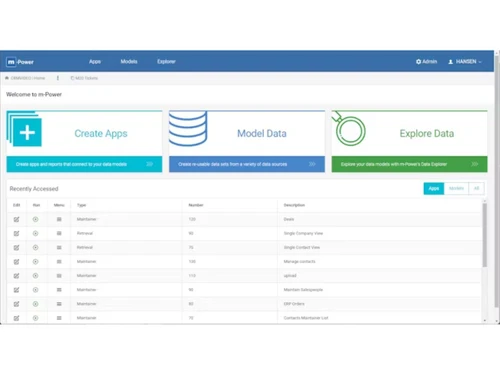
A low-code/no-code software that helps businesses quickly build secure web applications, automate workflows, and connect databases with minimal coding.
See MoreHave you used m Power before?
Share your insights for better experience
Brand: mrc
Founded Year: 1981
Established in 1981, mrc is a global software company specializing in enterprise web application development. mrc’s flagship product, the m-Power Development Platform, helps businesses build any type of application without coding.
Looking for The Right Pricing?
Share your requirements and get a plan built around your business.
Price Available on Request
Get personalised m Power pricing that fits your needs. Our team will connect with you.
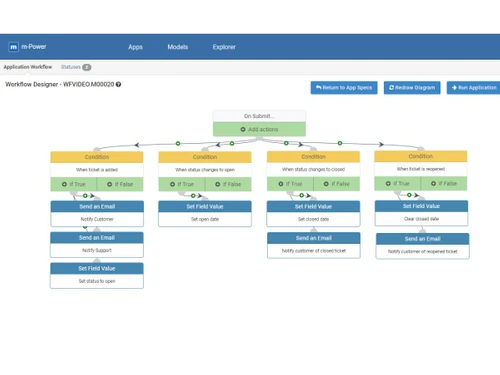
 Customization Multi Application Support Data Security Database Integration Reporting CRM Development Scheduling Dashboards ERP Integration Spreadsheet Conversion Financial Planning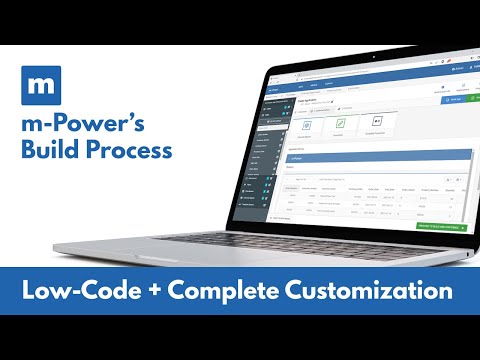

Watch the demo video to explore key features, real workflows, and how the software fits your business needs.
 Windows
  MacOS
MacOS  Linux
Linux  Desktop
  Cloud-Based
  Perpetual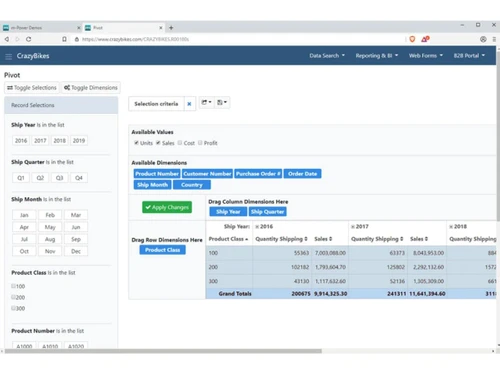
Small Business
Designed for startups and growing businesses
Medium Business
Built for business growth and flexibility
Enterprises
Designed for complex and large-scale business needs
4.3
Out of 5

Overall Rating
Based on
10 Verified Reviews
Rating Breakdown
90% Recommend this Product
Add ReviewOverall, users appreciate m-Power for its reliability and ability to facilitate rapid application development, especially in regulated environments where security is paramount. Many highlight the platform's flexibility in creating both internal and customer-facing applications without incurring additional user fees. However, some users note that certain advanced features require a learning curve and additional development work, particularly for custom UI designs. Additionally, while the support team is praised, there are mentions of documentation needing improvement for niche features.
Pros
"Each of our 2-week sprints accomplishes with one programmer what many development shops would take months to develop."
"The platform emphasises enterprise-grade development, secure, scalable apps and gives control over architecture (on-premise or cloud) and avoids vendor lock-in."
"Intuitive web apps for accounting, reporting & dashboards/data analysis can be easily conceived and deployed."
Cons
"Modern drag-and-drop designer capabilities (especially UI design) could be improved."
"Because security is strong, setting up governance/roles/user permissions required some effort."
"Some customer-facing UI polish needed extra design work; by default the templates were solid but not glamorous."

Oct 1, 2025
Techjockey Verified
“Mature platform, but roadmap still evolving”
We adopted m-Power as our long-term development platform. It feels solid and reliable for wide usage. At the same time, we keep an eye on enhancements (especially UI/UX templates) and work with the vendor on roadmap.
Pros
Each of our 2-week sprints accomplishes with one programmer what many development shops would take months to develop.
Cons
Modern drag-and-drop designer capabilities (especially UI design) could be improved.
Reason to switch
We switched because the previous vendor’s cost was skyrocketing and our apps hit performance issues. m-Power offered better scalability, less vendor-lock and stronger ROI.
Sep 10, 2025
Techjockey Verified
“Security and control gave us peace of mind”
Given we operate in regulated industry, we needed full control of who sees what, audit-trail, custom security. m-Power allowed us to deploy behind firewalls, define row-level security and integrate with existing auth systems.
Pros
The platform emphasises enterprise-grade development, secure, scalable apps and gives control over architecture (on-premise or cloud) and avoids vendor lock-in.
Cons
Because security is strong, setting up governance/roles/user permissions required some effort.
Reason to switch
We switched because SaaS platforms worried us from a compliance/control perspective; m-Power’s open architecture and on-prem options gave us greater assurance.
Aug 30, 2025
Techjockey Verified
“Built both internal and customer-facing apps and flexible usage”
We didn’t just build internal tools, we also built a portal for clients via m-Power, which improved our service offering. The platform’s flexibility let us build both types of apps with the same toolset.
Pros
Intuitive web apps for accounting, reporting & dashboards/data analysis can be easily conceived and deployed.
Cons
Some customer-facing UI polish needed extra design work; by default the templates were solid but not glamorous.
Reason to switch
We had to manage two platforms previously (one for internal, one for clients) which increased overhead. m-Power allowed consolidation into one platform.
m Power
Price On Request
Desktop
Mobile
Web based
On Premises
Windows
Mac OS

Zoho Creator
₹ 720
Desktop
Mobile
Web based
On Premises
Windows
Mac OS

Gooey AI
Price On Request
Desktop
Mobile
Web based
On Premises
Windows
Mac OS

FlutterFlow
₹ 1300
Desktop
Mobile
Web based
On Premises
Windows
Mac OS

Microsoft PowerApps
₹ 19980
Desktop
Mobile
Web based
On Premises
Windows
Mac OS

BuildAI
Price On Request
Desktop
Mobile
Web based
On Premises
Windows
Mac OS
WEM
Price On Request
Desktop
Mobile
Web based
On Premises
Windows
Mac OS

Tableflow
₹ 3500
Desktop
Mobile
Web based
On Premises
Windows
Mac OS

Ninox
Price On Request
Desktop
Mobile
Web based
On Premises
Windows
Mac OS

Adalo
Price On Request
Desktop
Mobile
Web based
On Premises
Windows
Mac OS

Plasmic
Price On Request
Desktop
Mobile
Web based
On Premises
Windows
Mac OS
(0) Product(s) selected
Starting Price:
$399 /Month
Starting Price:
$20
Available
Price on Request
Starting Price:
$156 /User/Year
Starting Price:
$49 /Month
Starting Price:
$50 /Developer/Month

Starting Price:
$15 /User/Month

Starting Price:
$12 /User/Month
Starting Price:
$29 /Month

Starting Price:
€25 /Seat/Month

Starting Price:
$29 /Month
m Power price is available upon request as listed on Techjockey.com.
No, m Power currently does not offer a dedicated mobile app.
m Power works on any OS with a web browser, including Linux, Windows and macOS.
Yes, m Power provides a free trial so users can test its features.
m Power uses a low-code builder and Java-based architecture to transform databases into web applications and automate workflows.
IT teams, business analysts, and enterprises looking for rapid app development and legacy modernization.
Yes, you can request a demo via the MRC Productivity website.
No, m Power is a commercial platform that requires a paid license.
20,000+ Software Listed
Best Price Guranteed
Free Expert Consultation
2M+ Happy Customers
Terms and Condtions

Users with registered businesses can purchase goods from merchants on the platform to satisfy their business needs. Users are not permitted to utilize any products acquired through the platform for resale, advertising, business, or further distribution.
For each purchase made, users will receive a Tax Invoice (or 'GST invoice') that includes specific details such as:
the GSTIN of the user associated with their registered business, and
the specified Entity Name for their business.
It should be noted that not all products are eligible for GST Invoice. Only the products displayed by participating sellers with the 'GST-based Invoice Available' callout on the product description page would qualify.
Certain goods and services are not eligible to get a GST Invoice, including items with VAS, i.e., Value Added Services (e.g., Total Mobile Protection/Assured Buyback) and those involving an exchange offer at the time of purchase.
Users must ensure the accuracy of the GSTIN, and business entity name provided for the GST Invoice. Requests for corrections into GST Invoice would not be accommodated by Techjockey.com or any Seller, and any issues arising from user-provided information are the sole responsibility of users.
Techjockey.com is not liable for the GST Invoice or any associated input tax credit. To efficiently claim an input tax credit, users should select the registered place of business address as per the GST authority's data and follow the provisions of the GST Act and rules.
To claim an input tax credit, the delivery and billing addresses must match. Furthermore, input tax credits will not be granted if the delivery address and GSTIN on the invoice are from different states. In case of incorrect GST details provided during the order placement, the order will be canceled automatically.