linkedin
Baserow logo
play Meet Kuma: Baserow’s AI Assistant for Building Databases, Formulas & Automations
baserow-database
baserow-gridview

Baserow

Brand: Baserow

  • 4.2

  • 5 Ratings

Baserow is an open-source, no-code database platform that allows users to create, manage, and collaborate on data-driven applications without programming skills.

See More

Have you used Baserow before?

Share your insights for better experience

Add a Review
Starting Price
$12

View plans

100% Genuine
Products
Best Price
Guaranteed
Safe & Secure
Payment
  • Description

  • Pricing

  • Features

  • Specification

  • Review

  • FAQ

Starting at $12

Baserow Software Overview

What is Baserow?

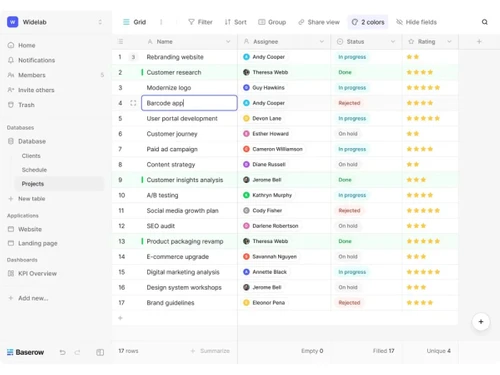
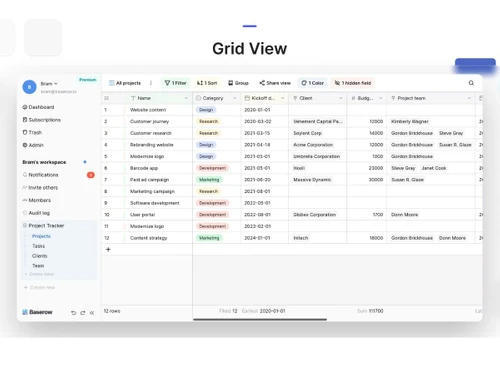
Baserow is a website development tool and a low code no code software that helps users create databases, web applications, and internal tools without requiring programming skills. It provides a spreadsheet-like interface with customizable fields, workflows, and integrations to manage data efficiently.

The platform is designed for teams and businesses that want to build data-driven applications quickly, automate processes, and collaborate in real time while maintaining flexibility and control through cloud or self-hosting options.

Why Choose Baserow?

  • No-Code & Low-Code Flexibility: Baserow allows users to build databases and applications without coding while still offering developer-friendly customization when needed.
  • Open-Source Advantage: Being open source, it provides full transparency, customization freedom, and the option to self-host for greater control over data.
  • Spreadsheet-Like Interface: The familiar grid layout makes it easy for teams to manage and organize data without a steep learning curve.
  • Collaboration in Real Time: Multiple users can work on the same data simultaneously, improving teamwork and productivity.
  • Powerful Integrations & API: Built-in integrations and APIs enable automation and seamless connection with other tools and workflows.
  • Scalable for Growing Needs: Suitable for individuals, startups, and enterprises, allowing projects to scale without switching platforms.

Benefits of Baserow

  • Easy Application Development: Build databases, internal tools, and workflows without coding skills.
  • Cost-Effective Solution: Open-source and flexible pricing reduce software and development costs.
  • Full Data Control: Self-hosting options give organizations greater ownership and security over their data.
  • Improved Collaboration: Real-time teamwork helps teams manage projects and information more efficiently.
  • Customizable Workflows: Flexible fields, automation, and integrations adapt to different business needs.
  • Scalable Platform: Supports growth from small projects to enterprise-level applications without major changes.

Baserow Pricing

Baserow pricing starts at USD 12 at techjockey.com. The pricing model is based on different parameters, including the amount of bandwidth you need, the number of servers you need, and the features you need. For further queries related to the product, you can contact our product team and learn more about the pricing and offers.

Read more

Baserow Pricing & Plans

Premium
Starting at $12
    • Users

      Users
      Users
    • Monthly

      Monthly
      Monthly

Key Features

  • 50,000 rows per workspace

  • 20GB of storage per workspace

  • Kanban, Survey & Calendar views

  • XML, JSON, & Excel export

  • Row comments & coloring

Advanced
Starting at $22
    • Users

      Users
      Users
    • Monthly

      Monthly
      Monthly

Key Features

  • Everything in Premium, plus:

  • 100GB of storage per workspace

  • 250,000 rows per workspace

  • Role based permissions

  • Free read/comment users

  • Audit logs

Baserow Features

  • icon_check Relational Database Engine
    Create complex data structures with linked tables and relational fields to maintain data integrity across your datasets.
  • icon_check No Code Application Builder
    Design custom user interfaces and business applications by dragging components onto a canvas without writing any code.
  • icon_check Self Hosting Deployment
    Deploy the entire platform on your own local infrastructure using Docker or AWS to maintain full data ownership and control.
  • icon_check Real-Time Collaboration
    Enable multiple team members to edit records simultaneously with instant synchronization across all active user sessions.
  • icon_check Automated Workflow Triggers
    Set up custom automation rules that execute specific actions when records are created, updated, or deleted in the system.
  • icon_check Webhook Integration
    Configure outgoing webhooks to send real-time data notifications to external services whenever database changes occur.
  • icon_check Kanban Boards
    Transform static table rows into interactive cards on a board to manage project stages and visual task transitions.
  • icon_check Calendar View
    Map date-based records onto a visual calendar interface to track deadlines, events, and project schedules effectively.
  • icon_check Data Import/Export
    Bulk upload data from CSV or XML files and export your tables into various formats for external reporting and backups.
  • icon_check Baserow AI Integration
    Leverage large language models to analyze, summarize, or generate content directly within your database table cells.
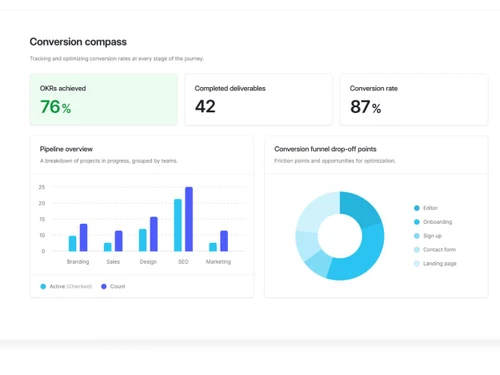
  • icon_check Dynamic Dashboard Charts
    Build visual reporting screens using bar charts, pie graphs, and line diagrams based on your live database records.
  • icon_check Formula Field Calculations
    Perform complex mathematical operations and string manipulations using a variety of built-in functions and operators.
  • icon_check Audit Logs
    Track every change made to your workspace with detailed logs showing who modified which record and exactly when it happened.
Baserow Demo Video play icon

Get Baserow Demo

Watch the demo video to explore key features, real workflows, and how the software fits your business needs.

Understand
Key Features
Personal
Demo Insights
Interactive
Demo Support

Baserow Specifications

Supported Platforms
Ubuntu Ubuntu Windows Windows MacOS MacOS Linux Linux
Devices
Desktop Desktop
Deployment
Cloud-Based Cloud-Based
Suitable For
All Industries
Business Specific
All Businesses
Business Size
Individual Small Business Startups Medium Business SMBs Freelancers
Customer Support
Email Communities
Language
English
Integration
API Integration
Training Resources
Documentation Videos
AI Features
AI Integrated

Baserow Review

4.2

Out of 5

img

Overall Rating

Based on
5 Verified Ratings

Rating Breakdown

  • Features 4.1
  • Value for Money 3.8
  • Ease of Use 4.6
  • Customer Support 4.3

80% Recommend this Product

Add Review

Techjockey Trusted Reviews from Verified Users

No reviews are currently available for Baserow. Discover similar Low Code No Code Software reviews

  • Softr

    4.3

    Whats great - Softr allowed me to create a Progressive Web App (PWA) that functioned adequately on mobile browsers. read more

  • Alchemy

    4.4

    Whats great - High uptime and low-latency performance. read more

  • m Power

    4.4

    Whats great - Each of our 2-week sprints accomplishes with one programmer what many development shops would take months to develop. read more

How much does Baserow cost?

Baserow pricing starts at USD 12 at techjockey.com. Pricing is customised based on specific business needs.

Which operating system does Baserow support?

Baserow is a web-based platform that works on any operating system, including Windows, macOS, and Linux, through modern browsers.

How does Baserow work?

Baserow provides a spreadsheet-like interface where users can create databases, define fields, and build workflows without coding. I

Is Baserow suitable for small businesses?

Yes, Baserow is suitable for small businesses because it enables them to build custom tools and manage data without hiring developers. Its scalability also supports business growth over time.

Does Baserow offer a free trial or a demo?

Baserow offers a free plan with core features, along with paid plans for advanced capabilities. This allows users to explore the platform before upgrading.

What features does Baserow offer?

Key features include database creation, customizable fields, views (grid, gallery, kanban), automation, API access, integrations, collaboration tools, and self-hosting options.

Is there a Baserow App?

Baserow primarily operates through a web interface, and while there may not be a dedicated mobile app, the platform can be accessed through mobile browsers.

Who are the potential users of Baserow?

Potential users include startups, small businesses, developers, project managers, operations teams, and enterprises needing custom databases or internal tools.

How secure is Baserow?

Baserow provides security through access controls, permissions, and deployment flexibility, including self-hosting for full data control.

What is Baserow used for?

Baserow is used for building databases, managing projects, creating internal tools, organizing business data, and developing no-code applications.

20,000+ Software Listed

Best Price Guranteed

Free Expert Consultation

2M+ Happy Customers

Terms and Condtions

close

Users with registered businesses can purchase goods from merchants on the platform to satisfy their business needs. Users are not permitted to utilize any products acquired through the platform for resale, advertising, business, or further distribution.

For each purchase made, users will receive a Tax Invoice (or 'GST invoice') that includes specific details such as:

  • the GSTIN of the user associated with their registered business, and

  • the specified Entity Name for their business.

It should be noted that not all products are eligible for GST Invoice. Only the products displayed by participating sellers with the 'GST-based Invoice Available' callout on the product description page would qualify.

Certain goods and services are not eligible to get a GST Invoice, including items with VAS, i.e., Value Added Services (e.g., Total Mobile Protection/Assured Buyback) and those involving an exchange offer at the time of purchase.

Users must ensure the accuracy of the GSTIN, and business entity name provided for the GST Invoice. Requests for corrections into GST Invoice would not be accommodated by Techjockey.com or any Seller, and any issues arising from user-provided information are the sole responsibility of users.

Techjockey.com is not liable for the GST Invoice or any associated input tax credit. To efficiently claim an input tax credit, users should select the registered place of business address as per the GST authority's data and follow the provisions of the GST Act and rules.

To claim an input tax credit, the delivery and billing addresses must match. Furthermore, input tax credits will not be granted if the delivery address and GSTIN on the invoice are from different states. In case of incorrect GST details provided during the order placement, the order will be canceled automatically.