linkedin
Microsoft PowerApps logo
play How to check Microsoft Power Apps?
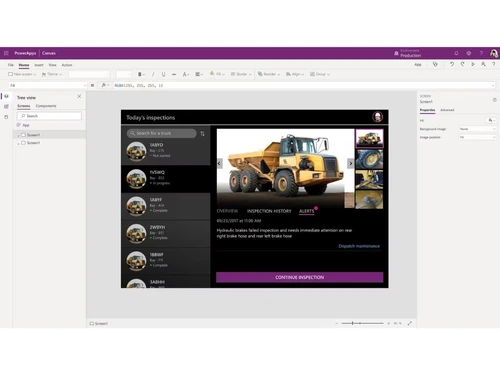
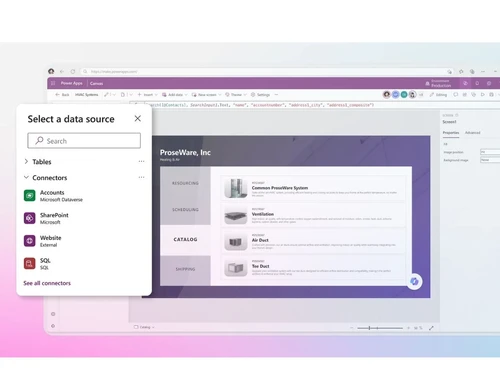
microsoft power apps dashboard
microsoft power apps source

Microsoft PowerApps

Brand: Microsoft Corporation

  • 4.4

  • 5 Ratings

A low-code no-code software that enables users to rapidly create custom business apps for web and mobile with easy design tools and AI support.

See More

Have you used Microsoft PowerApps before?

Share your insights for better experience

Add a Review
Starting Price
₹19,980 excl.GST
₹ 23,576 incl. GST

View plans

offer Save upto 18%, Get GST Invoice on your business purchase T&C
offer Buy Now & Pay Later, Check offer on payment page.
Buy Now
100% Genuine
Products
Best Price
Guaranteed
Safe & Secure
Payment
  • Description

  • Pricing

  • Features

  • Specification

  • Review

  • Compare

  • Alternatives

  • FAQ

Starting at ₹19,980
Buy Now

Microsoft PowerApps Software Overview

What is Microsoft Power Apps?

Microsoft Power Apps is a low-code no-code software development platform by Microsoft that helps users create custom business apps easily without needing advanced coding skills.

It uses simple drag-and-drop tools to build apps for mobile, web, and tablet that connect with services like Excel, SharePoint, Microsoft Teams, and Dynamics 365.

Power Apps helps automate tasks, streamline workflows, and manage data more efficiently, saving time and reducing manual work. It is widely used by businesses to improve productivity, simplify processes, and create tailored solutions for specific operational needs.

Why Choose Microsoft Power Apps Software?

  • Low-Code Development: Power Apps enables users to build functional applications with minimal coding. It empowers non-technical users to contribute to app development efficiently.
  • Fast App Creation: Its drag-and-drop interface speeds up designing layouts, forms, and workflows. This significantly reduces development time for businesses.
  • Seamless Microsoft Integration: Power Apps connects easily with Microsoft 365, Dynamics 365, Teams, and Azure. This ensures smooth data flow and consistency across Microsoft tools.
  • AI-Powered Features: With Copilot and AI tools, users can describe requirements in natural language. The platform automatically generates app components and logic, saving effort.
  • Cross-Platform Support: Apps built with Power Apps work on web browsers, mobile devices, and tablets. This enhances accessibility and usability across diverse platforms.
  • Easy Data Connectivity: It supports connections to over 100 data sources including SharePoint, SQL, Excel, and Dataverse. This allows businesses to centralize and utilize data effectively.
  • Customizable Solutions: Power Apps offers flexibility to tailor apps to specific business processes. Users can modify forms, logic, and UI to meet unique organizational needs.
  • Cost-Effective: The platform reduces the need for extensive coding resources and development teams. This makes app creation more affordable for small and large organizations.
  • Scalability: Power Apps supports growth from small teams to enterprise-level deployment. It handles increasing users, data, and workflows without performance issues.

Benefits of Microsoft Power Apps Software

  • Enterprise-Grade Security: Built-in compliance, encryption, and access controls ensure data safety. Organizations can define permissions and maintain strict security standards.
  • Automation Capabilities: When integrated with Power Automate, users can automate repetitive tasks. This boosts efficiency and reduces manual effort.
  • Faster Innovation: Its flexible tools encourage experimentation and rapid deployment. Teams can quickly test new ideas and make improvements.
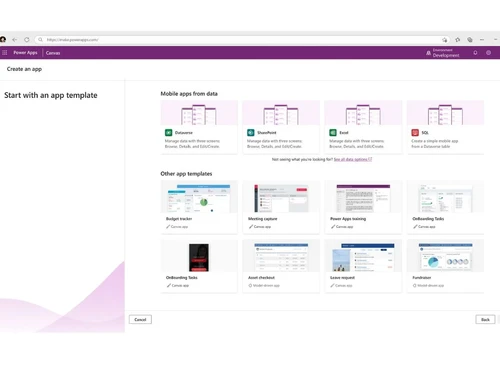
  • Reusable Templates: Power Apps includes several ready-to-use templates for common scenarios. These templates accelerate app creation and reduce setup time.
  • Improves Productivity: By converting manual tasks into automated digital workflows, productivity increases. Employees can focus on high-value work instead of routine activities.
  • Citizen Developer Friendly: It empowers non-developers to create apps independently. This reduces dependency on IT teams and increases overall output.
  • Centralized Data Management: Microsoft Dataverse offers a structured and secure data layer. It helps maintain consistency and simplifies managing organizational data.
  • Mobile-Friendly UI: Power Apps ensures apps are responsive and optimized for mobile use. This improves user experience for teams working on the go.

Microsoft Power Apps Pricing

Microsoft Power Apps price starts at Rs. 1,665 per user/month, paid yearly at Techjockey.com. The pricing model is based on different parameters, including extra features, deployment type, and the total number of users. For further queries related to the product, you can contact our product team and learn more about the pricing and offers.

Read more

Microsoft Corporation Company Details

Founded Year:  1975

Microsoft Corporation is an American multinational technology company with headquarters in Redmond, Washington.

Director/Founders Paul Allen , Bill Gates
Company Size 1000+ Employees

Microsoft PowerApps Pricing & Plans

Power Apps per user plan
Key Features
  • Natural Language AI
  • AI-Powered Copilot
  • AI Form Autofill
  • Adaptive Grids & Charts
  • Pro-Dev Custom Code
  • Centralized Governance

Calculated Price

19980 Exclusive of all taxes
    • Users

      Users
      Users
    • Yearly

      Yearly
      Yearly

Key Features

  • Natural Language AI

  • AI-Powered Copilot

  • AI Form Autofill

  • Adaptive Grids & Charts

  • Pro-Dev Custom Code

  • Centralized Governance

Microsoft PowerApps Features

  • icon_check Natural Language AI
    Describe your goals, roles, and workflows using natural language to create structured solution blueprints instantly.
  • icon_check AI-Powered Copilot
    Quickly build professional-grade applications without writing code using the built-in Copilot assistant.
  • icon_check AI Form Autofill
    Instantly speed up data entry and reduce human error by autofilling application forms from your documents.
  • icon_check Adaptive Grids & Charts
    Explore and visualize live data dynamically by utilizing natural language queries to spin up charts.
  • icon_check Pro-Dev Custom Code
    Expand functionality by using custom code and connecting seamlessly to Azure, Visual Studio, and GitHub.
  • icon_check Drag-and-Drop Designer
    Easily create, design, and customize the layout of your apps with a simple visual interface.
  • icon_check Centralized Governance
    Manage permissions, onboard app makers, and monitor environments from a single unified IT admin hub.
  • icon_check Data Loss Prevention
    Secure and protect your organizational workflows by centralizing access control and auditing policies.
  • icon_check Cross-Device Scaling
    Build responsive applications that run cleanly across any mobile device, tablet, or web browser.
  • icon_check Templates
    Accelerate your time-to-market by starting right with fully customizable, ready-to-use layouts.
  • icon_check Collaborative Workspace
    Empower business users and pro developers to co-create and refine applications in a single space.
  • icon_check Process Mapping
    Map business rules, automate decision points, and optimize execution paths visually before building.
Microsoft PowerApps Demo Video play icon

Get Microsoft PowerApps Demo

Watch the demo video to explore key features, real workflows, and how the software fits your business needs.

Understand
Key Features
Personal
Demo Insights
Interactive
Demo Support

Microsoft PowerApps Specifications

Supported Platforms
Windows Windows iOS iOS Android Android
Devices
Desktop Desktop Mobile Mobile Tablet Tablet iPad iPad
Deployment
Cloud-Based Cloud-Based
Suitable For
All Industries
Business Specific
All Businesses
Business Size
Small Business SMBs SMEs MSMBs
Customer Support
Phone Email Live Chat Communities Forums
Language
English
Training Resources
Live Online Webinars Documentation Videos
AI Features
AI Integrated

Explore the Best Alternative Solutions Similar to Your Business Size and Needs

Microsoft PowerApps Review

4.4

Out of 5

img

Overall Rating

Based on
5 Verified Ratings

Rating Breakdown

  • Features 4
  • Value for Money 4.2
  • Ease of Use 4.6
  • Customer Support 4.8

84% Recommend this Product

Add Review

Techjockey Trusted Reviews from Verified Users

No reviews are currently available for Microsoft PowerApps. Discover similar Low Code No Code Software reviews

  • Softr

    4.3

    Whats great - Softr allowed me to create a Progressive Web App (PWA) that functioned adequately on mobile browsers. read more

  • Alchemy

    4.4

    Whats great - High uptime and low-latency performance. read more

  • m Power

    4.4

    Whats great - Each of our 2-week sprints accomplishes with one programmer what many development shops would take months to develop. read more

Compare Microsoft PowerApps With other Low Code No Code Software

Products
Ratings
Pricing
Device Supported
Deployment
Supported Platforms
  • img

    Microsoft PowerApps

  • 4.4

  • ₹ 19980.00 excl. GST

  • Desktop

    Mobile

  • Web based

    On Premises

  • Windows

    Mac OS

  • img

    Zoho Creator

  • 4.4

  • ₹ 720

  • Desktop

    Mobile

  • Web based

    On Premises

  • Windows

    Mac OS

  • img

    Gooey AI

  • 4.0

  • Price On Request

  • Desktop

    Mobile

  • Web based

    On Premises

  • Windows

    Mac OS

  • img

    FlutterFlow

  • 4.6

  • ₹ 1300

  • Desktop

    Mobile

  • Web based

    On Premises

  • Windows

    Mac OS

  • img

    BuildAI

  • 4.7

  • Price On Request

  • Desktop

    Mobile

  • Web based

    On Premises

  • Windows

    Mac OS

  • img

    WEM

  • 4.4

  • Price On Request

  • Desktop

    Mobile

  • Web based

    On Premises

  • Windows

    Mac OS

  • img

    Tableflow

  • 4

  • ₹ 3500

  • Desktop

    Mobile

  • Web based

    On Premises

  • Windows

    Mac OS

  • img

    Ninox

  • 4.0

  • Price On Request

  • Desktop

    Mobile

  • Web based

    On Premises

  • Windows

    Mac OS

  • img

    Adalo

  • 4.7

  • Price On Request

  • Desktop

    Mobile

  • Web based

    On Premises

  • Windows

    Mac OS

  • img

    Plasmic

  • 4.3

  • Price On Request

  • Desktop

    Mobile

  • Web based

    On Premises

  • Windows

    Mac OS

  • img

    8base

  • 4.5

  • Price On Request

  • Desktop

    Mobile

  • Web based

    On Premises

  • Windows

    Mac OS

(0) Product(s) selected

Microsoft PowerApps Alternatives

See All Microsoft PowerApps Alternatives

Starting Price:

$20

WEM

4.4

Available

Price on Request

Starting Price:

$156 /User/Year

Starting Price:

$49 /Month

Starting Price:

$50 /Developer/Month

Starting Price:

$15 /User/Month

Starting Price:

$12 /User/Month
Starting Price:

$29 /Month

Starting Price:

€25 /Seat/Month

Riku

4.5

Starting Price:

$29 /Month

How much does Microsoft Power Apps cost?

Microsoft Power Apps price starts at Rs. 1,665 per user/month, paid yearly on Techjockey.com.

What is the use of Multistage business workflows within Microsoft PowerApps?

Organisations can monitor their employees and ensure proper consistency of data irrespective of their residing place with the help of multi-stage business workflows.

Can I get a demo of Microsoft PowerApps?

Yes, You can send in demo requests for Microsoft PowerApps. Our in-house product experts will get back to you as per the mentioned time schedule.

Can I use Microsoft PowerApps to design low-code websites for external use?

Yes, you can integrate model-based forms, embed dashboards and Power BI reports, charts, views and unlock CDS data to create low-code web pages for external users.

Does Microsoft PowerApps have a dedicated mobile app?

Yes, the software has a dedicated mobile app for iOS and Android devices.

20,000+ Software Listed

Best Price Guranteed

Free Expert Consultation

2M+ Happy Customers

Terms and Condtions

close

Users with registered businesses can purchase goods from merchants on the platform to satisfy their business needs. Users are not permitted to utilize any products acquired through the platform for resale, advertising, business, or further distribution.

For each purchase made, users will receive a Tax Invoice (or 'GST invoice') that includes specific details such as:

  • the GSTIN of the user associated with their registered business, and

  • the specified Entity Name for their business.

It should be noted that not all products are eligible for GST Invoice. Only the products displayed by participating sellers with the 'GST-based Invoice Available' callout on the product description page would qualify.

Certain goods and services are not eligible to get a GST Invoice, including items with VAS, i.e., Value Added Services (e.g., Total Mobile Protection/Assured Buyback) and those involving an exchange offer at the time of purchase.

Users must ensure the accuracy of the GSTIN, and business entity name provided for the GST Invoice. Requests for corrections into GST Invoice would not be accommodated by Techjockey.com or any Seller, and any issues arising from user-provided information are the sole responsibility of users.

Techjockey.com is not liable for the GST Invoice or any associated input tax credit. To efficiently claim an input tax credit, users should select the registered place of business address as per the GST authority's data and follow the provisions of the GST Act and rules.

To claim an input tax credit, the delivery and billing addresses must match. Furthermore, input tax credits will not be granted if the delivery address and GSTIN on the invoice are from different states. In case of incorrect GST details provided during the order placement, the order will be canceled automatically.