
linkedin
Blynk logo
play Blynk: The All-in-One IoT Platform to Build, Launch & Scale Devices
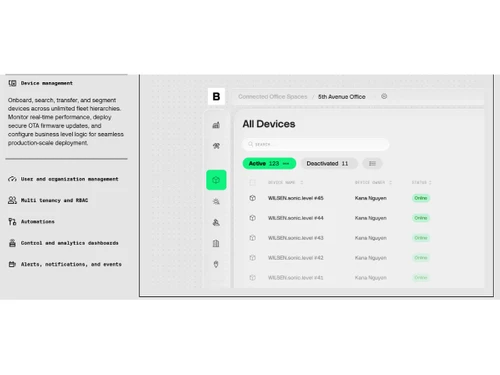
Blynk-device management
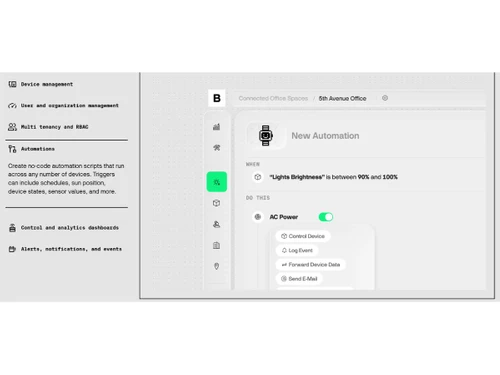
Blynk-automations

Blynk

Brand: Blynk Technologies

  • No Ratings & Reviews

Have you used Blynk before?

Share your insights for better experience

Add a Review
Starting Price
$29

View plans

100% Genuine
Products
Best Price
Guaranteed
Safe & Secure
Payment
  • Description

  • Pricing

  • Features

  • Specification

  • Review

Starting at $29

Blynk Software Overview

Blynk Technologies Company Details

Founded Year:  2014

Blynk offers a suite of software allowing to prototype, deploy, and remotely manage connected electronic devices.

Director/Founders Dumanskiy Dmitriy, Iryna Liashchuk, Pavlo Bayborodin, Volodymyr Shymanskyy
Company Size 1-100 Employees

Blynk Pricing & Plans

Starter
Starting at $29
    • Licenses

      Licenses
      Licenses
    • Monthly

      Monthly
      Monthly

Key Features

  • 10 devices, 1 user

  • 1 month data retention

  • 10,000,000 messages

  • Premium UI widgets

  • Data import and export

Prototype
Starting at $99
    • Licenses

      Licenses
      Licenses
    • Monthly

      Monthly
      Monthly

Key Features

  • 50 devices, and users

  • 6 month data retention

  • Unlimited messages

  • Premium UI widgets

  • Data import and export

Blynk Features

  • icon_check Device Management
    Centrally manage connected IoT devices by organizing, monitoring, configuring, and controlling them throughout their operational
  • icon_check Remote Monitoring
    Monitor real-time sensor readings, equipment status, and environmental conditions from anywhere using secure web and mobile
  • icon_check Remote Device Control
    Control connected devices remotely by sending commands, triggering actions, and managing operations without physical access.
  • icon_check Dashboard Builder
    Create interactive dashboards using drag-and-drop widgets to visualize live device data, metrics, and operational performance.
  • icon_check OTA Firmware Updates
    Deploy firmware updates remotely to connected devices, ensuring bug fixes, security patches, and new features without onsite
  • icon_check User Management
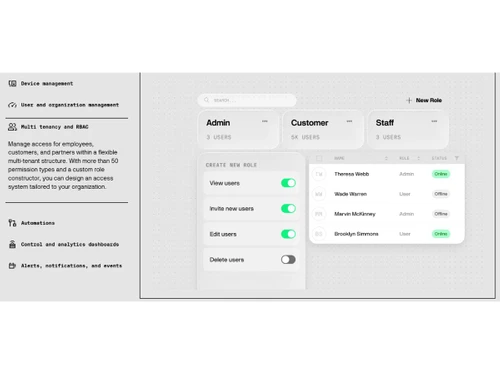
    Manage users, organizations, and permissions with role-based access controls to ensure secure collaboration and administration.
  • icon_check Role-Based Access Control (RBAC)
    Assign different permission levels to administrators, operators, technicians, and customers for secure access to platform
  • icon_check Real-Time Data Streaming
    Receive and display live telemetry data from connected devices for instant monitoring and faster operational decision-making.
  • icon_check Alerts & Notifications
    Configure automated alerts and receive instant notifications through mobile apps or email whenever predefined conditions are met.
  • icon_check Data Visualizations
    Visualize historical and live IoT data using charts, gauges, graphs, and widgets that simplify analysis and performance tracking.
  • icon_check API Integration
    Connect the platform with ERP, CRM, analytics, and third-party applications using secure APIs for seamless business integration.
  • icon_check Device Provisioning
    Simplify onboarding and secure registration of new IoT devices with automated provisioning workflows and authentication
  • icon_check Multi-Protocol Connectivity
    Support communication through Wi-Fi, Ethernet, Cellular, MQTT, HTTPS, and other protocols for reliable device connectivity.
  • icon_check Cloud-Based
    Utilize scalable cloud infrastructure to securely store, process, and manage IoT device data while supporting global deployments.
Blynk Demo Video play icon

Get Blynk Demo

Watch the demo video to explore key features, real workflows, and how the software fits your business needs.

Understand
Key Features
Personal
Demo Insights
Interactive
Demo Support

Blynk Specifications

Supported Platforms
Ubuntu Ubuntu Windows Windows MacOS MacOS Linux Linux
Devices
Desktop Desktop
Deployment
Cloud-Based Cloud-Based
Suitable For
All Industries
Business Specific
All Businesses
Business Size
Individual Small Business Startups Medium Business Enterprises SMBs SMEs MSMBs MSMEs
Customer Support
Phone Email Live Chat Communities Forums
Language
English
Integration
API Integration
Training Resources
Live Online Webinars Documentation Videos
Technology
Next Generation
Compliance Regulation
HIPAA SOC 2

Blynk Review

Be the First to Review

This product has no reviews yet. Be the first to leave your feedback.

Add Review

Articles for Blynk

See All Related Articles

20,000+ Software Listed

Best Price Guranteed

Free Expert Consultation

2M+ Happy Customers

Terms and Condtions

close

Users with registered businesses can purchase goods from merchants on the platform to satisfy their business needs. Users are not permitted to utilize any products acquired through the platform for resale, advertising, business, or further distribution.

For each purchase made, users will receive a Tax Invoice (or 'GST invoice') that includes specific details such as:

  • the GSTIN of the user associated with their registered business, and

  • the specified Entity Name for their business.

It should be noted that not all products are eligible for GST Invoice. Only the products displayed by participating sellers with the 'GST-based Invoice Available' callout on the product description page would qualify.

Certain goods and services are not eligible to get a GST Invoice, including items with VAS, i.e., Value Added Services (e.g., Total Mobile Protection/Assured Buyback) and those involving an exchange offer at the time of purchase.

Users must ensure the accuracy of the GSTIN, and business entity name provided for the GST Invoice. Requests for corrections into GST Invoice would not be accommodated by Techjockey.com or any Seller, and any issues arising from user-provided information are the sole responsibility of users.

Techjockey.com is not liable for the GST Invoice or any associated input tax credit. To efficiently claim an input tax credit, users should select the registered place of business address as per the GST authority's data and follow the provisions of the GST Act and rules.

To claim an input tax credit, the delivery and billing addresses must match. Furthermore, input tax credits will not be granted if the delivery address and GSTIN on the invoice are from different states. In case of incorrect GST details provided during the order placement, the order will be canceled automatically.