linkedin
Cheqroom logo
play AV equipment management with Cheqroom
Cheqroom Information
Cheqroom Tracking

Cheqroom

Brand: Cheqroom

  • 4.4

  • 5 Ratings

Cheqroom is an asset tracking and management software that simplifies tracking, managing, and maintaining business equipment and assets.

See More

Have you used Cheqroom before?

Share your insights for better experience

Add a Review
Starting Price
$125

View plans

100% Genuine
Products
Best Price
Guaranteed
Safe & Secure
Payment
  • Description

  • Pricing

  • Features

  • Specification

  • Review

  • Compare

  • Alternatives

  • FAQ

Starting at $125

CheqroomSoftware Overview

What is Cheqroom?

Cheqroom is an asset tracking software that helps businesses efficiently manage and monitor their equipment and assets. With features like barcode scanning and maintenance tracking, it simplifies operations and promotes accountability. Cheqroom's user-friendly interface makes it easy to track various assets, from tools to technology equipment.

The software also provides detailed reports on asset usage and maintenance, enabling businesses to optimize resource allocation and ensure efficient utilization. It suits different industries, offering flexibility and scalability to meet diverse asset management needs.

Why Choose Cheqroom Software?

  • Efficient Asset Tracking: Simplifies equipment and asset tracking, ensuring organization and easy retrieval.
  • User-Friendly Interface: Offers an easy-to-use interface, making it accessible for all users, including those with limited technical expertise.
  • Barcode Scanning: Enables quick and accurate asset information recording through barcode scanning, reducing the likelihood of errors.
  • Streamlined Check-In/Check-Out: Facilitates straightforward asset check-in and check-out processes, minimizing the risk of asset loss or misplacement.
  • Comprehensive Reporting: Provides detailed reports on asset usage and maintenance history, offering insights for informed decision-making.
  • Flexible for Different Industries: Adaptable to various industries, providing flexibility and scalability to meet diverse asset management needs.
  • Optimized Resource Allocation: Assists businesses in optimizing resource allocation, ensuring efficient use of assets, and minimizing downtime.

Benefits of Cheqroom Platform

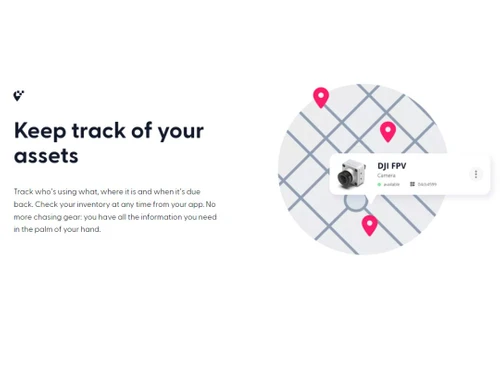
  • Equipment Tracking: Keep tabs on company assets like cameras, laptops, or tools, easily identifying their users and status.
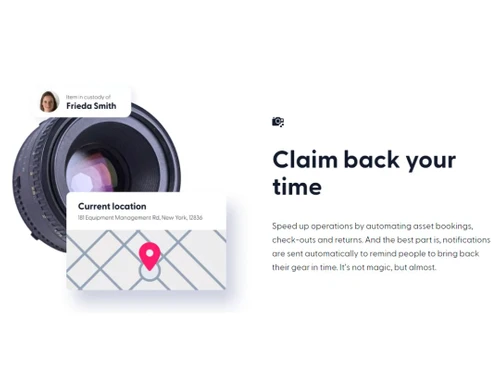
  • Check-in/Check-out: Record the borrowing and return of items to monitor who has the equipment and its usage timeline.
  • Reservation Management: Make reservations for specific items, ensuring availability and avoiding conflicts or double bookings.
  • Maintenance Tracking: Monitor the maintenance history and schedule of equipment, scheduling tasks and recording repairs or servicing.
  • Reporting and Analytics: Access reports on equipment usage, availability, and maintenance history for data-driven decision-making.
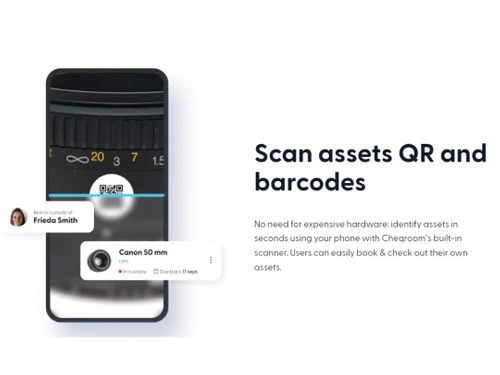
  • Mobile App: Manage equipment with a mobile app, allowing check-ins/outs, barcode/QR code scanning, and updates from smartphones or tablets.
  • Integration with Other Systems: Integrate with various company tools, such as asset management or accounting systems, for seamless data flow and reduced manual work.

Pricing of Cheqroom Asset Tracking Software

Cheqroom price in India starts from $125 at techjockey.com.

The pricing model is based on different parameters, including extra features, deployment type, and the total number of users. For further queries related to the product, you can contact our product team and learn more about the pricing and offers.

Read more

Cheqroom Company Details

Founded Year:  2013

The best-in-class software that makes it easier to get the right gear into the right hands.

Director/Founders Henk Schepens, Vincent Theeten
Company Size 1-100 Employees

Cheqroom Pricing & Plans

Essentials
Key Features
  • Inventory overview
  • Equipment flags
  • Mobile app
  • Mobile app
  • Bar & QR code scanning
Starting at $125
    • Quantity

      Quantity
      Quantity
    • Monthly

      Monthly
      Monthly

Key Features

  • Inventory overview

  • Equipment flags

  • Mobile app

  • Mobile app

  • Bar & QR code scanning

Cheqroom Features

  • icon_check Asset Tracking
    Easily monitor company assets, assigning unique identifiers, tracking location, and checking status and availability.
  • icon_check Activity Tracking
    Record all asset-related activities, track check-out details and return dates, and maintain accountability.
  • icon_check Fixed Asset Management
    Manage long-term assets like machinery or vehicles, tracking location, ownership, maintenance, and depreciation.
  • icon_check Inventory Management
    Efficiently manage asset inventory, providing real-time visibility into stock levels and setting alerts for restocking.
  • icon_check Depreciation Management
    Track asset depreciation over time, calculate current values and generate depreciation reports for financial purposes.
  • icon_check Barcode/RFID
    Support barcode and RFID technology for quick asset identification and status updates using mobile devices or scanners.
  • icon_check Check-in & Check-out
    Simplify asset check-in/out with reservation creation, scanning, and automatic status and user information updates.
  • icon_check Configuration Management
    Manage asset configurations, tracking versions or variations and associating them with specific users or projects.
  • icon_check Maintenance Management
    Schedule, set reminders, create tasks, and log activities for proper servicing and condition upkeep.
Cheqroom Demo Video play icon

Get Cheqroom Demo

Watch the demo video to explore key features, real workflows, and how the software fits your business needs.

Understand
Key Features
Personal
Demo Insights
Interactive
Demo Support

Cheqroom Specification

Supported Platforms
Ubuntu Ubuntu Windows Windows iOS iOS Android Android MacOS MacOS Linux Linux
Devices
Desktop Desktop Mobile Mobile Tablet Tablet iPad iPad
Deployment
Web-Based Web-Based
Suitable For
All Industries
Business Specific
All Businesses
Business Size
Small Business Medium Business Enterprises
Customer Support
Email Communities
Language
English
Training Resources
Videos

Explore the Best Alternative Solutions Similar to Your Business Size and Needs

Small Business

Designed for startups and growing businesses

Assetze

4.1

Tagscout

4.2

Setyl

4.0

See More

Cheqroom Review

4.4

Out of 5

img

Overall Rating

Based on
5 Verified Ratings

Rating Breakdown

  • Features 4
  • Value for Money 4.7
  • Ease of Use 4.4
  • Customer Support 4.6

92% Recommend this Product

Add Review

Be the First to Review

This product has no reviews yet. Be the first to leave your feedback.

Add Review

Compare Cheqroom With other Asset Tracking Software

Products
Ratings
Pricing
Device Supported
Deployment
Supported Platforms
  • img

    Cheqroom

  • 4.4

  • Price On Request

  • Desktop

    Mobile

  • Web based

    On Premises

  • Windows

    Mac OS

  • img

    Wasp AssetCloud

  • 4.5

  • Price On Request

  • Desktop

    Mobile

  • Web based

    On Premises

  • Windows

    Mac OS

  • img

    Itemit

  • 4.5

  • Price On Request

  • Desktop

    Mobile

  • Web based

    On Premises

  • Windows

    Mac OS

  • img

    eAssets

  • 4.5

  • ₹ 2500

  • Desktop

    Mobile

  • Web based

    On Premises

  • Windows

    Mac OS

  • img

    Setyl

  • 4.0

  • Price On Request

  • Desktop

    Mobile

  • Web based

    On Premises

  • Windows

    Mac OS

  • img

    Zed Assest

  • 4.3

  • Price On Request

  • Desktop

    Mobile

  • Web based

    On Premises

  • Windows

    Mac OS

  • img

    Trakkia

  • 4.2

  • Price On Request

  • Desktop

    Mobile

  • Web based

    On Premises

  • Windows

    Mac OS

  • img

    AIQoD GeoTwinX

  • 4.3

  • Price On Request

  • Desktop

    Mobile

  • Web based

    On Premises

  • Windows

    Mac OS

  • img

    AssetCues

  • 4.4

  • ₹ 35000

  • Desktop

    Mobile

  • Web based

    On Premises

  • Windows

    Mac OS

  • img

    AssetSonar

  • 4.2

  • Price On Request

  • Desktop

    Mobile

  • Web based

    On Premises

  • Windows

    Mac OS

  • img

    Tagscout

  • 4.2

  • Price On Request

  • Desktop

    Mobile

  • Web based

    On Premises

  • Windows

    Mac OS

(2) Product(s) selected

Cheqroom Alternatives

See All Cheqroom Alternatives

Starting Price:

£249

Available

Price on Request

Which operating system does Cheqroom Software Support?

Cheqroom Software is compatible with Ubuntu, Windows, Linux, and macOS.

Is there any Cheqroom App?

Yes, Cheqroom is available for Android and iOS app users.

What is the deployment type of Cheqroom Software?

Cheqroom Software supports web-based deployment.

How much does Cheqroom Software Cost?

Cheqroom price in India starts from $125 at techjockey.com.

Who are the potential users of Cheqroom Software?

Cheqroom Software can be used by various entities, including businesses, educational institutions, and government organizations. It helps them keep tabs on their assets, such as equipment, devices, or inventory.

Is there any free trial or demo for Cheqroom Software?

Yes, Cheqroom Software free demo is available at techjockey.com.

Is Cheqroom Software Free?

Cheqroom Software offers a free trial. However, the premium plan with advanced features is available at techjockey.com with exciting deals.

How can you download Cheqroom Software?

Cheqroom Software installation is not required, as it is web-based. Just open the Setup Wizard to get started.

How Does Cheqroom Software Work?

Cheqroom software works by allowing users to track, manage, and monitor their assets and inventory through features such as asset identification, check-in/check-out, activity tracking, and maintenance management.

20,000+ Software Listed

Best Price Guranteed

Free Expert Consultation

2M+ Happy Customers

Terms and Condtions

close

Users with registered businesses can purchase goods from merchants on the platform to satisfy their business needs. Users are not permitted to utilize any products acquired through the platform for resale, advertising, business, or further distribution.

For each purchase made, users will receive a Tax Invoice (or 'GST invoice') that includes specific details such as:

  • the GSTIN of the user associated with their registered business, and

  • the specified Entity Name for their business.

It should be noted that not all products are eligible for GST Invoice. Only the products displayed by participating sellers with the 'GST-based Invoice Available' callout on the product description page would qualify.

Certain goods and services are not eligible to get a GST Invoice, including items with VAS, i.e., Value Added Services (e.g., Total Mobile Protection/Assured Buyback) and those involving an exchange offer at the time of purchase.

Users must ensure the accuracy of the GSTIN, and business entity name provided for the GST Invoice. Requests for corrections into GST Invoice would not be accommodated by Techjockey.com or any Seller, and any issues arising from user-provided information are the sole responsibility of users.

Techjockey.com is not liable for the GST Invoice or any associated input tax credit. To efficiently claim an input tax credit, users should select the registered place of business address as per the GST authority's data and follow the provisions of the GST Act and rules.

To claim an input tax credit, the delivery and billing addresses must match. Furthermore, input tax credits will not be granted if the delivery address and GSTIN on the invoice are from different states. In case of incorrect GST details provided during the order placement, the order will be canceled automatically.