linkedin
CHUMS logo
chums-dashboard
chums-reports
chums-analytics

CHUMS

Brand: Live Church Solutions

  • 3.9

  • 3 Ratings

CHUMS (Church Management Software) helps churches efficiently manage memberships, donations, events, and daily administrative tasks.

See More

Have you used CHUMS before?

Share your insights for better experience

Add a Review

Price Available on Request

Questions about pricing or customization? We’re here to help, just a click away.

100% Genuine
Products
Best Price
Guaranteed
Safe & Secure
Payment
  • Description

  • Pricing

  • Features

  • Specification

  • Review

  • FAQ

CHUMS Software Overview

What is CHUMS?

CHUMS is an open-source church management software (ChMS) to help churches run smoothly without big costs.

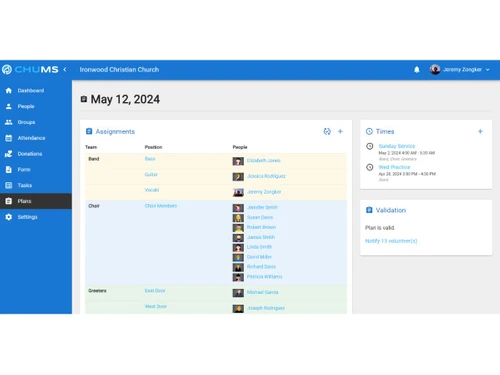
It lets church leaders track and manage member details, attendance, giving, and group participation. For child safety, CHUMS supports check-in and check-out during services or events.

It also handles event scheduling and group management, so churches can organise classes, volunteers, and meetings easily. Churches can record and report on donations transparently, making financial tracking simple.

Because it's open source, churches have full control over their data, they can import, export, or delete records. The software is built to make church admin professional without charging big fees, helping even small churches access powerful tools.

Why Choose CHUMS Software?

  • Easy Member Management: Maintain detailed member profiles in one place.
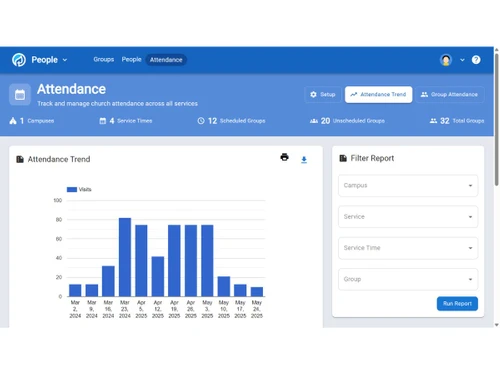
  • Attendance Tracking: Monitor attendance for services, groups, and events.
  • Donation & Tithing Management: Record, track, and report all contributions accurately.
  • Event Planning Tools: Organize church events and activities effortlessly.
  • Improved Communication: Send emails, messages, and announcements to members quickly.
  • Volunteer Management: Assign tasks and manage volunteer involvement efficiently.
  • Financial Reporting: Generate financial statements and donation summaries with ease.
  • User-Friendly Interface: Simple and intuitive design that even non-technical users can operate.
  • Centralized Database: All church information stored securely in one system.
  • Enhanced Security: Protects sensitive church and member data with strong security features.
  • Mobile Accessibility: Access the system from anywhere using mobile devices.
  • Role-Based Access Control: Provide different access levels to staff and volunteers.
  • Automation Features: Automate reminders, emails, and common administrative tasks.
  • Customizable Dashboard: Tailor the dashboard according to your church's needs.

Benefits of CHUMS Software

  • Budget Management: Track budgets, expenses, and financial planning easily.
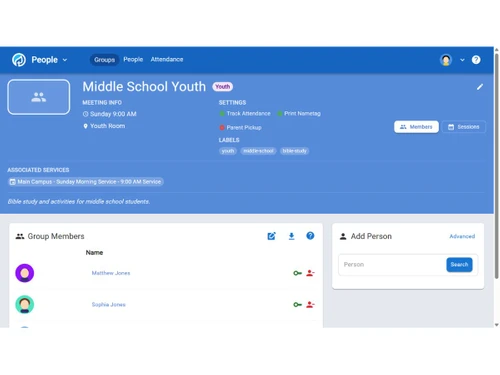
  • Group & Ministry Tracking: Manage small groups, ministries, and teams in a structured way.
  • Visitor Follow-Up: Record visitor information and schedule follow-up interactions.
  • Seamless Integration: Integrates with payment gateways, email tools, and more.
  • Scalable Solution: Suitable for small churches to large congregations.
  • Cost-Effective: Offers powerful features at an affordable price, improving overall church efficiency.

CHUMS Pricing

CHUMS price details are available on request at techjockey.com.The pricing model is based on different parameters, including extra features, deployment type, and the total number of users. For further queries related to the product, you can contact our product team and learn more about the pricing and offers.

Read more

CHUMS Pricing & Plans

Looking for The Right Pricing?

Share your requirements and get a plan built around your business.

  • Define your business needs
  • Get customised pricing
  • Choose features that fit your workflow

Price Available on Request

Get personalised CHUMS pricing that fits your needs. Our team will connect with you.

CHUMS Features

  • icon_check Member Management
    Maintain and organize church membership data, including personal details, status, and profile information.
  • icon_check Attendance Tracking
    Record and monitor congregation attendance across events, services, and ministries in one unified system.
  • icon_check Donation Management
    Track and oversee contributions with precise managing tools and detailed giving records.
  • icon_check Event Scheduling
    Plan, schedule, and coordinate church events, gatherings, and activities through a central calendar.
  • icon_check Volunteer Management
    Organize volunteers, assign roles, manage schedules, and streamline ministry participation.
  • icon_check Group Management
    Facilitate creation, scheduling, and engagement tracking for small groups and ministries.
  • icon_check Check-in/Check-out
    Provide secure check-in for children with name tags and pickup slips featuring unique matching codes.
  • icon_check Pledge Management
    Monitor pledged commitments and support donors in managing recurring giving over specified periods.
  • icon_check Email Management
    Build, send, and manage targeted email communications to members, volunteers, and groups.
  • icon_check SMS Messaging
    Dispatch timely alerts and announcements directly to congregants’ mobile phones via SMS.
  • icon_check Member Portal
    Provide a self-service portal for members to manage their profile, registrations, and giving.
  • icon_check Calendar Management
    Present a real-time online calendar showing upcoming events, services, and ministry dates.
  • icon_check Website Management
    Oversee and update church website content, pages, and public information from one interface.
  • icon_check Social Media Integration
    Seamlessly post updates, events, and announcements directly to your social media channels.
  • icon_check Forms Management
    Create, share, and administer custom forms for registrations, surveys, and data capture.
  • icon_check Multi-Location Support
    Centralize management of multiple campuses or ministry locations from one platform.

CHUMS Specifications

Supported Platforms
Ubuntu Ubuntu Windows Windows MacOS MacOS Linux Linux
Devices
Desktop Desktop
Deployment
Cloud-Based Cloud-Based
Suitable For
Religious Institutions
Business Specific
church
Business Size
Small Business Startups Medium Business Enterprises
Customer Support
Email Communities
Language
English
Training Resources
Videos

CHUMS Review

3.9

Out of 5

img

Overall Rating

Based on
3 Verified Ratings

Rating Breakdown

  • Features 4.1
  • Value for Money 3.6
  • Ease of Use 4
  • Customer Support 4

80% Recommend this Product

Add Review

Be the First to Review

This product has no reviews yet. Be the first to leave your feedback.

Add Review

How much does CHUMS Software cost?

CHUMS pricing information is available upon request on techjockey.com.

Is there a mobile app available for CHUMS Software?

No, CHUMS does not offer a mobile app for easy access.

Which operating systems are compatible with CHUMS Software?

CHUMS works on major operating systems like Ubuntu, Linux, Windows, macOS, and web browsers.

Does CHUMS Software offer a free trial?

Yes, the CHUMS free trial is available.

How does CHUMS Software function?

CHUMS manages church tasks like membership, donations, events, and communication through a centralized system.

Who uses CHUMS Software?

Churches, ministries, and religious organizations use CHUMS for administrative management.

Is a free demo available for CHUMS Software?

Yes, CHUMS offers a free demo upon request.

Is CHUMS Software available for free?

No, CHUMS is not available for free.

20,000+ Software Listed

Best Price Guranteed

Free Expert Consultation

2M+ Happy Customers

Terms and Condtions

close

Users with registered businesses can purchase goods from merchants on the platform to satisfy their business needs. Users are not permitted to utilize any products acquired through the platform for resale, advertising, business, or further distribution.

For each purchase made, users will receive a Tax Invoice (or 'GST invoice') that includes specific details such as:

  • the GSTIN of the user associated with their registered business, and

  • the specified Entity Name for their business.

It should be noted that not all products are eligible for GST Invoice. Only the products displayed by participating sellers with the 'GST-based Invoice Available' callout on the product description page would qualify.

Certain goods and services are not eligible to get a GST Invoice, including items with VAS, i.e., Value Added Services (e.g., Total Mobile Protection/Assured Buyback) and those involving an exchange offer at the time of purchase.

Users must ensure the accuracy of the GSTIN, and business entity name provided for the GST Invoice. Requests for corrections into GST Invoice would not be accommodated by Techjockey.com or any Seller, and any issues arising from user-provided information are the sole responsibility of users.

Techjockey.com is not liable for the GST Invoice or any associated input tax credit. To efficiently claim an input tax credit, users should select the registered place of business address as per the GST authority's data and follow the provisions of the GST Act and rules.

To claim an input tax credit, the delivery and billing addresses must match. Furthermore, input tax credits will not be granted if the delivery address and GSTIN on the invoice are from different states. In case of incorrect GST details provided during the order placement, the order will be canceled automatically.