linkedin
Cloaked logo
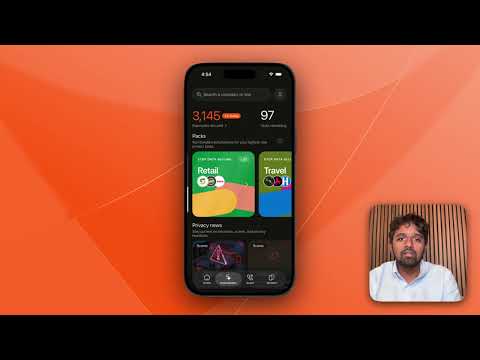
play Take Control of Your Digital Footprint: Introducing Privacy Action Packs!
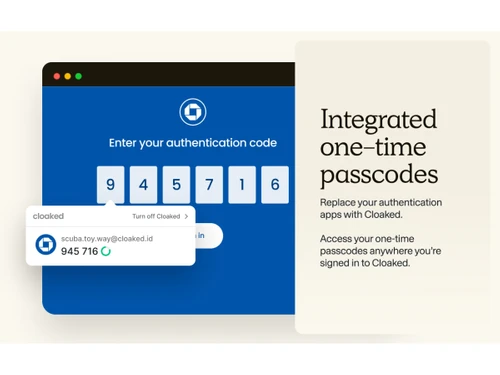
Cloaked-encrypted
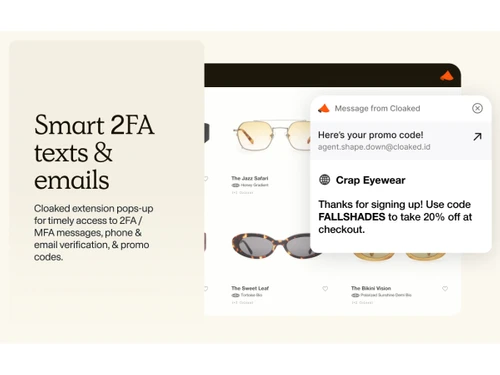
Cloaked-2FA

Cloaked

Brand: Cloaked

  • No Ratings & Reviews

Have you used Cloaked before?

Share your insights for better experience

Add a Review
Starting Price
$15

View plans

100% Genuine
Products
Best Price
Guaranteed
Safe & Secure
Payment
  • Description

  • Pricing

  • Features

  • Specification

  • Review

Starting at $15

Cloaked Software Overview

Cloaked Company Details

Founded Year:  2020

Cloaked provides privacy-focused digital identity and data protection tools for individuals and businesses.

Director/Founders Abhijay Bhatnagar, Arjun Bhatnagar
Company Size 101-500 Employees

Cloaked Pricing & Plans

Individual
Starting at $15
    • Licenses

      Licenses
      Licenses
    • Monthly

      Monthly
      Monthly

Key Features

  • Instant Spam/Scam Call Protection

  • Real-Time Sensitive Data Exposure Alerts

  • Identity Theft Insurance Coverage

  • Smart Password Generation

  • AI-Powered Password Changer

Couple
Starting at $20
    • Licenses

      Licenses
      Licenses
    • Monthly

      Monthly
      Monthly

Key Features

  • Instant Spam/Scam Call Protection

  • Real-Time Sensitive Data Exposure Alerts

  • Identity Theft Insurance Coverage

  • Smart Password Generation

  • AI-Powered Password Changer

Family
Starting at $30
    • Licenses

      Licenses
      Licenses
    • Monthly

      Monthly
      Monthly

Key Features

  • Instant Spam/Scam Call Protection

  • Real-Time Sensitive Data Exposure Alerts

  • Identity Theft Insurance Coverage

  • Smart Password Generation

  • AI-Powered Password Changer

Cloaked Features

  • icon_check Data Privacy
    Protect personal information by managing digital identities, contact details, and online data exposure from one platform.
  • icon_check Identity Protection
    Safeguard personal information and reduce the risk of identity theft through monitoring and privacy protection tools.
  • icon_check Email Masking
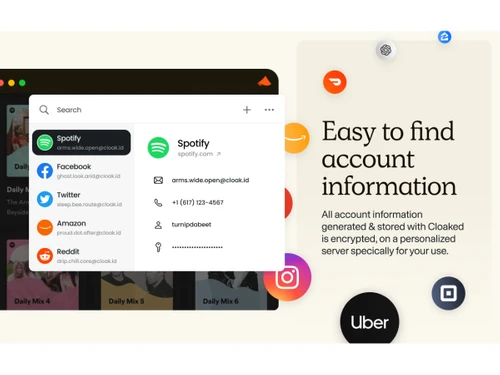
    Create unique email aliases for online services to keep your primary email address private and reduce unwanted messages.
  • icon_check Phone Number Masking
    Use alternative phone numbers to communicate online without exposing your personal phone number to others.
  • icon_check Data Removal
    Request the removal of personal information from data broker websites to reduce your publicly available digital footprint.
  • icon_check Password Management
    Store and manage passwords securely while simplifying access to online accounts across supported devices and browsers.
  • icon_check Password Generation
    Generate strong, unique passwords for online accounts to improve security and reduce the risk of password reuse.
  • icon_check Password Autofill
    Automatically fill saved login credentials on supported websites to simplify sign-ins and reduce manual entry.
  • icon_check Dark Web Monitoring
    Monitor for exposed personal information and receive alerts when monitored data is identified in known dark web sources.
  • icon_check Security Alerts
    Receive notifications about relevant privacy and security events to help you respond to potential risks promptly.
  • icon_check Cross-Platform Access
    Access privacy and identity management tools through supported web browsers, mobile applications, and browser extensions.
  • icon_check Virtual Private Network
    Encrypt supported internet connections through a VPN to help protect browsing traffic on untrusted networks.
  • icon_check Secure Browsing
    Improve online privacy using supported privacy tools that help protect personal information during internet activities.
  • icon_check Data Breach Monitoring
    Receive alerts about potential exposure of monitored personal information in known data breaches and security incidents.
  • icon_check Privacy Monitoring
    Monitor personal information exposure and manage privacy-related alerts to help maintain control over your digital footprint.
  • icon_check Identity Management
    Organize multiple digital identities and their associated contact details to maintain privacy across online services.
Cloaked Demo Video play icon

Get Cloaked Demo

Watch the demo video to explore key features, real workflows, and how the software fits your business needs.

Understand
Key Features
Personal
Demo Insights
Interactive
Demo Support

Cloaked Specifications

Supported Platforms
Windows Windows iOS iOS Android Android MacOS MacOS
Devices
Desktop Desktop Mobile Mobile Tablet Tablet iPad iPad
Deployment
Cloud-Based Cloud-Based Web-Based Web-Based
Suitable For
Basic Office Software ITES E-Commerce Finance Freelancers Corporations
Business Specific
Businessman e-commerce Finance Services
Business Size
Individual Small Business Startups Medium Business Enterprises SMBs SMEs Freelancers
Customer Support
Email
Language
English
Training Resources
Documentation
Compliance Regulation
CCPA CPRA GDPR SOC 2

Cloaked Review

Be the First to Review

This product has no reviews yet. Be the first to leave your feedback.

Add Review

Articles for Cloaked

See All Related Articles

20,000+ Software Listed

Best Price Guranteed

Free Expert Consultation

2M+ Happy Customers

Terms and Condtions

close

Users with registered businesses can purchase goods from merchants on the platform to satisfy their business needs. Users are not permitted to utilize any products acquired through the platform for resale, advertising, business, or further distribution.

For each purchase made, users will receive a Tax Invoice (or 'GST invoice') that includes specific details such as:

  • the GSTIN of the user associated with their registered business, and

  • the specified Entity Name for their business.

It should be noted that not all products are eligible for GST Invoice. Only the products displayed by participating sellers with the 'GST-based Invoice Available' callout on the product description page would qualify.

Certain goods and services are not eligible to get a GST Invoice, including items with VAS, i.e., Value Added Services (e.g., Total Mobile Protection/Assured Buyback) and those involving an exchange offer at the time of purchase.

Users must ensure the accuracy of the GSTIN, and business entity name provided for the GST Invoice. Requests for corrections into GST Invoice would not be accommodated by Techjockey.com or any Seller, and any issues arising from user-provided information are the sole responsibility of users.

Techjockey.com is not liable for the GST Invoice or any associated input tax credit. To efficiently claim an input tax credit, users should select the registered place of business address as per the GST authority's data and follow the provisions of the GST Act and rules.

To claim an input tax credit, the delivery and billing addresses must match. Furthermore, input tax credits will not be granted if the delivery address and GSTIN on the invoice are from different states. In case of incorrect GST details provided during the order placement, the order will be canceled automatically.