linkedin
Cloudcraft logo
play Cloudcraft Live Demo Snippet
Cloudcraft Visualize
Cloudcraft Diagrams

Cloudcraft

Brand: Datadog

  • 4.2

  • 5 Ratings

Cloudcraft enables professionals to design, visualize, and manage AWS and Azure infrastructures with real-time data, cost estimation, and collaborative features.

See More

Have you used Cloudcraft before?

Share your insights for better experience

Add a Review

Price Available on Request

Questions about pricing or customization? We’re here to help, just a click away.

100% Genuine
Products
Best Price
Guaranteed
Safe & Secure
Payment
  • Description

  • Pricing

  • Features

  • Specification

  • Review

  • Compare

  • Alternatives

  • FAQ

Cloudcraft Software Overview

What is Cloudcraft?

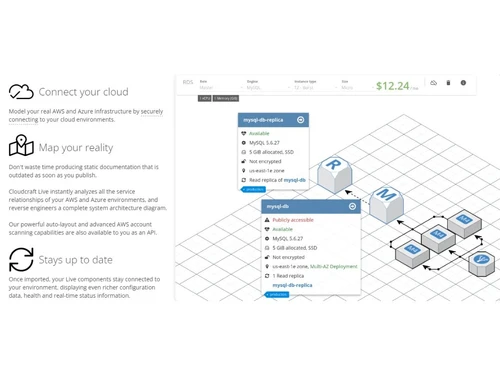
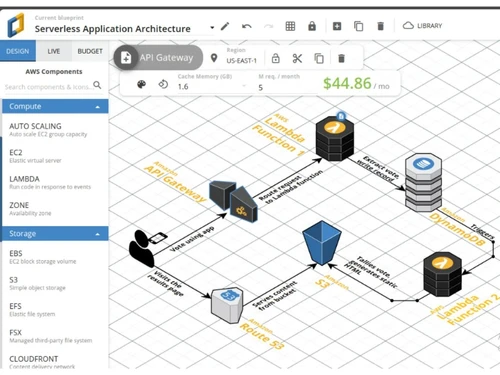
Cloudcraft is a cloud visualization tool designed for professionals managing AWS and Azure infrastructures. It offers an intuitive drag-and-drop interface, allowing users to create detailed 2D and 3D diagrams of their cloud environments.

With features like live scanning, real-time cost estimation, and collaboration tools, Cloudcraft helps teams visualize, plan, and optimize their cloud setups efficiently. It especially useful for documenting existing environments, forecasting budgets, and ensuring up-to-date infrastructure representations.

Why Choose Cloudcraft Cloud Visualization Software?

  • 2D & 3D Diagramming: Create isometric and flat diagrams for versatile presentations.
  • Drag-and-Drop Interface: Easily add AWS and Azure components to your diagrams.
  • Custom Icons Support: Import your own images or use hundreds of ready-made icons.
  • Live Scanning: Automatically generate diagrams from your live AWS or Azure environments.
  • Team Management: Assign roles and permissions to team members.
  • Secure Sharing: Share diagrams securely within your organization.
  • Onboarding Assistance: Use diagrams to expedite engineering onboarding.
  • Audit-Ready Documentation: Generate high-quality documentation for security audits.
  • API Access: Programmatically create and update diagrams using the Cloudcraft API.

Benefits of Cloudcraft Software

  • Export Options: Export diagrams to various formats for presentations and reports.
  • Confluence Plugin: Embed diagrams directly into Confluence pages.
  • SharePoint Integration: Integrate diagrams into SharePoint for easy access.
  • Customizable Views: Define your own visual style for diagrams.
  • Minimal Access Policies: Use strict minimal access policies for AWS roles.
  • No Credential Storage: Cloudcraft does not store user credentials.
  • Data Encryption: All data is encrypted in transit and at rest.
  • Audit Trails: Maintain logs for all user activities for compliance purposes.
  • Secure Payment Processing: Uses Stripe for secure credit card transactions.
  • Vulnerability Scanning: Regularly scans for and addresses security vulnerabilities.
  • Responsible Disclosure: Encourages responsible disclosure of security vulnerabilities.

Cloudcraft Pricing

Cloudcraft price details are available on request at techjockey.com.

The pricing model is based on different parameters, including extra features, deployment type, and the total number of users. For further queries related to the product, you can contact our product team and learn more about the pricing and offers.

Read more

Datadog Company Details

Founded Year:  2010

Datadog offers monitoring and analytics for cloud-based workflows.

Director/Founders Alexis Le-Quoc, Olivier Pomel
Company Size 1-100 Employees

Cloudcraft Pricing & Plans

Pro
Key Features
  • Infinite Grid
  • Live AWS & Azure Sync
  • Unlimited AWS & Azure Accounts
  • Team Collaboration
  • API access

Calculated Price

$ 490 Exclusive of all taxes
    • Licenses

      Licenses
      Licenses
    • Yearly

      Yearly
      Yearly

Key Features

  • Infinite Grid

  • Live AWS & Azure Sync

  • Unlimited AWS & Azure Accounts

  • Team Collaboration

  • API access

Cloudcraft Features

  • icon_check Visualizations
    Create clear, detailed diagrams to visually represent your cloud infrastructure.
  • icon_check System Architecture
    Design and map out the structure and components of your cloud systems.
  • icon_check Configuration Data
    Manage and use your cloud configuration details directly within diagrams.
  • icon_check API
    Access Cloudcraft features programmatically to automate diagram creation and updates.
  • icon_check Documentation
    Generate up-to-date, audit-ready documentation of your cloud environment.
  • icon_check Data Protection
    Ensure security and compliance by safeguarding your cloud infrastructure data.
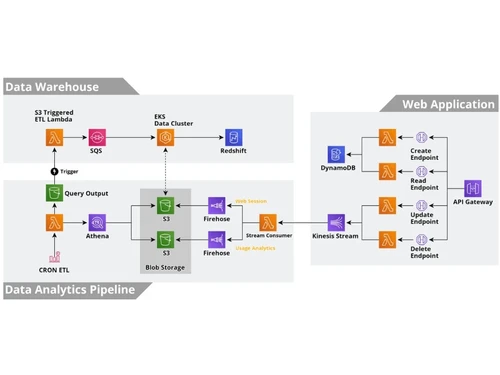
  • icon_check Data Warehouse
    Visualize and organize large-scale data storage solutions in the cloud.
  • icon_check Web Application
    Support for designing and managing cloud-based web applications.
  • icon_check Data Analytics Pipeline
    Plan and visualize the flow of data processing and analysis in your cloud setup.
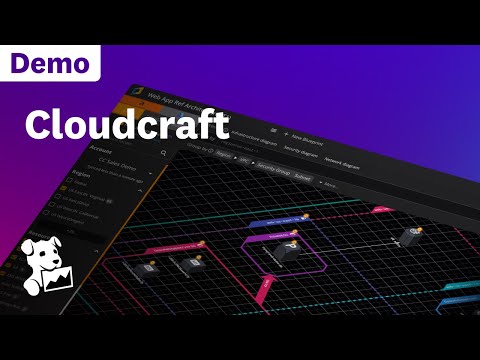
Cloudcraft Demo Video play icon

Get Cloudcraft Demo

Watch the demo video to explore key features, real workflows, and how the software fits your business needs.

Understand
Key Features
Personal
Demo Insights
Interactive
Demo Support

Cloudcraft Specifications

Supported Platforms
Ubuntu Ubuntu Windows Windows MacOS MacOS Linux Linux
Devices
Desktop Desktop Mobile Mobile Tablet Tablet iPad iPad
Deployment
Cloud-Based Cloud-Based
Suitable For
All Industries
Business Specific
All Businesses
Business Size
Small Business Startups Medium Business Enterprises
Customer Support
Email Communities
Language
English
Training Resources
Documentation Videos

Cloudcraft Review

4.2

Out of 5

img

Overall Rating

Based on
5 Verified Ratings

Rating Breakdown

  • Features 4.3
  • Value for Money 4.2
  • Ease of Use 4.5
  • Customer Support 4.1

88% Recommend this Product

Add Review

Be the First to Review

This product has no reviews yet. Be the first to leave your feedback.

Add Review

Compare Cloudcraft With other Cloud Visualization Tools

Products
Ratings
Pricing
Device Supported
Deployment
Supported Platforms
  • img

    Cloudcraft

  • 4.2

  • Price On Request

  • Desktop

    Mobile

  • Web based

    On Premises

  • Windows

    Mac OS

  • img

    Cloudockit

  • 4.7

  • Price On Request

  • Desktop

    Mobile

  • Web based

    On Premises

  • Windows

    Mac OS

  • img

    Hyperglance

  • 4.6

  • Price On Request

  • Desktop

    Mobile

  • Web based

    On Premises

  • Windows

    Mac OS

  • img

    CloudSkew

  • 4.4

  • Price On Request

  • Desktop

    Mobile

  • Web based

    On Premises

  • Windows

    Mac OS

  • img

    Cloudviz

  • 4.4

  • Price On Request

  • Desktop

    Mobile

  • Web based

    On Premises

  • Windows

    Mac OS

  • img

    Kumolus

  • 4.3

  • Price On Request

  • Desktop

    Mobile

  • Web based

    On Premises

  • Windows

    Mac OS

  • img

    Hava

  • 4.7

  • Price On Request

  • Desktop

    Mobile

  • Web based

    On Premises

  • Windows

    Mac OS

  • img

    Lucidscale

  • 4.5

  • Price On Request

  • Desktop

    Mobile

  • Web based

    On Premises

  • Windows

    Mac OS

(0) Product(s) selected

Cloudcraft Alternatives

See All Cloudcraft Alternatives

Starting Price:

$1,500 /Yearly

Starting Price:

$1,458 /Yearly

Starting Price:

$36 /Yearly

Starting Price:

$10 /Monthly

Available

Price on Request

Hava

4.7

Starting Price:

$59 /Month

Starting Price:

$2,000 /Monthly

How much does Cloudcraft Software cost?

Cloudcraft pricing details can be obtained upon request at techjockey.com.

Is there a mobile app available for Cloudcraft Cloud Visualization Software?

No, Cloudcraft currently does not offer a dedicated mobile app.

Which operating systems are compatible with Cloudcraft Software?

Cloudcraft Cloud Visualization software is web-based and compatible with Ubuntu, Windows, MacOS and Linux operating systems via a browser.

Does Cloudcraft Software offer a free trial?

Yes, Cloudcraft provides a free tier that acts as a trial with limited features.

How does Cloudcraft Cloud Visualization Software function?

Cloudcraft allows users to design, visualize, and manage cloud infrastructure diagrams using drag-and-drop and live scanning.

Who uses Cloudcraft Software?

Cloud architects, DevOps teams, and cloud engineers primarily use Cloudcraft.

Is a free demo available for Cloudcraft Software?

Yes, you can request a free demo or start with the free tier online.

Is Cloudcraft Software available for free?

Yes, Cloudcraft Cloud Visualization Tool offers a free tier with basic functionality.

Can Cloudcraft integrate with AWS and Azure?

Yes, Cloudcraft integrates seamlessly with both AWS and Azure environments.

Does Cloudcraft support team collaboration?

Yes, Cloudcraft offers real-time collaboration features for teams.

Can I export diagrams from Cloudcraft Cloud Visualization Tool?

Yes, diagrams can be exported in various formats like PNG, SVG, and PDF.

20,000+ Software Listed

Best Price Guranteed

Free Expert Consultation

2M+ Happy Customers

Terms and Condtions

close

Users with registered businesses can purchase goods from merchants on the platform to satisfy their business needs. Users are not permitted to utilize any products acquired through the platform for resale, advertising, business, or further distribution.

For each purchase made, users will receive a Tax Invoice (or 'GST invoice') that includes specific details such as:

  • the GSTIN of the user associated with their registered business, and

  • the specified Entity Name for their business.

It should be noted that not all products are eligible for GST Invoice. Only the products displayed by participating sellers with the 'GST-based Invoice Available' callout on the product description page would qualify.

Certain goods and services are not eligible to get a GST Invoice, including items with VAS, i.e., Value Added Services (e.g., Total Mobile Protection/Assured Buyback) and those involving an exchange offer at the time of purchase.

Users must ensure the accuracy of the GSTIN, and business entity name provided for the GST Invoice. Requests for corrections into GST Invoice would not be accommodated by Techjockey.com or any Seller, and any issues arising from user-provided information are the sole responsibility of users.

Techjockey.com is not liable for the GST Invoice or any associated input tax credit. To efficiently claim an input tax credit, users should select the registered place of business address as per the GST authority's data and follow the provisions of the GST Act and rules.

To claim an input tax credit, the delivery and billing addresses must match. Furthermore, input tax credits will not be granted if the delivery address and GSTIN on the invoice are from different states. In case of incorrect GST details provided during the order placement, the order will be canceled automatically.