linkedin

Get Free Advice

Get Quote

Console logo
Gallery Introducing: Console Assistant
Console Console-service desk Console-inbox Console-benefits
play Introducing: Console Assistant
Console
Console-service desk
Console-inbox
Console-benefits

Console

Brand : Console Inc

Price On Request

Save Extra with 2 Offers

  • offer_icon Save upto 18%, Get GST Invoice on your business purchase |
  • offer_icon Buy Now & Pay Later, Check offer on payment page.

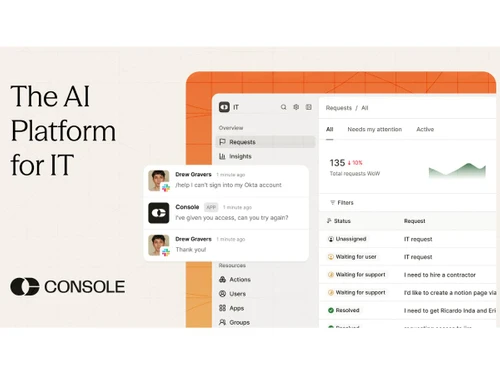
Console automates internal support tasks like tickets, access requests, and IT helpdesk workflows within tools like Slack and Microsoft Teams. ...Read more

  • AdviceGet Instant Expert
    Advice
  • PaymentSafe & Secure
    Payment
  • GuaranteedAssured Best Price
    Guaranteed

Console Software Pricing, Features & Reviews

What is Console?

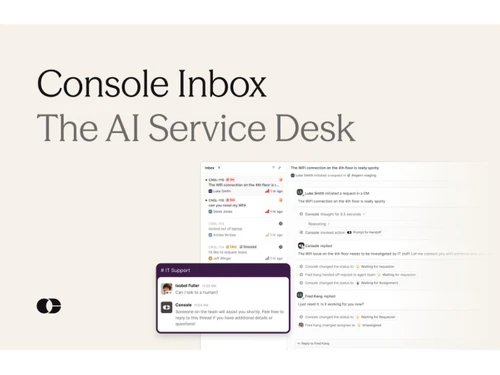
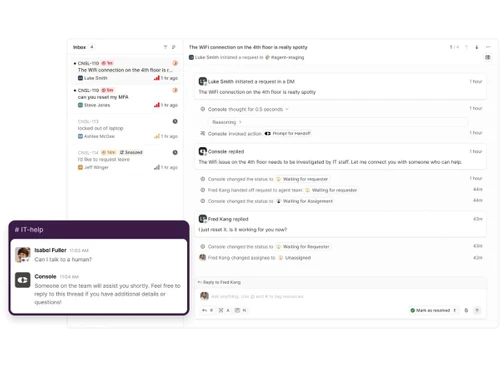
Console AI Agent is an AI-powered IT support and service management platform that helps organizations automate routine IT tasks and employee requests. It works as a frontline assistant for IT teams and can handle support requests directly through tools like Slack. The platform understands company-specific policies, processes, users, devices, and applications. It automates repetitive tasks such as password resets, access requests, ticket routing, and onboarding activities.

Console uses AI agents to complete workflows instead of just answering questions. It helps reduce manual work for IT teams and improves response times. The platform allows organizations to define workflows and processes using natural-language playbooks. It also provides visibility into IT operations and service requests. Console is designed to increase productivity and streamline internal support processes. Its goal is to help IT teams focus on higher-value work while AI handles routine tasks.

Why Choose Console Software?

  • AI-Powered Automation: Automates IT support tasks using artificial intelligence.
  • Faster Ticket Resolution: Reduces response and resolution time for user requests.
  • Slack & Teams Integration: Works directly within collaboration tools employees already use.
  • Self-Service Support: Enables users to solve common issues without IT intervention.
  • Reduced IT Workload: Minimizes repetitive manual tasks for IT teams.
  • Smart Ticket Routing: Automatically assigns issues to the right support agents.
  • Natural Language Processing: Users can raise requests in simple everyday language.
  • 24/7 Support Capability: Provides round-the-clock automated assistance.
  • Workflow Automation: Streamlines approvals, onboarding, and service requests.
  • Improved Productivity: Helps employees focus on important work instead of IT delays.
  • Easy Integration: Connects with existing business tools and systems.
  • Scalable Solution: Supports growing organizations without extra complexity.
  • Better User Experience: Simplifies how employees interact with IT support.

Benefits of Console Software

  • Cost Efficiency: Reduces operational costs by automating support processes.
  • Real-Time Updates: Keeps users informed about ticket status instantly.
  • Secure Operations: Maintains security standards for IT service workflows.
  • Customizable Workflows: Allows businesses to adapt processes as needed.
  • Knowledge Base Access: Provides instant answers from stored company knowledge.
  • Faster Onboarding: Automates employee setup and access provisioning.
  • Improved IT Performance: Enhances overall efficiency and service quality of IT teams.

Console Pricing

Console price details are available on request at techjockey.com.

The pricing model is based on different parameters, including extra features, deployment type, and the total number of users. For further queries related to the product, you can contact our product team and learn more about the pricing and offers.

Console Pricing & Plans

Looking for pricing details or customization options?
Share your requirements and receive a tailored quote

  • Share your business specific requirements
  • Get pricing customised to your business needs
  • Explore feature-level customization options

Price Available on Request

Get a customized quotation based on your needs.
Our team will respond within 24 hours.

Get Console Demo

We make it happen! Get your hands on the best solution based on your needs.

Interacted

Console Features

Core Functionality

  • icon_check Natural Language Processing (NLP) Ability to understand and generate human language
  • icon_check Autonomous Task Management Executes tasks independently, including scheduling and prioritization.
  • icon_check Reasoning and Decision-Making Evaluates information to make informed decisions autonomously.

Learning and Adaptation

  • icon_check Machine Learning Employs algorithms to learn from data and improve performance over time.
  • icon_check Contextual Memory Maintains short-term memory to manage context within interactions.
  • icon_check Deep Learning Utilizes neural networks to model complex patterns in data.
  • icon_check Supervised and Reinforcement Learning Learns from labeled data and through feedback mechanisms to optimize actions.
  • icon_check Long-Term Learning Develops long-term memory to adapt to user preferences and behaviors over time.

Interaction Capabilities

  • icon_check Behavior Customization Adjusts interaction style based on user preferences.
  • icon_check User Profiling Builds profiles based on user data to personalize interactions.
  • icon_check Multimodal Interaction Engages through multiple channels, including text, voice, and visual inputs.
  • icon_check Sentiment Analysis Detects and interprets user emotions from input data.
  • icon_check Empathetic Responses Generates responses that align with detected user emotions to enhance engagement.
  • icon_check Multi-Agent Collaboration Enables multiple GPT agents to work together, enhancing efficiency and effectiveness in handling complex projects.

Integration Capabilities

  • icon_check Third Party Integrations Incorporates services from external providers to enhance functionality.
  • icon_check API Connectivity Interfaces with external systems through Application Programming Interfaces.
  • icon_check Enterprise Software Integration Seamlessly connects with business applications like CRM and ERP systems.
  • icon_check Data Analytics Integration Integrates with analytics tools to process and interpret data.
  • icon_check IoT Integration Connects with Internet of Things devices for expanded interaction capabilities.

Performance and Scalability

  • icon_check Real-Time Processing Handles tasks and responses instantaneously to ensure prompt interaction.
  • icon_check Dynamic Scaling Adjusts resource allocation based on demand to ensure scalability.
  • icon_check Offline Functionality Operates without internet connectivity, maintaining essential features.
  • icon_check Database Querying Accesses and retrieves information from databases efficiently.
  • icon_check Load Balancing Distributes workloads evenly across resources to maintain performance.

Advanced Features

  • icon_check Workflow Automation Automates complex business processes to enhance efficiency.
  • icon_check Autonomous Problem Solving Identifies issues and implements solutions without human intervention.
  • icon_check Complex Scenario Handling Manages intricate situations requiring advanced decision-making capabilities.
  • icon_check Knowledge Graphs Utilizes interconnected data to enhance understanding and reasoning.
  • icon_check Simulation and Forecasting Predicts future trends and outcomes based on current data.

Security and Compliance

  • icon_check Audit Trail Track changes and updates within the system for enhanced security and transparency.
  • icon_check Encryption Secures data through encryption during transmission and storage.
  • icon_check Data Privacy Ensures user data is protected and handled responsibly.
  • icon_check Role-Based Access Control (RBAC) Restricts system access based on user roles to enhance security.
  • icon_check Regulatory Adherence Complies with laws and regulations relevant to data and operations.
  • icon_check Bias Mitigation Implements strategies to identify and reduce biases in decision-making processes.

Analytics and Reporting

  • icon_check Performance Metrics Tracks key performance indicators to assess effectiveness.
  • icon_check Workflow Insights Provides analysis of operational workflows to identify efficiencies and bottlenecks.
  • icon_check Error Reporting Identifies and reports system errors for prompt resolution.
  • icon_check Feedback Collection Gathers user feedback to inform improvements.
  • icon_check Custom Reporting Generates tailored reports to meet specific analytical needs.
  • icon_check Interaction Insights Analyzes user interactions to enhance engagement strategies.
  • icon_check Predictive Analytics Forecasts future trends based on historical data.

Maintenance and Support

  • icon_check Self Monitoring Continuously assesses system health to detect and address issues proactively.
  • icon_check User Feedback Loop Incorporates user feedback into development cycles for continuous improvement.
  • icon_check Iterative Updates Implements regular updates to enhance functionality and security.
  • icon_check Diagnostics and Debugging Provides tools for identifying and

Console Specifications

  • Supported Platforms :
  • Device:
  • Deployment :
  • Suitable For :
  • Business Specific:
  • Business Size:
  • Customer Support:
  • Integration:
  • Training:
  • Language:
  • AI Features:
  • Technology:
  • Compliance Regulation:
  • Integration Supported:
  • Ubuntu Windows MacOS Linux
  • Desktop
  • Web-Based
  • All Industries
  • All Businesses
  • Small Business, Startups, Medium Business, Enterprises, SMBs, SMEs, MSMEs
  • Phone, Email, Live Chat
  • API Integration
  • Live Online, Webinars, Documentation, Videos
  • English
  • AI Integrated
  • Next Generation
  • HIPAA, CCPA, CPRA, ECPA
  • More Than 100 Integrations

Console Reviews and Ratings

banner

Would you like to review this product?

Submit Reviews

Console Inc Company Details

Brand Name Console Inc
Information Console is the AI platform for IT, built to help teams automate support and shift from doing the work to managing the system that does it.
Founded Year 2024
Director/Founders Andrei Serban, Neal Chandra
Company Size 1-100 Employees

Console FAQ

A Console pricing details are available on request at techjockey.com.
A No, the Console mobile app is not available.
A Console is cloud-based and works on Ubuntu, Windows, MacOS and Linux.
A Yes, Console offers a free trial to help organizations evaluate the platform.
A Console uses AI agents to automate IT support tasks, service requests, workflows, and employee support processes.
A Console is used by IT teams, internal support teams, and organizations looking to automate IT operations and employee services.
A Yes, Console provides the option to book a demo through its website.
A No, Console is a commercial software platform, though it offers a free trial for evaluation.

Console Alternatives

See All
Why Choose Techjockey?

Software icon representing 20,000+ Software Listed 20,000+ Software Listed

Price tag icon for best price guarantee Best Price Guaranteed

Expert consultation icon Free Expert Consultation

Happy customer icon representing 2 million+ customers 2M+ Happy Customers