USA
USA UAE
UAESmall Business
Designed for startups and growing businesses
See More




Brand: Dynatrace
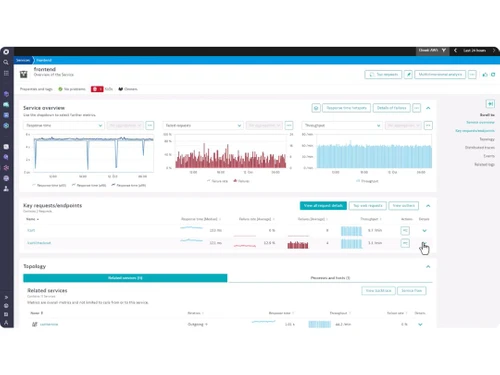
Dynatrace is a unified platform for observability and security, designed to simplify cloud complexity. It helps enterprises manage their in-house apps and cloud-native workloads. It can be used for enhanced collaboration, end-to-end hybrid cloud distribution tracing, service performance optimization etc. Intelligent observability module within the solution facilitates on-time access to vulnerabil...
See MoreHave you used Dynatrace before?
Share your insights for better experience
Brand: Dynatrace
Founded Year: 2005
Software intelligence to help DevSecOps teams across every industry tame cloud complexity and accelerate digital transformation
Looking for The Right Pricing?
Share your requirements and get a plan built around your business.
Price Available on Request
Get personalised Dynatrace pricing that fits your needs. Our team will connect with you.
 Performance Management Multi User Access Analytics & Reporting Distributed Monitoring Fault Management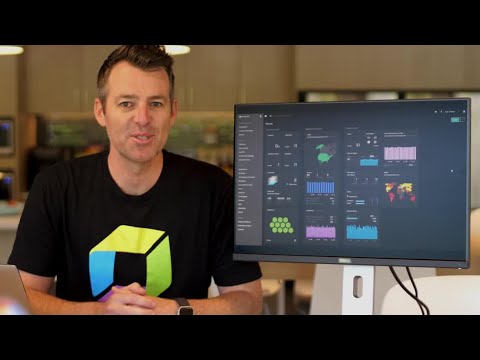

Watch the demo video to explore key features, real workflows, and how the software fits your business needs.
 Windows
  Desktop
  Cloud-Based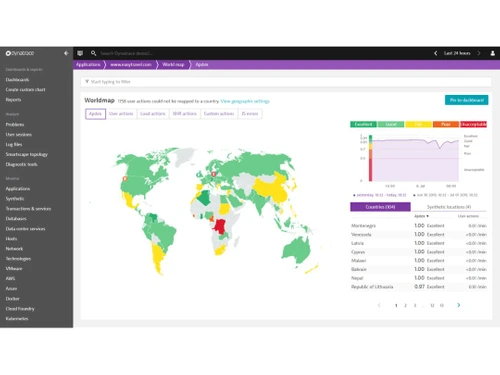
Small Business
Designed for startups and growing businesses
Medium Business
Built for business growth and flexibility
Enterprises
Designed for complex and large-scale business needs
4.1
Out of 5

Overall Rating
Based on
2 Verified Reviews
Rating Breakdown
85% Recommend this Product
Add Review

Nov 1, 2023
Techjockey Verified
“A Powerful Monitoring Tool with Some Caveats”
Pros
Live Alerts and Synthetic Monitoring: Dynatrace excels in delivering live alerts and synthetic monitoring for online or cloud-based applications. Predictive Data Analysis: The software provides sophisticated predictive data analysis, aiding in proactive issue resolution. User-Friendly Interface: The platform is remarkably simple to use, especially appreciated by DevOps enthusiasts. Davis AI Engine: The inclusion of the Davis AI Engine with software intelligence reduces daily monitoring responsibilities, offering all-in-one location tracking. Support for Modern Approaches: Dynatrace supports current software engineering approaches such as NoOps, GitOps, SRE, and others, providing versatility for various workflows.
Cons
Alert Monitoring Thresholds: The alert monitoring threshold can be a drawback, leading to multiple false signals during application testing. Synthetic Monitoring Limitations: Smaller organizations may face limitations in using synthetic monitoring due to encryption issues. Complexity for Beginners: The tool's extensive range of features can be overwhelming for novices, requiring an experienced user during the initial phase.

Dynatrace
Price On Request
Desktop
Mobile
Web based
On Premises
Windows
Mac OS

Oracle Application Performance Monitoring
Price On Request
Desktop
Mobile
Web based
On Premises
Windows
Mac OS

Datadog APM
Price On Request
Desktop
Mobile
Web based
On Premises
Windows
Mac OS

Scouter APM
Price On Request
Desktop
Mobile
Web based
On Premises
Windows
Mac OS

Firebase Crashlytics
Price On Request
Desktop
Mobile
Web based
On Premises
Windows
Mac OS

Coroot
Price On Request
Desktop
Mobile
Web based
On Premises
Windows
Mac OS

Highlight
Price On Request
Desktop
Mobile
Web based
On Premises
Windows
Mac OS

Foglight
Price On Request
Desktop
Mobile
Web based
On Premises
Windows
Mac OS

BugSnag
Price On Request
Desktop
Mobile
Web based
On Premises
Windows
Mac OS

Sauce Labs
Price On Request
Desktop
Mobile
Web based
On Premises
Windows
Mac OS

Netdata
Price On Request
Desktop
Mobile
Web based
On Premises
Windows
Mac OS
(0) Product(s) selected
Starting Price:
$31 /Month
Available
Price on Request
Starting Price:
$50 /Month
Starting Price:
$120 /Month
Starting Price:
$19 /Month

Available
Price on Request

Available
Price on Request

Available
Price on Request

Starting Price:
$100 /Month
Available
Price on Request
Available
Price on Request
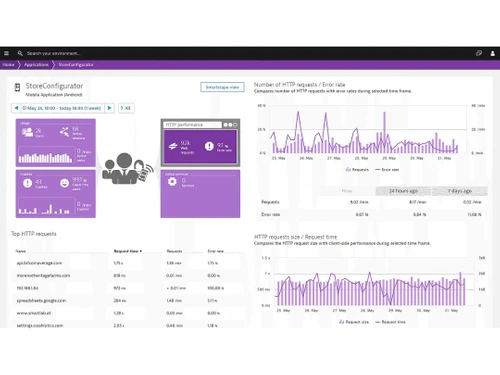
OneAgent module of the portal injects a JavaScript tag in the HTML of an individual application page. Organizational agents can use these tags to monitor the performance and response time experienced by individual app users with their web browsers or mobile.
The software is used for monitoring applications in a comprehensive manner. From multi-cloud to hybrid environments, it is capable of covering them all, detecting out blind spots, etc. Organizations get access to real-user data and resolve customer complaints in real-time.
Yes, an online demo of Dynatrace Application Performance Monitoring is available on request. Our in-house professional experts will reach out to you for further assistance.
The database management solution ensures application security with features like impact analysis, detection of run-time vulnerability and DevSecOps automation.
No, Dynatrace Application Performance Monitoring is not available as a mobile app as of now
Yes, the application lifecycle management software is available in multiple global languages like Italian, Chinese, Russian, Spanish, German, French and more offering robust support.
20,000+ Software Listed
Best Price Guranteed
Free Expert Consultation
2M+ Happy Customers
Terms and Condtions

Users with registered businesses can purchase goods from merchants on the platform to satisfy their business needs. Users are not permitted to utilize any products acquired through the platform for resale, advertising, business, or further distribution.
For each purchase made, users will receive a Tax Invoice (or 'GST invoice') that includes specific details such as:
the GSTIN of the user associated with their registered business, and
the specified Entity Name for their business.
It should be noted that not all products are eligible for GST Invoice. Only the products displayed by participating sellers with the 'GST-based Invoice Available' callout on the product description page would qualify.
Certain goods and services are not eligible to get a GST Invoice, including items with VAS, i.e., Value Added Services (e.g., Total Mobile Protection/Assured Buyback) and those involving an exchange offer at the time of purchase.
Users must ensure the accuracy of the GSTIN, and business entity name provided for the GST Invoice. Requests for corrections into GST Invoice would not be accommodated by Techjockey.com or any Seller, and any issues arising from user-provided information are the sole responsibility of users.
Techjockey.com is not liable for the GST Invoice or any associated input tax credit. To efficiently claim an input tax credit, users should select the registered place of business address as per the GST authority's data and follow the provisions of the GST Act and rules.
To claim an input tax credit, the delivery and billing addresses must match. Furthermore, input tax credits will not be granted if the delivery address and GSTIN on the invoice are from different states. In case of incorrect GST details provided during the order placement, the order will be canceled automatically.