
linkedin
Flywheel logo
play What is Flywheel?
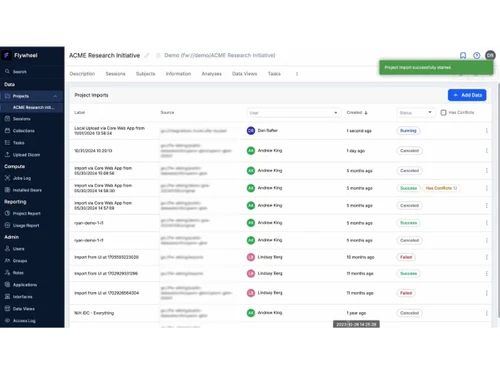
Flywheel-projects
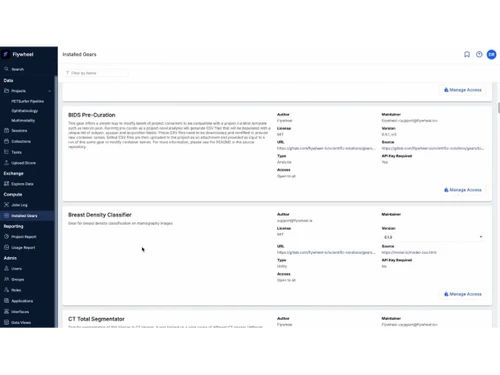
Flywheel-gears

Flywheel

Brand: Flywheel

  • No Ratings & Reviews

Flywheel is a medical imaging data management platform for research and AI development. This cloud-based healthcare software aggregates, curates, and analyzes medical imaging data.

See More

Have you used Flywheel before?

Share your insights for better experience

Add a Review

Price Available on Request

Questions about pricing or customization? We’re here to help, just a click away.

100% Genuine
Products
Best Price
Guaranteed
Safe & Secure
Payment
  • Description

  • Pricing

  • Features

  • Specification

  • Review

  • FAQ

Flywheel Software Overview

What is Flywheel Software?

Flywheel works as a cloud-based healthcare platform for handling medical imaging data. It brings scattered datasets into one connected and manageable space. Researchers and healthcare teams use it to keep their work organized. This medical imaging software reduces the confusion that often comes with large imaging collections.

Workflows appear more structured and easier to follow across projects. It assists researchers and AI developers in managing data, automating workflows, and building imaging algorithms. This platform also supports teams working across different locations without data conflicts.

Developers may use it to prepare reliable datasets for AI models. It includes a DICOM viewer with AI-enabled segmentation. It keeps information consistent throughout long research cycles and creates a steady base for studies, testing, and data-driven progress.

Why Choose Flywheel Software?

  • Unified Data Space: All imaging data appears within one connected system. Workflows feel easier to follow across projects.
  • Research Flow Clarity: Project stages appear in a clear and structured manner. Teams can avoid confusion during ongoing studies.
  • Cross-Team Access: Teams across locations share data without friction. Coordination improves across distributed research groups.
  • Consistent Data Handling: Data appears uniform across different stages of processing. Research outcomes gain better reliability.
  • Structured Workflow Paths: Each step follows a clear and predictable path. Project tracking feels more controlled and steady.
  • Scalable Data Setup: Large datasets fit smoothly within the system structure. Growth comes about without breaking existing processes.
  • Clean Project Organization: Projects stay arranged within logical data groupings. Navigation feels simple during everyday work.
  • Reliable Research Base: Data forms a strong base for ongoing analysis. Studies move forward with better confidence.

Benefits of Flywheel Software

  • Automated Task Handling: Routine data processes run through predefined automation layers. Time pressure reduces during repeated technical operations.
  • Faster Data Preparation: Datasets move quickly from raw input toward usable formats. Research timelines shorten across multiple project phases.
  • Reduced Manual Effort: Repetitive actions decrease through automated data handling layers. Teams may focus more on meaningful research tasks.
  • Multi-Site Study Support: Data from different locations connect within shared environments. Large studies progress without location-based delays.
  • Pipeline Execution Ease: Complex processing pipelines run through guided configurations. Execution steps appear manageable during heavy workloads.
  • AI-Ready Data Setup: Preparation of data aligns perfectly with machine learning requirements. Model development starts with cleaner, structured inputs.
  • Secure Data Sharing: Data exchange follows controlled and protected access layers. Collaboration takes place without unnecessary exposure risks.

Flywheel Software Pricing

Flywheel Software price is available on request at Techjockey

The pricing model is based on different parameters, including extra features, deployment type, and the total number of users. For further queries related to the product, you can contact our product team and learn more about the pricing and offers.

Read more

Flywheel Company Details

Founded Year:  2012

Flywheel.io is a data management and analysis platform built specifically for scientists and the researcher's workflow.

Director/Founders Brian Wandell, Gunnar Schaefer, Troy Kopischke
Company Size 1-100 Employees

Flywheel Pricing & Plans

Looking for The Right Pricing?

Share your requirements and get a plan built around your business.

  • Define your business needs
  • Get customised pricing
  • Choose features that fit your workflow

Price Available on Request

Get personalised Flywheel pricing that fits your needs. Our team will connect with you.

Flywheel Features

  • icon_check Data Management
    Centralizes medical imaging and research data with structured organization, metadata tagging, and lifecycle control.
  • icon_check Workflow Automation
    Automates repetitive processing tasks, reducing manual effort and ensuring consistent data handling across projects.
  • icon_check Cloud Storage
    Provides secure, scalable cloud storage optimized for large imaging datasets and research workflows.
  • icon_check AI/ML Integration
    Supports development and deployment of machine learning models directly within the imaging data ecosystem.
  • icon_check Collaboration Tools
    Enables teams to securely share datasets, annotations, and insights across institutions and research groups.
  • icon_check Data Annotation
    Offers tools for labeling and annotating imaging datasets to support AI training and clinical research analysis.
  • icon_check Pipeline Orchestration
    Manages automated processing pipelines with scheduling, monitoring, and reproducible execution capabilities.
  • icon_check API Integration
    Provides robust APIs for integrating external tools, custom applications, and automated workflows seamlessly.
  • icon_check Compliance Management
    Ensures regulatory compliance with HIPAA-ready infrastructure, access controls, and audit tracking features.
  • icon_check Access Control
    Implements role-based permissions to restrict or grant data access based on user roles and responsibilities.
  • icon_check Metadata Management
    Captures and organizes metadata automatically to enhance searchability, analysis readiness, and governance.
  • icon_check Data Import/Export
    Supports ingestion from scanners, PACS, and external sources with flexible export options for analysis tools.
  • icon_check Audit Logs
    Tracks user actions and system activities to maintain transparency, traceability, and compliance requirements.
  • icon_check Visualization
    Provides imaging visualization capabilities for reviewing scans, datasets, and processing outputs.
  • icon_check Version Control
    Maintains version history of datasets and workflows, ensuring reproducibility and data integrity over time.
  • icon_check Scalability
    Handles growing research demands with elastic compute and storage resources without infrastructure management.
  • icon_check Reporting & Analytics
    Generates insights into project performance, data usage, and workflow efficiency with reporting tools.
  • icon_check Security & Encryption
    Protects sensitive healthcare data using encryption, secure authentication, and enterprise-grade safeguards.
Flywheel Demo Video play icon

Get Flywheel Demo

Watch the demo video to explore key features, real workflows, and how the software fits your business needs.

Understand
Key Features
Personal
Demo Insights
Interactive
Demo Support

Flywheel Specifications

Supported Platforms
Windows Windows MacOS MacOS Linux Linux
Devices
Desktop Desktop
Deployment
Cloud-Based Cloud-Based
Suitable For
Healthcare
Business Specific
Hospitals
Business Size
Small Business Medium Business Enterprises
Customer Support
Email Communities
Language
English
Training Resources
Videos
AI Features
AI Integrated

Flywheel Review

Be the First to Review

This product has no reviews yet. Be the first to leave your feedback.

Add Review

How much does Flywheel Software cost?

The software price is available on request at techjockey.com. The final cost depends on finalized features, deployment type, and number of users.

Who uses Flywheel Software?

Flywheel is commonly used by researchers, healthcare professionals, and medical device developers. Teams working with imaging data may also use it regularly.

Is there a mobile app available for Flywheel Software?

Yes, a mobile application is available for Flywheel users. It helps manage imaging data and supports collaboration on research tasks.

Which operating systems are compatible with Flywheel Software?

It supports Windows, macOS, and Linux systems. Users can access it through compatible environments easily.

Does Flywheel Software offer a free trial?

Yes, a free trial is available for new users. It allows initial exploration prior to full usage.

How does Flywheel Software function?

Flywheel collects, organizes, and processes medical imaging data within a cloud platform. It also supports automation and prepares data for AI and research workflows.

20,000+ Software Listed

Best Price Guranteed

Free Expert Consultation

2M+ Happy Customers

Terms and Condtions

close

Users with registered businesses can purchase goods from merchants on the platform to satisfy their business needs. Users are not permitted to utilize any products acquired through the platform for resale, advertising, business, or further distribution.

For each purchase made, users will receive a Tax Invoice (or 'GST invoice') that includes specific details such as:

  • the GSTIN of the user associated with their registered business, and

  • the specified Entity Name for their business.

It should be noted that not all products are eligible for GST Invoice. Only the products displayed by participating sellers with the 'GST-based Invoice Available' callout on the product description page would qualify.

Certain goods and services are not eligible to get a GST Invoice, including items with VAS, i.e., Value Added Services (e.g., Total Mobile Protection/Assured Buyback) and those involving an exchange offer at the time of purchase.

Users must ensure the accuracy of the GSTIN, and business entity name provided for the GST Invoice. Requests for corrections into GST Invoice would not be accommodated by Techjockey.com or any Seller, and any issues arising from user-provided information are the sole responsibility of users.

Techjockey.com is not liable for the GST Invoice or any associated input tax credit. To efficiently claim an input tax credit, users should select the registered place of business address as per the GST authority's data and follow the provisions of the GST Act and rules.

To claim an input tax credit, the delivery and billing addresses must match. Furthermore, input tax credits will not be granted if the delivery address and GSTIN on the invoice are from different states. In case of incorrect GST details provided during the order placement, the order will be canceled automatically.