linkedin
FreeTTS logo
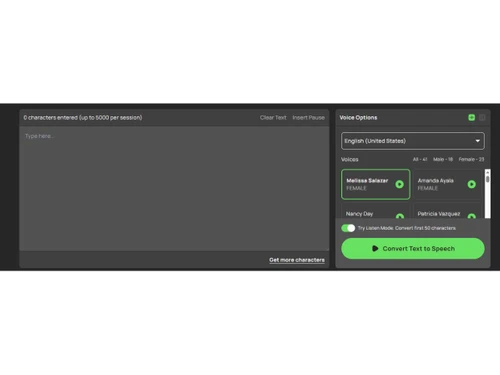
freetts-interface
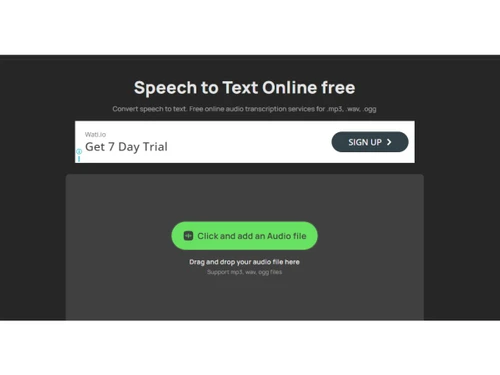
freetts-text
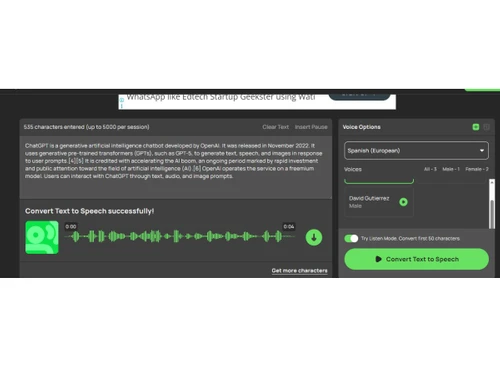
freetts-dialogue

FreeTTS

Brand: FreeTTS

  • No Ratings & Reviews

FreeTTS is an AI text-to-speech tool that converts written text into natural-sounding voice audio in multiple languages and styles.

See More

Have you used FreeTTS before?

Share your insights for better experience

Add a Review
Starting Price
$10

View plans

100% Genuine
Products
Best Price
Guaranteed
Safe & Secure
Payment
  • Description

  • Pricing

  • Features

  • Specification

  • Review

  • FAQ

Starting at $10

FreeTTS Software Overview

What is FreeTTS?

FreeTTS is an AI-powered text-to-speech tool that converts written text into natural-sounding audio voices online. It helps users create voiceovers, audiobooks, podcasts, presentations, and accessible content without recording their own voice.

The platform supports many languages, accents, and voice styles for different types of content. Users simply enter text, choose a voice, and generate downloadable audio files in seconds. FreeTTS also offers speech-to-text conversion, voice enhancement, vocal remover, audio cutting, joining, and format conversion tools. The software works directly in the browser, so no installation is needed.

It is designed for content creators, students, businesses, developers, and educators who need quick and simple audio generation. FreeTTS uses AI and neural voice technology to make speech sound more realistic and human-like. It also supports API access and batch processing for developers and advanced users. The platform is popular because of its easy interface, free tools, and fast audio processing features.

Why Choose FreeTTS Software?

  • Natural AI Voices: Generates realistic and human-like voice output.
  • Multiple Language Support: Supports many languages and accents.
  • Easy To Use: Simple interface for quick audio creation.
  • Online Accessibility: Works directly from a web browser.
  • No Installation Needed: No software download or setup required.
  • Fast Audio Generation: Converts text into speech within seconds.
  • Voiceover Creation: Helps create professional voiceovers easily.
  • Audiobook Support: Useful for making audiobook narration.
  • Podcast Assistance: Helps users create podcast audio content.
  • Speech-To-Text Feature: Converts spoken audio into written text.
  • Audio Editing Tools: Includes trimming and merging features.
  • Voice Enhancement: Improves voice clarity and sound quality.
  • Time Saving Tool: Reduces manual voice recording effort.
  • Content Creator Friendly: Useful for YouTubers and marketers.
  • Educational Use: Helps students and teachers create learning audio.

Benefits of FreeTTS Software

  • Accessibility Improvement: Supports users with reading difficulties.
  • Custom Voice Styles: Offers different speaking tones and styles.
  • Simple Text Input: Easy copy-and-paste text functionality.
  • Cloud-Based Processing: Provides fast online AI processing.
  • Beginner Friendly: No technical knowledge is required.
  • Business Audio Creation: Helps create customer audio messages.
  • Social Media Support: Useful for social media content creation.
  • Downloadable Audio Files: Allows quick audio file downloads.
  • Multi-Format Support: Supports various audio output formats.
  • All-In-One Audio Tools: Includes multiple AI audio utilities.
  • Mobile Compatible: Accessible on desktop and mobile devices.
  • eLearning Support: Useful for training and online courses.
  • Free Usage Options: Offers free tools for basic users.
  • Automation Features: Simplifies automated voice content creation.

FreeTTS Pricing

FreeTTS price starts at USD 10 at techjockey.com.

The pricing model is based on different parameters, including extra features, deployment type, and the total number of users. For further queries related to the product, you can contact our product team and learn more about the pricing and offers.

Read more

FreeTTS Pricing & Plans

Starter
Starting at $10
    • Licenses

      Licenses
      Licenses
    • Monthly

      Monthly
      Monthly

Key Features

  • 460,000 chars / month

  • up to 5000 chars per convert

  • All advanced human voices

  • All languages included

  • 15 audios conversion per time

Premium
Starting at $20
    • Licenses

      Licenses
      Licenses
    • Monthly

      Monthly
      Monthly

Key Features

  • 950,000 chars / month

  • up to 5000 chars per convert

  • All advanced human voices

  • All languages included

  • 50 audios conversion per time

FreeTTS Features

  • icon_check SSML Implementation
    Supports Speech Synthesis Markup Language to manage the pitch, volume, and rate of the generated voice via standard XML tags.
  • icon_check Multi-Language Support
    Provides phonetic processing for a wide variety of global languages to ensure accurate regional pronunciation and dialect.
  • icon_check Audio Format Export
    Allows the conversion of synthesized or edited audio streams into standard digital file types such as MP3, WAV, or OGG files.
  • icon_check Batch Processing
    Enables the simultaneous conversion of multiple data sets or audio files to streamline high-volume computational workflows.
  • icon_check Voice Pitch Modulation
    Provides technical controls to adjust the fundamental frequency of the synthetic voice output to meet specific audio needs.
  • icon_check Playback Speed Control
    Adjusts the temporal rate of the speech output, allowing users to accelerate or decelerate the audio without pitch shifting.
  • icon_check Multi Track Merging
    Facilitates the sequential joining of separate audio files into a single continuous stream without losing data or quality.
  • icon_check Vocal Track Isolation
    Uses algorithmic separation to remove vocal frequencies from a composite audio signal, leaving only instrumental components.
  • icon_check Noise Reduction
    Applies digital filters to identify and attenuate background interference and static within an uploaded audio file sequence.
  • icon_check Cloud Synchronization
    Provides a secure interface for importing and exporting files directly from distributed network storage environments online.
  • icon_check Browser Based Interface
    Operates entirely within a web browser using standard protocols, eliminating the requirement for local software installation.
  • icon_check API Integration
    Provides a structured interface for developers to programmatically access the text-to-speech and conversion engine services.
  • icon_check Sample Rate Selection
    Offers options to define the frequency resolution of the output audio file to balance file size with the desired sound depth.

FreeTTS Specifications

Supported Platforms
Ubuntu Ubuntu Windows Windows MacOS MacOS Linux Linux
Devices
Desktop Desktop
Deployment
Cloud-Based Cloud-Based
Suitable For
All Industries
Business Specific
All Businesses
Business Size
Individual SMBs MSMEs Freelancers
Customer Support
Email Communities
Language
English
Training Resources
Videos
AI Features
AI Integrated

FreeTTS Review

Techjockey Trusted Reviews from Verified Users

No reviews are currently available for FreeTTS. Discover similar AI Tools reviews

  • Chatrly

    5.0

    Whats great - Natural voice and chat experience, easy integration, real-time responsiveness, lead generation, user-friendly interface, exce... read more
  • SyncMonster

    4.3

    Whats great - syncMonster is a User-friendly product and its provides high-quality results read more

  • Krutrim AI

    4.4

    Whats great - It helped me communicate and get information in my preferred language. The AI is also easy to use and helped me generate good... read more

Articles for FreeTTS

See All Related Articles

How much does FreeTTS Software cost?

FreeTTS pricing starts at USD 10 on techjockey.

Is there a mobile app available for FreeTTS Software?

No, the FreeTTS mobile app is not available.

Which operating systems are compatible with FreeTTS Software?

FreeTTS is compatible with Windows, macOS, Ubuntu, and Linux through web browsers.

Does FreeTTS Software offer a free trial?

Yes, FreeTTS provides free access to basic text-to-speech features.

How does FreeTTS Software function?

FreeTTS converts written text into AI-generated speech using cloud-based text-to-speech technology.

Who uses FreeTTS Software?

Content creators, educators, businesses, students, and marketers commonly use FreeTTS.

Is a free demo available for FreeTTS Software?

Yes, users can try FreeTTS online without installing any software.

Is FreeTTS Software available for free?

Yes, FreeTTS offers a free version with limited features and usage.

20,000+ Software Listed

Best Price Guranteed

Free Expert Consultation

2M+ Happy Customers

Terms and Condtions

close

Users with registered businesses can purchase goods from merchants on the platform to satisfy their business needs. Users are not permitted to utilize any products acquired through the platform for resale, advertising, business, or further distribution.

For each purchase made, users will receive a Tax Invoice (or 'GST invoice') that includes specific details such as:

  • the GSTIN of the user associated with their registered business, and

  • the specified Entity Name for their business.

It should be noted that not all products are eligible for GST Invoice. Only the products displayed by participating sellers with the 'GST-based Invoice Available' callout on the product description page would qualify.

Certain goods and services are not eligible to get a GST Invoice, including items with VAS, i.e., Value Added Services (e.g., Total Mobile Protection/Assured Buyback) and those involving an exchange offer at the time of purchase.

Users must ensure the accuracy of the GSTIN, and business entity name provided for the GST Invoice. Requests for corrections into GST Invoice would not be accommodated by Techjockey.com or any Seller, and any issues arising from user-provided information are the sole responsibility of users.

Techjockey.com is not liable for the GST Invoice or any associated input tax credit. To efficiently claim an input tax credit, users should select the registered place of business address as per the GST authority's data and follow the provisions of the GST Act and rules.

To claim an input tax credit, the delivery and billing addresses must match. Furthermore, input tax credits will not be granted if the delivery address and GSTIN on the invoice are from different states. In case of incorrect GST details provided during the order placement, the order will be canceled automatically.