USA
USA UAE
UAESmall Business
Designed for startups and growing businesses
See More


Brand: GiliSoft
A data loss protection software designed to protect sensitive data by controlling and restricting access to USB drives and other external devices on a computer.
See MoreHave you used Gilisoft USB Lock before?
Share your insights for better experience
Brand: GiliSoft
Founded Year: 2005
GiliSoft has become a professional software developer.
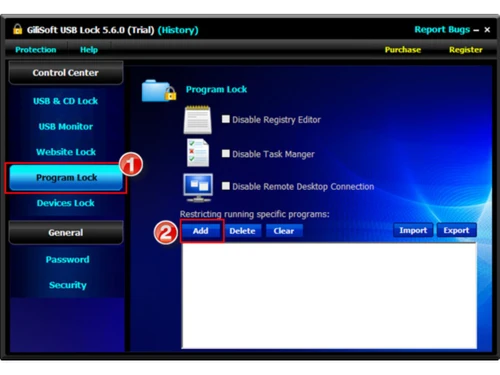
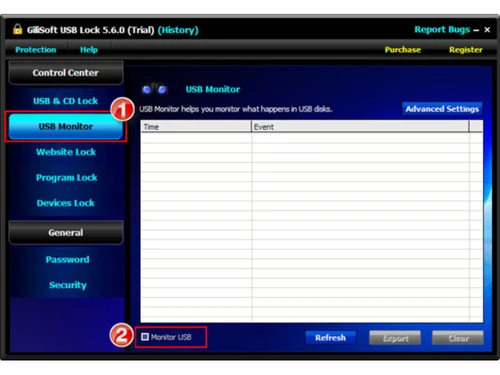
 Drive Access Control Optical Disc Restriction Mobile USB Data Restriction USB Tethering Block Device Whitelisting Activity Logging Read or Write Permission Policies Website Blocking Application Execution Restriction Control Panel Locking Self Protection Enforcement Alerts & Notifications Copy Prevention Mechanism Read Only Mode
  Windows
  Desktop
  Perpetual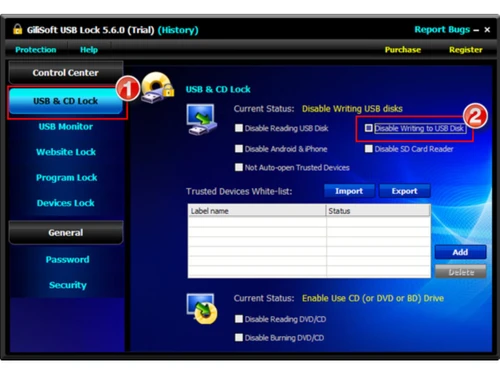
Small Business
Designed for startups and growing businesses
Medium Business
Built for business growth and flexibility
Enterprises
Designed for complex and large-scale business needs
This product has no reviews yet. Be the first to leave your feedback.
Add Review
Gilisoft USB Lock
$ 39.95 excl. GST
Desktop
Mobile
Web based
On Premises
Windows
Mac OS

Polymer DLP
Price On Request
Desktop
Mobile
Web based
On Premises
Windows
Mac OS

Zscaler Internet Access
Price On Request
Desktop
Mobile
Web based
On Premises
Windows
Mac OS

Strac
Price On Request
Desktop
Mobile
Web based
On Premises
Windows
Mac OS

Next DLP
Price On Request
Desktop
Mobile
Web based
On Premises
Windows
Mac OS

Nightfall AI
Price On Request
Desktop
Mobile
Web based
On Premises
Windows
Mac OS

Fortra Digital Guardian
Price On Request
Desktop
Mobile
Web based
On Premises
Windows
Mac OS

Safetica ONE
Price On Request
Desktop
Mobile
Web based
On Premises
Windows
Mac OS

Metomic
Price On Request
Desktop
Mobile
Web based
On Premises
Windows
Mac OS

CoSoSys Endpoint Protector
Price On Request
Desktop
Mobile
Web based
On Premises
Windows
Mac OS

Netskope DLP
Price On Request
Desktop
Mobile
Web based
On Premises
Windows
Mac OS
(0) Product(s) selected
Starting Price:
$95 /month
Available
Price on Request
Available
Price on Request
Available
Price on Request

Available
Price on Request

Available
Price on Request
Gilisoft USB Lock pricing starts at USD 40 at techjockey.com. Pricing is customised based on specific business needs.
GiliSoft USB Lock is primarily designed for Windows operating systems. It supports various versions of Windows, making it suitable for most desktop and laptop users.
It controls access to USB ports and external devices by applying restrictions like blocking, read-only mode, or device whitelisting.
Yes, it is well-suited for small businesses that need to protect sensitive data. It helps prevent data leaks and ensures secure usage of removable devices across systems.
Yes, GiliSoft USB Lock typically offers a free trial version. Users can test its features before purchasing the full licensed version.
Key features include USB blocking, read/write control, device whitelisting, activity monitoring, password protection, and restriction of other external devices like CDs and Bluetooth.
It is available as a desktop software for Windows. There is no dedicated mobile app for Android or iOS.
It is ideal for individuals, IT administrators, and organizations that handle sensitive data. Businesses, educational institutions, and professionals can benefit from its security features.
It is considered a reliable security tool with features like password protection and self-defense mode.
It is used to control and restrict access to USB drives and external devices. Its main purpose is to prevent data leakage, and protect confidential information.
20,000+ Software Listed
Best Price Guranteed
Free Expert Consultation
2M+ Happy Customers
Terms and Condtions

Users with registered businesses can purchase goods from merchants on the platform to satisfy their business needs. Users are not permitted to utilize any products acquired through the platform for resale, advertising, business, or further distribution.
For each purchase made, users will receive a Tax Invoice (or 'GST invoice') that includes specific details such as:
the GSTIN of the user associated with their registered business, and
the specified Entity Name for their business.
It should be noted that not all products are eligible for GST Invoice. Only the products displayed by participating sellers with the 'GST-based Invoice Available' callout on the product description page would qualify.
Certain goods and services are not eligible to get a GST Invoice, including items with VAS, i.e., Value Added Services (e.g., Total Mobile Protection/Assured Buyback) and those involving an exchange offer at the time of purchase.
Users must ensure the accuracy of the GSTIN, and business entity name provided for the GST Invoice. Requests for corrections into GST Invoice would not be accommodated by Techjockey.com or any Seller, and any issues arising from user-provided information are the sole responsibility of users.
Techjockey.com is not liable for the GST Invoice or any associated input tax credit. To efficiently claim an input tax credit, users should select the registered place of business address as per the GST authority's data and follow the provisions of the GST Act and rules.
To claim an input tax credit, the delivery and billing addresses must match. Furthermore, input tax credits will not be granted if the delivery address and GSTIN on the invoice are from different states. In case of incorrect GST details provided during the order placement, the order will be canceled automatically.