
linkedin
Guideflow logo
play Guideflow: Interactive product demo - SaaS
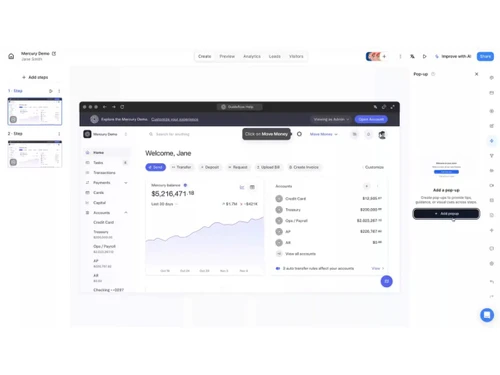
guideflow-interface
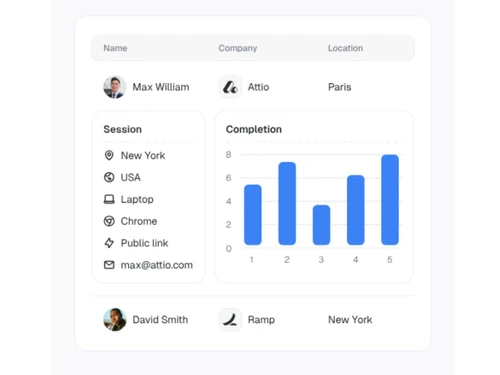
guideflow-completionrate

Guideflow

Brand: Guideflow

  • 4.3

  • 5 Ratings

Have you used Guideflow before?

Share your insights for better experience

Add a Review
Starting Price
$40

View plans

100% Genuine
Products
Best Price
Guaranteed
Safe & Secure
Payment
  • Description

  • Pricing

  • Features

  • Specification

  • Review

Starting at $40

GuideflowSoftware Overview

Guideflow Company Details

Founded Year:  2022

Create interactive demos & step-by-step guides to boost your productivity & conversion rate with Guideflow. Capture, customize, share & analyze your guideflows in seconds!

Director/Founders Geoffroy d'Halluin, Jeremy Boissinot
Company Size 1-100 Employees

Guideflow Pricing & Plans

Solo
Starting at $40
    • Licenses

      Licenses
      Licenses
    • Monthly

      Monthly
      Monthly

Key Features

  • Screenshot demo

  • Mobile demo

  • Unlimited guideflows

  • Advanced analytics

  • AI demo content

Startup
Starting at $599
    • Licenses

      Licenses
      Licenses
    • Monthly

      Monthly
      Monthly

Key Features

  • Screenshot demo

  • Mobile demo

  • HTML-based demo

  • HTML capture

  • AI personalization

  • Text, pict. & graph edit

Advanced
Starting at $1799
    • Licenses

      Licenses
      Licenses
    • Monthly

      Monthly
      Monthly

Key Features

  • Screenshot demo

  • Mobile demo

  • HTML-based demo

  • Sandbox demo

  • Demo Center (addon)

  • Clickable environment

  • Auto-linking element

  • Presenter notes

Enterprise
Starting at $3499
    • Licenses

      Licenses
      Licenses
    • Monthly

      Monthly
      Monthly

Key Features

  • Screenshot demo

  • Mobile demo

  • HTML-based demo

  • Sandbox demo

  • Demo Center

  • Live Demo (addon)

  • AI Dataset generator

  • Professional services

  • Dedicated landline

Guideflow Features

  • icon_check HTML Based Capture
    Automatically clones web application interfaces to create a fully interactive environment without writing any custom code.
  • icon_check Data Blurring
    Provides built-in privacy tools to hide or blur personally identifiable information and sensitive data within demo screens.
  • icon_check Dynamic Data Variables
    Allows the insertion of placeholders like names or company logos that update automatically based on visitor or CRM data.
  • icon_check Multi-Device Support
    Captures and displays demos optimized for desktop, tablet, and mobile views to ensure a responsive user experience across
  • icon_check No-Code Visual Editor
    Provides a drag-and-drop interface to reorder steps, edit text, and add UI elements without needing technical development skills.
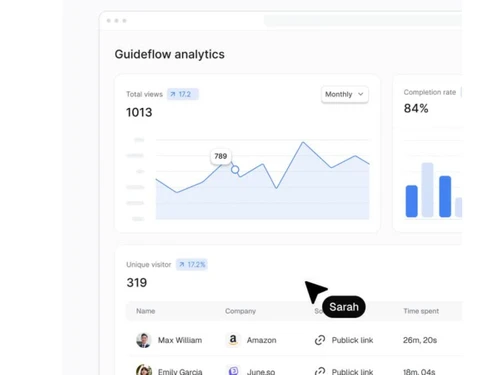
  • icon_check Engagement Analytics
    Tracks real-time viewer behavior including completion rates, time spent per step, and specific drop-off points in the demo.
  • icon_check Lead Generation
    Integrates customizable data collection forms directly into the demo flow to capture prospect information at peak interest.
  • icon_check Third Party Integration
    Synchronizes engagement data with tools like HubSpot or Salesforce and sends instant alerts when a lead views a demo page.
  • icon_check AI Powered Voiceovers
    Generates automated audio narration and localized voiceovers in multiple languages to guide users through the product steps.
  • icon_check Guided Annotation Tools
    Facilitates the addition of tooltips, hotspots, and pop-up guides to explain specific features during the interactive tour.
  • icon_check Custom Branding
    Offers tools to apply specific brand colors, logos, and custom domains to all shared demos and centralized landing pages.
  • icon_check Session Replay
    Records and replays individual user sessions to provide visual insights into how prospects interact with the software interface.
  • icon_check Team Collaboration
    Enables multiple team members to build, edit, and organize demo assets within shared workspace environments and directories.
  • icon_check Version Access Control
    Manages permissions and visibility settings to keep demos public, private, or gated behind a password for specific stakeholders.
Guideflow Demo Video play icon

Get Guideflow Demo

Watch the demo video to explore key features, real workflows, and how the software fits your business needs.

Understand
Key Features
Personal
Demo Insights
Interactive
Demo Support

Guideflow Specification

Supported Platforms
Windows Windows MacOS MacOS
Devices
Desktop Desktop
Deployment
Web-Based Web-Based Perpetual Perpetual
Suitable For
All Industries
Business Specific
All Businesses
Business Size
Individual Small Business Startups Medium Business Enterprises SMBs SMEs MSMBs MSMEs
Customer Support
Email Communities
Language
English
Integration
API Integration
Training Resources
Videos
AI Features
AI Integrated

Guideflow Review

4.3

Out of 5

img

Overall Rating

Based on
5 Verified Ratings

Rating Breakdown

  • Features 4.4
  • Value for Money 4
  • Ease of Use 4.4
  • Customer Support 4.4

80% Recommend this Product

Add Review

Be the First to Review

This product has no reviews yet. Be the first to leave your feedback.

Add Review

20,000+ Software Listed

Best Price Guranteed

Free Expert Consultation

2M+ Happy Customers

Terms and Condtions

close

Users with registered businesses can purchase goods from merchants on the platform to satisfy their business needs. Users are not permitted to utilize any products acquired through the platform for resale, advertising, business, or further distribution.

For each purchase made, users will receive a Tax Invoice (or 'GST invoice') that includes specific details such as:

  • the GSTIN of the user associated with their registered business, and

  • the specified Entity Name for their business.

It should be noted that not all products are eligible for GST Invoice. Only the products displayed by participating sellers with the 'GST-based Invoice Available' callout on the product description page would qualify.

Certain goods and services are not eligible to get a GST Invoice, including items with VAS, i.e., Value Added Services (e.g., Total Mobile Protection/Assured Buyback) and those involving an exchange offer at the time of purchase.

Users must ensure the accuracy of the GSTIN, and business entity name provided for the GST Invoice. Requests for corrections into GST Invoice would not be accommodated by Techjockey.com or any Seller, and any issues arising from user-provided information are the sole responsibility of users.

Techjockey.com is not liable for the GST Invoice or any associated input tax credit. To efficiently claim an input tax credit, users should select the registered place of business address as per the GST authority's data and follow the provisions of the GST Act and rules.

To claim an input tax credit, the delivery and billing addresses must match. Furthermore, input tax credits will not be granted if the delivery address and GSTIN on the invoice are from different states. In case of incorrect GST details provided during the order placement, the order will be canceled automatically.