linkedin
Harmony logo
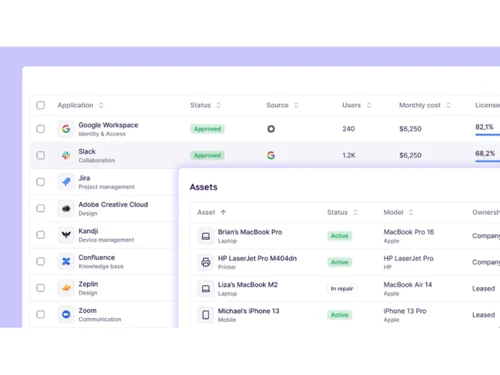
Harmony-inventory management
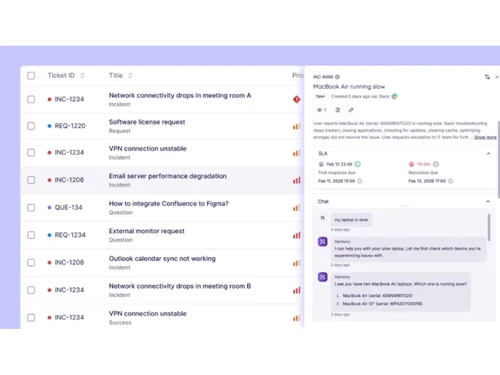
Harmony-chats
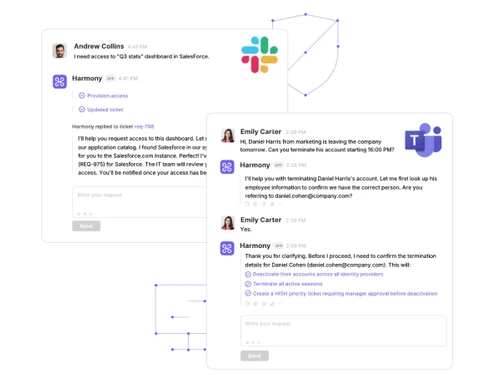
Harmony-converstations

Harmony

Brand: Harmony AI

  • No Ratings & Reviews

Harmony helps businesses automate customer support and communication by creating custom AI agents trained on their own business knowledge.

See More

Have you used Harmony before?

Share your insights for better experience

Add a Review
Starting Price 23% OFF
€99 €129

View plans

100% Genuine
Products
Best Price
Guaranteed
Safe & Secure
Payment
  • Description

  • Pricing

  • Features

  • Specification

  • Review

  • FAQ

Starting at €99

Harmony Software Overview

What is Harmony?

Harmony AI Agent is an AI platform that helps businesses build, train, and deploy custom AI agents to automate customer support and business communication. It allows users to upload their knowledge base and connect AI agents to channels such as WhatsApp, email, and social media. The platform can answer customer questions automatically using company-specific information.

It supports seamless handoff to human agents when needed. Businesses can create AI agents without complex technical setup. Harmony helps reduce manual support work and improve response times. The platform is designed to automate repetitive conversations and support tasks. It enables organizations to provide consistent customer service across multiple channels. Users can train AI agents using their own documents and business knowledge. Harmony AI aims to improve efficiency, customer experience, and support operations through intelligent automation.

Why Choose Harmony Software?

  • AI-Powered Automation: Automates repetitive tasks and workflows efficiently.
  • Intelligent AI Agents: Uses smart AI agents to handle complex business processes.
  • Improved Productivity: Helps teams complete tasks faster with minimal manual effort.
  • Workflow Optimization: Streamlines operations and reduces bottlenecks.
  • Easy Integration: Connects seamlessly with existing business tools and applications.
  • Scalable Platform: Adapts to the needs of growing businesses.
  • User-Friendly Interface: Simple and intuitive design for easy adoption.
  • Real-Time Insights: Provides actionable data and performance analytics.
  • Task Automation: Automates routine business activities and approvals.
  • Enhanced Collaboration: Enables teams to work together more effectively.
  • Customizable Solutions: Allows workflows and AI agents to be tailored to business needs.

Benefits of Harmony Software

  • Reduced Operational Costs: Minimizes manual labor and operational expenses.
  • Faster Decision-Making: Delivers intelligent recommendations and insights.
  • High Accuracy: Reduces human errors through automated processes.
  • 24/7 Availability: AI agents can operate continuously without downtime.
  • Secure Data Management: Protects sensitive business information with robust security measures.
  • Centralized Operations: Manages multiple tasks and workflows from a single platform.
  • Better Customer Experience: Supports faster and more personalized customer interactions.
  • Cloud-Based Accessibility: Access the platform from anywhere with an internet connection.
  • Continuous Innovation: Regular updates ensure access to the latest AI capabilities and features.

Harmony Pricing

Harmony price starts at Euros 99 at techjockey.com.

The pricing model is based on different parameters, including extra features, deployment type, and the total number of users. For further queries related to the product, you can contact our product team and learn more about the pricing and offers.

Read more

Harmony Pricing & Plans

Starter
Starting at €99 €129 SAVE UPTO 23%
    • Licenses

      Licenses
      Licenses
    • Monthly

      Monthly
      Monthly

Key Features

  • Monthly Conversations - 300

  • AI Agents - 1

  • Upload Custom Knowledge

  • Web Widget Deployment

  • Quick-Start Onboarding

Professional
Starting at €199 €259 SAVE UPTO 23%
    • Licenses

      Licenses
      Licenses
    • Monthly

      Monthly
      Monthly

Key Features

  • Monthly Conversations - 1,000

  • AI Agents - 3

  • Upload Custom Knowledge

  • WhatsApp, Socials & Email

  • Quick-Start Onboarding

Enterprise
Starting at €699 €899 SAVE UPTO 22%
    • Licenses

      Licenses
      Licenses
    • Monthly

      Monthly
      Monthly

Key Features

  • Monthly Conversations - 10,000+ (Custom Volume)

  • AI Agents - Unlimited

  • Upload Custom Knowledge

  • WhatsApp, Socials & Email

  • Quick-Start Onboarding

Harmony Features

Core Functionality

  • icon_check Natural Language Processing (NLP)
    Ability to understand and generate human language
  • icon_check Autonomous Task Management
    Executes tasks independently, including scheduling and prioritization.
  • icon_check Reasoning and Decision-Making
    Evaluates information to make informed decisions autonomously.

Learning and Adaptation

  • icon_check Machine Learning
    Employs algorithms to learn from data and improve performance over time.
  • icon_check Contextual Memory
    Maintains short-term memory to manage context within interactions.
  • icon_check Deep Learning
    Utilizes neural networks to model complex patterns in data.
  • icon_check Supervised and Reinforcement Learning
    Learns from labeled data and through feedback mechanisms to optimize actions.
  • icon_check Long-Term Learning
    Develops long-term memory to adapt to user preferences and behaviors over time.

Interaction Capabilities

  • icon_check Sentiment Analysis
    Detects and interprets user emotions from input data.
  • icon_check Behavior Customization
    Adjusts interaction style based on user preferences.
  • icon_check User Profiling
    Builds profiles based on user data to personalize interactions.
  • icon_check Empathetic Responses
    Generates responses that align with detected user emotions to enhance engagement.
  • icon_check Multimodal Interaction
    Engages through multiple channels, including text, voice, and visual inputs.
  • icon_check Multi-Agent Collaboration
    Enables multiple GPT agents to work together, enhancing efficiency and effectiveness in handling complex projects.

Integration Capabilities

  • icon_check Third Party Integrations
    Incorporates services from external providers to enhance functionality.
  • icon_check API Connectivity
    Interfaces with external systems through Application Programming Interfaces.
  • icon_check Enterprise Software Integration
    Seamlessly connects with business applications like CRM and ERP systems.
  • icon_check Data Analytics Integration
    Integrates with analytics tools to process and interpret data.
  • icon_check IoT Integration
    Connects with Internet of Things devices for expanded interaction capabilities.

Performance and Scalability

  • icon_check Real-Time Processing
    Handles tasks and responses instantaneously to ensure prompt interaction.
  • icon_check Dynamic Scaling
    Adjusts resource allocation based on demand to ensure scalability.
  • icon_check Offline Functionality
    Operates without internet connectivity, maintaining essential features.
  • icon_check Database Querying
    Accesses and retrieves information from databases efficiently.
  • icon_check Load Balancing
    Distributes workloads evenly across resources to maintain performance.

Advanced Features

  • icon_check Workflow Automation
    Automates complex business processes to enhance efficiency.
  • icon_check Autonomous Problem Solving
    Identifies issues and implements solutions without human intervention.
  • icon_check Complex Scenario Handling
    Manages intricate situations requiring advanced decision-making capabilities.
  • icon_check Knowledge Graphs
    Utilizes interconnected data to enhance understanding and reasoning.
  • icon_check Simulation and Forecasting
    Predicts future trends and outcomes based on current data.

Security and Compliance

  • icon_check Encryption
    Secures data through encryption during transmission and storage.
  • icon_check Data Privacy
    Ensures user data is protected and handled responsibly.
  • icon_check Regulatory Adherence
    Complies with laws and regulations relevant to data and operations.
  • icon_check Role-Based Access Control (RBAC)
    Restricts system access based on user roles to enhance security.
  • icon_check Bias Mitigation
    Implements strategies to identify and reduce biases in decision-making processes.
  • icon_check Audit Trail
    Track changes and updates within the system for enhanced security and transparency.

Analytics and Reporting

  • icon_check Performance Metrics
    Tracks key performance indicators to assess effectiveness.
  • icon_check Workflow Insights
    Provides analysis of operational workflows to identify efficiencies and bottlenecks.
  • icon_check Error Reporting
    Identifies and reports system errors for prompt resolution.
  • icon_check Feedback Collection
    Gathers user feedback to inform improvements.
  • icon_check Interaction Insights
    Analyzes user interactions to enhance engagement strategies.
  • icon_check Predictive Analytics
    Forecasts future trends based on historical data.
  • icon_check Custom Reporting
    Generates tailored reports to meet specific analytical needs.

Maintenance and Support

  • icon_check User Feedback Loop
    Incorporates user feedback into development cycles for continuous improvement.
  • icon_check Iterative Updates
    Implements regular updates to enhance functionality and security.
  • icon_check Self Monitoring
    Continuously assesses system health to detect and address issues proactively.
  • icon_check Diagnostics and Debugging
    Provides tools for identifying and

Harmony Specifications

Supported Platforms
Ubuntu Ubuntu Windows Windows MacOS MacOS Linux Linux
Devices
Desktop Desktop
Deployment
Cloud-Based Cloud-Based
Suitable For
All Industries
Business Specific
All Businesses
Business Size
Small Business Startups Medium Business Enterprises SMBs SMEs MSMEs
Customer Support
Phone Email Live Chat
Language
English
Integration
API Integration
Training Resources
Live Online Webinars Documentation Videos
AI Features
AI Integrated
Technology
Next Generation

Harmony Review

Techjockey Trusted Reviews from Verified Users

No reviews are currently available for Harmony. Discover similar AI Agents reviews

  • Pando AI

    4.4

    Whats great - Pando gives a lot of functional modules (routing, tracking, payments, integrations) in one suite. read more

  • Orby AI

    4.4

    Whats great - Easy deployment, scalable cloud performance, and proactive AI recommendations. read more

  • LegalFly

    4.5

    Whats great - LegalFly offers many different legal services, like helping with documents, writing contracts, or giving legal advice. read more

Articles for Harmony

See All Related Articles

How much does Harmony Software cost?

Harmony pricing starts at Euros 99, with plan details available on techjockey.

Is there a mobile app available for Harmony Software?

No, Harmony Software does not offer mobile apps.

Which operating systems are compatible with Harmony Software?

Harmony Software is compatible with Windows, macOS, Linux, and Ubuntu.

Does Harmony Software offer a free trial?

Yes, Harmony offers a free trial.

How does Harmony Software function?

Harmony Software uses AI agents to automate workflows, manage tasks, and improve operational efficiency.

Who uses Harmony Software?

Businesses, enterprises, and teams seeking AI-powered automation and productivity tools use Harmony Software.

Is a free demo available for Harmony Software?

Yes, Harmony offers a free demo.

Is Harmony Software available for free?

No, Harmony is not available for free.

20,000+ Software Listed

Best Price Guranteed

Free Expert Consultation

2M+ Happy Customers

Terms and Condtions

close

Users with registered businesses can purchase goods from merchants on the platform to satisfy their business needs. Users are not permitted to utilize any products acquired through the platform for resale, advertising, business, or further distribution.

For each purchase made, users will receive a Tax Invoice (or 'GST invoice') that includes specific details such as:

  • the GSTIN of the user associated with their registered business, and

  • the specified Entity Name for their business.

It should be noted that not all products are eligible for GST Invoice. Only the products displayed by participating sellers with the 'GST-based Invoice Available' callout on the product description page would qualify.

Certain goods and services are not eligible to get a GST Invoice, including items with VAS, i.e., Value Added Services (e.g., Total Mobile Protection/Assured Buyback) and those involving an exchange offer at the time of purchase.

Users must ensure the accuracy of the GSTIN, and business entity name provided for the GST Invoice. Requests for corrections into GST Invoice would not be accommodated by Techjockey.com or any Seller, and any issues arising from user-provided information are the sole responsibility of users.

Techjockey.com is not liable for the GST Invoice or any associated input tax credit. To efficiently claim an input tax credit, users should select the registered place of business address as per the GST authority's data and follow the provisions of the GST Act and rules.

To claim an input tax credit, the delivery and billing addresses must match. Furthermore, input tax credits will not be granted if the delivery address and GSTIN on the invoice are from different states. In case of incorrect GST details provided during the order placement, the order will be canceled automatically.