linkedin
HQ Rental Software logo
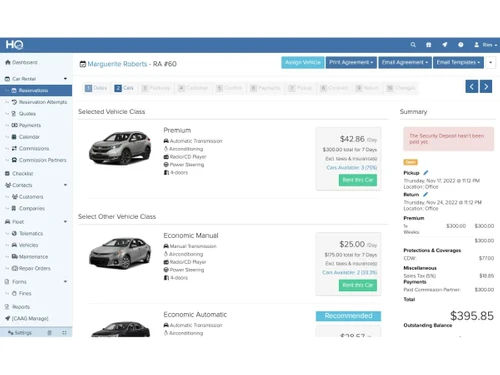
HQ Rental Software-quotes
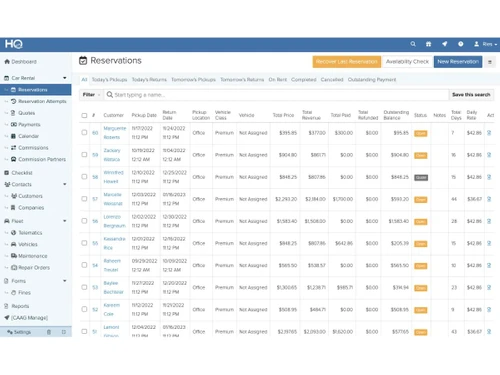
HQ Rental Software-reservations
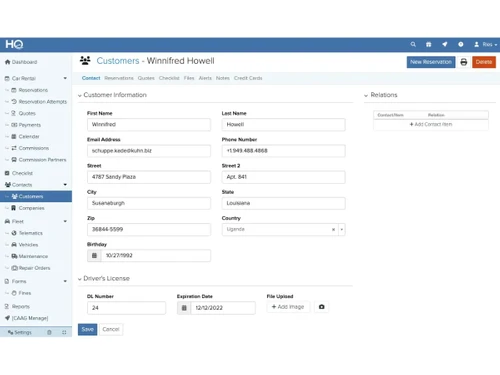
HQ Rental Software-customer profile

HQ Rental Software

Brand: Caag Software

  • 4.3

  • 6 Ratings

HQ Rental Software is designed to streamline and automate rental processes for businesses, offering features like online booking, fleet management, digital agreements, and integrated payments.

See More

Have you used HQ Rental Software before?

Share your insights for better experience

Add a Review
Starting Price
$90

View plans

100% Genuine
Products
Best Price
Guaranteed
Safe & Secure
Payment
  • Description

  • Pricing

  • Features

  • Specification

  • Review

  • Compare

  • Alternatives

  • FAQ

Starting at $90

HQ Rental Software Overview

What is HQ Rental Software?

HQ Rental Software is a comprehensive solution designed to help car rental businesses grow and operate more efficiently. It provides tools to accept online reservations and payments, automate the rental process, and enhance the customer experience through a user-friendly website plugin. The software also improves fleet management by tracking vehicle availability, repairs, and finances, eliminating the need for manual spreadsheets and extra administrative staff.

HQ Rental Software helps businesses go paperless by generating customizable digital rental agreements that customers can sign electronically using the HQ Mobile App, which also allows for uploading vehicle photos during check-out. Suitable for various rental markets, including motorbikes, boats, and equipment, HQ offers customization options to fit specific business needs. The cloud-based solution provides mobile access via Android and iOS apps, enabling on-the-go business management. With features like advanced reporting, integrated payments, and bookkeeping, HQ Rental Software automates sales processes and offers excellent customer support to ensure businesses get the best results.

Why Choose HQ Rental Software?

  • Comprehensive Solution: HQ Rental Software offers a total package for rental markets, covering everything from online reservations to fleet management.
  • Improves Efficiency: It helps increase efficiency and improve customer experience, which are essential for growing your car rental business.
  • Accept Online Reservations & Payments: Automates the rental process with a user-friendly website plugin to improve customer experience.
  • Improves Fleet Management: Provides tools to easily manage your fleet’s availability, repairs, and finances, eliminating messy sheets and extra administrative staff.
  • Go Paperless: Generates customizable digital rental agreements that customers can sign electronically via the HQ Mobile App.
  • Solutions for Various Rental Markets: Suitable for motorbikes, boats, and equipment rentals.
  • Highly Customizable: The system allows for a high degree of customization to fit your specific needs.
  • Cloud-Based Solution: Access your business from anywhere without downloads or installations.
  • Mobile Access: Manage your business on-the-go with Android and iOS apps.
  • Advanced Reporting: Keep track of your key performance indicators (KPIs) in a customized dashboard.
  • Integrated Payments: Send automatically generated & customizable receipts and booking services.
  • Integrated Bookkeeping: Automate your sales process and manage your rental business by tracking dates, time, and places.
  • Excellent Customer Support: Provides amazing customer service to help you get the best results for your rental business.
  • Trusted by Top Companies: Used by 1000+ companies from 80+ countries.

Benefits of HQ Rental Software

  • Reduce Overbooking: Manage availability accurately, decreasing the risk of overbooking.
  • Damage Overview: Simplifies handling and tracking damages to rental items.
  • Contract Automation: Automates contract creation, saving time and reducing errors.
  • User-Friendly Interface: Easy-to-navigate software ensures a quick learning curve for staff.
  • Detailed Fleet Overview: Provides a comprehensive view of the entire rental fleet's status.
  • Payment Integration: Seamlessly integrates payments to streamline financial processes.
  • Customizable Receipts: Automatically generate customizable receipts for customers.
  • Automated Sales Process: Manages sales activities, keeping track of dates, times, and locations.
  • Remote Access: Accessible from any location with an internet connection.
  • Real-time Updates: Provides real-time availability and status updates for all rental items.
  • Streamlined Checkout Process: Facilitates quick and efficient customer checkout.
  • Multi-Platform Support: Available on both Android and iOS devices for mobile management.
  • Tailored Customization: System allows for a high degree of customization to fit specific needs, ensuring it can adapt to various business models.

Pricing of HQ Rental Software

HQ Rental Software price starts at $90 at Techjockey.com.

The pricing model is based on different parameters, including extra features, deployment type, and the total number of users. For further queries related to the product, you can contact our product team and learn more about the pricing and offers.

Read more

HQ Rental Software Pricing & Plans

Basic
Starting at $90
    • Licenses

      Licenses
      Licenses
    • Monthly

      Monthly
      Monthly

Key Features

  • Number of Vehicles - 10

  • Number of branches - 1

  • online reservations

  • Rental Agreements

  • Fleet management

  • Customer Management

Standard
Starting at $150
    • Licenses

      Licenses
      Licenses
    • Monthly

      Monthly
      Monthly

Key Features

  • Number of Vehicles - 25

  • Number of branches - 1

  • online reservations

  • Rental Agreements

  • Fleet management

  • Customer Management

Professional
Starting at $225
    • Licenses

      Licenses
      Licenses
    • Monthly

      Monthly
      Monthly

Key Features

  • Number of Vehicles - 50

  • Number of branches - 1

  • online reservations

  • Rental Agreements

  • Fleet management

  • Customer Management

HQ Rental Software Features

  • icon_check Booking Management
    Streamlines the rental booking process with an intuitive interface and automated scheduling.
  • icon_check Customer Database
    Stores and manages customer details, rental history, and preferences for better service.
  • icon_check Quotes/Estimates
    Generates accurate rental quotes and cost estimates for customers in real time.
  • icon_check Fleet Management
    Tracks and maintains vehicle availability, maintenance schedules, and overall fleet performance.
  • icon_check Fines Management
    Monitors and handles penalties, traffic fines, and overdue payments efficiently.
  • icon_check Reservations Management
    Automates the reservation process, preventing double bookings and ensuring vehicle availability.
  • icon_check Vehicle Tracking
    Provides real-time GPS tracking and monitoring for rental vehicles to enhance security and logistics.

HQ Rental Software Specifications

Supported Platforms
Windows Windows iOS iOS Android Android
Devices
Desktop Desktop Mobile Mobile Tablet Tablet iPad iPad
Deployment
Cloud-Based Cloud-Based
Suitable For
Tours and Travels
Business Specific
Travel Agency
Business Size
Small Business Startups Medium Business SMBs SMEs
Customer Support
Email Communities
Language
English
Training Resources
Videos

Explore the Best Alternative Solutions Similar to Your Business Size and Needs

Small Business

Designed for startups and growing businesses

Rentall

4.0

Ecalypse

4.4

CARS+

4.2

See More

HQ Rental Software Review

4.3

Out of 5

img

Overall Rating

Based on
6 Verified Ratings

Rating Breakdown

  • Features 4.9
  • Value for Money 4.0
  • Ease of Use 4.2
  • Customer Support 4.3

88% Recommend this Product

Add Review

Be the First to Review

This product has no reviews yet. Be the first to leave your feedback.

Add Review

Compare HQ Rental Software With other Car Rental Software

Products
Ratings
Pricing
Device Supported
Deployment
Supported Platforms
  • img

    HQ Rental Software

  • 4.3

  • Price On Request

  • Desktop

    Mobile

  • Web based

    On Premises

  • Windows

    Mac OS

  • img

    CAB Saas

  • 4.6

  • Price On Request

  • Desktop

    Mobile

  • Web based

    On Premises

  • Windows

    Mac OS

  • img

    Rentall

  • 4.0

  • Price On Request

  • Desktop

    Mobile

  • Web based

    On Premises

  • Windows

    Mac OS

  • img

    Caryaati

  • 4.2

  • Price On Request

  • Desktop

    Mobile

  • Web based

    On Premises

  • Windows

    Mac OS

  • img

    Renthub

  • 4.1

  • Price On Request

  • Desktop

    Mobile

  • Web based

    On Premises

  • Windows

    Mac OS

  • img

    CARS+

  • 4.2

  • Price On Request

  • Desktop

    Mobile

  • Web based

    On Premises

  • Windows

    Mac OS

  • img

    RocketFleet

  • 4.1

  • Price On Request

  • Desktop

    Mobile

  • Web based

    On Premises

  • Windows

    Mac OS

  • img

    RentGuruz

  • 4.5

  • Price On Request

  • Desktop

    Mobile

  • Web based

    On Premises

  • Windows

    Mac OS

  • img

    Rent Centric

  • 4.2

  • Price On Request

  • Desktop

    Mobile

  • Web based

    On Premises

  • Windows

    Mac OS

(0) Product(s) selected

HQ Rental Software Alternatives

See All HQ Rental Software Alternatives

Starting Price:

$1,140

Starting Price:

€46 /Month

Available

Price on Request

Starting Price:

$17 /Month

Available

Price on Request

Available

Price on Request

Available

Price on Request

How much does HQ Rental Software cost?

HQ Rental Software price starts at $90 at Techjockey.com.

Does HQ Rental Software have a mobile app?

Yes, HQ Rental Software is available on iOS and Android apps.

Which operating systems are compatible with HQ Rental Software?

HQ Rental Software is accessible on Windows only.

Is a free trial available for HQ Rental Software?

Yes, HQ Rental Software offers a free trial.

What is the working mechanism of HQ Rental Software?

HQ Rental Software works by automating rental processes through features like online bookings, fleet management, maintenance scheduling, and integrated payments, streamlining operations for rental businesses.

Who can use HQ Rental Software?

HQ Rental Software is suitable for various rental businesses, including car, bike, boat, and equipment rentals, catering to both small and large enterprises.

Does HQ Rental Software provide a free demo?

Yes, HQ Rental Software offers a free demo upon request.

Is HQ Rental Software available for free?

No, HQ Rental Software is not available for free.

20,000+ Software Listed

Best Price Guranteed

Free Expert Consultation

2M+ Happy Customers

Terms and Condtions

close

Users with registered businesses can purchase goods from merchants on the platform to satisfy their business needs. Users are not permitted to utilize any products acquired through the platform for resale, advertising, business, or further distribution.

For each purchase made, users will receive a Tax Invoice (or 'GST invoice') that includes specific details such as:

  • the GSTIN of the user associated with their registered business, and

  • the specified Entity Name for their business.

It should be noted that not all products are eligible for GST Invoice. Only the products displayed by participating sellers with the 'GST-based Invoice Available' callout on the product description page would qualify.

Certain goods and services are not eligible to get a GST Invoice, including items with VAS, i.e., Value Added Services (e.g., Total Mobile Protection/Assured Buyback) and those involving an exchange offer at the time of purchase.

Users must ensure the accuracy of the GSTIN, and business entity name provided for the GST Invoice. Requests for corrections into GST Invoice would not be accommodated by Techjockey.com or any Seller, and any issues arising from user-provided information are the sole responsibility of users.

Techjockey.com is not liable for the GST Invoice or any associated input tax credit. To efficiently claim an input tax credit, users should select the registered place of business address as per the GST authority's data and follow the provisions of the GST Act and rules.

To claim an input tax credit, the delivery and billing addresses must match. Furthermore, input tax credits will not be granted if the delivery address and GSTIN on the invoice are from different states. In case of incorrect GST details provided during the order placement, the order will be canceled automatically.