linkedin
Julius AI logo
play Julius Workflows Tutorial | Create and Run Workflows in Julius
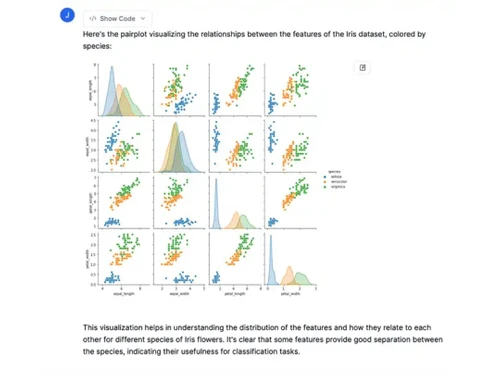
julius ai data visualization
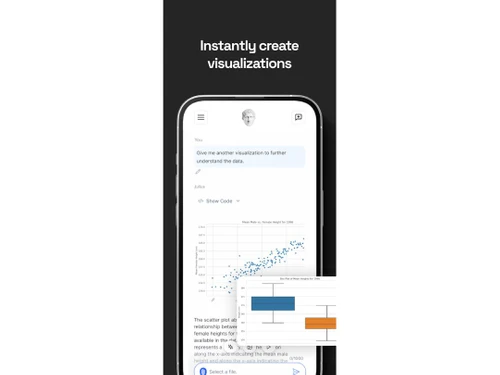
julius ai graph

Julius AI

Brand: Julius AI

  • 4.1

  • 7 Ratings & 1 Review

A computational AI tool that simplifies data analysis, making it accessible through a conversational interface and natural language processing. This software efficiently handles complex data, creating visualisations and reports to generate insights.

See More

Have you used Julius AI before?

Share your insights for better experience

Add a Review

Price Available on Request

Questions about pricing or customization? We’re here to help, just a click away.

100% Genuine
Products
Best Price
Guaranteed
Safe & Secure
Payment
  • Description

  • Pricing

  • Features

  • Specification

  • Review

  • Compare

  • Alternatives

  • FAQ

Julius AI Software Overview

What is Julius AI?

Julius AI is a cutting-edge computational tool that empowers users to conduct insightful data analysis with ease. By leveraging the power of natural language processing (NLP), Julius AI is able to comprehend user queries and provide actionable insights, delivering tangible results in the form of visualisations, reports, and predictive models.

This user-friendly software breaks down the data analysis process into manageable segments, allowing individuals without extensive technical expertise to extract valuable information and leverage it for informed decision-making.

Julius AI's flexible design allows it to accommodate a wide range of data formats, including CSV, Excel, and Google Sheets. This means that users can easily import their existing data and begin analysing it without having to manipulate or convert it first.

Why Choose Julius AI Generative Tools?

  • Intuitive Interface: The conversational approach to data interaction removes the need for technical skills. Users can easily ask questions and receive insights in plain language.
  • Data Analysis Efficiency: Julius AI significantly speeds up finding key data patterns and trends, allowing for a faster decision-making process. The software's natural language processing capabilities assist users by promptly answering your inquiries and producing graphs, enabling fast data analysis.
  • Wide Applicability across Industries: Its broad applicability to various industries, such as Finance and others, caters to a diverse array of business needs. Financial institutions can use it for portfolio optimization and complex technical indicators analysis.
  • Easy Data Management: Julius AI is flexible enough to work with various data types, such as CSV, Excel, and Google Sheets. This feature caters to the diverse range of business needs, where businesses may have data in different formats.
  • Advanced Capabilities: Julius AI goes beyond simple data analysis by providing forecast and prediction capabilities. This is invaluable for making future-oriented business decisions by anticipating trends. Its built-in machine learning models allow users to implement powerful predictive models directly.
  • Ease of Implementation: Its friendly user interface streamlines the process of using the software, which significantly improves usability and promotes quicker adoption by users. Its simplified methods, combined with natural language interaction, results in quick and easy data analysis, with less need for training.

Benefits of Julius Generative AI Tools

  • Streamlined Data Analysis Workflow: Improved workflow for data analysis; insights are delivered quickly and clearly in various formats, freeing up your time for more strategic endeavours. The user-friendly nature minimises the time to gain usable data, improving efficiency.
  • Accessible Insights (for Everyone): No longer requiring deep data science knowledge, users across all business functions can access actionable insights. Even employees who aren't statistical experts can use the software's capabilities.
  • Automated Insights and Reports: The software automates report generation, freeing up valuable time for decision-making rather than data analysis. The time saved allows for more efficient business processes.
  • Enhanced Decision-Making: The accurate and accessible insights provided by Julius AI enable sounder decision-making processes across diverse business areas. By empowering everyone with access to relevant, analysed data, it enables sounder decisions.
  • Financial Services Focus: Julius AI enhances financial analysis with tools like technical indicator analysis and portfolio optimization, streamlining a critical industry need. It specifically targets the complexities of financial decision-making, making it a beneficial tool in investment analysis.

Pricing of Julius

Julius AI pricing is available on request at techjockey.com.

The pricing model is based on different parameters, including the amount of bandwidth you need, the number of servers you need, and the features you need. For further queries related to the product, you can contact our product team and learn more about the pricing and offers.

Read more

Julius AI Company Details

Founded Year:  2023

Your AI Data Scientist: Easily analyze, visualize and transform data

Director/Founders Rahul Sonwalkar and Tanuj Tiwari
Company Size 1-100 Employees

Julius AI Pricing & Plans

Looking for The Right Pricing?

Share your requirements and get a plan built around your business.

  • Define your business needs
  • Get customised pricing
  • Choose features that fit your workflow

Price Available on Request

Get personalised Julius AI pricing that fits your needs. Our team will connect with you.

Julius AI Features

  • icon_check Graphs & Charts
    Interactive visualisations for data exploration and analysis.
  • icon_check Business Insights
    Gain actionable knowledge from your data with machine learning-powered insights.
  • icon_check Analysis
    Extract meaningful trends and patterns from large datasets.
  • icon_check Problem Solving
    Automate complex tasks and resolve issues efficiently.
  • icon_check Reports
    Generate customizable reports with ease.
  • icon_check Natural Language Processing
    Understand and process human language to extract valuable information.
  • icon_check Data Visualizations
    Quickly spot trends and correlations with intuitive visualisations.
  • icon_check Automation Tools
    Streamline workflows and increase productivity with automated tools.
Julius AI Demo Video play icon

Get Julius AI Demo

Watch the demo video to explore key features, real workflows, and how the software fits your business needs.

Understand
Key Features
Personal
Demo Insights
Interactive
Demo Support

Julius AI Specifications

Supported Platforms
Ubuntu Ubuntu Windows Windows iOS iOS Android Android MacOS MacOS Linux Linux
Devices
Desktop Desktop Mobile Mobile
Deployment
Cloud-Based Cloud-Based
Suitable For
All Industries
Business Specific
All Businesses
Business Size
Small Business Medium Business SMBs
Customer Support
Email Communities
Language
English
Training Resources
Documentation
AI Features
AI Integrated

Explore the Best Alternative Solutions Similar to Your Business Size and Needs

Julius AI Review

4.1

Out of 5

img

Overall Rating

Based on
1 Verified Review

Rating Breakdown

  • Features 4.5
  • Value for Money 4
  • Ease of Use 4.0
  • Customer Support 4.2

87% Recommend this Product

Add Review

Julius AI Video Review

youtubeVideoId

4.3

“Julius AI Review: The Smartest Data Analyst Tool for Non-Techies?”

Review by: Savage Reviews

Compare Julius AI With other AI Tools

Products
Ratings
Pricing
Device Supported
Deployment
Supported Platforms
  • img

    Julius AI

  • 4.1

  • Price On Request

  • Desktop

    Mobile

  • Web based

    On Premises

  • Windows

    Mac OS

  • img

    Devin AI

  • 4.4

  • Price On Request

  • Desktop

    Mobile

  • Web based

    On Premises

  • Windows

    Mac OS

  • img

    NovelAI

  • 4.5

  • Price On Request

  • Desktop

    Mobile

  • Web based

    On Premises

  • Windows

    Mac OS

  • img

    Krea AI

  • 4.3

  • Price On Request

  • Desktop

    Mobile

  • Web based

    On Premises

  • Windows

    Mac OS

  • img

    Kling AI

  • 4.0

  • Price On Request

  • Desktop

    Mobile

  • Web based

    On Premises

  • Windows

    Mac OS

  • img

    Hailuo AI

  • 4.3

  • Price On Request

  • Desktop

    Mobile

  • Web based

    On Premises

  • Windows

    Mac OS

  • img

    Jibyte AI

  • 4.3

  • Price On Request

  • Desktop

    Mobile

  • Web based

    On Premises

  • Windows

    Mac OS

  • img

    Media io

  • 4.3

  • Price On Request

  • Desktop

    Mobile

  • Web based

    On Premises

  • Windows

    Mac OS

  • img

    ElevenLabs

  • 4.6

  • Price On Request

  • Desktop

    Mobile

  • Web based

    On Premises

  • Windows

    Mac OS

  • img

    Designs AI

  • 4.6

  • Price On Request

  • Desktop

    Mobile

  • Web based

    On Premises

  • Windows

    Mac OS

  • img

    Vmake AI

  • 4.2

  • Price On Request

  • Desktop

    Mobile

  • Web based

    On Premises

  • Windows

    Mac OS

(0) Product(s) selected

Julius AI Alternatives

See All Julius AI Alternatives

Starting Price:

$500 /Month

Starting Price:

$10 /Month

Starting Price:

$10 /Month

Available

Price on Request

Starting Price:

$18 /Month

Starting Price:

$25 /Month

Starting Price:

$5 /Month

Articles for Julius AI

See All Related Articles

How much does Julius AI Software Platform Cost?

Contact techjockey.com for detailed pricing information on Julius AI. Pricing is customised based on specific business needs.

Is Julius AI suitable for small businesses?

Yes, Julius AI can be a valuable tool for small businesses. Its user-friendly interface and conversational approach make it accessible to teams without extensive data science expertise.

Does Julius AI offer a free trial or a demo?

Contact techjockey.com to explore trial options for Julius AI. They can provide information about available testing periods.

Which operating system does Julius AI Software Support?

Julius AI supports Windows, iOS, Android, macOS, and Linux operating systems.

Is there any Julius AI App?

Julius AI is available as an app for iOS and Android devices.

How secure is Julius AI?

Julius AI's To inquire about Julius AI's security features and how they protect user data, contact our product experts.

How does Julius AI software Work?

Julius AI is a conversational AI tool for data analysis that simplifies the process by enabling users to interact with their data through language-based commands. It understands natural language requests, and generates reports, visualisations, and insights. Julius AI can also help build forecasting models and other analytical tools such as statistical calculations and model building.

20,000+ Software Listed

Best Price Guranteed

Free Expert Consultation

2M+ Happy Customers

Terms and Condtions

close

Users with registered businesses can purchase goods from merchants on the platform to satisfy their business needs. Users are not permitted to utilize any products acquired through the platform for resale, advertising, business, or further distribution.

For each purchase made, users will receive a Tax Invoice (or 'GST invoice') that includes specific details such as:

  • the GSTIN of the user associated with their registered business, and

  • the specified Entity Name for their business.

It should be noted that not all products are eligible for GST Invoice. Only the products displayed by participating sellers with the 'GST-based Invoice Available' callout on the product description page would qualify.

Certain goods and services are not eligible to get a GST Invoice, including items with VAS, i.e., Value Added Services (e.g., Total Mobile Protection/Assured Buyback) and those involving an exchange offer at the time of purchase.

Users must ensure the accuracy of the GSTIN, and business entity name provided for the GST Invoice. Requests for corrections into GST Invoice would not be accommodated by Techjockey.com or any Seller, and any issues arising from user-provided information are the sole responsibility of users.

Techjockey.com is not liable for the GST Invoice or any associated input tax credit. To efficiently claim an input tax credit, users should select the registered place of business address as per the GST authority's data and follow the provisions of the GST Act and rules.

To claim an input tax credit, the delivery and billing addresses must match. Furthermore, input tax credits will not be granted if the delivery address and GSTIN on the invoice are from different states. In case of incorrect GST details provided during the order placement, the order will be canceled automatically.