linkedin
Map My Crop logo
play How to use map my crop?
map my crop farm
map my crop monitoring

Map My Crop

Brand: Hardcastle Agrotech Solutions Pvt Ltd

  • 4.5

  • 2 Ratings & 2 Reviews

Map My Crop helps farmers monitor crops, detect issues, and access real-time weather and agronomy insights.

See More

Have you used Map My Crop before?

Share your insights for better experience

Add a Review

Price Available on Request

Questions about pricing or customization? We’re here to help, just a click away.

100% Genuine
Products
Best Price
Guaranteed
Safe & Secure
Payment
  • Description

  • Pricing

  • Features

  • Specification

  • Review

  • Compare

  • Alternatives

  • FAQ

Map My Crop Software Overview

What is Map My Crop?

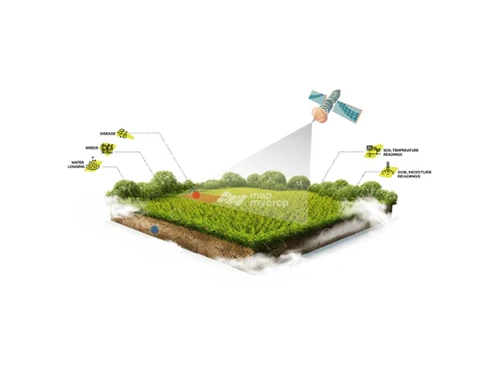
Map My Crop is a farm management software that helps farmers track the health and growth of their crops using satellite imagery and AI-powered analytics.

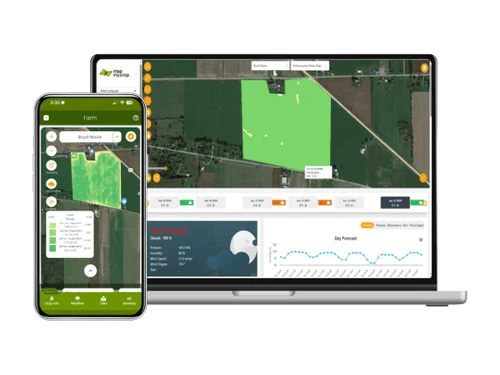
The platform gives farmers real-time views of their fields and alerts them to problems like disease, pests, or low productivity zones, allowing for quick action and smarter decision-making.

Its hyperlocal weather data and disease forecasting features help farmers plan activities and protect crops from unexpected conditions. Map My Crop provides over 30 maps and tools to visualize important agricultural data, making farm management easier.

The platform includes expert advice from agronomists, personalized crop calendars, and a free scouting tool to detect problems early.

Automated reports, pesticide calculators, and variable rate application maps help farmers optimize the use of fertilizers and pesticides, saving money and reducing waste.

Why Choose Map My Crop Software?

  • AI-Powered Precision Farming: Uses AI and satellite data for accurate crop insights.
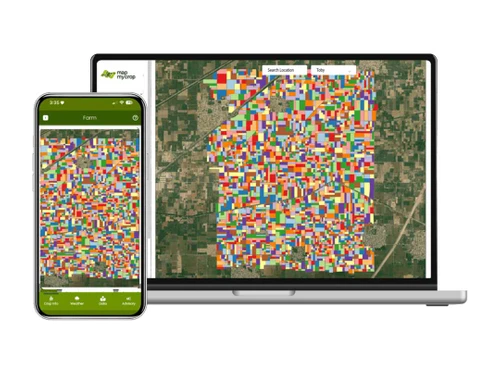
  • Farm Boundary Detection: Automatically identifies and maps farm boundaries.
  • Crop Type Identification: Recognizes crop types with advanced algorithms.
  • Disease & Pest Forecasting: Predicts pest attacks and crop diseases in advance.
  • Hyper-Local Weather Insights: Provides real-time, location-specific weather updates.
  • Satellite-Based Monitoring: Offers high-resolution satellite imagery for crop health.
  • Soil & Nutrient Analysis: Analyzes soil health and suggests nutrient management.
  • Water Management Support: Enables efficient irrigation planning and water savings.
  • Mobile-Friendly Platform: Easy access via smartphones anytime, anywhere.
  • Real-Time Guidance: Delivers instant alerts and actionable recommendations.
  • Expert Agronomist Support: Connects farmers with professional agronomy advice.
  • Cost Optimization: Reduces input costs through data-driven suggestions.

Benefits of Map My Crop Software

  • Yield Improvement: Enhances crop productivity and yield.
  • Sustainability Focus: Encourages eco-friendly and resource-efficient farming.
  • Multi-Crop Compatibility: Works with diverse crops across regions.
  • Global Reach: Active in 80+ countries, ensuring scalability and trust.
  • Farmer-Friendly Interface: Simple, intuitive, and easy to use.
  • Data Security: Safeguards farm and personal data with strong privacy.
  • Supports Agribusinesses: Benefits farmers, cooperatives, FPOs, and enterprises.
  • Free Access for Small Farmers: Provides free crop monitoring tools for smallholders.

Map My Crop Pricing

Map My Crop price details are available on request at techjockey.com.

The pricing model is based on different parameters, including extra features, deployment type, and the total number of users. For further queries related to the product, you can contact our product team and learn more about the pricing and offers.

Read more

Hardcastle Agrotech Solutions Pvt Ltd Company Details

Founded Year:  2021

At MapMyCrop, we are transforming the way farmers, enterprises, and governments monitor and manage crops. Headquartered in New York and Pune, we offer an innovative 360-degree agriculture suite that works seamlessly for all crops and across all locations, without the need for sensors.

Director/Founders HAS
Company Size 1-100 Employees

Map My Crop Pricing & Plans

Looking for The Right Pricing?

Share your requirements and get a plan built around your business.

  • Define your business needs
  • Get customised pricing
  • Choose features that fit your workflow

Price Available on Request

Get personalised Map My Crop pricing that fits your needs. Our team will connect with you.

Map My Crop Features

  • icon_check Crop Monitoring
    Tracks crop health and growth using satellite imagery and AI.
  • icon_check Farm Boundary Detection
    Automatically maps farm boundaries for accurate analysis.
  • icon_check Tree Monitoring
    Monitors tree health, density, and growth patterns.
  • icon_check Farm Detection
    Identifies farm areas and differentiates them from non-farm land.
  • icon_check Farm Prediction
    Provides predictive insights on crop performance and yield.
  • icon_check Sustainable Agriculture Monitoring
    Promotes eco-friendly practices and resource optimization.
  • icon_check Irrigation Modelling
    Helps plan efficient water usage to avoid wastage.
Map My Crop Demo Video play icon

Get Map My Crop Demo

Watch the demo video to explore key features, real workflows, and how the software fits your business needs.

Understand
Key Features
Personal
Demo Insights
Interactive
Demo Support

Map My Crop Specifications

Supported Platforms
Windows Windows MacOS MacOS
Devices
Desktop Desktop
Deployment
Cloud-Based Cloud-Based
Suitable For
Agriculture Farm
Business Specific
All Businesses
Business Size
Small Business Medium Business Enterprises SMBs SMEs MSMBs MSMEs
Customer Support
Email
Language
English
Integration
API Integration
Training Resources
Live Online
Compliance Regulation
GDPR

Explore the Best Alternative Solutions Similar to Your Business Size and Needs

Map My Crop Reviews

4.5

Out of 5

img

Overall Rating

Based on
2 Verified Reviews

Rating Breakdown

  • Features 4.7
  • Value for Money 4.2
  • Ease of Use 4.2
  • Customer Support 4.7

80% Recommend this Product

Add Review

Map My Crop Video Reviews

youtubeVideoId

4.6

“MMC Farmer Testimonial”

Review by: Map My Crop

youtubeVideoId

4.4

“Map my Crop Farmer Testimonial ”

Review by: Map my Crop

Compare Map My Crop With other Farm Management Software

Products
Ratings
Pricing
Device Supported
Deployment
Supported Platforms
  • img

    Map My Crop

  • 4.5

  • Price On Request

  • Desktop

    Mobile

  • Web based

    On Premises

  • Windows

    Mac OS

  • img

    Shivrai Farm ERP

  • 4.1

  • Price On Request

  • Desktop

    Mobile

  • Web based

    On Premises

  • Windows

    Mac OS

  • img

    Farmbrite

  • 4.5

  • Price On Request

  • Desktop

    Mobile

  • Web based

    On Premises

  • Windows

    Mac OS

  • img

    NAVFarm ERP

  • 4.4

  • Price On Request

  • Desktop

    Mobile

  • Web based

    On Premises

  • Windows

    Mac OS

  • img

    Croptracker

  • 4.5

  • Price On Request

  • Desktop

    Mobile

  • Web based

    On Premises

  • Windows

    Mac OS

  • img

    Farmplan

  • 4.4

  • Price On Request

  • Desktop

    Mobile

  • Web based

    On Premises

  • Windows

    Mac OS

  • img

    Tend

  • 4.5

  • Price On Request

  • Desktop

    Mobile

  • Web based

    On Premises

  • Windows

    Mac OS

  • img

    SourceTrace

  • 4.2

  • Price On Request

  • Desktop

    Mobile

  • Web based

    On Premises

  • Windows

    Mac OS

  • img

    Kheti Buddy

  • 4.1

  • Price On Request

  • Desktop

    Mobile

  • Web based

    On Premises

  • Windows

    Mac OS

  • img

    Aeros LIVE

  • 4.1

  • Price On Request

  • Desktop

    Mobile

  • Web based

    On Premises

  • Windows

    Mac OS

(0) Product(s) selected

Map My Crop Alternatives

See All Map My Crop Alternatives

Available

Price on Request

Available

Price on Request

Available

Price on Request

Starting Price:

$100 /Month

How much does Map My Crop Software cost?

The pricing details for Map My Crop are available upon request at techjockey.com.

Is there a mobile app available for Map My Crop Software?

No, Map My Crop is not accessible through mobile apps.

Which operating systems are compatible with Map My Crop Software?

Map My Crop is web-based and works across Windows and MacOS operating systems.

Does Map My Crop Software offer a free trial?

No, Map My Crop free trial is not available.

How does Map My Crop Software function?

Map My Crop uses AI and satellite imagery to monitor and manage crops.

Who uses Map My Crop Software?

Farmers, cooperatives, FPOs, and agribusiness enterprises use Map My Crop.

Is a free demo available for Map My Crop Software?

Yes, Map My Crop free demo is available upon request.

Is Map My Crop Software available for free?

Yes, small farmers get free crop monitoring tools.

20,000+ Software Listed

Best Price Guranteed

Free Expert Consultation

2M+ Happy Customers

Terms and Condtions

close

Users with registered businesses can purchase goods from merchants on the platform to satisfy their business needs. Users are not permitted to utilize any products acquired through the platform for resale, advertising, business, or further distribution.

For each purchase made, users will receive a Tax Invoice (or 'GST invoice') that includes specific details such as:

  • the GSTIN of the user associated with their registered business, and

  • the specified Entity Name for their business.

It should be noted that not all products are eligible for GST Invoice. Only the products displayed by participating sellers with the 'GST-based Invoice Available' callout on the product description page would qualify.

Certain goods and services are not eligible to get a GST Invoice, including items with VAS, i.e., Value Added Services (e.g., Total Mobile Protection/Assured Buyback) and those involving an exchange offer at the time of purchase.

Users must ensure the accuracy of the GSTIN, and business entity name provided for the GST Invoice. Requests for corrections into GST Invoice would not be accommodated by Techjockey.com or any Seller, and any issues arising from user-provided information are the sole responsibility of users.

Techjockey.com is not liable for the GST Invoice or any associated input tax credit. To efficiently claim an input tax credit, users should select the registered place of business address as per the GST authority's data and follow the provisions of the GST Act and rules.

To claim an input tax credit, the delivery and billing addresses must match. Furthermore, input tax credits will not be granted if the delivery address and GSTIN on the invoice are from different states. In case of incorrect GST details provided during the order placement, the order will be canceled automatically.