linkedin
Maptek Vulcan logo
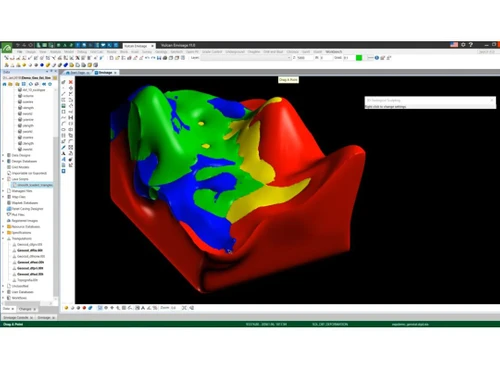
maptek vulcan dashboard
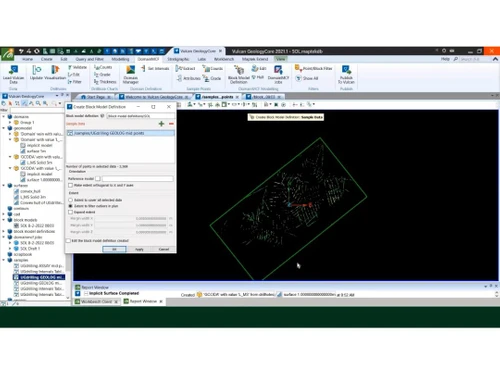
maptek vulcan diagram
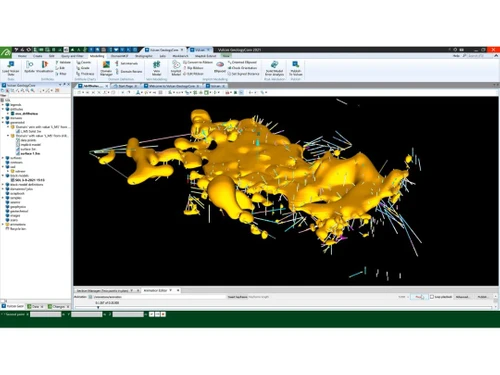
maptek vulcan sketch

Maptek Vulcan

Brand: Maptek

  • 4.3

  • 5 Ratings

Maptek Vulcan is a robust solution for geological modeling, mine design, and planning.

See More

Have you used Maptek Vulcan before?

Share your insights for better experience

Add a Review

Price Available on Request

Questions about pricing or customization? We’re here to help, just a click away.

100% Genuine
Products
Best Price
Guaranteed
Safe & Secure
Payment
  • Description

  • Pricing

  • Features

  • Specification

  • Review

  • Compare

  • Alternatives

  • FAQ

Maptek Vulcan Software Overview

What is Maptek Vulcan?

Maptek Vulcan is a leading mining software that provides robust tools for geological modeling, mine design, and planning. It enables users to create detailed 3D models of ore bodies, optimizing the extraction process. Vulcan supports various mining methods and integrates data from multiple sources to improve accuracy and efficiency.

Its advanced visualization capabilities help identify potential issues and opportunities. The software also offers features for pit optimization, underground design, and resource estimation. Widely used in the mining industry, Vulcan enhances decision-making and operational performance.

Why Choose Maptek Vulcan Software?

  • End-to-End Solutions: Provides an integrated solution for geological modeling, mine design, planning, and scheduling, benefiting the entire mining lifecycle.
  • Automated Workflows: Offers tools for tasks like attributing solids, updating surfaces, splitting seams, and preparing mining blocks for scheduling.
  • Improved Efficiency: This reduces the time spent on CAD work and data preparation, allowing focus on quality long-range or life-of-mine schedules.
  • Enhanced Collaboration: Facilitates seamless collaboration between geological, geotechnical, and engineering teams with reliable, repeatable results.
  • Powerful Modeling: Provides an intuitive 3D environment for visualizing designs, running animations, and exploring alternative scenarios.
  • Flexibility: Supports multiple pits and projects and offers flexibility for different seams, saving time and effort.
  • Streamlined Scheduling: Gantt Scheduler reads block models, allowing the import and export of multiple Gantt files to schedule shorter-range plans.
  • Improved Reporting: Offers enhanced reporting capabilities, reducing manual work and minimizing errors.
  • Cutting-Edge Features: This package includes advanced features like Kriging Neighbourhood Analysis, Uniform Conditioning, Implicit Modeling, and Radial Basis Function estimation.

Benefits of Maptek Vulcan Platform

  • Enhanced Collaboration: It facilitates better team communication and collaboration by providing a shared platform for data and model access, ensuring all stakeholders are on the same page.
  • Improved Efficiency: Automation of routine tasks and streamlined workflows saves time and reduces the potential for human error, increasing overall operational efficiency.
  • Risk Management: Its advanced analysis tools help identify and mitigate potential risks early in the project lifecycle, contributing to safer mining operations.
  • Resource Optimization: The software aids in optimizing resource extraction and utilization, leading to more cost-effective and sustainable mining practices.
  • Scalability: It can scale with the growth of your mining project, accommodating increasing data complexity and larger operations without sacrificing performance.
  • Regulatory Compliance: The software supports adherence to industry regulations and standards by providing accurate and reliable data management and reporting capabilities.

Pricing of Maptek Vulcan

Maptek Vulcan price details are available on request at techjockey.com.

The pricing model is based on different parameters, including extra features, deployment type, and the total number of users. If you have further queries related to the product, you can contact our product team to learn more about the pricing and offers.

Read more

Maptek Company Details

Founded Year:  1981

Maptek

Director/Founders Bob Johnson
Company Size 101-500 Employees

Maptek Vulcan Pricing & Plans

Looking for The Right Pricing?

Share your requirements and get a plan built around your business.

  • Define your business needs
  • Get customised pricing
  • Choose features that fit your workflow

Price Available on Request

Get personalised Maptek Vulcan pricing that fits your needs. Our team will connect with you.

Maptek Vulcan Features

  • icon_check 3D Modeling
    Enables the creation of detailed, three-dimensional representations of geological structures.
  • icon_check 3D Visualization
    Provides advanced tools for visualizing complex geological data in three dimensions.
  • icon_check Block Modelling
    Facilitates the construction of block models for resource estimation and mine planning.
  • icon_check Creation & Editing
    Allows users to easily create and edit geological and mining data.
  • icon_check Data Import/Export
    Supports importing and exporting data from various formats, ensuring seamless data integration.
  • icon_check Detailed Information Breakdown
    Offers comprehensive geological and mining data breakdowns for in-depth analysis.
  • icon_check Geostatistics
    Utilizes statistical methods to analyze spatial data and improve resource estimates.
  • icon_check Multivariate & Simulation
    Supports multivariate analysis and simulation to model multiple variables and predict outcomes.
  • icon_check Gantt Scheduler
    Provides a scheduling tool for planning and tracking mining activities over time.
  • icon_check Grade Control Suite
    Includes tools for monitoring and controlling ore grades to ensure quality and consistency in mining operations.

Maptek Vulcan Specifications

Supported Platforms
Windows Windows
Devices
Desktop Desktop
Deployment
Perpetual Perpetual
Suitable For
All Industries
Business Specific
All Businesses
Business Size
Small Business Startups Medium Business Enterprises
Customer Support
Email Communities
Language
English Português русский Español
Training Resources
Live Online Webinars Videos

Explore the Best Alternative Solutions Similar to Your Business Size and Needs

Maptek Vulcan Review

4.3

Out of 5

img

Overall Rating

Based on
5 Verified Ratings

Rating Breakdown

  • Features 4.2
  • Value for Money 4.2
  • Ease of Use 4.3
  • Customer Support 4.5

92% Recommend this Product

Add Review

Be the First to Review

This product has no reviews yet. Be the first to leave your feedback.

Add Review

Compare Maptek Vulcan With other Mining Software

Products
Ratings
Pricing
Device Supported
Deployment
Supported Platforms
  • img

    Maptek Vulcan

  • 4.3

  • Price On Request

  • Desktop

    Mobile

  • Web based

    On Premises

  • Windows

    Mac OS

  • img

    Deswik

  • 3.7

  • Price On Request

  • Desktop

    Mobile

  • Web based

    On Premises

  • Windows

    Mac OS

  • img

    GEOVIA Surpac

  • 4.2

  • Price On Request

  • Desktop

    Mobile

  • Web based

    On Premises

  • Windows

    Mac OS

  • img

    Rocscience Dips

  • 4.0

  • Price On Request

  • Desktop

    Mobile

  • Web based

    On Premises

  • Windows

    Mac OS

  • img

    GIM Suite

  • 4.1

  • Price On Request

  • Desktop

    Mobile

  • Web based

    On Premises

  • Windows

    Mac OS

  • img

    MiningPro

  • Price On Request

  • Desktop

    Mobile

  • Web based

    On Premises

  • Windows

    Mac OS

  • img

    Mine Excellence

  • 4.3

  • Price On Request

  • Desktop

    Mobile

  • Web based

    On Premises

  • Windows

    Mac OS

  • img

    Pitram

  • 4.3

  • Price On Request

  • Desktop

    Mobile

  • Web based

    On Premises

  • Windows

    Mac OS

  • img

    RPM MinePlanner

  • 4.1

  • Price On Request

  • Desktop

    Mobile

  • Web based

    On Premises

  • Windows

    Mac OS

  • img

    LandTrack

  • 4.1

  • Price On Request

  • Desktop

    Mobile

  • Web based

    On Premises

  • Windows

    Mac OS

(0) Product(s) selected

Maptek Vulcan Alternatives

See All Maptek Vulcan Alternatives

Available

Price on Request

Available

Price on Request

Which operating system does Maptek Vulcan Software support?

Maptek Vulcan Software supports Windows operating systems.

How much does Maptek Vulcan Software cost?

Maptek Vulcan pricing details are available upon request at techjockey.com.

Is there any Maptek Vulcan Software app?

No, there is no dedicated app for Maptek Vulcan Software.

Does Maptek Vulcan offer a free trial?

No, Maptek Vulcan Software does not offer a free trial.

How does Maptek Vulcan Software work?

Maptek Vulcan Software works by providing tools for geological modeling, mine design, and planning through advanced 3D visualization and data integration.

Who are the potential users of Maptek Vulcan Software?

Potential users include geologists, mining engineers, and planners in the mining industry.

Can Maptek Vulcan Software handle large datasets?

Maptek Vulcan Software is designed to handle large and complex datasets efficiently.

Is Maptek Vulcan Software customizable?

Maptek Vulcan Software can be customized to meet specific project requirements and user needs.

20,000+ Software Listed

Best Price Guranteed

Free Expert Consultation

2M+ Happy Customers

Terms and Condtions

close

Users with registered businesses can purchase goods from merchants on the platform to satisfy their business needs. Users are not permitted to utilize any products acquired through the platform for resale, advertising, business, or further distribution.

For each purchase made, users will receive a Tax Invoice (or 'GST invoice') that includes specific details such as:

  • the GSTIN of the user associated with their registered business, and

  • the specified Entity Name for their business.

It should be noted that not all products are eligible for GST Invoice. Only the products displayed by participating sellers with the 'GST-based Invoice Available' callout on the product description page would qualify.

Certain goods and services are not eligible to get a GST Invoice, including items with VAS, i.e., Value Added Services (e.g., Total Mobile Protection/Assured Buyback) and those involving an exchange offer at the time of purchase.

Users must ensure the accuracy of the GSTIN, and business entity name provided for the GST Invoice. Requests for corrections into GST Invoice would not be accommodated by Techjockey.com or any Seller, and any issues arising from user-provided information are the sole responsibility of users.

Techjockey.com is not liable for the GST Invoice or any associated input tax credit. To efficiently claim an input tax credit, users should select the registered place of business address as per the GST authority's data and follow the provisions of the GST Act and rules.

To claim an input tax credit, the delivery and billing addresses must match. Furthermore, input tax credits will not be granted if the delivery address and GSTIN on the invoice are from different states. In case of incorrect GST details provided during the order placement, the order will be canceled automatically.