linkedin
Moxie logo
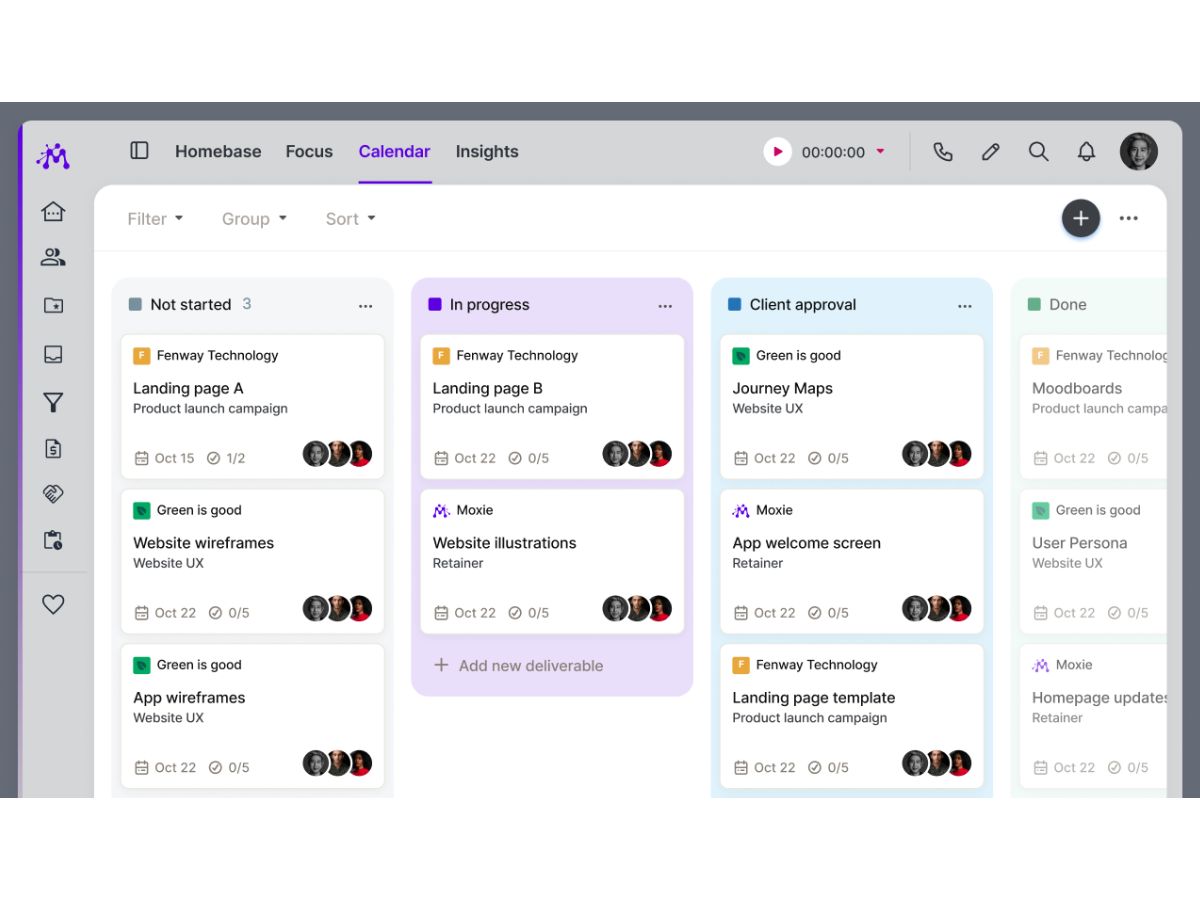
Moxie-project
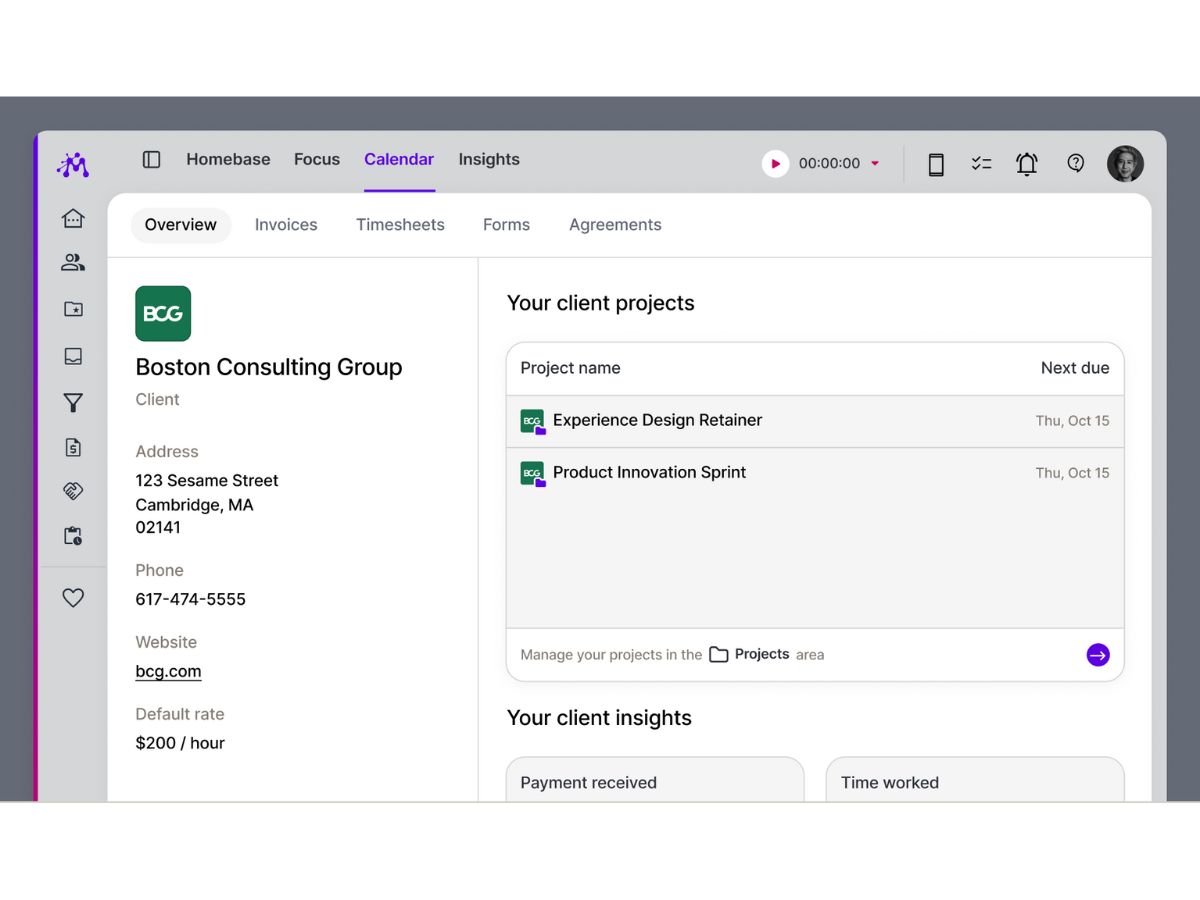
Moxie-client
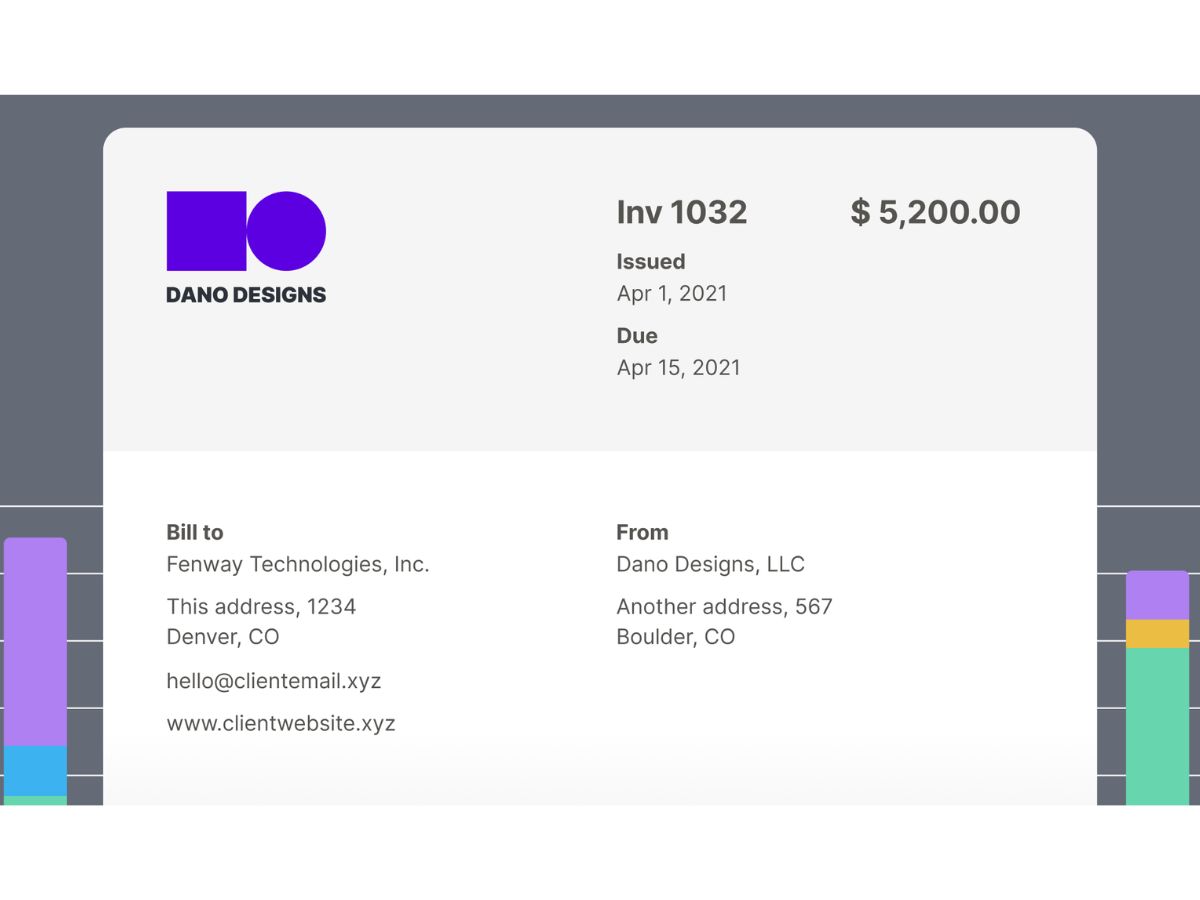
Moxie-invoice

Moxie

Brand: Moxie

  • 4.2

  • 7 Ratings & 2 Reviews

An agency management software that enables freelancers and creatives to manage clients, projects, invoices, and communication all in one place.

See More

Have you used Moxie before?

Share your insights for better experience

Add a Review
Starting Price
$12

View plans

100% Genuine
Products
Best Price
Guaranteed
Safe & Secure
Payment
  • Description

  • Pricing

  • Features

  • Specification

  • Review

  • Compare

  • Alternatives

  • FAQ

Starting at $12

Moxie Software Overview

What is Moxie?

Moxie is an all-in-one agency management software designed primarily for freelancers and creative professionals to run their work smoothly. It helps you keep track of clients, projects, invoices, contracts, time tracking, and expenses all in one place.

Moxie also offers tools like a sales pipeline to manage leads, a meeting scheduler, and a client portal where clients can view project details or pay invoices.

The platform centralizes communication so you can message clients without cluttering your email. It supports collaboration with teammates and integrates key business functions like proposals, billing, and accounting to simplify operations.

Moxie is built to replace multiple separate tools by bringing everything a freelancer needs into one dashboard.

Why Choose Moxie Software?

  • All-in-One Dashboard: Manage clients, projects, invoices, and communication in one platform.
  • Client Management: Keep all client information and agreements organized in one place.
  • Project Management: Track tasks, deadlines, and deliverables efficiently.
  • Sales Pipeline: Monitor leads and opportunities to grow your business.
  • Proposal Builder: Create professional proposals quickly and easily.
  • Contract Management: Generate and send contracts directly from Moxie.
  • Time Tracking: Log hours per project or task for accurate billing.
  • Invoice Automation: Turn tracked time into invoices effortlessly.
  • Expense Management: Track and categorize expenses for better financial control.
  • Financial Reports: Monitor profit, loss, and revenue in real-time.
  • Calendar Sync: Integrate meetings and tasks with your calendar.
  • Meeting Scheduler: Allow clients to book appointments automatically.
  • Client Portal: Provide clients with a secure place to view projects and payments.
  • Unified Inbox: Consolidate all client communications in one inbox.
  • Business Phone Line: Communicate with clients using a dedicated work number.

Benefits of Moxie Software

  • Custom Forms: Collect client information efficiently through tailored forms.
  • Automated Reminders: Set automatic reminders to prevent missed tasks or payments.
  • Online Payments: Accept payments via Stripe, PayPal, or credit card.
  • Workflow Automation: Automate repetitive business processes for efficiency.
  • Role-Based Access: Control permissions for clients and team members.
  • Integrated CRM: Manage client relationships without needing a separate tool.
  • Professional Invoicing: Send detailed and polished invoices to clients.
  • Recurring Billing: Handle subscriptions, retainers, and repeat payments easily.
  • Business Overview: Get a snapshot of important metrics on the home dashboard.
  • Templates & Guides: Use ready-made templates for proposals, contracts, and invoices.
  • Easy Onboarding: Set up your account quickly and start managing work immediately.
  • Reduces Admin Work: Replace multiple tools by centralizing business operations.

Moxie Pricing

Moxie price starts at USD 12 at techjockey.com. The pricing model is based on different parameters, including extra features, deployment type, and the total number of users. For further queries related to the product, you can contact our product team and learn more about the pricing and offers.

Read more

Moxie Company Details

Founded Year:  2020

Moxie is a tool for freelancers to grow their business.

Director/Founders Geoffrey Mina
Company Size 1-100 Employees

Moxie Pricing & Plans

Starter
Starting at $12
    • Licenses

      Licenses
      Licenses
    • Monthly

      Monthly
      Monthly

Key Features

  • Client management

  • Project management

  • Invoicing & payments

  • Proposals, quotes & contracts

  • Sales pipeline

Pro
Starting at $25
    • Licenses

      Licenses
      Licenses
    • Monthly

      Monthly
      Monthly

Key Features

  • Everything in Starter plus

  • Custom domain

  • Client portal

  • Workflow automations

  • API Integrations (Zapier, Make, Webhooks, Public A

Team
Starting at $40
    • Licenses

      Licenses
      Licenses
    • Monthly

      Monthly
      Monthly

Key Features

  • Everything in Pro plus

  • Up to five team members

  • Unlimited project collaborators

  • 1 additional communicator phone line

  • Everything you and your team need to run your busi

Moxie Features

  • icon_check Project Management
    Plan, organize, and track client projects with tasks, deadlines, and ownership to ensure on-time delivery.
  • icon_check Client Portal
    Offer clients a secure portal to view project progress, invoices, files, and communications in one place.
  • icon_check Proposal Management
    Create and send professional proposals with scopes, pricing, and approvals to speed up client onboarding.
  • icon_check Contract Management
    Draft, send, and store digital contracts securely, ensuring all client agreements are centralized.
  • icon_check Time Tracking
    Track billable and non-billable hours across projects to improve utilization, forecasting, and billing accuracy.
  • icon_check Invoicing
    Generate invoices from projects or retainers automatically, reducing manual effort and billing errors.
  • icon_check Online Payment
    Accept client payments directly through invoices to improve cash flow and reduce payment delays.
  • icon_check Retainer Management
    Manage recurring retainers with usage tracking to monitor scope consumption and prevent over-servicing.
  • icon_check Resource Management
    Allocate team members based on availability and workload to balance capacity and avoid bottlenecks.
  • icon_check Expense Tracking
    Capture and categorize project expenses to ensure accurate cost tracking and client reimbursements.
  • icon_check File Management
    Store and share project-related files securely within client and project records for easy collaboration.
  • icon_check Workflow Automation
    Automate routine workflows such as invoicing, reminders, and status updates to save operational time.
  • icon_check Reporting & Analytics
    Access real-time reports on revenue, utilization, and profitability to support data-driven decisions.
  • icon_check Team Collaboration
    Enable internal comments, discussions, and updates within projects to keep teams aligned and informed.

Moxie Specifications

Supported Platforms
Windows Windows iOS iOS Android Android MacOS MacOS
Devices
Desktop Desktop Mobile Mobile
Deployment
Cloud-Based Cloud-Based
Suitable For
All Industries
Business Specific
All Businesses
Business Size
Freelancers
Customer Support
Email
Language
English
Integration
API Integration
Training Resources
Videos

Moxie Reviews

4.2

Out of 5

img

Overall Rating

Based on
2 Verified Reviews

Rating Breakdown

  • Features 4.5
  • Value for Money 4.1
  • Ease of Use 4.2
  • Customer Support 4

82% Recommend this Product

Add Review

Moxie Video Reviews

youtubeVideoId

4.6

“Moxie 3 Month Review (Bonsai and Fiverr Workspace Killer?)”

Review by: Self-Employment Sidekick

youtubeVideoId

4.3

“Moxie Review - Best Freelance Accounting Client Management Software”

Review by: AI Advancement

Compare Moxie With other Agency Management Software

Products
Ratings
Pricing
Device Supported
Deployment
Supported Platforms
  • img

    Moxie

  • 4.2

  • Price On Request

  • Desktop

    Mobile

  • Web based

    On Premises

  • Windows

    Mac OS

  • img

    Productive

  • 5

  • Price On Request

  • Desktop

    Mobile

  • Web based

    On Premises

  • Windows

    Mac OS

  • img

    LPGSoft

  • 4.3

  • Price On Request

  • Desktop

    Mobile

  • Web based

    On Premises

  • Windows

    Mac OS

  • img

    ManyRequests

  • 4.3

  • Price On Request

  • Desktop

    Mobile

  • Web based

    On Premises

  • Windows

    Mac OS

  • img

    Agency Simplifier

  • 4.1

  • Price On Request

  • Desktop

    Mobile

  • Web based

    On Premises

  • Windows

    Mac OS

  • img

    CampaignSwift

  • Price On Request

  • Desktop

    Mobile

  • Web based

    On Premises

  • Windows

    Mac OS

  • img

    Function Point

  • 4.3

  • Price On Request

  • Desktop

    Mobile

  • Web based

    On Premises

  • Windows

    Mac OS

  • img

    Functionfox

  • 4.7

  • Price On Request

  • Desktop

    Mobile

  • Web based

    On Premises

  • Windows

    Mac OS

(0) Product(s) selected

Moxie Alternatives

See All Moxie Alternatives

Available

Price on Request

How much does Moxie Software cost?

Moxie pricing starts at USD 12 on techjockey.com.

Is there a mobile app available for Moxie Software?

Yes, Moxie has a dedicated Android and iOS mobile app.

Which operating systems are compatible with Moxie Software?

Moxie works on any operating system such as Windows and MacOS.

Does Moxie Software offer a free trial?

Yes, Moxie provides a free trial.

How does Moxie Software function?

Moxie functions by helping freelancers manage clients, projects, contracts, invoicing, time tracking, and communication all in one platform.

Who uses Moxie Software?

Freelancers, creatives, and small teams use Moxie to organize and run their business workflows.

Is a free demo available for Moxie Software?

Yes, Moxie offers a free trial/demo.

Is Moxie Software available for free?

Yes, Moxie provides a free 14-day trial for new users.

20,000+ Software Listed

Best Price Guranteed

Free Expert Consultation

2M+ Happy Customers

Terms and Condtions

close

Users with registered businesses can purchase goods from merchants on the platform to satisfy their business needs. Users are not permitted to utilize any products acquired through the platform for resale, advertising, business, or further distribution.

For each purchase made, users will receive a Tax Invoice (or 'GST invoice') that includes specific details such as:

  • the GSTIN of the user associated with their registered business, and

  • the specified Entity Name for their business.

It should be noted that not all products are eligible for GST Invoice. Only the products displayed by participating sellers with the 'GST-based Invoice Available' callout on the product description page would qualify.

Certain goods and services are not eligible to get a GST Invoice, including items with VAS, i.e., Value Added Services (e.g., Total Mobile Protection/Assured Buyback) and those involving an exchange offer at the time of purchase.

Users must ensure the accuracy of the GSTIN, and business entity name provided for the GST Invoice. Requests for corrections into GST Invoice would not be accommodated by Techjockey.com or any Seller, and any issues arising from user-provided information are the sole responsibility of users.

Techjockey.com is not liable for the GST Invoice or any associated input tax credit. To efficiently claim an input tax credit, users should select the registered place of business address as per the GST authority's data and follow the provisions of the GST Act and rules.

To claim an input tax credit, the delivery and billing addresses must match. Furthermore, input tax credits will not be granted if the delivery address and GSTIN on the invoice are from different states. In case of incorrect GST details provided during the order placement, the order will be canceled automatically.