linkedin
MuleRun logo
play MuleRun Official Launch
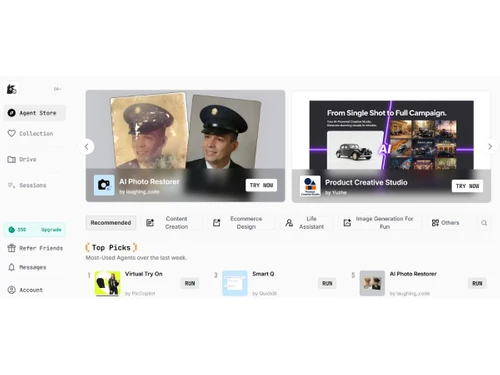
MuleRun-agent store
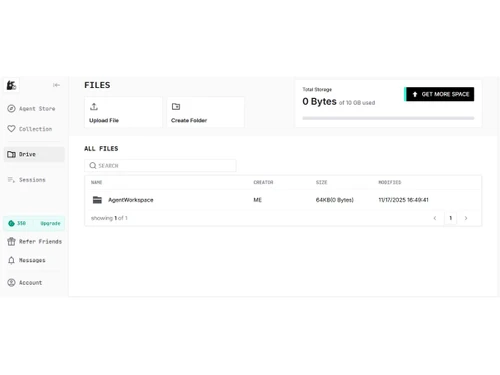
MuleRun-drive

MuleRun

Brand: MuleRun

  • 4.1

  • 4 Ratings

MuleRun is an AI agent that helps automate complex tasks and optimize workflows to improve productivity.

See More

Have you used MuleRun before?

Share your insights for better experience

Add a Review
Starting Price
$20

View plans

100% Genuine
Products
Best Price
Guaranteed
Safe & Secure
Payment
  • Description

  • Pricing

  • Features

  • Specification

  • Review

  • Compare

  • Alternatives

  • FAQ

Starting at $20

MuleRun Software Overview

What is MuleRun?

MuleRun is a sophisticated software platform categorized under AI Agents. It is engineered to empower organizations by deploying intelligent, autonomous agents that can execute complex tasks, process information, and automate workflows without direct human intervention. The core purpose of MuleRun is to serve as a digital workforce, capable of understanding instructions, interacting with various software systems, and making data-driven decisions to optimize business operations.

The platform is designed for scalability, allowing businesses to build and manage a fleet of AI agents tailored to specific functions, such as data analysis, customer support, process automation, and system monitoring. By leveraging advanced machine learning and natural language processing, MuleRun agents can interpret unstructured data, learn from interactions, and continuously improve their performance over time. This enables businesses to delegate repetitive, high-volume tasks to the software, freeing up human capital to focus on more strategic and creative initiatives.

Why Choose MuleRun?

  • Enhanced Productivity: By automating routine and time-consuming tasks, MuleRun allows your team to focus on high-value activities. The AI agents operate 24/7, ensuring that critical processes are always running without delays or downtime.
  • Improved Accuracy: AI agents eliminate the risk of human error in data entry, processing, and other repetitive tasks. This leads to higher quality outcomes, improved compliance, and more reliable business intelligence.
  • Scalable Operations: MuleRun is designed to grow with your business. You can deploy additional agents as your workload increases, ensuring that your operational capacity can scale on demand without a proportional increase in headcount or overhead.
  • Data-Driven Insights: The platform's agents can gather, process, and analyze vast amounts of data from multiple sources. This capability provides stakeholders with actionable insights, enabling more informed and strategic decision-making across the enterprise.
  • Seamless Integration: MuleRun is engineered with a flexible architecture that allows for straightforward integration with existing enterprise systems, including CRMs, ERPs, and other third-party applications, ensuring a cohesive technology ecosystem.

Advanced Features of MuleRun

  • Autonomous Task Execution: Agents can independently manage and complete multi-step workflows from start to finish. They can prioritize tasks, handle exceptions, and make logical decisions based on pre-defined rules and learned behaviors.
  • Super Agent: MuleRun's Super Agent can handle research, writing, analysis, planning, and automation tasks using browsers, editors, databases, and other tools.
  • Scheduled Tasks: MuleRun allows users to schedule AI tasks to run once or repeatedly, helping automate recurring workflows.
  • Customizable Logic and Workflows: The platform offers a highly flexible environment where users can design and customize the logic, rules, and workflows for their AI agents without requiring extensive coding knowledge.
  • Real-Time Monitoring and Reporting: A comprehensive dashboard provides real-time visibility into agent performance, task status, and overall system health. Detailed logs and analytics reports help in optimizing agent behavior and measuring ROI.

Key Capabilities of MuleRun

  • Intelligent Data Processing: MuleRun excels at ingesting data from diverse sources, including databases, APIs, and documents. It can clean, structure, and analyze this data to extract meaningful information for subsequent actions.
  • Workflow Automation: At its core, MuleRun is an automation powerhouse. It allows for the design and deployment of agents that can automate business processes such as invoice processing, report generation, data synchronization, and user onboarding.
  • Cognitive Decision-Making: Agents are not just rule-followers; they possess cognitive capabilities that allow them to evaluate situations and make optimal decisions based on the available data and historical patterns.
  • System Integration and API Interaction: The platform includes a robust framework for integrating with other software. Agents can interact with applications through their APIs, enabling them to perform actions like updating records in a CRM or retrieving data from an ERP system.

How to Use MuleRun?

  1. Define Objectives: The first step is to identify the business processes or tasks that are prime candidates for automation. Clearly define the goals, desired outcomes, and key performance indicators (KPIs).
  2. Configure the Agent: Using the MuleRun interface, configure your AI agent. This involves connecting to necessary data sources, defining the rules and logic the agent will follow, and setting up the specific steps of the workflow it needs to execute.
  3. Run and Review: Give the agent a task, review its execution and results, and refine the instructions or workflow as needed.
  4. Deploy and Monitor: Once testing is complete, deploy the agent into the live production environment. Use the platform's monitoring tools to track its performance, review its activity logs, and ensure it is delivering the expected value.
  5. Optimize and Scale: Continuously analyze agent performance data to identify opportunities for optimization. As your needs evolve, you can refine existing agents or deploy new ones to automate additional processes.

MuleRun Pricing

MuleRun price starts at USD 20 at techjockey.com.

The pricing model is based on different parameters, including extra features, deployment type, and the total number of users. For further queries related to the product, you can contact our product team and learn more about the pricing and offers.

Read more

MuleRun Pricing & Plans

Plus
Starting at $20
    • Licenses

      Licenses
      Licenses
    • Monthly

      Monthly
      Monthly

Key Features

  • 50 Trial credits refers everyday

  • 2,000 credits per month

  • Up to 5 concurrent agent sessions

  • 100GB storage space

  • Access to 350+ high quality agents

  • Agent scheduled & recurring tasks

Pro
Starting at $100
    • Licenses

      Licenses
      Licenses
    • Monthly

      Monthly
      Monthly

Key Features

  • 50 Trial credits refers everyday

  • 10,000 credits per month

  • Up to 30 concurrent agent sessions

  • 1TB storage space

  • Access to 350+ high quality agents

  • Agent scheduled & recurring tasks

MuleRun Features

Core Functionality

  • icon_check Natural Language Processing (NLP)
    Ability to understand and generate human language
  • icon_check Autonomous Task Management
    Executes tasks independently, including scheduling and prioritization.
  • icon_check Reasoning and Decision-Making
    Evaluates information to make informed decisions autonomously.

Learning and Adaptation

  • icon_check Machine Learning
    Employs algorithms to learn from data and improve performance over time.
  • icon_check Deep Learning
    Utilizes neural networks to model complex patterns in data.
  • icon_check Supervised and Reinforcement Learning
    Learns from labeled data and through feedback mechanisms to optimize actions.
  • icon_check Contextual Memory
    Maintains short-term memory to manage context within interactions.
  • icon_check Long-Term Learning
    Develops long-term memory to adapt to user preferences and behaviors over time.

Interaction Capabilities

  • icon_check Multimodal Interaction
    Engages through multiple channels, including text, voice, and visual inputs.
  • icon_check Behavior Customization
    Adjusts interaction style based on user preferences.
  • icon_check User Profiling
    Builds profiles based on user data to personalize interactions.
  • icon_check Sentiment Analysis
    Detects and interprets user emotions from input data.
  • icon_check Empathetic Responses
    Generates responses that align with detected user emotions to enhance engagement.
  • icon_check Multi-Agent Collaboration
    Enables multiple GPT agents to work together, enhancing efficiency and effectiveness in handling complex projects.

Integration Capabilities

  • icon_check Third Party Integrations
    Incorporates services from external providers to enhance functionality.
  • icon_check API Connectivity
    Interfaces with external systems through Application Programming Interfaces.
  • icon_check Enterprise Software Integration
    Seamlessly connects with business applications like CRM and ERP systems.
  • icon_check Data Analytics Integration
    Integrates with analytics tools to process and interpret data.
  • icon_check IoT Integration
    Connects with Internet of Things devices for expanded interaction capabilities.

Performance and Scalability

  • icon_check Load Balancing
    Distributes workloads evenly across resources to maintain performance.
  • icon_check Real-Time Processing
    Handles tasks and responses instantaneously to ensure prompt interaction.
  • icon_check Dynamic Scaling
    Adjusts resource allocation based on demand to ensure scalability.
  • icon_check Offline Functionality
    Operates without internet connectivity, maintaining essential features.
  • icon_check Database Querying
    Accesses and retrieves information from databases efficiently.

Advanced Features

  • icon_check Workflow Automation
    Automates complex business processes to enhance efficiency.
  • icon_check Autonomous Problem Solving
    Identifies issues and implements solutions without human intervention.
  • icon_check Knowledge Graphs
    Utilizes interconnected data to enhance understanding and reasoning.
  • icon_check Complex Scenario Handling
    Manages intricate situations requiring advanced decision-making capabilities.
  • icon_check Simulation and Forecasting
    Predicts future trends and outcomes based on current data.

Security and Compliance

  • icon_check Encryption
    Secures data through encryption during transmission and storage.
  • icon_check Data Privacy
    Ensures user data is protected and handled responsibly.
  • icon_check Role-Based Access Control (RBAC)
    Restricts system access based on user roles to enhance security.
  • icon_check Regulatory Adherence
    Complies with laws and regulations relevant to data and operations.
  • icon_check Bias Mitigation
    Implements strategies to identify and reduce biases in decision-making processes.
  • icon_check Audit Trail
    Track changes and updates within the system for enhanced security and transparency.

Analytics and Reporting

  • icon_check Performance Metrics
    Tracks key performance indicators to assess effectiveness.
  • icon_check Error Reporting
    Identifies and reports system errors for prompt resolution.
  • icon_check Feedback Collection
    Gathers user feedback to inform improvements.
  • icon_check Workflow Insights
    Provides analysis of operational workflows to identify efficiencies and bottlenecks.
  • icon_check Predictive Analytics
    Forecasts future trends based on historical data.
  • icon_check Custom Reporting
    Generates tailored reports to meet specific analytical needs.
  • icon_check Interaction Insights
    Analyzes user interactions to enhance engagement strategies.

Maintenance and Support

  • icon_check User Feedback Loop
    Incorporates user feedback into development cycles for continuous improvement.
  • icon_check Iterative Updates
    Implements regular updates to enhance functionality and security.
  • icon_check Diagnostics and Debugging
    Provides tools for identifying and
  • icon_check Self Monitoring
    Continuously assesses system health to detect and address issues proactively.
MuleRun Demo Video play icon

Get MuleRun Demo

Watch the demo video to explore key features, real workflows, and how the software fits your business needs.

Understand
Key Features
Personal
Demo Insights
Interactive
Demo Support

MuleRun Specifications

Supported Platforms
Windows Windows MacOS MacOS
Devices
Desktop Desktop
Deployment
Cloud-Based Cloud-Based
Suitable For
All Industries
Business Specific
All Businesses
Business Size
Small Business Startups Medium Business Enterprises
Customer Support
Email Communities
Language
English
Training Resources
Videos
AI Features
AI Integrated

Explore the Best Alternative Solutions Similar to Your Business Size and Needs

MuleRun Review

4.1

Out of 5

img

Overall Rating

Based on
4 Verified Ratings

Rating Breakdown

  • Features 4.3
  • Value for Money 3.8
  • Ease of Use 4.6
  • Customer Support 3.7

80% Recommend this Product

Add Review

Techjockey Trusted Reviews from Verified Users

No reviews are currently available for MuleRun. Discover similar AI Agents reviews

  • Orby AI

    4.4

    Whats great - Easy deployment, scalable cloud performance, and proactive AI recommendations. read more

  • Pando AI

    4.4

    Whats great - Pando gives a lot of functional modules (routing, tracking, payments, integrations) in one suite. read more

  • LegalFly

    4.5

    Whats great - LegalFly offers many different legal services, like helping with documents, writing contracts, or giving legal advice. read more

Compare MuleRun With other AI Agents

Products
Ratings
Pricing
Device Supported
Deployment
Supported Platforms
  • img

    MuleRun

  • 4.1

  • Price On Request

  • Desktop

    Mobile

  • Web based

    On Premises

  • Windows

    Mac OS

  • img

    Manus AI

  • 4.3

  • Price On Request

  • Desktop

    Mobile

  • Web based

    On Premises

  • Windows

    Mac OS

  • img

    SleekFlow

  • 5

  • Price On Request

  • Desktop

    Mobile

  • Web based

    On Premises

  • Windows

    Mac OS

  • img

    Kaily

  • 4.2

  • Price On Request

  • Desktop

    Mobile

  • Web based

    On Premises

  • Windows

    Mac OS

  • img

    Wand AI

  • 4.5

  • Price On Request

  • Desktop

    Mobile

  • Web based

    On Premises

  • Windows

    Mac OS

  • img

    CrewAI

  • 4.3

  • Price On Request

  • Desktop

    Mobile

  • Web based

    On Premises

  • Windows

    Mac OS

  • img

    Cosmitude Bridge

  • 4.3

  • ₹ 1999

  • Desktop

    Mobile

  • Web based

    On Premises

  • Windows

    Mac OS

  • img

    Lindy

  • 4.2

  • Price On Request

  • Desktop

    Mobile

  • Web based

    On Premises

  • Windows

    Mac OS

  • img

    Quickchat AI

  • 4.6

  • Price On Request

  • Desktop

    Mobile

  • Web based

    On Premises

  • Windows

    Mac OS

  • img

    Uservox

  • 4.4

  • Price On Request

  • Desktop

    Mobile

  • Web based

    On Premises

  • Windows

    Mac OS

  • img

    Skywork AI

  • 4.6

  • Price On Request

  • Desktop

    Mobile

  • Web based

    On Premises

  • Windows

    Mac OS

(0) Product(s) selected

MuleRun Alternatives

See All MuleRun Alternatives

Starting Price:

$19 /Month

Starting Price:

$39 /Month

Starting Price:

$25 /Month

Starting Price:

$50 /Month

Starting Price:

$20 /Month

Starting Price:

$50 /Month

Available

Price on Request

Available

Price on Request

Tars

4.3

Starting Price:

$20 /Month

Articles for MuleRun

See All Related Articles

What does MuleRun do?

MuleRun is an AI workflow platform that uses its Super Agent to handle research, writing, analysis, planning, automation, file handling, web tasks, and other knowledge-work tasks.

How much does MuleRun cost?

MuleRun price starts at USD 20 at techjockey.com.

What are the main features of MuleRun?

Key features include Super Agent, MuleRun Computer, Channels, Pages, Drive, Knowledge, Scheduled Tasks, Toolbox, Data Sources, Connector, MuleRun CLI, and Sharing & Collaboration.

Who can use MuleRun?

MuleRun can be used by individuals and teams for research, writing, development, automation, data analysis, content creation, and other knowledge-work tasks. Team and Enterprise editions are designed for organizations and collaborative teams.

Does MuleRun support specific geographic regions?

MuleRun has some region-specific feature limitations. For example, Scheduled Tasks are not currently available in the CN region.

How does MuleRun handle user authentication?

Users can register with an email address or sign in using Google/Gmail or Apple ID. For third-party connectors, MuleRun supports authentication methods including OAuth2, OAuth1, Basic Auth, API Key, and JWT, depending on the integration.

What kind of data does MuleRun process?

MuleRun can process documents, spreadsheets, presentations, PDFs, images, audio, video, code, ZIP files, web data, and other task-related information. Its Super Agent can also work with databases, browsers, files, and external tools.

What technology stack does MuleRun utilize?

MuleRun uses an AI-agent/workflow architecture built around its Super Agent, cloud-based MuleRun Computer, browser and tool integrations, databases, file handling, AI model integrations, and a Skills system. Its documentation does not provide a complete public list of programming languages or underlying frameworks, so a more specific technology-stack claim would not be confirmed.

21,000+ Software Listed

Best Price Guranteed

Free Expert Consultation

5M+ Happy Customers

Terms and Condtions

close

Users with registered businesses can purchase goods from merchants on the platform to satisfy their business needs. Users are not permitted to utilize any products acquired through the platform for resale, advertising, business, or further distribution.

For each purchase made, users will receive a Tax Invoice (or 'GST invoice') that includes specific details such as:

  • the GSTIN of the user associated with their registered business, and

  • the specified Entity Name for their business.

It should be noted that not all products are eligible for GST Invoice. Only the products displayed by participating sellers with the 'GST-based Invoice Available' callout on the product description page would qualify.

Certain goods and services are not eligible to get a GST Invoice, including items with VAS, i.e., Value Added Services (e.g., Total Mobile Protection/Assured Buyback) and those involving an exchange offer at the time of purchase.

Users must ensure the accuracy of the GSTIN, and business entity name provided for the GST Invoice. Requests for corrections into GST Invoice would not be accommodated by Techjockey.com or any Seller, and any issues arising from user-provided information are the sole responsibility of users.

Techjockey.com is not liable for the GST Invoice or any associated input tax credit. To efficiently claim an input tax credit, users should select the registered place of business address as per the GST authority's data and follow the provisions of the GST Act and rules.

To claim an input tax credit, the delivery and billing addresses must match. Furthermore, input tax credits will not be granted if the delivery address and GSTIN on the invoice are from different states. In case of incorrect GST details provided during the order placement, the order will be canceled automatically.