 USA
USA UAE
UAESmall Business
Designed for startups and growing businesses


See More




Brand: Playform
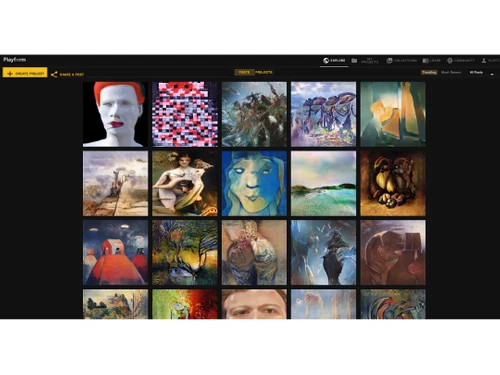
Playform is a generative AI tool that enables users to create original content, including images, through advanced artificial intelligence models.
See MoreHave you used Playform before?
Share your insights for better experience
Brand: Playform
Founded Year: 2018
Playform is a no-code AI for creative people.
Image Generation and Processing
 Real-time Preview Text-to-Image Generation Image-to-Image Transformation Multi-Layer Image Processing High-Resolution Output Batch Generation Preset Styles Drag and Drop Real-Time Rendering
 Editing and Customization Tools
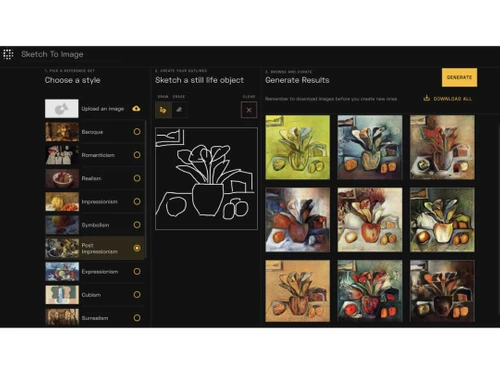
Content Filters Style Transfer Adjustable Parameters Layer Control Image Upscaling Denoising Image Weights AI Editor 3D Effects Realistic Object Generation Resolution Control Object Removal Background Removal Text Overlay Image Tiling Style Adaptation Prompt Control and Enhancements
Prompt Sensitivity Prompt Flexibility Prompt Editing Prompt Enhancer Negative Prompt Prompt Matrix Seed Real-Time Generation Model and AI Capabilities
Multi-Model Support Fine Tuning Model Merging Collaboration and Sharing
Prompt Libraries Image Sharing Custom Templates Collaboration Tools Branding and Commercial Use
Brand Kit Integration Commercial Rights Data Privacy Integration Supported
API Integration 3D Modeling Software Integration Animation Tools Integration Content Management Systems (CMS) Integration Design and Editing Software Integration Cloud Storage and Collaboration Tools Integration E-Commerce Platforms Integration Game Engines Integration Video Editing Tools Integration NFT Marketplaces Plugin & Extensions 

Watch the demo video to explore key features, real workflows, and how the software fits your business needs.
 Ubuntu
  Windows
  MacOS
MacOS  Linux
Linux  Desktop
  Cloud-Based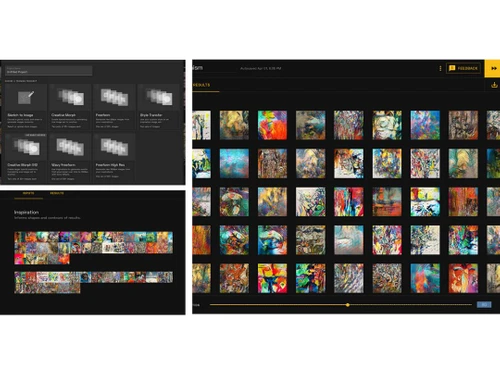
Small Business
Designed for startups and growing businesses
Medium Business
Built for business growth and flexibility
Enterprises
Designed for complex and large-scale business needs
4.3
Out of 5

Overall Rating
Based on
10 Verified Reviews
Rating Breakdown
86% Recommend this Product
Add ReviewOverall, users have a positive sentiment towards Playform, appreciating its AI-driven tools that facilitate creativity and experimentation in image generation. Many editors highlight the ease of use, even for those without extensive artistic backgrounds, and the effectiveness of features like text-to-image generation and style transfer. However, common complaints include slow image rendering times and occasional inconsistencies in output quality. Additionally, some users mention a need for better project organization within the interface.

Sep 2, 2024
Techjockey Verified
“Playform Has Enhanced My Ability to Experiment with Images”
Playform offers a variety of tools available and has helped me create some truly unique pieces.
Pros
The AI-driven features in Playform have made it easier for me to experiment with new creative styles and ideas. I often use the style transfer tool to blend multiple styles together, which helps me produce work that feels unique.
Cons
The interface could use some improvements when it comes to organizing projects.
Reason to switch
I wanted to explore more ai image generator.
Sep 3, 2024
Techjockey Verified
“Playform Has Made Image Generation More Accessible for Me”
The software is easy to use, even for someone without much artistic experience, and the variety of features available has helped me create pieces that I’m proud of.
Pros
Playform has opened up new possibilities for me, even though I’m not a professional artist. The text-to-image generator helps me bring ideas to life quickly, and the photo enhancement tool is a nice touch for improving older images.
Cons
It can take a while for images to render, and sometimes the results are inconsistent.
Reason to switch
The collaboration feature and wider range of creative options convinced me to switch to Playform.
Sep 2, 2024
Techjockey Verified
“Playform Has Been a game changer for me as it is packed with a variety of features”
I mostly use the text-to-image feature to generate base images that I later refine with other software.
Pros
I like the style transfer tool, which allows me to merge different artistic styles into one cohesive piece. Further, the software offers additional features like prompt enhancer, prompt editing, prompt flexibility and more to improve the results.
Cons
Nothing to dislike
Reason to switch
I wanted a tool that allowed for more exploration and creativity, and Playform’s diverse feature set met that need.

Playform
Price On Request
Desktop
Mobile
Web based
On Premises
Windows
Mac OS

Remaker AI
Price On Request
Desktop
Mobile
Web based
On Premises
Windows
Mac OS

Deepnude
Price On Request
Desktop
Mobile
Web based
On Premises
Windows
Mac OS

Leonardo AI
Price On Request
Desktop
Mobile
Web based
On Premises
Windows
Mac OS

Adobe Firefly
Price On Request
Desktop
Mobile
Web based
On Premises
Windows
Mac OS

DeepSukebe
Price On Request
Desktop
Mobile
Web based
On Premises
Windows
Mac OS

Facet AI
Price On Request
Desktop
Mobile
Web based
On Premises
Windows
Mac OS

SUPERMACHINE
Price On Request
Desktop
Mobile
Web based
On Premises
Windows
Mac OS

GoEnhance AI
Price On Request
Desktop
Mobile
Web based
On Premises
Windows
Mac OS

Getimg AI
₹ 850
Desktop
Mobile
Web based
On Premises
Windows
Mac OS

DiffusionBee
Price On Request
Desktop
Mobile
Web based
On Premises
Windows
Mac OS
(0) Product(s) selected
Starting Price:
$30 /Month
Starting Price:
$19 /Month
Starting Price:
$10 /Month
Available
Price on Request

Available
Price on Request

Starting Price:
$9 /Month

Available
Price on Request

Available
Price on Request

Starting Price:
$5
Starting Price:
$12 /Month



Playform pricing starts from $10 at techjockey.com.
No, Playform is accessed through a web-based platform and does not have a mobile app.
Playform supports all major operating systems via modern web browsers, including Ubuntu, Windows, MacOS, and Linux.
Yes, Playform provides a free trial to explore its features before purchasing.
Playform uses AI to generate and enhance art based on user inputs and tools.
Digital artists, graphic designers, marketers, and anyone interested in AI-driven art creation are users of Playform.
A free demo of Playform is available at techjockey.com.
Playform has a free version with limited features, full access requires a paid plan.
The free version of Playform includes basic tools such as text-to-image generation and style transfer but may have limited usage and features.
Yes, Playform provides cloud storage for saving and managing artwork.
Simply hover over a collection and click the X in the upper right corner of the collection's bounding box will delete it from the input sets. Alternatively, you can click into a collection, and there will be a button for eliminating the collection in the border of the dialog box.
0 0
Playform AI collaborations let multiple users like artists and creators work together on a project. It facilitates real-time art designs, creative, and contribution sharing, enabling cooperative AI-generated art production. The project can be altered, improved, or expanded upon by each member, fostering teamwork and encouraging shared creativity.
0 0
To create patterns in Playform AI, follow the steps given below:
0 0
Go to your account settings, find the ‘Email’ area, and replace it with your new email address in Playform to change your email address. After saving the modifications, you might need to click a verification link to confirm the new email address.
0 0
The number of results you get in a platform depends on the platform and the type of results you're looking for, such as:
0 0
20,000+ Software Listed
Best Price Guranteed
Free Expert Consultation
2M+ Happy Customers
Terms and Condtions

Users with registered businesses can purchase goods from merchants on the platform to satisfy their business needs. Users are not permitted to utilize any products acquired through the platform for resale, advertising, business, or further distribution.
For each purchase made, users will receive a Tax Invoice (or 'GST invoice') that includes specific details such as:
the GSTIN of the user associated with their registered business, and
the specified Entity Name for their business.
It should be noted that not all products are eligible for GST Invoice. Only the products displayed by participating sellers with the 'GST-based Invoice Available' callout on the product description page would qualify.
Certain goods and services are not eligible to get a GST Invoice, including items with VAS, i.e., Value Added Services (e.g., Total Mobile Protection/Assured Buyback) and those involving an exchange offer at the time of purchase.
Users must ensure the accuracy of the GSTIN, and business entity name provided for the GST Invoice. Requests for corrections into GST Invoice would not be accommodated by Techjockey.com or any Seller, and any issues arising from user-provided information are the sole responsibility of users.
Techjockey.com is not liable for the GST Invoice or any associated input tax credit. To efficiently claim an input tax credit, users should select the registered place of business address as per the GST authority's data and follow the provisions of the GST Act and rules.
To claim an input tax credit, the delivery and billing addresses must match. Furthermore, input tax credits will not be granted if the delivery address and GSTIN on the invoice are from different states. In case of incorrect GST details provided during the order placement, the order will be canceled automatically.



