linkedin
PramukhIME Telugu Typing logo
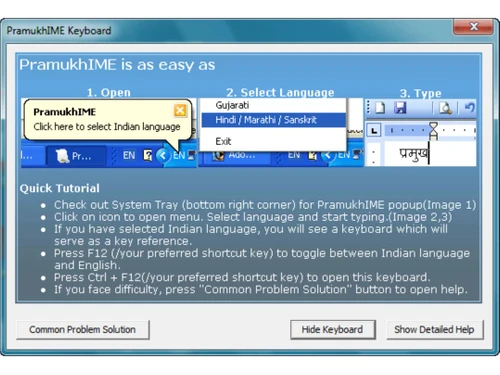
pramukhime telugu typing windows
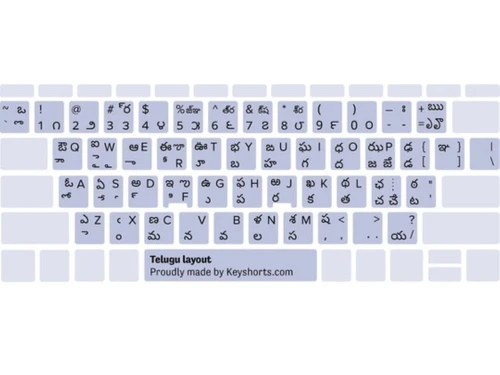
pramukhime telugu typing keyboard
pramukhime telugu typing dashboard

PramukhIME Telugu Typing

Brand: Pramukh IME

  • 4.2

  • 6 Ratings

PramukhIME Telugu Typing lets users type తెలుగు using English keys.

See More

Have you used PramukhIME Telugu Typing before?

Share your insights for better experience

Add a Review

Free Forever

Get started immediately at no cost. Upgrade anytime if your business demand more.

100% Genuine
Products
Best Price
Guaranteed
Safe & Secure
Payment
  • Description

  • Pricing

  • Features

  • Specification

  • Review

  • Compare

  • Alternatives

  • FAQ

PramukhIME Telugu Typing Software Overview

What is PramukhIME Telugu Typing?

PramukhIME Telugu Typing software is a user-friendly tool that facilitates typing in the Telugu language. It allows users to input Telugu text using their standard English keyboard, eliminating the need for memorizing complex Telugu keyboard layouts. The software seamlessly converts English characters typed by the user into Telugu script in real-time, enabling effortless communication and content creation in Telugu.

With its intuitive interface and accurate conversion capabilities, PramukhIME simplifies the typing process in Telugu, catering to users of all skill levels. It supports various applications and platforms, making it suitable for various digital communication needs.

Why Choose PramukhIME Telugu Typing Software?

  • User-Friendly Interface: It offers an intuitive and easy-to-use interface, ensuring a seamless typing experience for users of all levels.
  • Effortless Typing: Its innovative design simplifies Telugu typing by allowing users to input text using their standard English keyboard, eliminating the need to learn complex Telugu keyboard layouts.
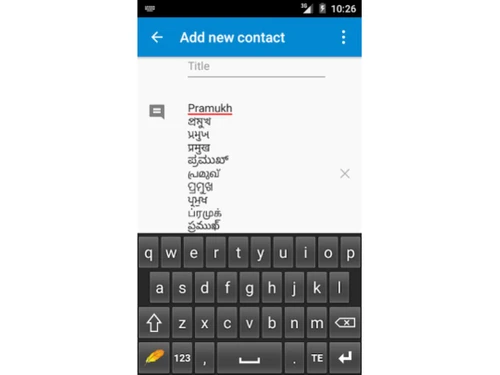
  • Real-Time Conversion: It converts English characters typed by the user into Telugu script in real-time, enabling smooth and accurate typing without interruptions.
  • Versatile Compatibility: It is compatible with various applications and platforms, including word processors, email clients, and social media platforms, making it suitable for various digital communication needs.
  • Enhanced Productivity: By streamlining the Telugu typing process and offering efficient conversion capabilities, users save time and increase productivity in language-related tasks.
  • Reliable Performance: It ensures reliable performance and accurate conversion results, allowing users to communicate effectively and confidently express themselves in Telugu.

Benefits of PramukhIME Telugu Typing Platform

  • Simplified Typing: It simplifies Telugu typing with user-friendly keyboard layouts corresponding to the script.
  • Multiple Layouts: Offers keyboard layouts like InScript and Phonetic to accommodate different typing styles.
  • Online and Offline Access: Users can utilize it online or download it for offline use as per their preference.
  • Customization Options: Users can customize key mappings and choose font preferences for a tailored experience.
  • Spell Checker: Some versions feature a spell checker to rectify spelling errors in Telugu text.
  • Text Conversion: Converts Roman script (English) into Telugu script so that users are more comfortable with English characters.
  • Font Selection: Provides options for font styles and sizes to personalize text formatting.
  • Auto-Suggestions: Offers word predictions or auto-suggestions while typing to enhance efficiency and accuracy.

Pricing of PramukhIME Telugu Typing

PramukhIME Telugu Typing is available for free.

The pricing model is based on different parameters, including extra features, deployment type, and the total number of users. For further queries related to the product, you can contact our product team and learn more about the pricing and offers.

Read more

PramukhIME Telugu Typing Pricing & Plans

This Product is Available Free Forever.

Start instantly with no fees, no subscriptions, and no commitments.

  • Full access to basic version available
  • No credit card or sign-up required

Free Forever Plan

Get started immediately at no cost. Upgrade anytime if your business demand more.

Free Forever

PramukhIME Telugu Typing Features

  • icon_check Write in Telugu Any-time
    Enables users to type in Telugu anytime, facilitating seamless language communication.
  • icon_check Supports 22 Indian Languages
    Besides Telugu, it supports a wide range of Indian languages, catering to diverse linguistic needs.
  • icon_check Email Support
    Provides email support for users to receive assistance and resolve any queries or issues they may encounter.
  • icon_check Dashboard
    Offers a dashboard interface for users to conveniently access key features and settings.
  • icon_check Keyboard Layout
    Features a user-friendly keyboard layout for comfortable and efficient Telugu typing.
  • icon_check Comfortable Typing
    Ensures a comfortable typing experience, allowing users to express themselves effortlessly in Telugu.
  • icon_check Easy to Use
    Boasts a simple and intuitive interface, making it easy for users of all skill levels to navigate and utilize effectively.

PramukhIME Telugu Typing Specifications

Supported Platforms
Windows Windows
Devices
Desktop Desktop
Deployment
Perpetual Perpetual
Suitable For
All Industries
Business Specific
All Businesses
Business Size
Small Business Startups Medium Business Enterprises
Customer Support
Email
Language
ગુજરાતી हिन्दी ಕನ್ನಡ മലയാളം नेपाली ਪੰਜਾਬੀ తెలుగు

PramukhIME Telugu Typing Review

4.2

Out of 5

img

Overall Rating

Based on
6 Verified Ratings

Rating Breakdown

  • Features 3.9
  • Value for Money 4.2
  • Ease of Use 4.2
  • Customer Support 4.4

88% Recommend this Product

Add Review

Be the First to Review

This product has no reviews yet. Be the first to leave your feedback.

Add Review

Compare PramukhIME Telugu Typing With other Telugu Typing Software

Products
Ratings
Pricing
Device Supported
Deployment
Supported Platforms
  • img

    PramukhIME Telugu Typing

  • 4.2

  • FREE

  • Desktop

    Mobile

  • Web based

    On Premises

  • Windows

    Mac OS

  • img

    Easy Telugu Typing

  • 4.3

  • Price On Request

  • Desktop

    Mobile

  • Web based

    On Premises

  • Windows

    Mac OS

  • img

    Shree-Lipi

  • 4.1

  • Price On Request

  • Desktop

    Mobile

  • Web based

    On Premises

  • Windows

    Mac OS

  • img

    Typing Vidya

  • 4.0

  • Price On Request

  • Desktop

    Mobile

  • Web based

    On Premises

  • Windows

    Mac OS

  • img

    Google Input Tools

  • 4.3

  • Price On Request

  • Desktop

    Mobile

  • Web based

    On Premises

  • Windows

    Mac OS

  • img

    Typing Baba

  • 5

  • Price On Request

  • Desktop

    Mobile

  • Web based

    On Premises

  • Windows

    Mac OS

  • img

    Quillpad

  • 4.1

  • Price On Request

  • Desktop

    Mobile

  • Web based

    On Premises

  • Windows

    Mac OS

(0) Product(s) selected

PramukhIME Telugu Typing Alternatives

See All PramukhIME Telugu Typing Alternatives

Available

Price on Request

Available

Price on Request

Which operating system does PramukhIME Telugu Typing Software Support?

PramukhIME Telugu Typing Software is compatible with Windows.

Is there any PramukhIME Telugu Typing Software App?

PramukhIME Telugu Typing Software is unavailable for Android and iOS app users.

What is the deployment type of PramukhIME Telugu Typing Software?

PramukhIME Telugu Typing Software supports web-based deployment.

How much does PramukhIME Telugu Typing Software Cost?

PramukhIME Telugu Typing is available for FREE at techjockey.com.

Who are the potential users of PramukhIME Telugu Typing Software?

PramukhIME Telugu Typing Software is typically used by all industries to type in the Telugu language using their regular English keyboard.

Is there any free demo for PramukhIME Telugu Typing Software?

Yes, PramukhIME Telugu Typing Software demo is available at techjockey.com.

Is PramukhIME Telugu Typing Software Free?

PramukhIME Telugu Typing Software is available for free.

How can you download PramukhIME Telugu Typing Software?

PramukhIME Telugu Typing Software installation is not required, as it is web-based. Just open the Setup Wizard to get started.

How does PramukhIME Telugu Typing Software Work?

PramukhIME Telugu Typing Software enables users to type in Telugu using their standard English keyboard, with real-time conversion of English characters into Telugu script. Users can simply install the software, select their preferred keyboard layout, and start typing in Telugu seamlessly without needing complex keyboard mappings or script memorization.

20,000+ Software Listed

Best Price Guranteed

Free Expert Consultation

2M+ Happy Customers

Terms and Condtions

close

Users with registered businesses can purchase goods from merchants on the platform to satisfy their business needs. Users are not permitted to utilize any products acquired through the platform for resale, advertising, business, or further distribution.

For each purchase made, users will receive a Tax Invoice (or 'GST invoice') that includes specific details such as:

  • the GSTIN of the user associated with their registered business, and

  • the specified Entity Name for their business.

It should be noted that not all products are eligible for GST Invoice. Only the products displayed by participating sellers with the 'GST-based Invoice Available' callout on the product description page would qualify.

Certain goods and services are not eligible to get a GST Invoice, including items with VAS, i.e., Value Added Services (e.g., Total Mobile Protection/Assured Buyback) and those involving an exchange offer at the time of purchase.

Users must ensure the accuracy of the GSTIN, and business entity name provided for the GST Invoice. Requests for corrections into GST Invoice would not be accommodated by Techjockey.com or any Seller, and any issues arising from user-provided information are the sole responsibility of users.

Techjockey.com is not liable for the GST Invoice or any associated input tax credit. To efficiently claim an input tax credit, users should select the registered place of business address as per the GST authority's data and follow the provisions of the GST Act and rules.

To claim an input tax credit, the delivery and billing addresses must match. Furthermore, input tax credits will not be granted if the delivery address and GSTIN on the invoice are from different states. In case of incorrect GST details provided during the order placement, the order will be canceled automatically.