linkedin
QR Code Monkey logo
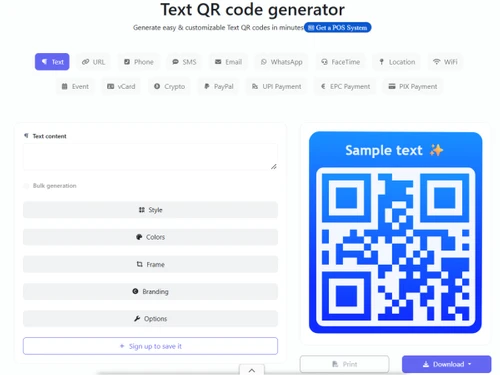
Qr Code Monkey-text
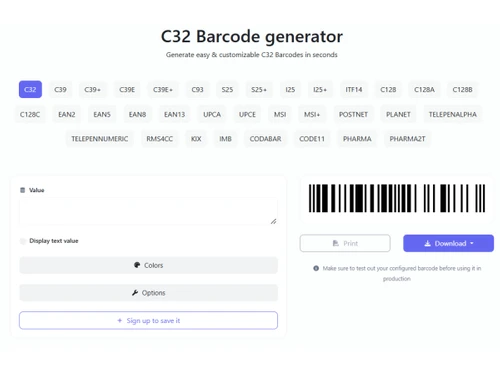
Qr Code Monkey-barcode
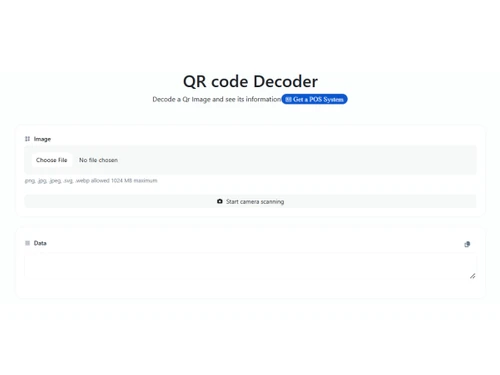
Qr Code Monkey-decoder

QR Code Monkey

Brand: QR Code Monkey

  • No Ratings & Reviews

Have you used QR Code Monkey before?

Share your insights for better experience

Add a Review
Starting Price
$7

View plans

100% Genuine
Products
Best Price
Guaranteed
Safe & Secure
Payment
  • Pricing

  • Features

  • Specification

  • Review

Starting at $7

QR Code Monkey Pricing & Plans

Premium
Key Features
  • 16 QR code types
  • Unlimited saved QR codes
  • Unlimited Bulk QR codes limit
  • 34 barcodes types
  • Unlimited Bulk barcodes limit
Starting at $7
    • Licenses

      Licenses
      Licenses
    • Monthly

      Monthly
      Monthly

Key Features

  • 16 QR code types

  • Unlimited saved QR codes

  • Unlimited Bulk QR codes limit

  • 34 barcodes types

  • Unlimited Bulk barcodes limit

QR Code Monkey Features

  • icon_check QR Code Generation
    Generate QR codes from website URLs, text, contact details, email addresses and other supported information.
  • icon_check Custom QR Code Design
    Customize QR code appearance by adjusting patterns, shapes, colours and design elements to match branding requirements.
  • icon_check Logo Integration
    Add a company logo or brand image to the centre of QR codes for better brand recognition and identification.
  • icon_check Colour Customization
    Change QR code foreground, background and gradient colours to create visually distinctive and branded codes.
  • icon_check Templates
    Use predefined design options to create QR codes with consistent layouts, patterns and visual styling.
  • icon_check Static QR Codes
    Generate permanent QR codes that store encoded information directly and remain functional without subscription requirements.
  • icon_check Dynamic QR Codes
    Create editable QR codes that redirect users to updated destinations without changing the printed QR code.
  • icon_check High-Resolution Export
    Export QR codes in high-resolution formats to maintain clarity and scanning accuracy across different print sizes.
  • icon_check Bulk QR Code Generation
    Generate multiple QR codes for different links or information to simplify large-scale QR code creation workflows.
  • icon_check URL Encoding
    Convert website links into scannable QR codes, allowing users to access webpages directly through mobile devices.
  • icon_check Error Correction
    Apply QR code error correction levels to help maintain readability when portions of the code are damaged or obscured.
  • icon_check Preview
    Preview customized QR code designs before downloading to review their appearance and make necessary design adjustments.
  • icon_check Contact Information Encoding
    Generate QR codes containing contact details that users can scan to access or save supported information.
  • icon_check Vector File Export
    Download QR code designs in scalable vector formats for professional printing and resizing without quality loss.

QR Code Monkey Specifications

Supported Platforms
Ubuntu Ubuntu Windows Windows iOS iOS Android Android MacOS MacOS Linux Linux
Devices
Desktop Desktop Mobile Mobile Tablet Tablet iPad iPad
Deployment
Cloud-Based Cloud-Based Web-Based Web-Based
Suitable For
All Industries
Business Specific
All Businesses
Business Size
Individual Small Business Startups Medium Business Enterprises SMBs SMEs MSMBs MSMEs Freelancers
Customer Support
Email
Language
English
Training Resources
Documentation

QR Code Monkey Review

Be the First to Review

This product has no reviews yet. Be the first to leave your feedback.

Add Review

21,000+ Software Listed

Best Price Guranteed

Free Expert Consultation

5M+ Happy Customers

Terms and Condtions

close

Users with registered businesses can purchase goods from merchants on the platform to satisfy their business needs. Users are not permitted to utilize any products acquired through the platform for resale, advertising, business, or further distribution.

For each purchase made, users will receive a Tax Invoice (or 'GST invoice') that includes specific details such as:

  • the GSTIN of the user associated with their registered business, and

  • the specified Entity Name for their business.

It should be noted that not all products are eligible for GST Invoice. Only the products displayed by participating sellers with the 'GST-based Invoice Available' callout on the product description page would qualify.

Certain goods and services are not eligible to get a GST Invoice, including items with VAS, i.e., Value Added Services (e.g., Total Mobile Protection/Assured Buyback) and those involving an exchange offer at the time of purchase.

Users must ensure the accuracy of the GSTIN, and business entity name provided for the GST Invoice. Requests for corrections into GST Invoice would not be accommodated by Techjockey.com or any Seller, and any issues arising from user-provided information are the sole responsibility of users.

Techjockey.com is not liable for the GST Invoice or any associated input tax credit. To efficiently claim an input tax credit, users should select the registered place of business address as per the GST authority's data and follow the provisions of the GST Act and rules.

To claim an input tax credit, the delivery and billing addresses must match. Furthermore, input tax credits will not be granted if the delivery address and GSTIN on the invoice are from different states. In case of incorrect GST details provided during the order placement, the order will be canceled automatically.