linkedin
Rosebud AI logo
Rosebud AI-chats
Rosebud AI-code
Rosebud AI-history

Rosebud AI

Brand: Rosebud AI

  • No Ratings & Reviews

Rosebud AI is an AI platform that helps users create games, apps, and interactive content easily without coding.

See More

Have you used Rosebud AI before?

Share your insights for better experience

Add a Review
Starting Price
$15
100% Genuine
Products
Best Price
Guaranteed
Safe & Secure
Payment
  • Description

  • Pricing

  • Features

  • Specification

  • Review

  • FAQ

Starting at $15

Rosebud AISoftware Overview

What is Rosebud AI?

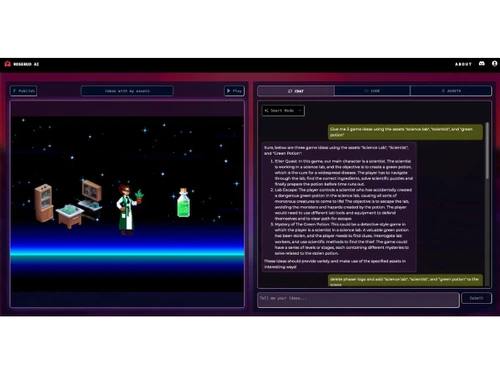
Rosebud AI is a game development software that uses artificial intelligence to help people create games, apps, and interactive content easily. Users can simply type their ideas, and the AI generates code, designs, and game features automatically.

It supports creating both 2D and 3D games, along with characters, worlds, and story-based experiences. The platform is beginner-friendly and does not require coding skills, making it accessible to anyone.

It works directly in a web browser, so no installation is needed. Rosebud AI also provides templates and tools for building different types of projects, including multiplayer games and apps. Created projects can be played instantly and shared online.

Why Choose Rosebud AI Software?

  • No Coding Required: Create games and apps without programming knowledge.
  • AI-Powered Creation: Automatically generates code, visuals, and gameplay.
  • Fast Development: Turn ideas into playable projects in minutes.
  • 3D World Building: Easily design immersive 3D environments.
  • 2D & 3D Support: Build both simple and advanced game formats.
  • Browser-Based Platform: No heavy installation required.
  • Beginner Friendly: Ideal for users with no technical background.
  • Creative Freedom: Build games, stories, or interactive apps.
  • Template Library: Start quickly using ready-made projects.
  • Remix Feature: Modify existing projects to create new ones.
  • AI Assistance: Helps in design, logic, and gameplay creation.
  • Quick Prototyping: Test game ideas rapidly.
  • Cross-Device Access: Work from different devices via browser.

Benefits of Rosebud AI Software

  • Time Saving: Reduces manual coding and design effort.
  • Interactive Experience: Build engaging and playable content.
  • Supports Creators: Useful for developers, designers, and hobbyists.
  • Visual Game Design: Focus on creativity rather than coding syntax.
  • Easy Experimentation: Try multiple ideas quickly.
  • Cloud-Based Workflow: Projects are accessible online.
  • Innovation Friendly: Encourages new ways of building games with AI.

Rosebud AI Pricing

Rosebud AI price starts at USD 25 at techjockey.com.

The pricing model is based on different parameters, including extra features, deployment type, and the total number of users. For further queries related to the product, you can contact our product team and learn more about the pricing and offers.

Read more

Rosebud AI Company Details

Founded Year:  2019

Rosebud AI Gamemaker. Create Games, Share and Play Instantly Craft Worlds with Words. Go from text description to code to game.

Director/Founders Lisha Li
Company Size 1-100 Employees

Rosebud AI Pricing & Plans

Indie Dev
Starting at $15
    • Licenses

      Licenses
      Licenses
    • Monthly

      Monthly
      Monthly

Key Features

  • 100,000 credits per month

  • Fully hosted & maintained site

  • Higher quality asset generation & AI chat

10x Dev
Starting at $30
    • Licenses

      Licenses
      Licenses
    • Monthly

      Monthly
      Monthly

Key Features

  • 300,000 credits per month

  • Commercial rights

  • No Rosebud branding on your hosted pages

Pro
Starting at $50
    • Licenses

      Licenses
      Licenses
    • Monthly

      Monthly
      Monthly

Key Features

  • 1,000,000 credits per month

  • Downloadable project code

  • Infrastructure managed for scale

Rosebud AI Features

  • icon_check AI Game Generation
    Create complete playable games from simple text prompts, including mechanics, assets, and logic automatically.
  • icon_check No-Code Development
    Build games and interactive apps without coding knowledge using intuitive AI-driven creation workflows.
  • icon_check Real Time Editing
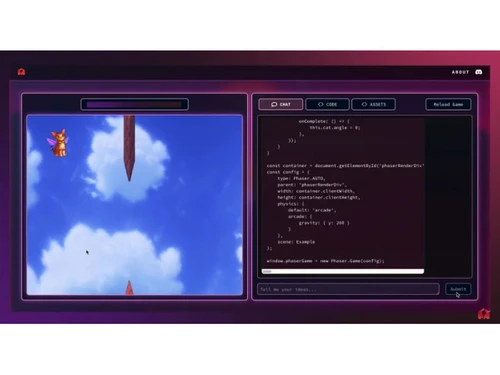
    Modify gameplay, visuals, or logic instantly with prompts and see changes reflected immediately in your project.
  • icon_check Asset Generation
    Generate characters, environments, sprites, and animations using AI without needing external design tools.
  • icon_check NPC Behavior Creation
    Design intelligent non-player characters with custom behaviors, dialogues, and interactions automatically.
  • icon_check Template Library
    Access prebuilt game templates to accelerate development and customize projects based on your needs.
  • icon_check Multiplayer Support
    Create multiplayer experiences with shared environments and player interactions through built-in features.
  • icon_check Storytelling Engine
    Build narrative-driven games with branching dialogues, choices, and interactive story progression systems.
  • icon_check Code Export
    Export generated code for further customization or integration into external development environments.
  • icon_check Collaboration Tools
    Work with team members on projects, share access, and collaborate on game development in real time.
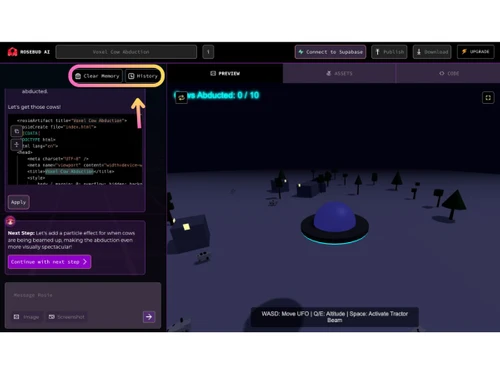
  • icon_check Version Control
    Track project changes, revert to earlier versions, and manage iterations safely during development.
  • icon_check Cross-Platform Deployment
    Publish games playable across browsers and devices without complex configuration or installation.
  • icon_check AI Animation Tools
    Automatically generate character animations and movements based on prompts or predefined behaviors.
  • icon_check Community Sharing
    Share projects publicly, explore community creations, and remix existing games for inspiration.
  • icon_check Prototyping
    Quickly transform ideas into playable prototypes for testing concepts, mechanics, or educational purposes.
  • icon_check Interactive UI Builder
    Design menus, interfaces, and user interactions easily using AI-assisted layout and component generation.

Rosebud AI Specification

Supported Platforms
Windows Windows MacOS MacOS Linux Linux
Devices
Desktop Desktop
Deployment
Web-Based Web-Based
Suitable For
All Industries
Business Specific
All Businesses
Business Size
Small Business Startups Medium Business Enterprises
Customer Support
Email Communities
Language
English
Training Resources
Videos
AI Features
AI Integrated

Rosebud AI Review

Be the First to Review

This product has no reviews yet. Be the first to leave your feedback.

Add Review

Articles for Rosebud AI

See All Related Articles

How much does Rosebud AI Software cost?

Rosebud AI price starts at USD 25 on techjockey.com.

Is there a mobile app available for Rosebud AI Software?

Currently, Rosebud AI is primarily a web-based platform and does not have a dedicated mobile app.

Which operating systems are compatible with Rosebud AI Software?

Rosebud AI is compatible with Windows, macOS, and Linux through any modern web browser.

Does Rosebud AI Software offer a free trial?

Yes, Rosebud AI offers free access/trial features for users to start building projects.

How does Rosebud AI Software function?

Rosebud AI uses AI to convert text prompts into code, visuals, and interactive games automatically.

Who uses Rosebud AI Software?

Rosebud AI is used by game developers, designers, students, and beginners interested in creating games without coding.

Is a free demo available for Rosebud AI Software?

Yes, users can try a demo or explore sample projects on the platform.

Is Rosebud AI Software available for free?

Yes, Rosebud AI offers a free plan with basic features, along with premium options for advanced tools.

20,000+ Software Listed

Best Price Guranteed

Free Expert Consultation

2M+ Happy Customers

Terms and Condtions

close

Users with registered businesses can purchase goods from merchants on the platform to satisfy their business needs. Users are not permitted to utilize any products acquired through the platform for resale, advertising, business, or further distribution.

For each purchase made, users will receive a Tax Invoice (or 'GST invoice') that includes specific details such as:

  • the GSTIN of the user associated with their registered business, and

  • the specified Entity Name for their business.

It should be noted that not all products are eligible for GST Invoice. Only the products displayed by participating sellers with the 'GST-based Invoice Available' callout on the product description page would qualify.

Certain goods and services are not eligible to get a GST Invoice, including items with VAS, i.e., Value Added Services (e.g., Total Mobile Protection/Assured Buyback) and those involving an exchange offer at the time of purchase.

Users must ensure the accuracy of the GSTIN, and business entity name provided for the GST Invoice. Requests for corrections into GST Invoice would not be accommodated by Techjockey.com or any Seller, and any issues arising from user-provided information are the sole responsibility of users.

Techjockey.com is not liable for the GST Invoice or any associated input tax credit. To efficiently claim an input tax credit, users should select the registered place of business address as per the GST authority's data and follow the provisions of the GST Act and rules.

To claim an input tax credit, the delivery and billing addresses must match. Furthermore, input tax credits will not be granted if the delivery address and GSTIN on the invoice are from different states. In case of incorrect GST details provided during the order placement, the order will be canceled automatically.