
linkedin
Siemens Opcenter logo
play Siemens Opcenter Quality – A comprehensive Quality Management System (QMS) Software
siemens opcenter-analytics
siemens opcenter-terminal

Siemens Opcenter

Brand: Siemens Digital Industries Software

  • No Ratings & Reviews

Siemens Opcenter is a manufacturing operations management software that helps companies plan, monitor, and improve production processes efficiently in real time.

See More

Have you used Siemens Opcenter before?

Share your insights for better experience

Add a Review

Price Available on Request

Questions about pricing or customization? We’re here to help, just a click away.

100% Genuine
Products
Best Price
Guaranteed
Safe & Secure
Payment
  • Description

  • Pricing

  • Features

  • Specification

  • Review

  • FAQ

Siemens Opcenter Software Overview

What is Siemens Opcenter?

Siemens Opcenter is a quality management software that helps companies manage and improve their production processes in a smart digital way. It connects planning, production, quality, and performance systems into one unified system.

The software collects real-time data from factories and machines. It helps businesses track production, reduce errors, and improve product quality. Opcenter supports manufacturing execution, quality management, and production planning.

It gives clear dashboards and insights for better decision-making. The system helps find problems quickly and fix them faster.

It improves efficiency by reducing waste and downtime. Siemens Opcenter works with both small and large industries. It is mainly used in smart factories and Industry 4.0 environments.

Why Choose Siemens Opcenter Software?

  • End-to-End Manufacturing Control: Manages complete production processes in one system.
  • Real-Time Production Visibility: Tracks factory operations instantly.
  • Improves Product Quality: Ensures products meet standards consistently.
  • Faster Production Execution: Reduces manufacturing delays and downtime.
  • Optimized Resource Usage: Uses materials, machines, and labor efficiently.
  • Better Production Planning: Helps organize and schedule operations smoothly.
  • Digital Manufacturing Twin: Connects virtual design with real production.
  • Reduced Manufacturing Costs: Improves efficiency and reduces waste.
  • Real-Time Data Analytics: Provides actionable insights from shop-floor data.
  • Improves Decision-Making: Helps managers make faster, smarter decisions.
  • Quality Management System: Controls inspection, testing, and compliance.
  • Manufacturing Execution (MES): Controls production operations step-by-step.
  • Advanced Scheduling Support: Optimizes production timelines and flow.
  • Traceability of Products: Tracks materials and finished goods easily.
  • Reduces Production Errors: Detects issues early in the process.

Benefits of Siemens Opcenter Software

  • Higher Equipment Efficiency: Improves machine utilization (OEE).
  • Supports Industry 4.0: Designed for smart factory environments.
  • Cloud and On-Premise Options: Flexible deployment models.
  • Scalable System: Works for small plants to global enterprises.
  • Improved Supply Chain Coordination: Aligns production with demand.
  • Real-Time Issue Detection: Quickly identifies production problems.
  • Better Compliance Control: Meets industry regulations easily.
  • Paperless Manufacturing: Reduces manual documentation.
  • Increases Productivity: Improves overall factory output.
  • Centralized Data System: All manufacturing data in one platform.
  • Supports Multiple Industries: Automotive, pharma, electronics, etc.
  • Improves Delivery Time: Speeds up production-to-market cycle.
  • Enhanced Workforce Management: Tracks operator performance and skills.
  • Continuous Improvement: Helps optimize processes over time.

Siemens Opcenter Pricing

Siemens Opcenter price is available upon request, as listed on Techjockey. The pricing model is based on different parameters, including extra features, deployment type, and the total number of users. For further queries related to the product, you can contact our product team and learn more about the pricing and offers.

Read more

Siemens Digital Industries Software Company Details

Founded Year:  1922

Siemens is an engineering and electronics company that specializes in the fields of industry, energy, transportation, and healthcare.

Director/Founders Johann Halske, Sebastian Greiss, Werner Siemens
Company Size 1000+ Employees

Siemens Opcenter Pricing & Plans

Looking for The Right Pricing?

Share your requirements and get a plan built around your business.

  • Define your business needs
  • Get customised pricing
  • Choose features that fit your workflow

Price Available on Request

Get personalised Siemens Opcenter pricing that fits your needs. Our team will connect with you.

Siemens Opcenter Features

  • icon_check Quality Inspection Management
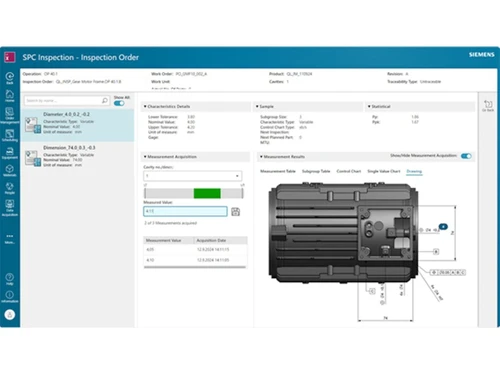
    Define inspection criteria, assign inspections to production stages, and collect inspection data to verify product quality
  • icon_check Inspection Planning
    Create structured inspection plans with procedures, criteria, and tools to ensure consistent product quality during manufacturing.
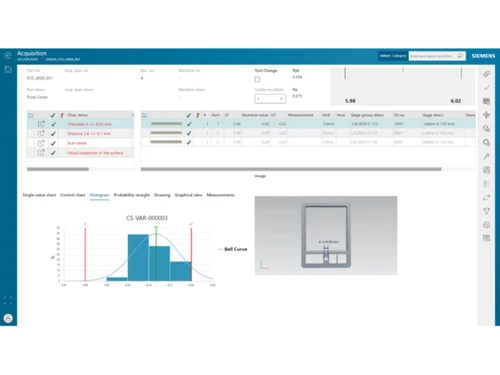
  • icon_check Data Acquisition and Evaluation
    Collect measurement and inspection data and evaluate process performance using quality data analysis tools.
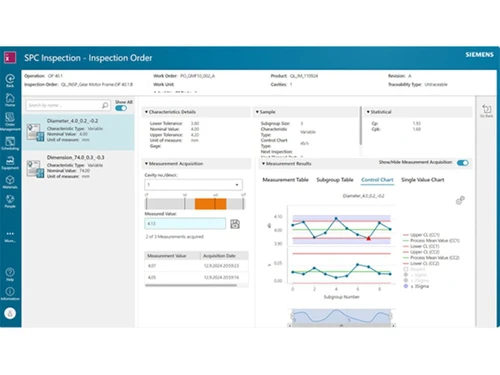
  • icon_check Statistical Process Control
    Monitor process performance using SPC charts and real-time data to identify process variations and maintain quality control.
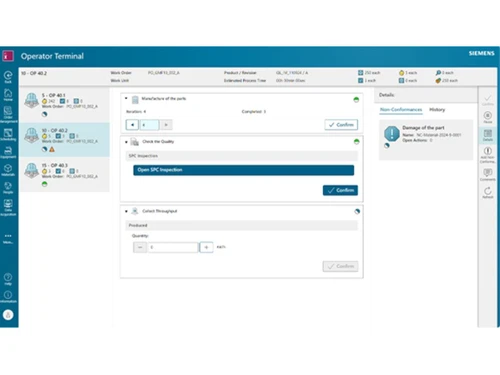
  • icon_check Nonconformance Management
    Record and manage nonconforming products, track defect events, and manage investigation and resolution processes.
  • icon_check Control Plan Management
    Define control plans outlining quality controls and procedures to be executed during production operations.
  • icon_check Data Analysis
    Analyze inspection and process data to identify trends, defects, and process improvement opportunities.
  • icon_check Process Monitoring
    Continuously monitor manufacturing processes and trigger actions when process limits or violations occur.
  • icon_check Failure Pattern Tracking
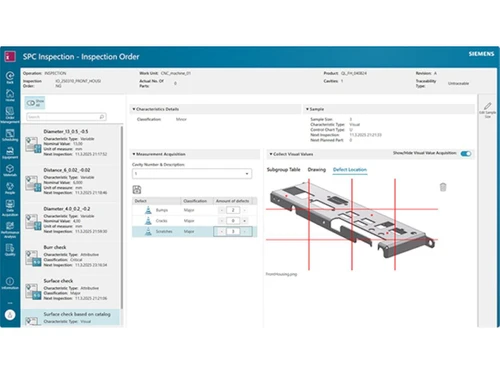
    Identify and record defect patterns visually to analyze defect locations and recurring failure patterns in production.
  • icon_check Deviation and Corrective Actions
    Define and manage corrective actions for process deviations to prevent recurring quality issues in manufacturing.
  • icon_check Process Automations
    Automate inspections, data collection, and violation-triggered actions to improve efficiency and reduce manual tasks.
Siemens Opcenter Demo Video play icon

Get Siemens Opcenter Demo

Watch the demo video to explore key features, real workflows, and how the software fits your business needs.

Understand
Key Features
Personal
Demo Insights
Interactive
Demo Support

Siemens Opcenter Specifications

Supported Platforms
Ubuntu Ubuntu Windows Windows MacOS MacOS Linux Linux
Devices
Desktop Desktop
Deployment
Cloud-Based Cloud-Based
Suitable For
Manufacturing
Business Specific
All Businesses
Business Size
Medium Business Enterprises MSMBs
Customer Support
Email Communities
Language
English
Training Resources
Videos
AI Features
AI Integrated

Siemens Opcenter Review

Be the First to Review

This product has no reviews yet. Be the first to leave your feedback.

Add Review

How much does Siemens Opcenter cost?

Siemens Opcenter price is available upon request, as listed on techjockey.com.

Is there a mobile app available for Siemens Opcenter Software?

No, the Siemens Opcenter mobile app is not available on iOS and Android.

Which operating systems are compatible with Siemens Opcenter Software?

Siemens Opcenter is compatible with Ubuntu, Linux, Windows and MacOS operating systems.

Does Siemens Opcenter Software offer a free trial?

Yes, Siemens Opcenter offers a free trial. How does Siemens Opcenter

Software function?

Siemens Opcenter works by collecting real-time manufacturing data from machines and systems, then using it to plan, monitor, control, and improve production processes through dashboards and analytics.

Who uses Siemens Opcenter Software?

Siemens Opcenter is used by manufacturers, production managers, quality teams, and large industries like automotive, electronics, pharma, and industrial engineering companies.

Is a free demo available for Siemens Opcenter Software?

Yes, Siemens Opcenter provides a free demo.

Is Siemens Opcenter Software available for free?

No, Siemens Opcenter is not available for free.

20,000+ Software Listed

Best Price Guranteed

Free Expert Consultation

2M+ Happy Customers

Terms and Condtions

close

Users with registered businesses can purchase goods from merchants on the platform to satisfy their business needs. Users are not permitted to utilize any products acquired through the platform for resale, advertising, business, or further distribution.

For each purchase made, users will receive a Tax Invoice (or 'GST invoice') that includes specific details such as:

  • the GSTIN of the user associated with their registered business, and

  • the specified Entity Name for their business.

It should be noted that not all products are eligible for GST Invoice. Only the products displayed by participating sellers with the 'GST-based Invoice Available' callout on the product description page would qualify.

Certain goods and services are not eligible to get a GST Invoice, including items with VAS, i.e., Value Added Services (e.g., Total Mobile Protection/Assured Buyback) and those involving an exchange offer at the time of purchase.

Users must ensure the accuracy of the GSTIN, and business entity name provided for the GST Invoice. Requests for corrections into GST Invoice would not be accommodated by Techjockey.com or any Seller, and any issues arising from user-provided information are the sole responsibility of users.

Techjockey.com is not liable for the GST Invoice or any associated input tax credit. To efficiently claim an input tax credit, users should select the registered place of business address as per the GST authority's data and follow the provisions of the GST Act and rules.

To claim an input tax credit, the delivery and billing addresses must match. Furthermore, input tax credits will not be granted if the delivery address and GSTIN on the invoice are from different states. In case of incorrect GST details provided during the order placement, the order will be canceled automatically.