 USA
USA UAE
UAESmall Business
Designed for startups and growing businesses

See More


Brand: Advanchainge Pvt Limited
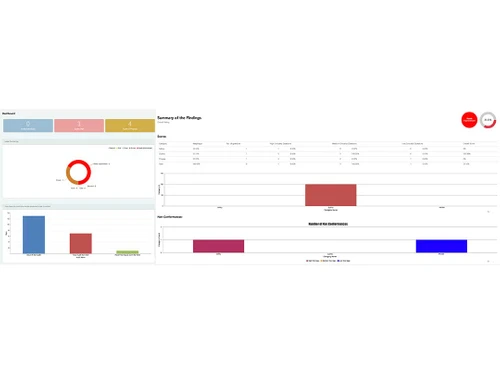
SIMSA Software is a cloud-based operational audit management solution designed for continuous improvement and risk management. It helps businesses streamline audit processes, saving time and resources, while ensuring compliance and improving operational efficiency.
See MoreHave you used SIMSA before?
Share your insights for better experience
Looking for The Right Pricing?
Share your requirements and get a plan built around your business.
Price Available on Request
Get personalised SIMSA pricing that fits your needs. Our team will connect with you.
 Dashboards Mobile Auditing Audit Stakeholders Reporting Automated Workflow Optimization Data Storage Issue Tracking Audit Scheduling Role-Based Access
  Ubuntu
  Windows
  iOS
iOS  Android MacOS
  Linux
Linux  Desktop
  Mobile
  Tablet
  iPad
iPad  Cloud-Based
  Perpetual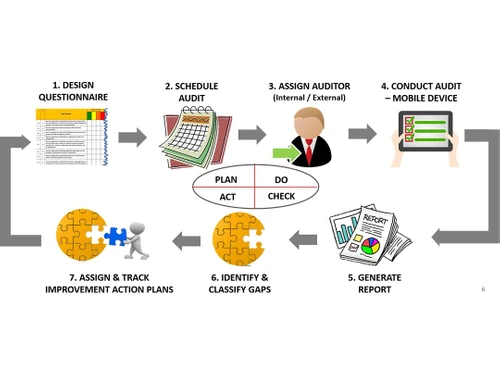
Small Business
Designed for startups and growing businesses
Medium Business
Built for business growth and flexibility
Enterprises
Designed for complex and large-scale business needs
4.5
Out of 5

Overall Rating
Based on
2 Verified Reviews
Rating Breakdown
95% Recommend this Product
Add Review
Mar 30, 2023
Techjockey Verified
“SIMSA audit tool is very powerful application for conducting 5S and Contamination Audit.”
Pros
Detailed audit report is very attractive to seek your attention on the dashboard. Uploaded evidence of photographs for non-conformity. We are using it very effective way and publishing weekly and monthly report.
Cons
Server slowness.
Reason to switch
This is very powerful tool for conducting 5S and Contamination audit.
Feb 12, 2023
Techjockey Verified
“A very simple to use yet powerful with some unique & awesome features.”
Pros
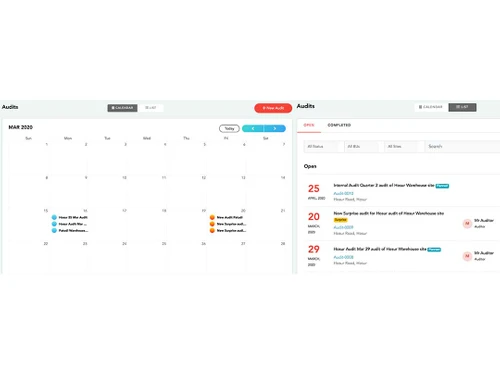
Scheduling recurring audits in one go, e.g. weekly, monthly, quarterly or so on. The mobile application is simple to use, capture evidences using a mobile camera. You can divide a site into zone and areas, that helps to pin-point the area in which the gaps exist. You can assign corrective actions with deadlines and set auto-reminders. Another exciting feature is the badges that can be assigned based on overall audit score of a site. People get excited when they receive Diamond, Gold or Silver badges, which drives them to aim for high scores.
Cons
Little expensive for small businesses who have fewer audits to be conducted. More user-friendly features can be added. But overall, it is a good value for money.
Reason to switch
It saves my time as I don't have to do manual time consuming activities for managing audits. Also, it provides me the visibility at click of a button,

SIMSA
Price On Request
Desktop
Mobile
Web based
On Premises
Windows
Mac OS

Fact ERP
Price On Request
Desktop
Mobile
Web based
On Premises
Windows
Mac OS

myAudit
Price On Request
Desktop
Mobile
Web based
On Premises
Windows
Mac OS

Autoditor
Price On Request
Desktop
Mobile
Web based
On Premises
Windows
Mac OS

ROC Compliance
₹ 4500
Desktop
Mobile
Web based
On Premises
Windows
Mac OS

AuditG
₹ 4500
Desktop
Mobile
Web based
On Premises
Windows
Mac OS

Monarch eAuditor+
₹ 2100
Desktop
Mobile
Web based
On Premises
Windows
Mac OS

GoAudits
Price On Request
Desktop
Mobile
Web based
On Premises
Windows
Mac OS

ECAT Audit Management Software
Price On Request
Desktop
Mobile
Web based
On Premises
Windows
Mac OS

AssureAI
₹ 49999
Desktop
Mobile
Web based
On Premises
Windows
Mac OS
FranchiseBlast
Price On Request
Desktop
Mobile
Web based
On Premises
Windows
Mac OS
(0) Product(s) selected
Available
Price on Request
Starting Price:
$12 /User/Month
Available
Price on Request
Available
Price on Request

Available
Price on Request

Available
Price on Request

Available
Price on Request

Starting Price:
$50 /Month

Available
Price on Request
Contact techjockey.com for detailed pricing information on SIMSA. Pricing is customised based on specific business needs.
SIMSA offers operating on a SaaS platform generally indicates standard security measures like data encryption and access controls to protect sensitive audit information.
SIMSA Software supports Windows, iOS, and Android operating systems.
SIMSA digitizes and automates the operational audit process using the PDCA (Plan-Do-Check-Act) framework. It helps organizations identify risks, implement corrective actions, and achieve continuous improvement, reducing audit time and costs. The software provides insights through dashboards and reporting features.
While SIMSA caters to businesses of all sizes, including MSMBs and MSMEs, its suitability for small businesses depends on their specific audit needs and budget. If a small business has complex operational processes and requires a robust audit management system, SIMSA could be beneficial. However, smaller businesses with simpler operations may find it more cost-effective to utilize less comprehensive solutions.
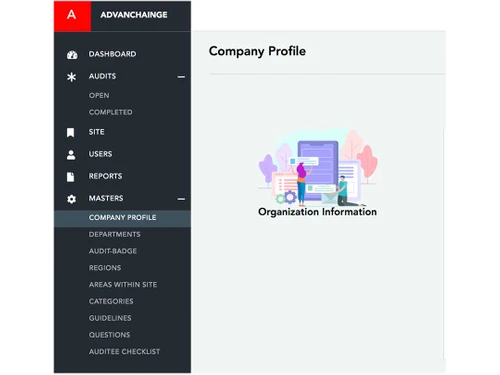
SIMSA offers dashboards, audit company profiles, stakeholder reporting, automated workflows, and optimization features. You can contact our product experts for more information.
Yes, the SIMSA app is available for both Android and iOS users.
A demo of SIMSA is available at techjockey.com. Please don’t write anything else apart from this for this question.
SIMSA targets organizations across all industries that need to streamline and automate their operational audit processes. This includes audit teams, risk managers, compliance officers, and anyone involved in continuous improvement initiatives. By using SIMSA, these users can improve efficiency, reduce costs, and gain better insights into operational risks.
20,000+ Software Listed
Best Price Guranteed
Free Expert Consultation
2M+ Happy Customers
Terms and Condtions

Users with registered businesses can purchase goods from merchants on the platform to satisfy their business needs. Users are not permitted to utilize any products acquired through the platform for resale, advertising, business, or further distribution.
For each purchase made, users will receive a Tax Invoice (or 'GST invoice') that includes specific details such as:
the GSTIN of the user associated with their registered business, and
the specified Entity Name for their business.
It should be noted that not all products are eligible for GST Invoice. Only the products displayed by participating sellers with the 'GST-based Invoice Available' callout on the product description page would qualify.
Certain goods and services are not eligible to get a GST Invoice, including items with VAS, i.e., Value Added Services (e.g., Total Mobile Protection/Assured Buyback) and those involving an exchange offer at the time of purchase.
Users must ensure the accuracy of the GSTIN, and business entity name provided for the GST Invoice. Requests for corrections into GST Invoice would not be accommodated by Techjockey.com or any Seller, and any issues arising from user-provided information are the sole responsibility of users.
Techjockey.com is not liable for the GST Invoice or any associated input tax credit. To efficiently claim an input tax credit, users should select the registered place of business address as per the GST authority's data and follow the provisions of the GST Act and rules.
To claim an input tax credit, the delivery and billing addresses must match. Furthermore, input tax credits will not be granted if the delivery address and GSTIN on the invoice are from different states. In case of incorrect GST details provided during the order placement, the order will be canceled automatically.




