linkedin

Get Free Advice

Get Quote

Skyvia logo
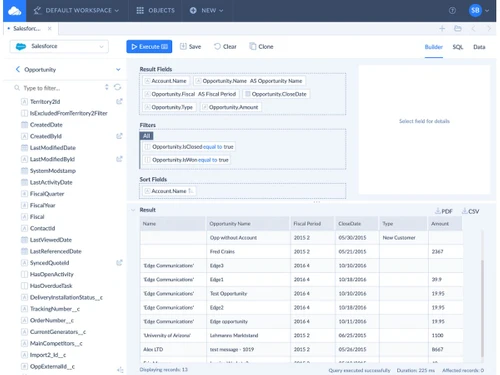
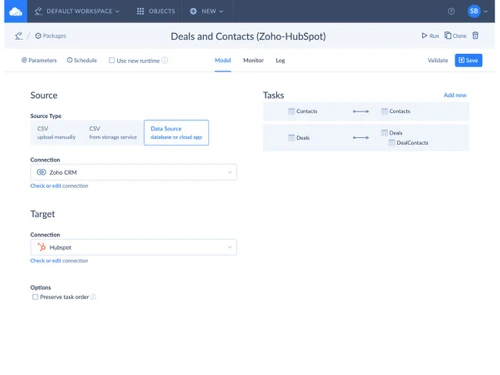
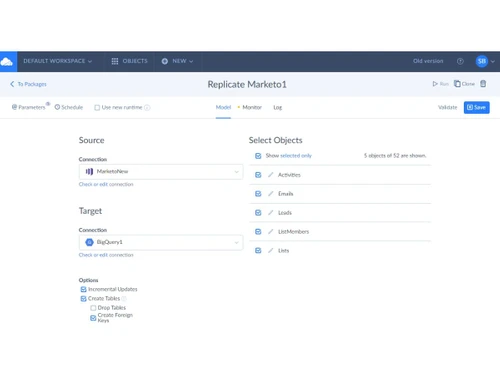
Gallery Overview of Skyvia Cloud Data Platform
Skyvia-builder Skyvia-deals-and contacts Skyvia-replication package Skyvia-export package Skyvia-import package Skyvia-benefits
play Overview of Skyvia Cloud Data Platform
Skyvia-builder
Skyvia-deals-and contacts
Skyvia-replication package
Skyvia-export package

Skyvia

Brand : Skyvia

Starting at

$ 99

Save Extra with 2 Offers

  • offer_icon Save upto 18%, Get GST Invoice on your business purchase |
  • offer_icon Buy Now & Pay Later, Check offer on payment page.

Skyvia turns disconnected data into perfectly connected business opportunities. Automate integrations effortlessly and keep information moving without interruptions. ...Read more

  • AdviceGet Instant Expert
    Advice
  • PaymentSafe & Secure
    Payment
  • GuaranteedAssured Best Price
    Guaranteed

Skyvia Software Pricing, Features & Reviews

What is Skyvia Software?

Skyvia is a cloud-based data integration software solution. It is built for managing and connecting business data. Skyvia works smoothly with online applications, databases, and cloud data warehouses. The software program allows users to create data processes without having to write programming code. Everything is managed through a browser instead of local software installation.

Skyvia is mainly used to handle data between different business systems. It supports organisations that store information across multiple digital platforms. The advanced digital tool also manages data exchanged between cloud services and databases. It overall acts as a single central platform for all business data management and integration efforts.

Why Choose Skyvia Software?

  • No Coding Hassle: No technical knowledge is required for regular data tasks. Visual tools make everyday setup much easier.
  • Wide Platform Coverage: Many business applications can work together through one platform. Different databases can also be connected without extra effort.
  • Cloud-Based Access: Internet access keeps the platform available from different locations. Local installation is usually unnecessary for everyday use.
  • Flexible Data Handling: Business information moves between separate systems without manual copying. Different data sources are handled within one environment.
  • Simple Data Mapping: Data relationships are created through clear visual selections. Manual scripting is rarely part of the process.
  • Regular Data Updates: Scheduled tasks keep connected information reasonably current. Repeated manual transfers are greatly reduced.
  • Central Data Control: Business data is handled from one online workspace. Different systems receive consistent attention through shared processes.

Benefits of Skyvia Software

  • Nominal Manual Effort: Repeated entries are reduced across connected records. Extra typing eats up much less time than before.
  • Better Data Accuracy: Matching records contain fewer avoidable differences. Incorrect values are spotted with ease.
  • Quicker Report Access: Updated information reaches reporting tools without lengthy preparation. Decisions rely on fresher business figures.
  • Reliable Data Backup: Important records automatically create protected backup copies. Earlier versions remain available when required.
  • Faster Team Responses: Shared information reaches everyone without unnecessary waiting. Customer requests receive quicker attention.
  • Reduced File Confusion: Fewer duplicate files gather across different storage locations. Record tracking grows much simpler.
  • Consistent Business Records: Similar information looks uniform across connected systems. Mixed entries rarely cause any misunderstandings.

Skyvia Software Pricing

Skyvia Software price starts at USD 99.00 per month (per every license) at techjockey.com.

The pricing model is based on different parameters, including extra features, deployment type, and the total number of users. For further queries related to the product, you can contact our product team and learn more about the pricing and offers.

Skyvia Pricing & Plans

Basic
  • Source/Target Connections - Unlimited
  • Users - Unlimited
  • All DML Operations
  • FTP, SFTP, Storages
  • Target Lookup Mapping
    • Licenses
    • Monthly
Starting at $ 99
Standard
  • Source/Target Connections - Unlimited
  • Users - Unlimited
  • All DML Operations
  • FTP, SFTP, Storages
  • Target Lookup Mapping
    • Licenses
    • Monthly
Starting at $ 199
Professional
  • Source/Target Connections - Unlimited
  • Users - Unlimited
  • All DML Operations
  • FTP, SFTP, Storages
  • Target Lookup Mapping
    • Licenses
    • Monthly
Starting at $ 499

Get Skyvia Demo

We make it happen! Get your hands on the best solution based on your needs.

Interacted

Skyvia Features

  • icon_check Data Integration Connects cloud apps, databases, and files to unify data into a centralized system for analytics and operations.
  • icon_check ELT Processing Loads raw data into warehouses first and performs transformations later for better scalability and performance.
  • icon_check Data Synchronization Enables bi-directional or one-way sync between systems to keep data consistent and up to date automatically.
  • icon_check Data Migration Transfers large datasets between platforms securely with minimal downtime and configurable transformation rules.
  • icon_check Pre-built Connectors Provides 200+ connectors for SaaS apps, databases, and cloud services to accelerate integration setup.
  • icon_check API Integration Allows integration with REST APIs and external systems using configurable endpoints and connection settings.
  • icon_check Data Transformation Supports SQL-based transformations to clean, enrich, and prepare datasets for analytics and reporting.
  • icon_check Workflow Automation Automates data flows with scheduling, triggers, and conditional logic to reduce manual intervention.
  • icon_check Change Data Capture Captures incremental data changes in real time to ensure efficient and up-to-date data synchronization.
  • icon_check Data Backup & Recovery Provides automated cloud data backup with restore capabilities to ensure data safety and availability.
  • icon_check Data Replication Replicates data across systems or warehouses for analytics, reporting, and centralized storage use cases.
  • icon_check Data Access Enables live data access via SQL queries and OData APIs without moving data across systems.
  • icon_check Scheduling & Triggers Supports automated execution of pipelines based on time schedules or event-driven triggers.
  • icon_check Error Handling & Logging Provides detailed logs, error tracking, and notifications to quickly identify and resolve pipeline issues.
  • icon_check No-Code Interface Allows users to build integrations visually without coding, making it accessible to both technical and business users.
  • icon_check Scalability Cloud-native architecture scales with growing data volumes and supports enterprise-level workloads efficiently.
  • icon_check Security & Compliance Ensures secure data handling with cloud infrastructure, access control, and compliance-ready architecture.

Skyvia Specifications

  • Supported Platforms :
  • Device:
  • Deployment :
  • Suitable For :
  • Business Specific:
  • Business Size:
  • Customer Support:
  • Integration:
  • Training:
  • Language:
  • Ubuntu Windows MacOS Linux
  • Desktop
  • Web-Based
  • All Industries
  • All Businesses
  • Small Business, Startups, Medium Business, Enterprises, SMBs, SMEs
  • Email, Communities, Forums
  • API Integration
  • Live Online, Webinars, Documentation, Videos
  • English

Skyvia Reviews and Ratings

banner

Would you like to review this product?

Submit Reviews

Skyvia Company Details

Brand Name Skyvia
Information Skyvia is a no-code cloud platform for data integration, workflow automation, SaaS backup, connectivity and data management.
Founded Year 1997
Director/Founders Alexander Hirniy
Company Size 1-100 Employees

Skyvia FAQ

A The price starts at USD 99.00 per month for each license at techjockey.com. Final pricing may vary based on features, deployment method, and user count.
A It is used by businesses that need to connect, manage, back up, and move data. Both technical and non-technical users can work with Skyvia.
A No, there is no dedicated mobile app available. Users can access it through a web browser on their smartphones or tablets.
A The platform is compatible with Windows, macOS, Linux, and Ubuntu systems.
A Yes, a free trial is available for everyone. Users can easily try the platform before purchasing a subscription.
A It works as a cloud-based platform for connecting and managing data across different systems. Users can handle data tasks through a web browser without writing any code.

Skyvia Alternatives

See All
Why Choose Techjockey?

Software icon representing 20,000+ Software Listed 20,000+ Software Listed

Price tag icon for best price guarantee Best Price Guaranteed

Expert consultation icon Free Expert Consultation

Happy customer icon representing 2 million+ customers 2M+ Happy Customers