linkedin
Splunk User Behavior Analytics logo
play What is Splunk? (2022)
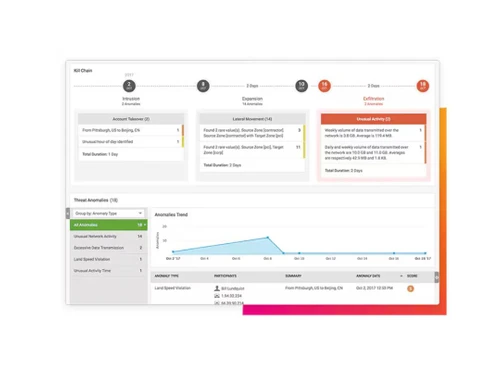
splunk-chain
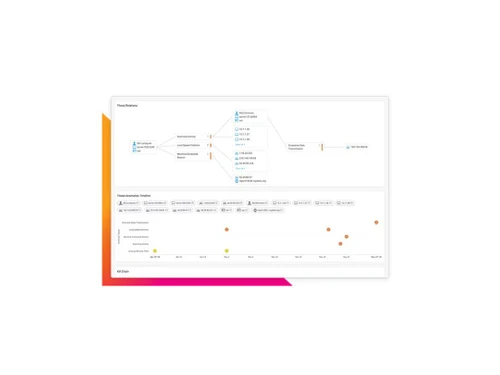
splunk-relations

Splunk User Behavior Analytics

Brand: Splunk

  • 4.6

  • 5 Ratings

Splunk User and Entity Behavior Analytics uses AI and machine learning to detect suspicious user activity, identify insider threats, and improve security visibility and SOC efficiency.

See More

Have you used Splunk User Behavior Analytics before?

Share your insights for better experience

Add a Review

Price Available on Request

Questions about pricing or customization? We’re here to help, just a click away.

100% Genuine
Products
Best Price
Guaranteed
Safe & Secure
Payment
  • Description

  • Pricing

  • Specification

  • Review

  • Compare

  • Alternatives

  • FAQ

Splunk User Behavior Analytics Software Overview

What is Splunk User and Entity Behavior Analytics (UEBA)?

Splunk User and Entity Behavior Analytics (UEBA) is an advanced security solution that functions as a native capability within Splunk Enterprise Security (ES) Premier edition. It is not available as a standalone product or as an add-on to Splunk Enterprise Security Essentials. It leverages sophisticated machine learning and behavioral analytics to establish a baseline of normal behavior for users and entities (such as hosts, applications, and devices) within an organization's IT environment. By continuously monitoring for deviations from this baseline, Splunk UEBA can proactively detect and surface subtle, complex, and otherwise hidden threats that traditional security tools often miss. Its primary focus is on identifying insider threats, compromised credentials, and advanced persistent threats (APTs) by analyzing behavioral patterns rather than relying solely on predefined rules or signatures.

The solution provides security teams with high-fidelity, risk-scored alerts enriched with contextual intelligence. This allows analysts to quickly understand the scope and severity of a potential threat, reducing alert fatigue and accelerating investigation and response times. By integrating seamlessly into the broader Splunk security ecosystem, UEBA unifies detection and response workflows, offering a comprehensive view of an organization's security posture.

Why Choose Splunk User and Entity Behavior Analytics (UEBA)?

  • Proactively Mitigate Insider Threats: Splunk UEBA excels at identifying malicious or negligent actions from within. It uses behavior-based anomaly detection to flag activities like unauthorized data access, credential misuse, and lateral movement, enabling security teams to neutralize threats before significant damage occurs.
  • Enhance Security Visibility and Context: The platform aggregates behavioral data from across the enterprise, including users, devices, and applications, to provide holistic risk insights. By generating a dynamic Entity Risk Score, it offers crucial situational awareness, helping teams prioritize the most critical threats.
  • Optimize SOC Efficiency: By automating threat detection and prioritization, Splunk UEBA significantly reduces alert fatigue. It filters out low-risk noise and scores potential threats, allowing analysts to focus their efforts on genuine incidents. This streamlines SOC workflows, leading to faster, more precise investigations and a more effective incident response process.
  • Detect Unknown and Advanced Threats: Unlike rule-based systems, Splunk machine learning models adapt to evolving environments. This allows the platform to uncover novel and sophisticated attack patterns that have no known signature, providing a critical layer of defense against zero-day exploits and advanced adversaries.

Advanced Features of Splunk User and Entity Behavior Analytics (UEBA)

  • Behavioral Analytics and Machine Learning: At its core, the platform continuously learns and baselines normal user and entity behavior. This adaptive machine learning engine is capable of detecting subtle deviations that indicate compromised accounts, insider threats, or other advanced attacks that evade traditional security measures.
  • Entity Risk Scoring and Aggregation: To combat alert fatigue, Splunk UEBA aggregates risk signals from multiple sources into a single, actionable risk score for each user or entity. This dynamic scoring system helps SOC teams effectively prioritize threats and focus on the most critical risks first.
  • Multi-Entity Correlation: The solution can uncover sophisticated attack chains by correlating behaviors across multiple entities. It connects the dots between users, endpoints, devices, and cloud applications to detect complex patterns like lateral movement, privilege escalation, and data exfiltration.
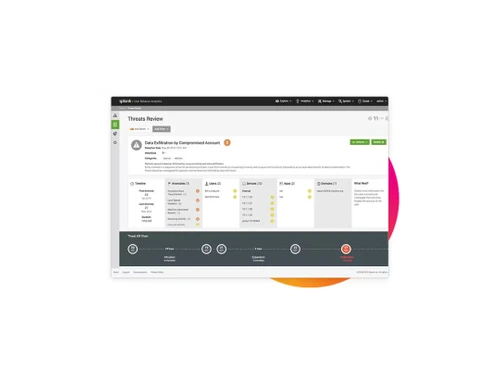
  • Real-Time Risk Insights with Contextual Intelligence: Analysts are empowered with enriched alert metadata, peer group comparisons, and historical behavioral context. This boosts situational awareness and enables faster, more confident decision-making, supported by intuitive visualizations like threat timelines and risk heat maps.
  • Seamless Integration with Splunk Enterprise Security: As a native component of Splunk ES, UEBA unifies detection, investigation, and response workflows. This tight integration provides a centralized incident view, combining powerful behavioral insights with the robust SIEM correlation rules of the broader platform.

Key Capabilities of Splunk User and Entity Behavior Analytics (UEBA)

  • Automated Threat Hunting: The platform automates the process of hunting for emerging threats. Its machine learning models continuously monitor activity to identify suspicious patterns without requiring manual intervention, effectively acting as a force multiplier for the security team.
  • Insider Threat Program Support: It provides the foundational technology for a robust insider threat program by offering detailed visibility into user actions. It helps distinguish between malicious intent and accidental policy violations, providing clear evidence for investigations.
  • Credential and Account Misuse Detection: Splunk UEBA quickly identifies when user credentials have been compromised or are being misused. It flags unusual login times, locations, and access patterns that indicate an account takeover.
  • Lateral Movement Detection: By correlating activity across the network, the solution is highly effective at detecting lateral movement, a common tactic used by attackers to expand their foothold after an initial breach.
  • Data Exfiltration Analysis: The platform monitors for unusual data access and transfer patterns, helping to detect and prevent data exfiltration attempts by both insiders and external attackers.

How to Use Splunk User and Entity Behavior Analytics (UEBA)?

Splunk User and Entity Behavior Analytics is designed to be an integral part of a modern security operations workflow. The process begins by ingesting data from various sources across the IT environment into the Splunk platform. Once data is flowing, the UEBA capability automatically starts its machine learning processes to baseline normal behavior for all users and entities. Security analysts then monitor the system for anomalies and high-risk scores that are automatically generated and prioritized. When a threat is detected, analysts can use the platform rich contextual data, including peer group analysis and historical timelines, to investigate the incident. The seamless integration with Splunk Enterprise Security allows for a smooth transition from investigation to response, enabling teams to contain threats and remediate issues efficiently within a single, unified interface.

Splunk User and Entity Behavior Analytics Pricing

Splunk User and Entity Behavior Analytics pricing details are available on request on techjockey.com.

The pricing model is based on different parameters, including extra features, deployment type, and the total number of users. For further queries related to the product, you can contact our product team and learn more about the pricing and offers.

Read more

Splunk Company Details

Founded Year:  2002

Splunk provides operational intelligence software that monitors, reports, and analyzes real-time machine data.

Director/Founders Erik Swan, Michael Baum, Rob Das
Company Size 1000+ Employees

Splunk User Behavior Analytics Pricing & Plans

Looking for The Right Pricing?

Share your requirements and get a plan built around your business.

  • Define your business needs
  • Get customised pricing
  • Choose features that fit your workflow

Price Available on Request

Get personalised Splunk User Behavior Analytics pricing that fits your needs. Our team will connect with you.

Splunk User Behavior Analytics Demo Video play icon

Get Splunk User Behavior Analytics Demo

Watch the demo video to explore key features, real workflows, and how the software fits your business needs.

Understand
Key Features
Personal
Demo Insights
Interactive
Demo Support

Splunk User Behavior Analytics Specifications

Supported Platforms
Windows Windows
Devices
Desktop Desktop
Deployment
Cloud-Based Cloud-Based
Suitable For
All Industries
Business Specific
All Businesses
Business Size
Small Business Medium Business SMBs MSMEs
Customer Support
Phone Email Forums
Language
English

Explore the Best Alternative Solutions Similar to Your Business Size and Needs

Splunk User Behavior Analytics Review

4.6

Out of 5

img

Overall Rating

Based on
5 Verified Ratings

Rating Breakdown

  • Features 4.4
  • Value for Money 4.5
  • Ease of Use 4.8
  • Customer Support 4.8

90% Recommend this Product

Add Review

Be the First to Review

This product has no reviews yet. Be the first to leave your feedback.

Add Review

Compare Splunk User Behavior Analytics With other Predictive Analytics Software

Products
Ratings
Pricing
Device Supported
Deployment
Supported Platforms
  • img

    Splunk User Behavior Analytics

  • 4.6

  • Price On Request

  • Desktop

    Mobile

  • Web based

    On Premises

  • Windows

    Mac OS

  • img

    Dryrun

  • 4.4

  • Price On Request

  • Desktop

    Mobile

  • Web based

    On Premises

  • Windows

    Mac OS

  • img

    Attention Insight

  • 4.2

  • Price On Request

  • Desktop

    Mobile

  • Web based

    On Premises

  • Windows

    Mac OS

  • img

    Pecan AI

  • 4.2

  • Price On Request

  • Desktop

    Mobile

  • Web based

    On Premises

  • Windows

    Mac OS

  • img

    Conative AI

  • 4.2

  • Price On Request

  • Desktop

    Mobile

  • Web based

    On Premises

  • Windows

    Mac OS

  • img

    Apigee

  • 4.6

  • Price On Request

  • Desktop

    Mobile

  • Web based

    On Premises

  • Windows

    Mac OS

  • img

    DataStories

  • 4.2

  • Price On Request

  • Desktop

    Mobile

  • Web based

    On Premises

  • Windows

    Mac OS

  • img

    Plat AI

  • 4.2

  • Price On Request

  • Desktop

    Mobile

  • Web based

    On Premises

  • Windows

    Mac OS

  • img

    Duetto GameChanger

  • 4.1

  • Price On Request

  • Desktop

    Mobile

  • Web based

    On Premises

  • Windows

    Mac OS

  • img

    Unifers AI

  • 4.2

  • Price On Request

  • Desktop

    Mobile

  • Web based

    On Premises

  • Windows

    Mac OS

(0) Product(s) selected

Splunk User Behavior Analytics Alternatives

See All Splunk User Behavior Analytics Alternatives

Starting Price:

$125 /Month

Starting Price:

€267 /User/Month

Is there any free trial or demo for Splunk User Behavior Analytics?

Splunk User Behavior Analytics Predictive Analytics Software demo is available for free at Techjockey.

Is Splunk User Behavior Analytics free?

Splunk User Behavior Analytics Predictive Analytics Software offers a free trial. However, the premium plan with advanced features available at Techjockey.

How can you download Splunk User Behavior Analytics?

For Splunk User Behavior Analytics Predictive Analytics Software installation, insert the given CD/USB flash storage in your system and open the Setup Wizard to get started.

What is Splunk UEBA used for?

Splunk UEBA is used to protect against unknown threats by proactively identifying and mitigating insider threats through behavior-based anomaly detection and machine learning. It enhances security visibility with user and entity risk intelligence and optimizes SOC efficiency by automating threat detection and prioritization.

How does Splunk UEBA work?

Splunk UEBA works by continuously learning and baselining normal user and entity behavior using machine learning models and behavior-based anomaly detection. It aggregates and correlates behavioral data across various entities to detect subtle deviations, assign an Entity Risk Score, and identify sophisticated threats.

What is the difference between Splunk ES and Splunk UEBA?

Splunk Enterprise Security (ES) is the broader unified security operations platform, while UEBA is a native capability within Splunk Enterprise Security Premier. UEBA provides behavioral analytics, anomaly detection, and risk insights within the broader ES platform.

How does Splunk UEBA detect anomalies?

Splunk UEBA detects anomalies by continuously learning and baselining normal user and entity behavior using multiple machine learning models and behavior-based anomaly detection. It identifies subtle deviations from these established baselines, which indicate potential insider threats or advanced attacks.

What are the features of Splunk UEBA?

Key features of Splunk UEBA include behavioral analytics and machine learning, entity risk scoring and aggregation, multi-entity correlation, real-time risk insights with contextual intelligence, automated threat detection and prioritization, and seamless integration with Splunk Enterprise Security.

Who can use Splunk User and Entity Behavior Analytics (UEBA)?

Splunk User and Entity Behavior Analytics is designed for security teams, including SOC analysts, who need to enhance situational awareness, prioritize emerging threats, and streamline their workflows for faster and more precise investigations and incident response.

What types of threats does Splunk UEBA help mitigate?

Splunk UEBA helps mitigate sophisticated threats, particularly insider threats, by identifying issues like account misuse, compromised credentials, and lateral movement within an organization's systems.

How does Splunk UEBA improve SOC efficiency?

Splunk UEBA optimizes SOC efficiency by reducing alert fatigue, filtering noise, and automating threat scoring and prioritization. This streamlines SOC workflows, allowing analysts to focus on critical risks for faster and more precise incident response.

Does Splunk UEBA provide a unified view of security incidents?

Yes. Because UEBA is natively integrated into Splunk Enterprise Security, behavioral insights, risk information, and security events can be brought together within centralized detection, investigation, and response workflows.

What is the pricing model forSplunk User and Entity Behavior Analytics (UEBA)?

Splunk User and Entity Behavior Analytics pricing details are available on request on techjockey.com.

21,000+ Software Listed

Best Price Guranteed

Free Expert Consultation

5M+ Happy Customers

Terms and Condtions

close

Users with registered businesses can purchase goods from merchants on the platform to satisfy their business needs. Users are not permitted to utilize any products acquired through the platform for resale, advertising, business, or further distribution.

For each purchase made, users will receive a Tax Invoice (or 'GST invoice') that includes specific details such as:

  • the GSTIN of the user associated with their registered business, and

  • the specified Entity Name for their business.

It should be noted that not all products are eligible for GST Invoice. Only the products displayed by participating sellers with the 'GST-based Invoice Available' callout on the product description page would qualify.

Certain goods and services are not eligible to get a GST Invoice, including items with VAS, i.e., Value Added Services (e.g., Total Mobile Protection/Assured Buyback) and those involving an exchange offer at the time of purchase.

Users must ensure the accuracy of the GSTIN, and business entity name provided for the GST Invoice. Requests for corrections into GST Invoice would not be accommodated by Techjockey.com or any Seller, and any issues arising from user-provided information are the sole responsibility of users.

Techjockey.com is not liable for the GST Invoice or any associated input tax credit. To efficiently claim an input tax credit, users should select the registered place of business address as per the GST authority's data and follow the provisions of the GST Act and rules.

To claim an input tax credit, the delivery and billing addresses must match. Furthermore, input tax credits will not be granted if the delivery address and GSTIN on the invoice are from different states. In case of incorrect GST details provided during the order placement, the order will be canceled automatically.