USA
USA UAE
UAESmall Business
Designed for startups and growing businesses

See More





Brand: Surfshark
This VPN secures online activities and privacy by hiding IP address so that identity cannot be traced/tracked by companies and bots.
See MoreHave you used Surfshark before?
Share your insights for better experience
Brand: Surfshark
Founded Year: 2018
Developer of a virtual private network software designed to protect people's digital lives. The company's product offers ad-free encryption of online data, cybersecurity tools and changing of IP, thereby helping users in safeguarding their information from data breaches as well as malware.
Core Modules
 Remote Access Split Tunneling Automatic Kill Switch DNS Leak Protection IPv6 Leak Protection Multi-hop VPN Alternative Routing P2P Support Smart DNS Ad Blocker Wi-Fi Protection Cookie Blocker Port Forwarding
 Privacy Protection
Multi-Factor Authentication (MFA) Obfuscated Servers IP Address Masking WebRTC Leak Protection Static and Dynamic IP Addresses Privacy-Focused DNS Servers Automatic Reconnection Deep & Dark Web Monitoring No Log Policy Encryption Protocols
OpenVPN IKEv2/IPsec WireGuard SSTP L2TP/IPsec PPTP Performance & Monitoring
Load Balancing Stealth Mode Speed Throttling Connection Speed Unlimited Bandwidth Server Locations Connection Stability Usability Features
User-Friendly Interface Multi-Device Support Platform Compatibility Cross-Platform Synchronization Browser Extension Availability Compliance Management
GDPR Compliant HIPAA Compliance PCI DSS Compliance Security Audits Advanced Firewall Features
Phishing Protection DDoS protection Malware Blocker Device Scanning Administrative Features
Policy Management Reporting & Analytics URL Filtering User Access Management Content Filtering Global Content Access Torrent Downloading Session Management Traffic Management 

Watch the demo video to explore key features, real workflows, and how the software fits your business needs.
 Ubuntu
  Windows
  iOS
iOS  Android MacOS
  Desktop
  Mobile
  Tablet
  Cloud-Based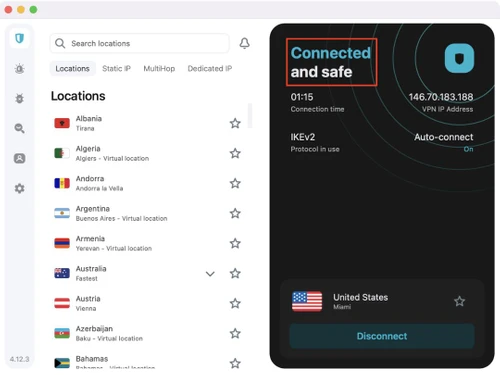
Small Business
Designed for startups and growing businesses
Medium Business
Built for business growth and flexibility
Enterprises
Designed for complex and large-scale business needs
4.4
Out of 5

Overall Rating
Based on
13 Verified Reviews
Rating Breakdown
86% Recommend this Product
Add ReviewCustomers generally appreciate Surfshark for its affordability, ease of use, and reliable performance across multiple devices, making it a popular choice for privacy-conscious users. Many users highlight its fast connection speeds and effective customer support, although some have noted limitations with server availability and occasional workarounds required for certain platforms. A common concern is the slow response time and accuracy of customer service. Overall, users find value in Surfshark, especially for streaming and maintaining online anonymity.
Pros
"This is a great VPN, it's easy to use, has a ton of servers, and is easy on the wallet. It's a must-have if you're looking to protect your privacy online!"
Cons
"Overall the product is good, but the customer service is slow. I have to wait to get answers on customer support chat."
"One thing that I have found problematic with SurfShark is its poor customer service. However, they reply on time but the main issue is with the accuracy of their replies. "
"I had faced difficulty in updating the software, but eventually it happened. So, overall, it’s a nice VPN software to use. "


Jan 16, 2021
Techjockey Verified
“Surfshark is a great VPN, it's easy to use,”
Pros
This is a great VPN, it's easy to use, has a ton of servers, and is easy on the wallet. It's a must-have if you're looking to protect your privacy online!
Cons
Subscription plans need to be revised and lowered for the students
Reason to switch
It is perfect for a beginner or someone that just needs a basic VPN
Jul 12, 2022
Techjockey Verified
“Best Product among other products”
Pros
SurfShark is affordable, quick, and dependable, and I appreciate that they do not place a restriction on the number of devices it may be installed on. It is really simple to use and delivers on its promises. I've frequently used it abroad to access my Youtube TV and Netflix accounts. They have easily accessible services all over the world. A no logs policy is also in place for further security.
Cons
NO CONS
Jul 12, 2022
Techjockey Verified
“Surfshark is a completely functional, affordable VPN alternative.”
Pros
I appreciate that Surfshark is free and autonomous. I especially appreciate how effectively it operates on the Linux command line. OpenVPN compatibility is excellent, and the browser plugin appears to be reliable.
Cons
NO CONS

Surfshark
Price On Request
Desktop
Mobile
Web based
On Premises
Windows
Mac OS

Avast SecureLine VPN
Price On Request
Desktop
Mobile
Web based
On Premises
Windows
Mac OS

Astrill VPN
Price On Request
Desktop
Mobile
Web based
On Premises
Windows
Mac OS

NordVPN
₹ 4999
Desktop
Mobile
Web based
On Premises
Windows
Mac OS

TorGuard VPN
Price On Request
Desktop
Mobile
Web based
On Premises
Windows
Mac OS

Private Internet Access
₹ 901
Desktop
Mobile
Web based
On Premises
Windows
Mac OS

Proton VPN
Price On Request
Desktop
Mobile
Web based
On Premises
Windows
Mac OS

Cyberghost
₹ 965
Desktop
Mobile
Web based
On Premises
Windows
Mac OS

Bitdefender Premium VPN
₹ 1458
Desktop
Mobile
Web based
On Premises
Windows
Mac OS

Mullvad VPN
Price On Request
Desktop
Mobile
Web based
On Premises
Windows
Mac OS

Hotspot Shield
Price On Request
Desktop
Mobile
Web based
On Premises
Windows
Mac OS
(0) Product(s) selected
Starting Price:
$11 /Month
Starting Price:
₹901 /Month
Starting Price:
$10 /Month

Starting Price:
$6 /month

Starting Price:
$7 /Month

Starting Price:
$10 /Month

Starting Price:
$15 /Month

Starting Price:
$12 /month

Starting Price:
$10 /Month

Available
Price on Request

Starting Price:
$6 /Month
Surfshark VPN uses OpenVPN, IKEv2/IPsec and Wireguard for faster and more secure connections.
Yes, Surfshark VPN includes a kill switch feature that automatically disconnects your internet if the VPN connection drops.
Yes, Surfshark VPN offers DNS and IPv6 Leak Protection to prevent any potential data leaks.
Yes, Surfshark VPN supports Split Tunnelling but doesn’t provide Port Forwarding.
Yes, Alternative Routing is available in Surfshark VPN Software.
Yes, Surfshark VPN is optimized for P2P file sharing, allowing you to share files securely.
Yes, Surfshark VPN includes an ad and tracker blocking feature that prevents unwanted ads and tracking.
Our no-log policy means that Surfshark VPN does not track or store any data about your online activities, ensuring your privacy and security.
Yes, Surfshark VPN offer multi-factor authentication (MFA) for account accessibility.
Yes, techjockey.com often has special discounts and deals on Surfshark VPN. Visit our website to find the latest offers.
Surfshark VPN price in India is available for $15.45 /month at techjockey.com. The pricing model is based on different parameters, including extra features, deployment type, and the total number of users.
Open the Surfshark app, go to Settings, and select the VPN protocol you want to use (e.g., OpenVPN, IKEv2).
0 0
Ensure your app is updated, try switching servers, or check your internet connection. If the problem persists, reinstall the app or contact support.
0 0
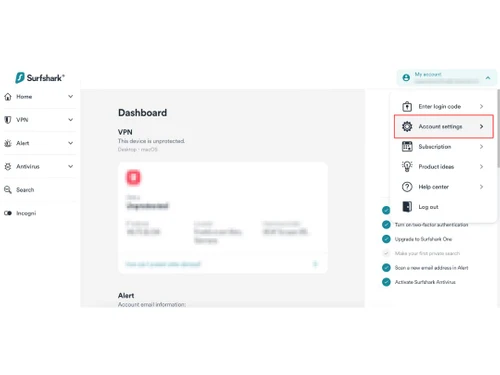
Log in to your Surfshark account, go to the subscription settings, and follow the instructions to cancel. You can also contact support for assistance.
0 0
Yes, Surfshark allows unlimited simultaneous connections, so you can use it on all your devices.
0 0
Restart your device, switch servers, check your internet connection, or reinstall the Surfshark app. If issues persist, contact Surfshark support.
0 0
20,000+ Software Listed
Best Price Guranteed
Free Expert Consultation
2M+ Happy Customers
Terms and Condtions

Users with registered businesses can purchase goods from merchants on the platform to satisfy their business needs. Users are not permitted to utilize any products acquired through the platform for resale, advertising, business, or further distribution.
For each purchase made, users will receive a Tax Invoice (or 'GST invoice') that includes specific details such as:
the GSTIN of the user associated with their registered business, and
the specified Entity Name for their business.
It should be noted that not all products are eligible for GST Invoice. Only the products displayed by participating sellers with the 'GST-based Invoice Available' callout on the product description page would qualify.
Certain goods and services are not eligible to get a GST Invoice, including items with VAS, i.e., Value Added Services (e.g., Total Mobile Protection/Assured Buyback) and those involving an exchange offer at the time of purchase.
Users must ensure the accuracy of the GSTIN, and business entity name provided for the GST Invoice. Requests for corrections into GST Invoice would not be accommodated by Techjockey.com or any Seller, and any issues arising from user-provided information are the sole responsibility of users.
Techjockey.com is not liable for the GST Invoice or any associated input tax credit. To efficiently claim an input tax credit, users should select the registered place of business address as per the GST authority's data and follow the provisions of the GST Act and rules.
To claim an input tax credit, the delivery and billing addresses must match. Furthermore, input tax credits will not be granted if the delivery address and GSTIN on the invoice are from different states. In case of incorrect GST details provided during the order placement, the order will be canceled automatically.