 USA
USA UAE
UAESmall Business
Designed for startups and growing businesses

See More


Brand: Seriousbit
Have you used UndeleteMyFiles Pro before?
Share your insights for better experience
Brand: Seriousbit
Founded Year: 2007
SeriousBit is a seriously-established software company founded in 2007 and providing serious software products and services used by millions of users and hundreds of other seriously-established companies around the globe.
This Product is Available Free Forever.
Start instantly with no fees, no subscriptions, and no commitments.
Free Forever Plan
Get started immediately at no cost. Upgrade anytime if your business demand more.
Free ForeverCore Data Recovery
 Partition Recovery Formatted Drive Recovery Accidental File Recovery Corrupted or Damaged File Recovery RAW Partition Data Recovery Deleted File Recovery Recovery from External Devices Cloud Data Recovery
 Backup & Restore Capabilities
Full System Backup and Restore Incremental Backup and Restore Mobile App Data Backup and Recovery Email Backup and Recovery Factory Recovery Partition Backup Cloud Native Backups Data Replication Security
Encrypted Data Recovery Ransomware Protection Secure Data Wiping Password Recovery Data Compliance and Governance Advanced Threat Detection Recovery for Different Devices and Platforms
Mobile Device Data Recovery Windows and macOS Compatibility Virtual Machine Recovery Cross-Platform Data Recovery Rooting Error Recovery File and Media Recovery
Preview Files Before Recovery Media File Recovery Multimedia File Repair SD Card and USB Recovery Document and Email Recovery Photo Recovery with Editing Tools Automatic Device Detection Batch Recovery Data Protection and Compliance
Comprehensive Backup and Protection Disaster Recovery Plans Legal and Compliance-Based Data Recovery Data Loss Prevention Data Migration Data Residency Enforcement Hierarchy & Access Management Advanced Features
Deep Scan Quick Scan Smart Scanning Advanced Scan Algorithms Selective Recovery Filter by File Type Secure OST Converter Others
Photo Recovery  Windows
  Desktop
  Perpetual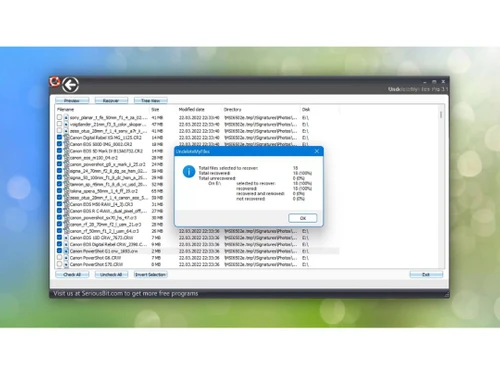
Small Business
Designed for startups and growing businesses
Medium Business
Built for business growth and flexibility
Enterprises
Designed for complex and large-scale business needs
4.2
Out of 5

Overall Rating
Based on
4 Verified Ratings
Rating Breakdown
97% Recommend this Product
Add ReviewTechjockey Trusted Reviews from Verified Users
No reviews are currently available for UndeleteMyFiles Pro. Discover similar Data Recovery Software reviews

SysTools SQL Recovery
Whats great - I was looking for the SQL database recovery tool to get back my corrupted and lost data files. Among all the ineffective solu... read more

Recoverit
Whats great - the product is anything but difficult to utilize, it doesn't threaten even the most essential clients, and it is include rich... read more

7 Data Recovery Software
Whats great - Best Software for use Data Recovery Software read more

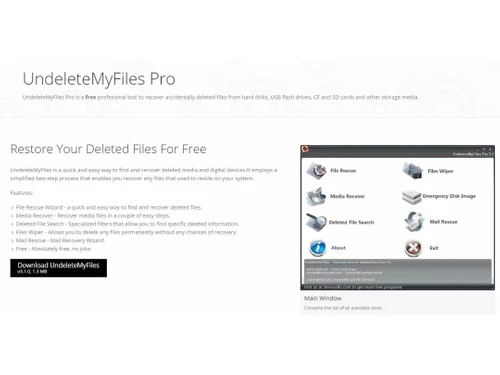
UndeleteMyFiles Pro
FREE
Desktop
Mobile
Web based
On Premises
Windows
Mac OS

Disk Drill
Price On Request
Desktop
Mobile
Web based
On Premises
Windows
Mac OS
Recoverit
₹ 5699
Desktop
Mobile
Web based
On Premises
Windows
Mac OS

Stellar Data Recovery
₹ 3999
Desktop
Mobile
Web based
On Premises
Windows
Mac OS

Recuva
₹ 990
Desktop
Mobile
Web based
On Premises
Windows
Mac OS
4DDiG Data Recovery
Price On Request
Desktop
Mobile
Web based
On Premises
Windows
Mac OS

AnyRecover
Price On Request
Desktop
Mobile
Web based
On Premises
Windows
Mac OS

SalvageData
Price On Request
Desktop
Mobile
Web based
On Premises
Windows
Mac OS

R-Studio Data Recovery
Price On Request
Desktop
Mobile
Web based
On Premises
Windows
Mac OS

UFS Explorer Standard Recovery
Price On Request
Desktop
Mobile
Web based
On Premises
Windows
Mac OS

DiskGenius
Price On Request
Desktop
Mobile
Web based
On Premises
Windows
Mac OS
(2) Product(s) selected
Starting Price:
$46 /Month
Available
Price on Request
Starting Price:
$80 /License
Starting Price:
$65 /License
Starting Price:
$70 /Quantity

Starting Price:
$30 /Month

Starting Price:
₹8,259 /Quantity

Starting Price:
$50 /Month

Starting Price:
$20 /Year

Available
Price on Request

Starting Price:
$60 /Year




20,000+ Software Listed
Best Price Guranteed
Free Expert Consultation
2M+ Happy Customers
Terms and Condtions

Users with registered businesses can purchase goods from merchants on the platform to satisfy their business needs. Users are not permitted to utilize any products acquired through the platform for resale, advertising, business, or further distribution.
For each purchase made, users will receive a Tax Invoice (or 'GST invoice') that includes specific details such as:
the GSTIN of the user associated with their registered business, and
the specified Entity Name for their business.
It should be noted that not all products are eligible for GST Invoice. Only the products displayed by participating sellers with the 'GST-based Invoice Available' callout on the product description page would qualify.
Certain goods and services are not eligible to get a GST Invoice, including items with VAS, i.e., Value Added Services (e.g., Total Mobile Protection/Assured Buyback) and those involving an exchange offer at the time of purchase.
Users must ensure the accuracy of the GSTIN, and business entity name provided for the GST Invoice. Requests for corrections into GST Invoice would not be accommodated by Techjockey.com or any Seller, and any issues arising from user-provided information are the sole responsibility of users.
Techjockey.com is not liable for the GST Invoice or any associated input tax credit. To efficiently claim an input tax credit, users should select the registered place of business address as per the GST authority's data and follow the provisions of the GST Act and rules.
To claim an input tax credit, the delivery and billing addresses must match. Furthermore, input tax credits will not be granted if the delivery address and GSTIN on the invoice are from different states. In case of incorrect GST details provided during the order placement, the order will be canceled automatically.



